

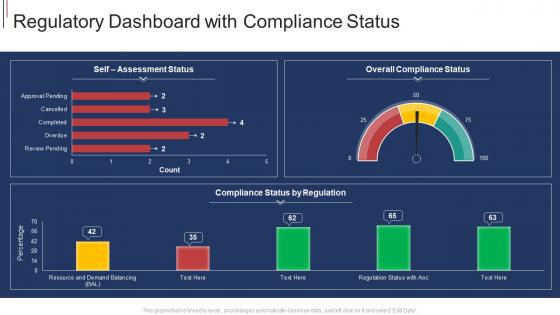
Regulatory dashboard with compliance status




Try Before you Buy Download Free Sample Product
 Impress Your
 Audience
 100%
100% Editable
 Save Hours
 of Time


Our Regulatory Dashboard With Compliance Status are topically designed to provide an attractive backdrop to any subject. Use them to look like a presentation pro.
People who downloaded this PowerPoint presentation also viewed the following :
Regulatory dashboard with compliance status with all 2 slides:
Use our Regulatory Dashboard With Compliance Status to effectively help you save your valuable time. They are readymade to fit into any presentation structure.
FAQs for Regulatory dashboard
You'll definitely want real-time compliance status indicators and risk scoring metrics - those are your bread and butter. Audit trail tracking is huge too, plus regulatory deadline calendars (seriously, this feature alone will keep you sane during crunch time). Exception reporting catches violations before they blow up, and automated alerts are a lifesaver. Performance benchmarks against regulatory standards help too. Oh, and make sure it shows high-level KPIs for the executives but lets your compliance team drill down into the weeds when needed. I'd start with your most critical regulations first - don't try to boil the ocean right away.
Set up automated validation rules that catch problems right when data comes in. Skip manual uploads if you can - that's where everything goes wrong, trust me. Connect your dashboard straight to the source systems instead. You'll want alerts that flag weird outliers or missing stuff immediately. Each data stream needs someone who actually owns it and checks quality. I'd start by looking at your current setup to find the biggest problem spots first. Build in multiple checkpoints so if one validation misses something, another catches it.
For your dashboard, track these four things: compliance rate percentage (basically how many requirements you're hitting vs total). Time-to-fix when violations pop up. Audit findings over time - trust me, this saves your butt during yearly reviews. Training completion rates too since people mess up when they don't know better. Oh, and if your system can spit out a risk exposure score, throw that on there. Keep it clean so you can scan it quickly and catch problems before they blow up into real disasters.
Different industries build their dashboards around what they actually need to track. Financial companies focus on SOX controls and capital ratios. Healthcare is all about HIPAA breaches and patient data audits. Manufacturing? Environmental compliance stuff. Pharma goes crazy with FDA validation workflows - that's where things get really complex. Most platforms let you create custom widgets anyway, which is helpful. Start by figuring out your main regulatory requirements first. Then set up views that show auditors and executives exactly what they need without overwhelming them with random metrics they don't care about.
So automation basically saves your sanity with compliance dashboards. It pulls data from all your different systems automatically and checks everything against current regs. Way better than doing it manually - trust me, tracking that stuff by hand across departments is brutal. Plus it catches problems early and generates those reports regulators want to see. The audit trails update in real-time too, which is nice. I'd start by figuring out which compliance tasks take forever to do manually. Those are your best automation targets.
Honestly, charts and graphs are a game-changer for compliance stuff. Your brain just picks up on visual patterns way faster than scanning through endless spreadsheet rows. You'll spot trends instantly instead of squinting at numbers for ages. Heat maps are my favorite - they basically scream "hey, this area is a disaster" without you having to dig around. The trick is matching the right chart type to whatever metric you're tracking. Otherwise your team ends up making decisions based on gut feeling instead of actually seeing what the data's telling them. Way better than drowning in numbers, trust me.
Data quality is gonna be your worst nightmare - stuff's everywhere and half of it's garbage. Departments hoard their data like dragons, IT will drag their feet on integration, and nobody can agree on what actually needs tracking. Oh, and regulations change constantly so you need something flexible. Politics are honestly the hardest part though. My advice? Find your cleanest data first and build up slowly. Don't try to fix everything at once or you'll lose your mind. Start small, prove it works, then expand.
Monthly updates are ideal, but let's be real - quarterly is what actually happens unless you're dealing with finance or healthcare regs. Set up alerts for major regulatory changes so you don't get blindsided between updates. I've watched teams crash and burn because their dashboards showed outdated metrics from months ago. Put a recurring reminder on someone's calendar (not just "the team" because then nobody owns it). Oh and definitely don't wait until audit season to realize everything's wrong - learned that one the hard way at my last job.
So compliance dashboards are like having a crystal ball for spotting problems before they blow up. Real-time alerts show you exactly where things might go sideways - way better than digging through endless Excel files (ugh). You'll catch trends fast and see which areas need your attention right now. The visual setup makes red flags super obvious. Set up automated notifications for the scary stuff, then you can instantly pull reports when your boss asks. Oh, and don't try to monitor everything at once - pick your top 3-5 risk areas first.
Look, Tableau and Power BI are your best bets - there's a reason everyone uses them for compliance stuff. They handle regulatory data without breaking a sweat. You could also check out GRC platforms like MetricStream or ServiceNow, but honestly? They might be way more than you need if you just want dashboards. Don't laugh, but Excel with Power Query actually works great for smaller teams (just don't tell the data nerds I said that). The real trick is finding something your compliance folks can update themselves. Nobody wants to bug IT every single time. Start with what data you've got and pick whatever plays nice with your current setup.
Honestly, user feedback is make-or-break for compliance dashboards. Without it, you're just building another shiny tool that sits there collecting dust. Ask your team what data they actually need, which alerts are annoying them, where they keep hitting roadblocks. I can't tell you how many gorgeous dashboards I've seen that completely missed what the compliance folks needed day-to-day. Set up quarterly feedback sessions or quick surveys. Oh, and definitely grab your power users for 15-minute chats ASAP - they'll be brutally honest about what's not working.
You'll want to hit three main areas with your team: dashboard basics, how to read your compliance metrics, and what to do when alerts pop up. Navigation's the easy part - people get that fast. The tricky bit is teaching them to spot patterns and know which issues need fixing right now vs later. Honestly, skip the boring feature walkthrough and just throw them into real scenarios. Let them mess around with actual data before you go live. Oh, and make sure they really get the escalation process - that's where things usually go wrong.
Honestly, start with the basics - audit pass rates and how many violations you've got sitting around. Time to fix issues matters too. I'd throw together a dashboard that shows if things are trending up or down over time (color-coding saves your sanity here). Don't forget the money stuff - track fines you've dodged and training completion rates. The magic happens when you can walk into a meeting and show execs actual dollar savings from your compliance work. Oh, and set up alerts for anything going sideways so you're not scrambling later.
Start with role-based access - only give people what they actually need for their jobs. Encrypt everything (both when it's moving and stored), and log all user activity so you can see who looked at what. Data anonymization is clutch, especially with PII or financial stuff. Also set up retention policies because honestly, who needs compliance data from 2015? I'd audit your current dashboard first to see what you're exposing, then work backwards to lock it down. The logging part will save your butt later if anyone asks questions.
So basically you're building this one central hub that grabs data from all your different systems - ERP, HR stuff, financial tools, whatever you've got. No more hopping around between platforms to check compliance issues. Everything just flows into one spot so you can catch problems early. The automation part is honestly a game changer since data syncs itself instead of someone manually updating spreadsheets all the time (been there, it sucks). I'd start by figuring out which systems have your most important compliance data first. Then tackle those integrations before moving on to the smaller stuff.
-
Much better than the original! Thanks for the quick turnaround.