

Continuous Process Improvement Powerpoint Ppt Template Bundles




Try Before you Buy Download Free Sample Product
 Impress Your
 Audience
 100%
100% Editable
 Save Hours
 of Time


This visually captivating and informative deck provides a deep dive into Process Management, Improvement Strategies, and Business Improvement Plans. Our carefully curated slides empower you to optimize your workflows, identify bottlenecks, and implement effective solutions. With an emphasis on streamlining processes, our PPT equips you with invaluable tools to enhance productivity, efficiency, and overall organizational performance. Explore key topics like process mapping, root cause analysis, continuous improvement methodologies, and change management techniques. Whether youre a business owner, manager, or consultant, this PPT is an essential resource to foster a culture of innovation and drive sustainable growth. Ignite your process improvement journey today.
People who downloaded this PowerPoint presentation also viewed the following :
Continuous Process Improvement Powerpoint Ppt Template Bundles with all 24 slides:
Use our Continuous Process Improvement Powerpoint Ppt Template Bundles to effectively help you save your valuable time. They are readymade to fit into any presentation structure.
-
Continuous process improvement
-
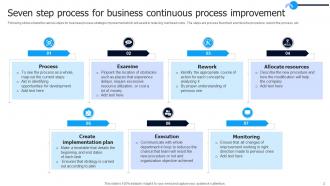
Seven step process for business continuous process improvement
-
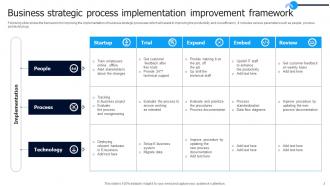
Business strategic process implementation improvement framework
-
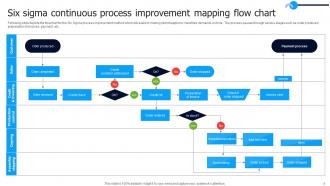
Six sigma continuous process improvement mapping flow chart
-
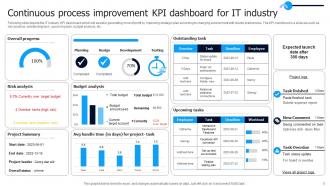
Continuous process improvement KPI dashboard for IT industry
-
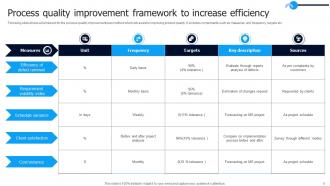
Process quality improvement framework to increase efficiency
-
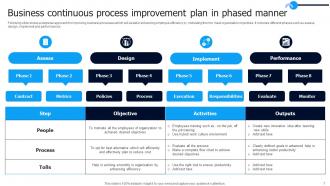
Business continuous process improvement plan in phased manner
-

Enhancement and continuous process improvement in healthcare industry
-
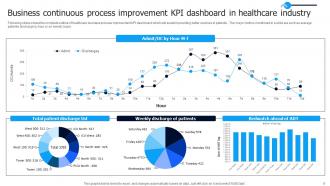
Business continuous process improvement KPI dashboard in healthcare industry
-
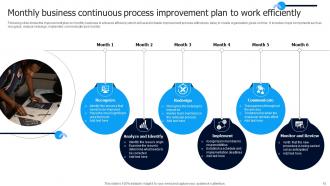
Monthly business continuous process improvement plan to work efficiently
-
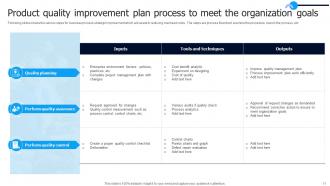
Product quality improvement plan process to meet the organization goals
-
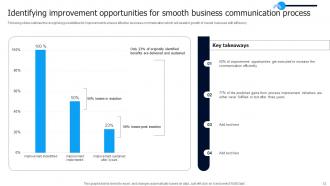
Identifying improvement opportunities for smooth business communication process
-
Operational continuous process improvement plan icon to meet company goals
-
Process manufacturing improvement plan icon
-
Continuous process improvement icon to boost revenue growth of organization
-
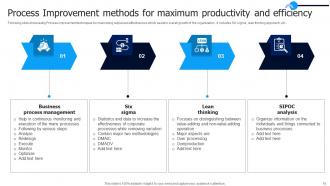
Process Improvement methods for maximum productivity and efficiency
-
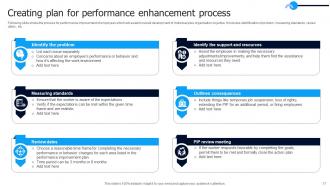
Creating plan for performance enhancement process
-
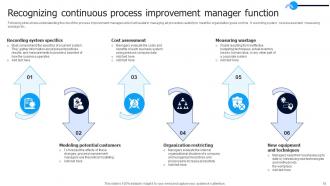
Recognizing continuous process improvement manager function
-
Thank for watching
-

-

-

-

-

FAQs for Continuous Process Improvement Powerpoint
So CPI is basically about measuring stuff constantly and getting your team involved instead of doing huge dramatic changes. Let people doing the actual work tell you what's broken - they always know first anyway. Data beats guessing, but honestly sometimes your gut isn't wrong either. Test small tweaks before going company-wide. Build those feedback loops so you can see if things actually worked. Don't make it some big separate project - just weave improvement into regular work. Pick one annoying process your team complains about and map it out. You'll spot quick fixes right away, I guarantee it.
Honestly, you gotta look at both the hard numbers and the soft stuff. Grab your baseline metrics first - cycle times, error rates, cost savings, customer scores. But here's the thing that trips people up: the spreadsheets might look amazing while your team secretly hates the new process. Survey people regularly about whether things actually feel better day-to-day. I'd do monthly check-ins with quarterly deeper reviews. Employee buy-in is everything - I've watched so many "perfect" projects die because nobody wanted to use them. The data only tells half the story.
Honestly, your employees are seeing stuff you're probably missing from up there in management land. They're dealing with the broken systems every single day, so they know exactly what's not working. Plus they usually have decent ideas for fixing things - which always surprises me but it's true. The real challenge is making people feel safe enough to actually speak up without looking like they're just whining all the time. Set up regular ways to collect feedback, but here's the thing that matters most: you have to actually DO something with what they tell you and let them know what changed because of their suggestions.
Yeah totally! Start with Lean stuff like 5S and value stream mapping - gets you those quick wins that make everyone happy. Six Sigma's DMAIC comes in handy when you're dealing with really stubborn problems that need serious data crunching. Honestly, I've seen too many people try to do both at once and just confuse everyone. Figure out if you're mainly fighting waste or quality issues first, then pick your lead methodology. They work great together though - kind of like having different tools for different jobs.
Dude, automation is seriously a lifesaver for this stuff. Real-time data means you're not flying blind anymore - you'll catch issues before they blow up. Set up dashboards that actually watch your metrics while you sleep, which honestly feels like having a robot assistant. The best part? Your team stops doing mind-numbing tasks and can work on stuff that matters. I started with just one automated workflow last year and now I'm kinda obsessed. Human error drops way down too since machines don't have off days. Begin small though - pick one thing to automate first.
Honestly, the biggest mistake is trying to do everything at once - you'll just overwhelm everyone. Start small with one process instead. Also, never force it from the top down without getting your actual workers on board first. That's a disaster waiting to happen, trust me on this one. Oh, and people get way too caught up in the framework details rather than fixing real problems. Weird how that happens. Quick wins are huge though. Celebrate those small victories or momentum dies fast. Get some early success, then build from there.
So CPI basically gives your team permission to mess up without getting in trouble. People start thinking outside the box when they know you won't roast them for trying something new. The whole "how can we do this better?" mindset becomes contagious - honestly, it's pretty cool to watch happen. Regular check-ins mean good ideas actually get noticed instead of buried. When someone's suggestion gets used, they suddenly care way more about improving stuff. Short experiments that don't work? Those still teach you something useful for next time.
Skip the boring PowerPoint presentations - get people doing workshops where they actually practice stuff right away. I'd focus on problems they deal with every day, not some random textbook examples. Pair up your experienced people with the newbies - honestly works way better than formal training. Don't just teach the steps, explain WHY each method matters. People resist change less when they get the logic behind it. Oh, and don't overwhelm them with everything at once. Pick something like Kaizen first, let them get comfortable with it. Give them time to actually use what they learned before dumping more on them.
Honestly, people hate "continuous improvement" because it sounds like extra work on top of their already crazy workload. Connect it to stuff that actually bugs them daily - show how fixing processes makes their lives easier. I always start by asking what drives them nuts and tackle that first. Share real examples of when it worked before, and definitely celebrate the small wins publicly. When you frame CPI as solving those annoying problems they're already complaining about anyway, that's when teams actually get excited about it. Try asking in your next meeting what one thing would make their job easier if it just worked better.
You need to watch both speed and quality metrics to see if your changes actually work. I'd go with cycle time, defect rates, customer satisfaction, and cost per unit - those tell you if you're really making progress. Employee engagement is huge too. Your team has to believe in the changes or they'll just revert back when you're not looking. Oh, and track some forward-looking stuff like improvement suggestions or training hours. Don't go overboard though - pick maybe 4-5 metrics tops and check them regularly. Too much data just makes everything confusing. Start basic first.
So CPI basically turns your company into this adaptive machine that can roll with whatever craziness the market throws at it. Your teams get used to tweaking things constantly, which means you can pivot super fast while competitors are still stuck doing the same old stuff. After a while it becomes automatic - you catch problems earlier, workflows evolve quicker, and nobody freaks out when changes happen. Oh, and here's what I'd actually do: pick one process that touches customers directly and make tiny improvements every week. Way better than those massive overhauls that nobody wants to deal with.
Think of data analytics as your go-to detective tool when you need to find what's broken. Dig into your process metrics and performance data - honestly, the numbers will show you stuff that's totally invisible day-to-day. Bottlenecks, waste, all that messy inefficiency becomes super clear. Track whatever matters: cycle times, error rates, customer scores. You'll want dashboards that don't suck so you can catch trends fast. Takes all the guesswork out of it, which is huge. Way better than just hoping you'll notice problems before they blow up.
Dude, you really need different teams involved in your CPI stuff. Marketing sees things ops completely misses, and vice versa. Those handoff points between departments? That's where the real mess happens. Getting everyone in the room from the start means people actually care about making it work instead of just complaining later. I've watched so many "brilliant" improvements crash because only one team thought them up - kinda predictable honestly. Map out who actually touches your process first, then get them all together. Finance might hate the meetings, but they'll catch budget issues early.
So for CPI stuff, I'd grab Lucidchart or Visio first to map out your processes. Minitab's your friend for Six Sigma stats work. Project management? Just use Asana or Monday - seriously, don't waste money on enterprise nonsense unless someone's forcing you to. Power BI makes decent dashboards that people will actually look at. Excel works fine too if you're keeping things basic. Oh, and JMP's solid for analysis if you can get it. Here's the thing though - whatever your team will consistently use beats the shiniest tool they'll ignore. Start simple, upgrade later when you know what you actually need.
Honestly, you've gotta weave CPI into everyday work instead of treating it like some big quarterly thing. Get your leaders to actually notice when people improve stuff - even just saying "hey, nice process fix" works wonders. I'd block out 30 minutes weekly where your team can brainstorm one small tweak. Don't let the same person handle all improvements either, spread it around. Oh and definitely share your wins! People need to see this stuff actually matters. The trick is protecting that improvement time so urgent crap doesn't kill it.
-
Fantastic collection. Loved how we can personalize these templates as per the requirements.
-
I looked at their huge selection of themes and designs. They appeared to be ideal for my profession. I'm sure I'll grab a few of them.