


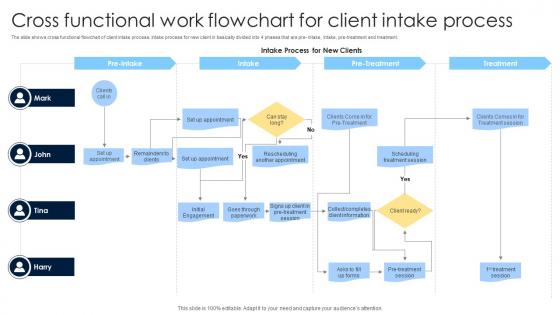
Cross Functional Work Flowchart For Client Intake Process




Try Before you Buy Download Free Sample Product
 Impress Your
Audience
 100%
Editable
 Save Hours
of Time


The slide shows cross functional flowchart of client intake process. Intake process for new client in basically divided into 4 phases that are pre intake, intake, pre treatment and treatment.
People who downloaded this PowerPoint presentation also viewed the following :
Cross Functional Work Flowchart For Client Intake Process with all 6 slides:
Use our Cross Functional Work Flowchart For Client Intake Process to effectively help you save your valuable time. They are readymade to fit into any presentation structure.



FAQs for Cross Functional Work Flowchart For
Definitely start with the basics - contact info, why they're reaching out, some demographic stuff. Background details matter too: their history, current situation, what they're hoping to accomplish. Legal paperwork is annoying but necessary (consent forms, privacy stuff). Communication preferences are clutch - some people hate phone calls, others won't check email to save their lives. Accessibility needs too if relevant. Marketing always bugs me about including "how'd you find us" so might as well throw that in. Just don't make it endless or people bail halfway through.
Oh dude, you'll save SO much time with digital intake forms. No more endless email chains trying to get basic info from clients. Set up online forms that grab everything upfront, then use automated workflows to send different client types to whoever handles them. I probably should've mentioned this earlier, but integrating with your CRM is key so stuff doesn't get lost. Clients actually prefer it too - they can fill things out whenever instead of scheduling calls. Seriously, just pick your most-used form and digitize that first. You can always add more later.
Ugh, you'll deal with so many incomplete forms it's not even funny. Plus clients taking forever to respond and just... not getting what you actually need from them. Half the time they literally skip questions! Make a checklist that explains WHY you need each thing - people cooperate way more when they understand the reasoning. Set up auto-reminders for missing stuff, or honestly just do a quick phone call instead of endless form back-and-forth. Give them realistic timelines upfront too. Oh and batch your reviews together - saves your sanity. Trust me on that one.
Oh totally, you should definitely do this! Healthcare clients need way different info upfront than like a tech startup would. It shows them right away that you actually get their industry instead of using some generic form. Plus it saves you from those awkward "wait we forgot to ask about..." calls later. I'd honestly start small - maybe just 2-3 templates for your biggest client types? You can always add more once you see what works. The whole onboarding just feels more professional when the questions actually make sense for what they do.
Honestly, automation is a game changer for all that tedious stuff. When someone books a consultation, it shoots them the intake forms automatically. Their answers go straight into your CRM, and if they don't fill everything out, boom - follow-up email gets sent. No more playing email tag with people. I used to lose track of clients all the time, but now the system just moves them through each step. Your clients actually get a way better experience too since everything flows smoothly. I'd start small though - just automate sending forms first and you'll be shocked how much time you get back.
Your clients are literally telling you how to fix your intake process - just listen! Survey them after they go through it and ask what sucked. Long forms? Shorten them. Confusing steps? Clarify. I know one team that cut their intake time in half because they actually paid attention to complaints. The key is being specific with your questions about each stage. Look for patterns in what people say, then make changes. Maybe do a quarterly check to see what trends keep coming up? Trust me, future clients will notice the difference when things actually work smoothly.
Okay so first thing - encrypted systems only for collecting and storing client stuff. Don't even think about emailing intake forms or dumping files in random folders. During calls, make sure your space is totally private. I once had a coworker walk by mid-session and it was mortifying! Always verify who you're talking to before sharing details. Keep that need-to-know circle super tight - like, crazy tight. Written consent before you share anything with outside parties, obviously. Oh and honestly? Just pretend it's your own personal info you're protecting. That mindset shift makes everything click.
Start by picking 3-4 categories from your intake forms - stuff like case complexity, budget, and how urgent they think it is. Most firms go crazy with like 10 different segments which is honestly overkill. Focus on things that'll actually change how you handle them: timeline expectations, whether they've dealt with lawyers before, how they want you to communicate. Oh and practice area obviously. Set up your intake system to auto-tag based on their answers, then use those tags to send different follow-ups and get cases to the right people. Way easier than manually sorting through everything later.
Conversion rate from first contact to signed client is your main one - that's what actually pays the bills. Also track how long it takes people to convert and where they're dropping off in your process. Client satisfaction scores from intake are useful too, plus time spent at each stage. Honestly? Start with conversion rate since everything else is just nice-to-have data. Figure out how many prospects you're bleeding at each step - that's where the real insights are. I'd check these numbers weekly at first, then drill down to see what's making people bail. Your CRM probably has basic tracking already, so don't overthink the setup.
Honestly, visual templates are a game-changer for client intake. You know how nobody actually reads those boring procedure docs? Flowcharts and simple slide decks work so much better. People can actually see what's happening at each step. Your team gets it faster, clients aren't confused, and you'll spot problems early. I'd start with just mapping out the main handoff points - saves you from so many headaches down the road. Even something basic makes a huge difference.
Start with CRM stuff - hook your intake forms straight into Salesforce or HubSpot so you're not typing everything twice. Calendly is a lifesaver for letting people book their own appointments. Stripe handles payments upfront, which is clutch for getting retainers without the awkward money conversation. DocuSign keeps contracts moving instead of that endless email ping-pong we all hate. Oh, and make sure everything actually connects - I learned this the hard way when I had three different systems that didn't talk to each other. Total nightmare.
Yeah so basically different cultures handle personal stuff totally differently, right? Some people are super direct, others think asking personal questions straight up is rude as hell. You gotta have multiple ways to do intake instead of just one rigid process. Language preferences matter, plus some families make decisions together while others don't. Oh and don't even get me started on scheduling - "being on time" means different things to different people. Train your staff to pick up on these cues. Flexibility is everything here.
Start with active listening and communication training - that's honestly the most important part. Your team also needs to learn whatever intake software you're using, plus documentation rules and HIPAA stuff if that applies. Role-playing helps a ton here, especially for handling difficult conversations. I've noticed people get way better at de-escalation when they practice it first. Maybe do a half-day workshop covering everything, then monthly check-ins after that. Oh, and quarterly refreshers are smart since processes change. Trust me, skipping the basics always backfires later.
Honestly, just break down that monster intake form into smaller chunks - nobody wants to fill out 47 fields at once. Add progress bars so people know they're not stuck forever. Set up automatic follow-ups because clients get weird when you go silent after they've shared their whole business with you. Smart forms are your friend too - use conditional stuff so if someone says they don't have a website, you skip all the web questions. Oh, and map out where people usually drop off or get confused. That's where you'll find the real problems messing up your flow.
Look, getting your intake process right is huge - it literally sets the tone for everything. Clients immediately feel like they made a smart choice when you're organized from the start. You'll catch those red flag clients early too (trust me, you don't want scope creep drama down the road). The whole thing makes you look more professional and valuable. I mean, when clients see you have actual systems, they're willing to pay more. Map out every step first, then smooth out anything that might annoy people. Make it thorough but not painful, you know?
-
Crisp and neat slides. Makes it fun and easier to curate presentations.
-
Thank you for showering me with discounts every time I was reluctant to make the purchase.