


Slides de apresentação em Powerpoint de treinamento de segurança cibernética e conhecimento de phishing




Try Before you Buy Download Free Sample Product
 Impress Your
 Audience
 100%
100% Editable
 Save Hours
 of Time


Nossos slides de apresentação em PowerPoint de treinamento de conscientização sobre segurança cibernética são elaborados topicamente para fornecer um pano de fundo atraente para qualquer assunto. Use-os para se parecer com um profissional de apresentação.
People who downloaded this PowerPoint presentation also viewed the following :
Conteúdo desta apresentação em PowerPoint
Slide 1 : Este slide apresenta o treinamento de conscientização sobre segurança cibernética e phishing. Indique o nome da sua empresa e comece.
Slide 2 : Este slide mostra a Agenda para Treinamento de Conscientização sobre Segurança Cibernética e Phishing.
Slide 3 : Este slide apresenta a Tabela de Conteúdo do Treinamento de Conscientização sobre Segurança Cibernética e Phishing.
Slide 4 : Este slide exibe o Índice da apresentação.
Slide 5 : Este slide representa o problema enfrentado pela organização causado pelos funcionários devido à falta de programas de treinamento de conscientização de segurança.
Slide 6 : Este slide mostra as ameaças de segurança à organização causadas por funcionários de diferentes departamentos devido à falta de conscientização sobre segurança cibernética
Slide 7 : Este slide apresenta os ataques cibernéticos vivenciados pela Companhia no exercício anterior.
Slide 8 : Este slide mostra o Índice da apresentação.
Slide 9 : Este slide mostra problemas na organização em relação ao treinamento de conscientização de segurança, juntamente com a lacuna e a solução para superar essas lacunas
Slide 10 : Este slide representa a Lista de Verificação que ajudará as organizações a preparar e implementar seu treinamento de conscientização de segurança.
Slide 11 : Este slide mostra o Índice da apresentação.
Slide 12 : Este slide mostra maneiras eficazes de construir segurança cibernética em uma organização, incluindo os principais programas e abordagens para os programas de aprendizado
Slide 13 : Este slide apresenta programas de treinamento automatizados para conscientização de segurança que ajudarão a educar os trabalhadores a agir adequadamente.
Slide 14 : Este slide exibe o Índice da apresentação.
Slide 15 : Este slide representa Diferentes Formatos de Treinamento para Diferentes Níveis Organizacionais.
Slide 16 : Este slide descreve os critérios, descreve possíveis posições que podem estar sujeitas a instrução, fontes de informação de instrução e métricas para avaliar o sucesso do treinamento nessas áreas de controle.
Slide 17 : Este slide apresenta os critérios, descreve possíveis posições que podem ser objeto de instrução.
Slide 18 : Este slide mostra o Índice da apresentação.
Slide 19 : Este slide exibe métricas que medem o efeito da preparação na conscientização de segurança, como o treinamento que afeta os hábitos, comportamentos ou crenças das pessoas.
Slide 20 : Este slide mostra como seu plano de conscientização de segurança atende ao sistema de segurança geral de sua empresa.
Slide 21 : Este slide representa as Métricas de Conformidade da Organização.
Slide 22 : Este slide mostra o Índice da apresentação.
Slide 23 : Este slide apresenta os cálculos da taxa de interesse de conscientização de segurança, incluindo o fator típico de gerenciamento de risco cibernético para uma força de trabalho treinada e com consciência cibernética.
Slide 24 : Este slide exibe o plano de comunicação do cronograma para o programa de conscientização de segurança, incluindo uma breve descrição, frequência e público
Slide 25 : Este slide representa o Plano de Comunicação para Eventos e Incidentes de Segurança Cibernética.
Slide 26 : Este slide mostra o Índice da apresentação.
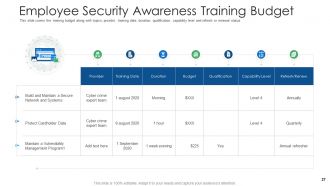
Slide 27 : Este slide apresenta o orçamento do treinamento junto com os tópicos, provedor, data do treinamento, etc.
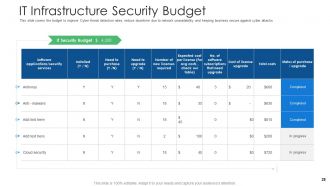
Slide 28 : Este slide mostra o orçamento para melhorar as taxas de detecção de ameaças cibernéticas.
Slide 29 : Este slide exibe o Índice da apresentação.
Slide 30 : Este slide representa o cronograma de implementação de conscientização de segurança para a organização.
Slide 31 : Este slide mostra o roteiro para conceitos de treinamento e diretrizes sobre conscientização de segurança.
Slide 32 : Este slide apresenta o Índice da apresentação.
Slide 33 : Este slide cobre as ameaças à segurança da organização causadas por funcionários de diferentes departamentos.
Slide 34 : Este slide mostra o bom impacto do programa de conscientização de segurança.
Slide 35 : Este slide representa o impacto detalhado do treinamento de conscientização de segurança pode reduzir o risco de violação de dados.
Slide 36 : Este slide mostra o Índice da apresentação.
Slide 37 : Este slide apresenta o principal desempenho para treinamento de conscientização de segurança, incluindo conformidade, cultura de segurança e redução de incidentes
Slide 38 : Este slide exibe os principais indicadores de desempenho de segurança cibernética para a organização.
Slide 39 : Este slide mostra os ícones de treinamento sobre segurança cibernética e conscientização sobre phishing.
Slide 40 : Este slide é intitulado como Slides Adicionais para avançar.
Slide 41 : Este é um slide sobre nós para mostrar as especificações da empresa etc.
Slide 42 : Este é o slide Nossa Missão com imagens e textos relacionados.
Slide 43 : Este slide mostra o Plano 30 60 90 Dias com caixas de texto.
Slide 44 : Este é um slide de linha do tempo. Mostrar dados relacionados a intervalos de tempo aqui.
Slide 45 : Este slide exibe a Linha do Tempo Semanal com o Nome da Tarefa.
Slide 46 : Este slide mostra o Roteiro com caixas de texto adicionais.
Slide 47 : Este slide mostra o Quebra-cabeça com ícones e textos relacionados.
Slide 48 : Este slide mostra Post It Notes. Poste suas notas importantes aqui.
Slide 49 : Este slide mostra Lupa para destacar informações, especificações, etc.
Slide 50 : Este é um slide de agradecimento com endereço, números de contato e endereço de e-mail.
Segurança cibernética e treinamento de conscientização sobre phishing Slides de apresentação em PowerPoint com todos os 50 slides:
Use nossos slides de apresentação em PowerPoint para treinamento de conscientização sobre segurança cibernética e phishing para ajudá-lo a economizar seu valioso tempo. Eles estão prontos para caber em qualquer estrutura de apresentação.
-
Cyber Security Phishing Awareness Training
-

Agenda for Cyber Security Phishing Awareness Training
-
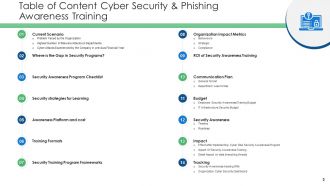
Table of Content Cyber Security Phishing Awareness Training
-
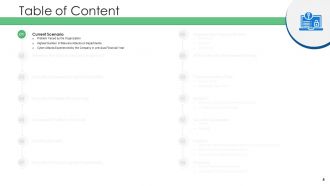
Table of Content
-
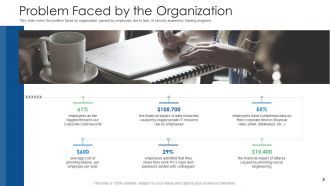
Problem Faced by the Organization
-
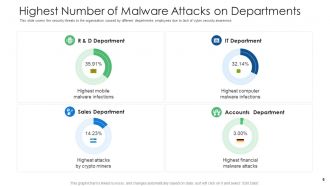
Highest Number of Malware Attacks on Departments
-
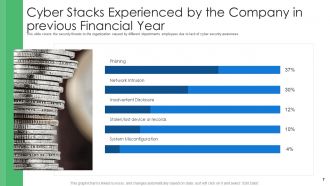
Cyber Stacks Experienced by the Company in previous Financial Year
-
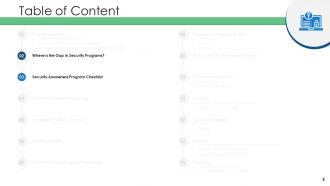
Table of Content
-
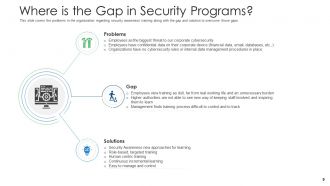
Where is the Gap in Security Programs
-
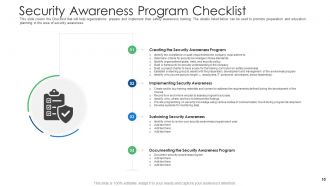
Security Awareness Program Checklist
-
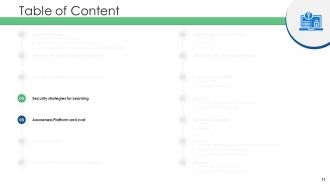
Table of Content
-
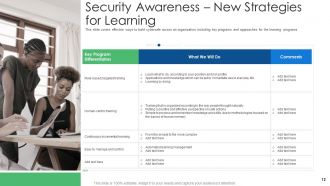
Security Awareness New Strategies for Learning
-
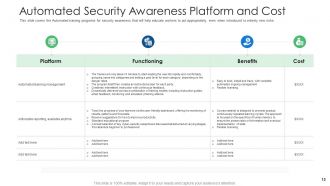
Automated Security Awareness Platform and Cost
-
Table of Content
-
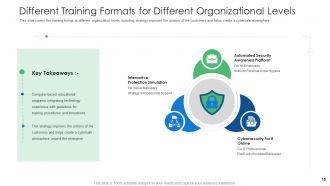
Different Training Formats for Different Organizational Levels
-
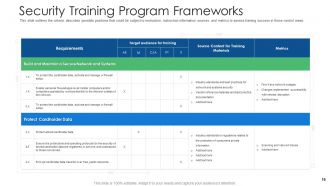
Security Training Program Frameworks
-
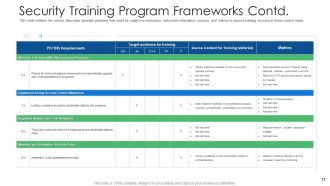
Security Training Program Frameworks Contd
-
Table of Content
-
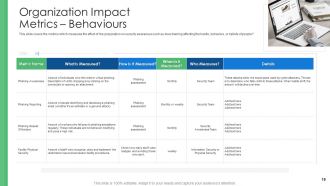
Organization Impact Metrics Behaviours
-
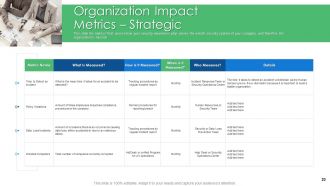
Organization Impact Metrics Strategic
-
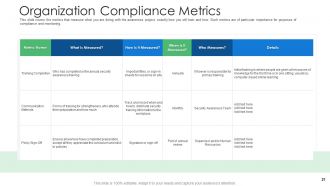
Organization Compliance Metrics
-
Table of Content
-
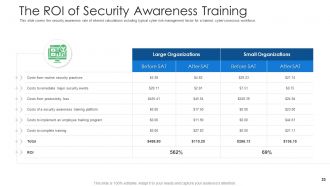
The ROI of Security Awareness Training
-
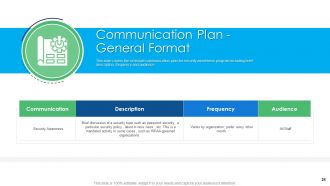
Communication Plan General Format
-

Communication Plan for Cybersecurity Events and Incidents
-
Table of Content
-
Employee Security Awareness Training Budget
-
IT Infrastructure Security Budget
-
Table of Content
-
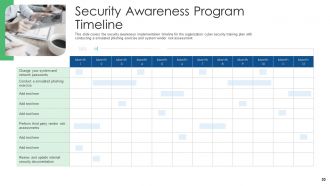
Security Awareness Program Timeline
-
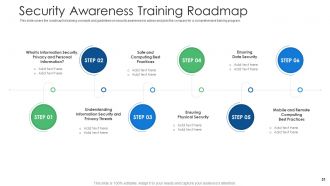
Security Awareness Training Roadmap
-
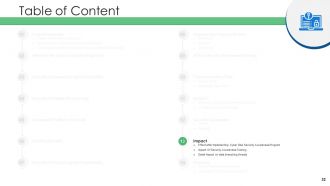
Table of Content
-
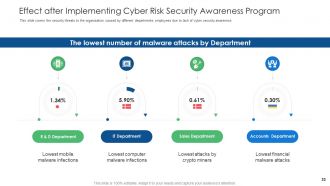
Effect after Implementing Cyber Risk Security Awareness Program
-
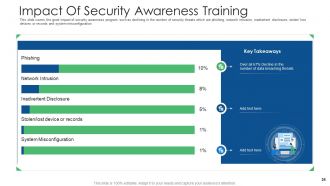
Impact Of Security Awareness Training
-
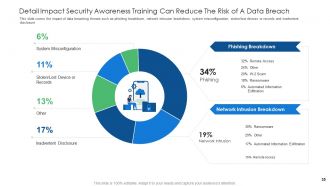
Detail Impact Security Awareness Training Can Reduce The Risk of A Data Breach
-
Table of Content
-
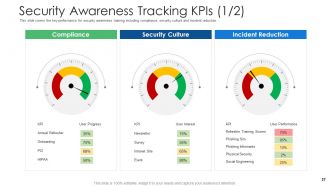
Security Awareness Tracking KPIs 1 2
-
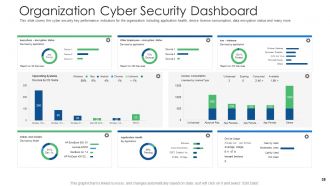
Organization Cyber Security Dashboard
-
Cyber Security Phishing Awareness Training Icons Slide
-
Additional Slides
-
About Us
-
Our MISSION
-
30 60 90 Days Plan
-
Timeline
-
Weekly Timeline with Task Name
-
Roadmap
-
Puzzle
-
Post It Notes
-
Magnifying Glass
-
Thank You
FAQs for Cyber security and phishing awareness training
Honestly, phishing emails are still the biggest pain - those sketchy messages trying to trick your employees into clicking bad links or handing over login info. Ransomware's another nightmare that can lock down everything until you pay (which obviously sucks). You've also got credential stuffing where hackers try stolen passwords from other data breaches on your accounts. Social engineering is getting worse too - like when scammers just call and sweet-talk people into giving up info instead of going through all the technical stuff. Make sure everyone knows what suspicious emails look like and uses different passwords for each account.
Honestly, monthly phishing simulations work way better than just talking about it. Show your team real examples - especially the sneaky ones that almost got you fooled. Quick reference guides are clutch too, something they can actually bookmark and use. The reporting system thing is huge though. People won't flag suspicious emails if they think they're being annoying. Make it dead simple. Mix up your training with hands-on stuff instead of death-by-PowerPoint. Watch for the usual red flags: urgent language, weird links, random requests for passwords. It's kinda like building muscle memory, you know?
Okay so password managers are honestly a game changer. You know how we all reuse the same 3 passwords for everything? Yeah, that's basically handing hackers your entire digital life on a silver platter. I learned this the hard way when I got completely locked out of my email last year - what a nightmare. These apps generate crazy complex passwords for each account and remember them all for you. You just need one master password. The best part? If someone breaks into your Instagram or whatever, your bank account is still safe because every password is different. Seriously worth setting up.
Dude, you really need to keep your stuff updated. Those notifications are annoying as hell, but skipping updates leaves security holes wide open. Hackers literally target old systems because they know exactly what's broken. Your phone, computer, browser - all of it needs those patches. Think of it like this: companies find problems and fix them constantly, but only if you actually install the updates. I learned this the hard way when my laptop got infected last year. Just turn on automatic updates and save yourself the headache.
Start with vulnerability scans and pen testing - that's your foundation. Honestly, I'd bring in outside auditors because internal teams miss stuff all the time (we're too close to our own work). Test your people with fake phishing emails too - you'd be surprised how many click random links. Make sure your incident response plan isn't just gathering dust on a shelf somewhere. NIST or ISO 27001 give you solid benchmarks to measure against. The big thing is doing this regularly, maybe quarterly? One-time assessments are pretty much useless since threats change constantly.
Okay so first thing - get WPA3 on your home wifi and ditch that default router password. You'll want a VPN for work stuff, plus two-factor auth on literally everything. Keep your devices updated too. I get that coffee shops are nice for working, but their wifi is sketchy for anything important. Try setting up a proper workspace at home if you can. Always lock your screen when you get up (learned this the hard way), and stick to your company's cloud storage instead of random file sites. Oh and back up regularly - trust me on this one.
Social engineering hits your emotions, not your brain - that's why it works so well. Scammers fake being IT support screaming about "urgent" password resets, or they'll send phishing emails pretending to be your bank. Even smart people get fooled because when you're panicked or rushed, you just react. Fear and wanting to help others? That's their sweet spot. I've honestly seen brilliant engineers hand over login info to fake "emergencies." Your best bet is hitting pause before you do anything. Verify through a different way - call the company directly, don't use their provided links.
Oh man, notification laws are your biggest headache - most states give you like 72 hours to tell customers, which is insane when you're dealing with chaos. Industry stuff matters too: HIPAA if you're healthcare, PCI DSS for payments, whatever. Honestly the fines will wreck you - I'm talking millions if it's bad. Customers will probably sue, especially over SSNs or bank info. SEC reporting kicks in if you're public. I'd get a lawyer to look over your incident plan now rather than scrambling later when everything's on fire.
Ok so MFA is basically extra security steps on top of your password. Hackers can't just waltz into your accounts even if they somehow get your login info - they'd also need your phone or fingerprint or whatever. I use the authenticator app thing instead of text codes because it's supposedly safer (though honestly the text thing works fine too). Your email and bank accounts should definitely have it turned on first. It's kinda like having a deadbolt plus a chain lock. Takes two seconds to set up but saves you from getting totally screwed over later.
So October is Cybersecurity Awareness Month - it's this big push to get everyone (not just tech people) thinking about their online security. Most data breaches still happen because someone clicked a sketchy link or used terrible passwords. You'll probably get bombarded with security training emails at work, which is honestly annoying but whatever. The main thing is using it as your yearly reminder to actually do that stuff you keep avoiding - like setting up a password manager or updating your software. Basic cyber hygiene really does matter, even though it feels boring.
Look, AI's basically turned cybersecurity into this weird arms race. Hackers are using it to build smarter attacks that actually learn from your defenses - kinda terrifying if you think about it. But you can fight fire with fire. AI security tools spot weird patterns way faster than any human could, and they'll predict what's coming next. The catch? Those same tools help bad guys create better phishing emails and malware. Honestly, you should probably start adding AI-based defenses to whatever you're already running. Just make sure your team knows how to spot AI-generated attacks too.
People make dumb cybersecurity choices mostly because our brains take shortcuts. Like when you're curious about a sketchy link and click it anyway, or use "password123" because it's easier to remember. We get numb to all those security warnings too - honestly, who actually reads them anymore? Your coworkers probably think "hackers won't target us" which is classic optimism bias. Plus we copy what others do, even if it's risky behavior. I'm totally guilty of rushing through those annoying security prompts when I'm busy. The trick is making the secure option the obvious, easy choice instead of fighting human nature.
Okay so first thing - turn on encryption for everything. Data at rest, data in transit, all of it. Most cloud providers have it but it's not always enabled by default which is kinda annoying. Set up multi-factor auth too, obviously. You'll want to check user permissions pretty regularly because honestly people get way too click-happy with sharing access. Oh and don't forget backups - sounds basic but you'd be surprised. Have some kind of incident plan ready just in case. The big thing is you can't just rely on your provider's security. You've gotta actually configure your own stuff properly.
Okay so first things first - isolate any compromised systems and change those passwords ASAP. Document everything you can remember while it's still fresh in your head. This stuff gets fuzzy fast, trust me. Alert your IT team and management right away. Depending how bad it is, you might need to loop in law enforcement too. If customer data got hit, you'll have to notify them - that conversation's gonna suck but it's unavoidable. Once the dust settles, do a full review of what went sideways and patch those gaps for next time.
Honestly, the biggest thing is getting everyone to actually care about it, not just dump it on IT. Those marathon training sessions? Waste of time. Break it into quick, relevant bits that connect to what people actually do. When someone spots a sketchy email, celebrate them! And for the love of god, don't punish people for honest mistakes - they'll just start hiding stuff. Keep your policies simple enough that normal humans can follow them. Oh, and if the leadership team acts like security is optional, good luck getting anyone else to care. Lead from the top or you're basically screwed.
-
Great quality slides in rapid time.
-
Excellent design and quick turnaround.
-
The content is very helpful from business point of view.
-
Great experience, I would definitely use your services further.
-
Unique research projects to present in meeting.
-
Unique research projects to present in meeting.
-
Easily Editable.
-
Perfect template with attractive color combination.
-
Editable templates with innovative design and color combination.
-
Unique and attractive product design.
-
Page:
- You're currently reading page 1
- Page 2
-
