

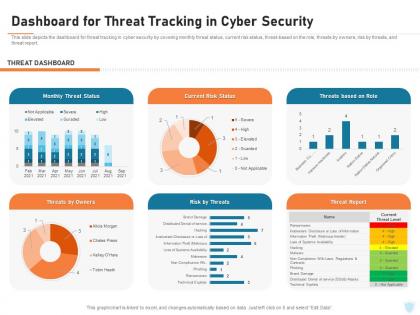
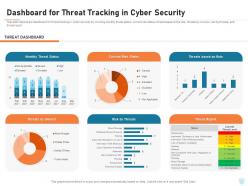
Cyber security it dashboard for threat tracking in cyber security ppt powerpoint tutorials




Try Before you Buy Download Free Sample Product
 Impress Your
 Audience
 100%
100% Editable
 Save Hours
 of Time


Our Cyber Security IT Dashboard For Threat Tracking In Cyber Security Ppt Powerpoint Tutorials are topically designed to provide an attractive backdrop to any subject. Use them to look like a presentation pro.
People who downloaded this PowerPoint presentation also viewed the following :
Cyber security it dashboard for threat tracking in cyber security ppt powerpoint tutorials with all 2 slides:
Use our Cyber Security IT Dashboard For Threat Tracking In Cyber Security Ppt Powerpoint Tutorials to effectively help you save your valuable time. They are readymade to fit into any presentation structure.
FAQs for Cyber security it dashboard for threat tracking in cyber security
Honestly, start with the basics - track your threat detection rates and how fast you're responding to incidents. Failed login attempts are huge too, plus keep an eye on vulnerability counts (separate the critical stuff from the minor issues). Patch management status is boring but necessary, and don't forget security training completion rates. Network traffic anomalies are probably my favorite though - they catch weird stuff early. Oh, and compliance scores if that applies to you. But seriously, don't go crazy with like 20 different metrics. Pick maybe 6-8 that actually help your team make decisions day-to-day.
Dude, visualizations are a game changer for security stuff. You get heat maps showing attack patterns instead of drowning in boring log files. Geographic maps show where threats come from, trend lines catch weird spikes - way better than staring at endless text. Your brain will miss things in raw data that jump right out in charts. Plus explaining threats to your boss gets so much easier when you've got visuals. I'd start simple though, maybe dashboards with your biggest risk indicators first. It's honestly like night and day difference.
Dude, you absolutely need real-time data for your cybersecurity dashboard. Without it, you're basically staring at yesterday's threats while new ones are hitting right now. It's like trying to drive using only your rearview mirror - good luck with that lol. Live feeds let you catch weird patterns as they happen and actually stop breaches instead of just writing reports about them later. Honestly, if your dashboard isn't refreshing every few minutes, you might as well be flying blind. The whole point is responding to incidents immediately, not discovering them hours after the damage is done.
So basically you wanna map out what different people actually care about first. SOC analysts need the real-time threat stuff and incident queues, but executives just want those high-level risk scores and compliance updates. Most platforms let you drag and drop widgets around, set up custom alerts, filter by department - that kind of thing. Role-based views are clutch because they'll automatically show relevant info to each person. Honestly, some of these dashboards can get pretty overwhelming if you don't customize them right. Just start simple and build it out based on what each team's asking for.
Splunk, ELK Stack, and Grafana are probably your best bets - they're what most teams use. Tableau's solid if you want those really polished charts that make management happy. SIEM tools like QRadar have dashboards built in too. Oh, and if you're in the cloud, CloudWatch or Azure Monitor are no-brainers. Honestly though? Getting your data cleaned up first is where you'll spend most of your time anyway. I'd just go with whatever your team already knows how to use. You can always switch platforms later once you figure out what you actually need. Way easier than learning something totally new from scratch.
Looking at historical data lets you catch patterns you'd totally miss just watching things in real-time. Pull your last 6 months of security logs and check for timing patterns, attack types, entry points - that stuff. You'll see which security measures actually stopped threats versus the ones that just looked impressive in meetings (honestly, half of them are probably useless). Past incidents show you where attackers usually hit next, so you can put your resources in the right spots. It's way better than guessing. Recurring attack vectors become super obvious once you map them out over time.
So basically you need three things sorted: data validation, reliable sources, and regular check-ups. Automated checks are your best friend here - catching bad data before it hits your dashboard saves so much embarrassment later. Pull from verified sources only and normalize everything so different formats play nice together. Weekly spot-checks against raw logs are clutch, plus document your collection methods so anyone can jump in and troubleshoot. Oh and data lineage - sounds fancy but just means you can trace problems back to where they started. Honestly the documentation part is boring but you'll thank yourself later when things go sideways.
Honestly, dashboards are your best friend for this. Show risk levels with color coding - red means "panic now," green means "we're good." Include trend lines so they can see if things are getting better or worse over time. The key is connecting it to money - like potential losses from breaches. I swear, half the dashboards I've seen look like they're launching rockets instead of tracking security. Keep it simple enough that they can scan it in 2 minutes max. Always end with what you actually need from them - more budget, staff, whatever. Skip the tech jargon completely.
Honestly, user access control is what makes or breaks your cybersecurity dashboard design. You can't just dump everything on one screen - that's a security nightmare. Map out who needs what first: SOC analysts get the nitty-gritty incident data, execs see risk summaries and compliance stuff. Keep sensitive things like vulnerability details locked down tight. Different people have different tech skills too, so your interface has to work for everyone. I learned this the hard way - it's way easier to build access tiers from the start than trying to bolt on permissions afterward.
Honestly, dashboards are a lifesaver for compliance stuff. They automatically track all the security metrics regulations want - access logs, how fast you respond to incidents, patch status, encryption levels, whatever. The coolest part? Most can spit out compliance reports instantly, so you're not panicking when audits come around. Real-time alerts tell you when something's off too. I'd definitely set up separate views for each regulation you deal with. Trust me, it'll save you hours during reviews. Way better than doing everything manually like we used to.
So there are four metrics you really need to watch. Mean time to detection (MTTD) shows how fast you catch threats in the first place. Response time (MTTR) is the delay between spotting something and actually jumping on it. Recovery time measures end-to-end resolution - honestly, this is the one your boss will bug you about most. Don't forget incident recurrence rate either, because that tells you if you're truly fixing things or just slapping temporary fixes on everything. Oh, and definitely set up alerts when these numbers start going haywire compared to your normal baseline.
Threat intel feeds are a total game changer for your dashboard. You'll get real-time context instead of just generic "suspicious activity" alerts. Like, you can see if that sketchy IP is actually part of a known botnet or if the malware matches something hitting companies like yours. Makes prioritization so much easier when you're not flying blind. I've seen teams cut their response times way down just by correlating internal events with external threat data. Oh, and definitely stick with reputable feed sources - there's some garbage out there.
Honestly, data integration is gonna be your biggest pain point. All these security tools speak different languages, so getting everything normalized is a total mess. Real-time updates sound great until you realize constantly hitting massive datasets will tank your performance - learned that one the hard way. Alert fatigue hits hard too because people just zone out when the dashboard's screaming about everything. Oh, and budget constraints make it even trickier. I'd say start with just your most critical stuff first, then slowly add complexity once you've got the foundation solid.
Honestly, you need different views for different people. Executives just want the big picture - high-level risk scores and trends. Your security team needs all the nitty-gritty alerts and technical stuff. Color-coding is huge here - non-tech people literally just want to know if they're looking at green or red, not dive into packet logs or whatever. Plain language for everything, maybe add those little hover tooltips to explain the techy terms. Oh and set up default views that actually match what each person cares about. Saves everyone time.
Honestly, dashboards are pretty clutch for training because you can pull real incidents that just happened. Like "we got hit with 50 phishing emails this week" hits different than some generic example, you know? People actually pay attention to charts and visuals way more than slides. You can track who's clicking sketchy links or reporting threats - that data's gold for figuring out where training needs to happen. Oh, and try doing monthly "security moments" in team meetings where you just show what's currently going down on your network. Makes it feel way more real.
-
Understandable and informative presentation.
-
Very unique, user-friendly presentation interface.
-
Great quality slides in rapid time.
-
Out of the box and creative design.
-
Colors used are bright and distinctive.