

Diapositivas de presentación de Powerpoint de capacitación en concientización sobre ciberseguridad




Try Before you Buy Download Free Sample Product
 Impress Your
 Audience
 100%
100% Editable
 Save Hours
 of Time


Nuestras diapositivas de presentación en Powerpoint de capacitación en concientización sobre ciberseguridad están diseñadas por temas para brindar un telón de fondo atractivo para cualquier tema. Úselos para lucir como un profesional de presentaciones.
People who downloaded this PowerPoint presentation also viewed the following :
Contenido de esta presentación de Powerpoint
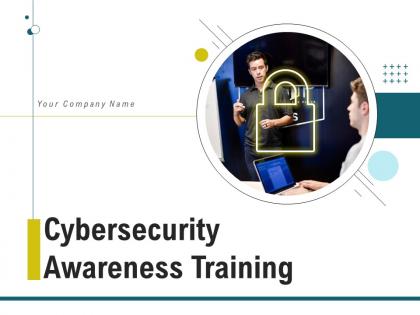
Diapositiva 1 : Esta diapositiva presenta la capacitación de concientización sobre seguridad cibernética. Indique el nombre de su empresa y comience.
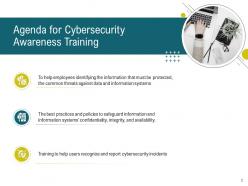
Diapositiva 2 : Esta diapositiva muestra la agenda para la capacitación en concientización sobre seguridad cibernética.
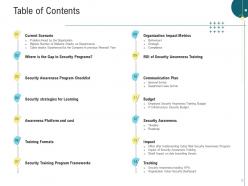
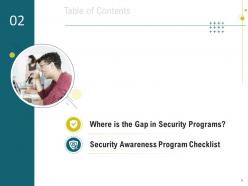
Diapositiva 3 : Esta diapositiva presenta la tabla de contenido de la presentación.
Diapositiva 4 : Esta diapositiva muestra la tabla de contenido que destaca el escenario actual.
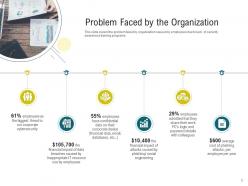
Diapositiva 5 : Esta diapositiva muestra el problema que enfrenta la organización causado por los empleados debido a la falta de programas de capacitación en concientización sobre seguridad.
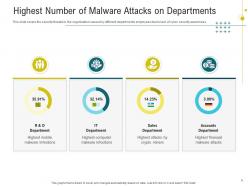
Diapositiva 6 : Esta diapositiva representa las amenazas a la seguridad de la organización causadas por los empleados de diferentes departamentos debido a la falta de conciencia sobre seguridad cibernética.
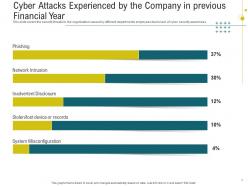
Diapositiva 7 : Esta diapositiva muestra los ataques cibernéticos experimentados por la empresa en el ejercicio fiscal anterior.
Diapositiva 8 : Esta diapositiva presenta la lista de verificación del programa de concientización sobre seguridad.
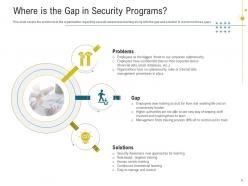
Diapositiva 9 : Esta diapositiva cubre los problemas en la organización con respecto a la capacitación en concientización sobre seguridad.
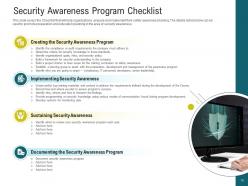
Diapositiva 10 : Esta diapositiva muestra la lista de verificación que ayudará a las organizaciones a preparar e implementar su capacitación de concientización sobre seguridad.
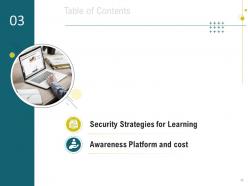
Diapositiva 11 : esta diapositiva representa la tabla de contenido de la presentación.
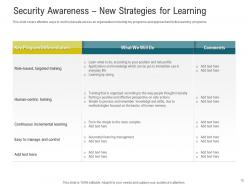
Diapositiva 12 : Esta diapositiva cubre formas efectivas de crear seguridad cibernética en una organización, incluidos programas y enfoques clave para los programas de aprendizaje.
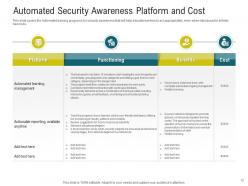
Diapositiva 13 : esta diapositiva presenta la plataforma y el costo de la conciencia de seguridad automatizada.
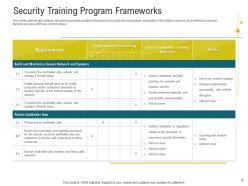
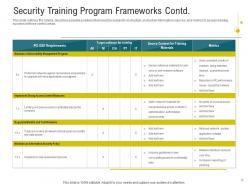
Diapositiva 14 : esta diapositiva muestra los marcos del programa de capacitación en seguridad.
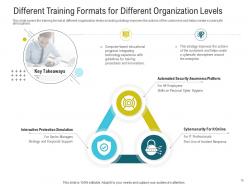
Diapositiva 15 : esta diapositiva muestra diferentes formatos de capacitación para diferentes niveles de organización.
Diapositiva 16 : esta diapositiva representa los marcos del programa de capacitación en seguridad.
Diapositiva 17 : esta es otra diapositiva que continúa con los marcos del programa de capacitación en seguridad.
Diapositiva 18 : Esta diapositiva presenta la tabla de contenido de la presentación.
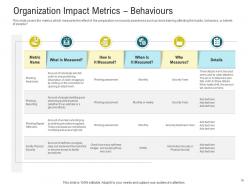
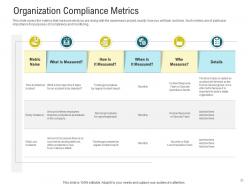
Diapositiva 19 : esta diapositiva cubre las métricas que miden el efecto de la preparación en la conciencia de seguridad.
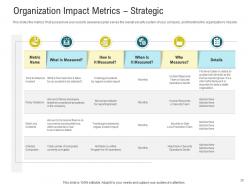
Diapositiva 20 : esta diapositiva muestra cómo su plan de concientización sobre seguridad sirve al sistema de seguridad general de su empresa.
Diapositiva 21 : Esta diapositiva representa las métricas que miden lo que está haciendo con el proyecto de concientización.
Diapositiva 22 : esta diapositiva muestra la tabla de contenido de la presentación.
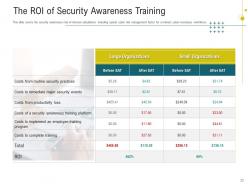
Diapositiva 23 : esta diapositiva presenta los cálculos de la tasa de interés de la conciencia de seguridad, incluido el factor típico de gestión del riesgo cibernético.
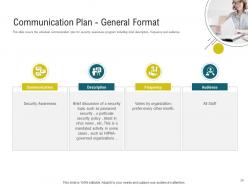
Diapositiva 24 : Esta diapositiva cubre el plan de comunicación del cronograma para el programa de concientización sobre seguridad, incluida una breve descripción, la frecuencia y la audiencia.
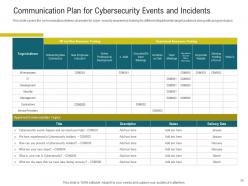
Diapositiva 25 : Esta diapositiva muestra el Plan de comunicación para eventos e incidentes de ciberseguridad.
Diapositiva 26 : esta diapositiva representa la tabla de contenido de la presentación.
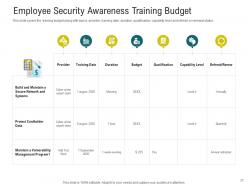
Diapositiva 27 : Esta diapositiva muestra el presupuesto de capacitación para la concientización sobre la seguridad de los empleados.
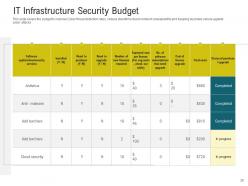
Diapositiva 28 : Esta diapositiva presenta el presupuesto para mejorar las tasas de detección de amenazas cibernéticas, reducir el tiempo de inactividad debido a la falta de disponibilidad de la red y mantener la empresa segura contra los ataques cibernéticos.
Diapositiva 29 : esta diapositiva muestra la tabla de contenido de la presentación.
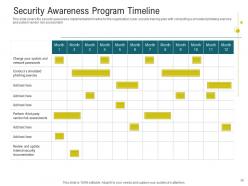
Diapositiva 30 : esta diapositiva muestra el cronograma de implementación de la conciencia de seguridad para el plan de capacitación en seguridad cibernética de la organización.
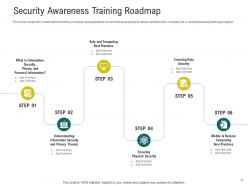
Diapositiva 31 : Esta diapositiva representa la hoja de ruta para los conceptos de capacitación y las pautas sobre concientización sobre seguridad.
Diapositiva 32 : esta diapositiva muestra la tabla de contenido de la presentación.
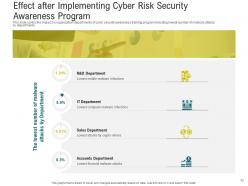
Diapositiva 33 : Esta diapositiva presenta el efecto después de implementar el programa de concientización sobre la seguridad de los riesgos cibernéticos.
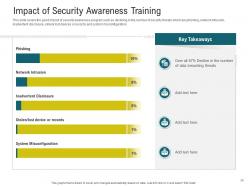
Diapositiva 34 : Esta diapositiva cubre el buen impacto del programa de concientización sobre seguridad, como la disminución en la cantidad de amenazas a la seguridad.
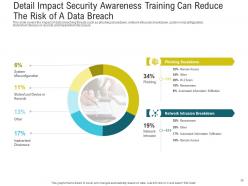
Diapositiva 35 : esta diapositiva muestra el impacto de las amenazas de violación de datos, como la falla de phishing.
Diapositiva 36 : esta diapositiva representa la tabla de contenido de la presentación.
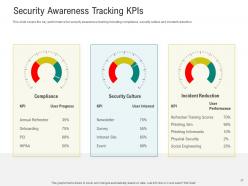
Diapositiva 37 : Esta diapositiva cubre el desempeño clave para la capacitación en concientización sobre seguridad, incluido el cumplimiento.
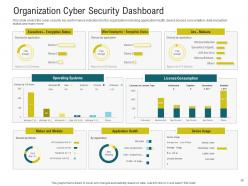
Diapositiva 38 : Esta diapositiva presenta los indicadores clave de rendimiento de seguridad cibernética para la organización.
Diapositiva 39 : Esta diapositiva muestra los íconos de capacitación de concientización sobre seguridad cibernética.
Diapositiva 40 : esta diapositiva se titula Diapositivas adicionales para avanzar.
Diapositiva 41 : Esta es la diapositiva Nuestra misión con imágenes y texto relacionados.
Diapositiva 42 : Esta es la diapositiva Nuestro equipo con nombres y designación.
Diapositiva 43 : Esta es una diapositiva de generación de ideas para exponer una nueva idea o resaltar información, especificaciones, etc.
Diapositiva 44 : esta diapositiva muestra una lupa para resaltar información, especificaciones, etc.
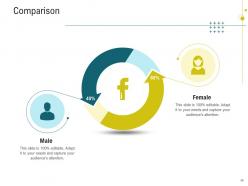
Diapositiva 45 : Esta es una diapositiva de comparación para establecer la comparación entre productos básicos, entidades, etc.
Diapositiva 46 : Esta diapositiva representa Circular con íconos y texto relacionados.
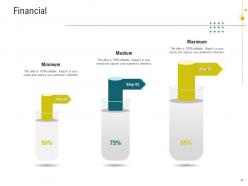
Diapositiva 47 : Esta es una diapositiva financiera. Muestre sus cosas relacionadas con las finanzas aquí.
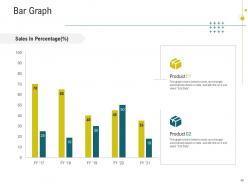
Diapositiva 48 : Esta diapositiva presenta un gráfico de barras con una comparación de dos productos.
Diapositiva 49 : Esta diapositiva muestra Post-It Notes. Publique sus notas importantes aquí.
Diapositiva 50 : esta es una diapositiva de la línea de tiempo. Mostrar datos relacionados con los intervalos de tiempo aquí.
Diapositiva 51 : Esta es una diapositiva de agradecimiento con dirección, números de contacto y dirección de correo electrónico.
Diapositivas de presentación de Powerpoint de capacitación en concientización sobre ciberseguridad con las 51 diapositivas:
Utilice nuestras diapositivas de presentación de Powerpoint de capacitación en concientización sobre ciberseguridad para ayudarlo de manera efectiva a ahorrar su valioso tiempo. Están listos para adaptarse a cualquier estructura de presentación.

FAQs for Cybersecurity awareness training
Focus on four big things: phishing training with fake attacks, password managers plus MFA, social engineering awareness, and how to report sketchy stuff. Phishing simulations are clutch - people fall for that crap all the time. Skip the boring PowerPoints and do interactive scenarios instead. Honestly, the data protection basics matter too but don't overwhelm them. Password stuff should be pretty straightforward. Make it ongoing though, like quarterly check-ins. One-and-done training doesn't stick. Keep it real with actual examples they'd see at work.
Honestly? Every 6 months at minimum, but I'd go with quarterly if you can swing it. Cyber threats move crazy fast these days - like, new phishing scams literally pop up weekly. My old IT manager used to say "if you're not updating, you're already behind" and he wasn't wrong. Set a calendar reminder for every 6 months to do a full review of your training stuff. Between those big updates, just keep an eye on security news and patch in new threats as they come up. Oh, and if you ever have a close call or actual incident, drop everything and update immediately. That's usually when the best learning happens anyway.
So phishing simulations are like fake phishing emails you send to your team to see who takes the bait. It's basically a fire drill for email threats - helps you figure out who needs more training. The best part? People actually start developing better instincts for spotting sketchy emails. You'll want to run these pretty regularly and use the results to fix whatever specific mistakes people keep making. Honestly, it's way better than just lecturing everyone about email security and hoping they remember it when it counts.
So you want to know if your security training actually works? Start with before/after tests to see knowledge gains. Then hit them with fake phishing emails - the click rates don't lie. Course completion stats are whatever, people just rush through those anyway. What really matters is tracking actual incident reports over time. Are employees reporting more suspicious stuff after training? That's your sweet spot right there. Oh, and watch for overall security incidents dropping. Set up some kind of tracker and check it every few months. You'll start seeing patterns pretty quick.
Oh man, the worst myth? People think cybersecurity is just IT's job. Wrong. Also, tons of folks believe antivirus catches everything - it really doesn't. Small companies especially think they're not worth targeting, which is nuts because hackers love easy targets. Phishing emails aren't always obvious anymore either. I see people relying only on passwords too, completely skipping two-factor authentication. Here's the thing - everyone's basically the human firewall now. Most breaches happen because someone got tricked, not because of some crazy movie hacker scenario. Your training should use real examples from similar companies.
Look, generic training is totally useless - nobody pays attention to it. Map out what data each team actually handles first. Your IT people need the heavy technical stuff about vulnerabilities. HR should focus on phishing and social engineering since they're swimming in employee info all day. Executives? Business email compromise for sure, plus governance stuff. They're honestly painted with the biggest targets on their backs. Sales teams are constantly on sketchy public wifi, so mobile security is huge for them. Build scenarios that actually match what they deal with daily - way more effective than boring generic modules everyone clicks through mindlessly.
Honestly, gamification works way better than those boring slide presentations everyone hates. Break your training into small chunks - people actually finish those. VR is getting pretty cool for phishing practice, though it might be overkill depending on your budget. Interactive simulations are solid too. Learning management systems help you track who's struggling with what. Some AI platforms will adjust difficulty automatically, which is nice because not everyone learns the same way. I'd start by figuring out where you're most vulnerable first - like, are people clicking sketchy links or using terrible passwords? Then pick maybe two tools max that fit your budget and culture.
Dude, your training needs to work online and actually match how people work now - from home, cafes, wherever. Most companies are stuck teaching office stuff that's totally irrelevant. Hit the real problems: securing home WiFi, spotting sketchy emails (especially when personal/work blur together), video call safety. Make it hands-on with scenarios they'll recognize, not boring corporate nonsense. Here's what works better - ditch the annual marathon session. Break it into monthly 15-minute chunks people can do anywhere. Track who's done what so nobody disappears. Honestly, consistency beats everything else here. Short and regular wins every time.
Hey! So for security training that actually works - use real examples your people see daily. You know, fake CEO emails asking for wire transfers, sketchy USB drives in the parking lot. Skip the boring PowerPoint marathons and do interactive stuff instead. Quizzes, simulations, whatever keeps them awake. Keep sessions super short, like 15-20 minutes tops. Share actual breach stories so they get why this matters. Honestly, most people tune out if it feels too "corporate training-y." Pop quizzes help too - just quick ones to make sure stuff's sticking. The goal is making cybersecurity feel relevant to what they're doing every day, not some random IT checkbox.
Honestly, you've gotta get everyone involved, not just dump it all on IT. Skip the boring training videos - nobody actually watches those anyway. Try interactive stuff like phishing simulations that relate to their actual jobs. Your executives need to walk the walk too; people notice when leadership actually cares about security. Set up simple ways for folks to report weird stuff, and don't forget to give props when they do. The whole trick is framing it as "we're protecting our team" instead of just more corporate rules to follow.
So it really depends on what kind of business you're running. GDPR, HIPAA, SOX, PCI-DSS - they all have their own training requirements for handling data and responding to breaches. Keep records of who completed what because you'll need proof later. Healthcare and financial companies get hit the hardest with regulations, but even smaller businesses have to deal with state breach notification laws (which are honestly a pain). Your legal team should know which ones apply to you specifically. Just focus your training on whatever compliance stuff you actually have to follow. When auditors show up, you'll be glad you documented everything.
Honestly, your employees make or break your whole security setup. They're clicking links, opening emails, handling data - basically deciding if that suspicious message is real or fake. Just takes one person falling for a phishing scam to mess up everything. But here's the thing - when your team actually knows what to look for, they become pretty solid at catching threats early. Training helps, though you gotta make it interesting or people just tune out (learned that the hard way). Short bursts work better than those marathon sessions nobody remembers.
Honestly, gamification works because people love competition and rewards - it's just human nature. Add some leaderboards, badges, maybe point systems to your cybersecurity training. Way better than boring presentations, trust me. Remember those mobile games you couldn't put down? Same concept here. You could do phishing contests where teams compete, or trivia games about security stuff. Progressive modules that unlock new content work great too. The whole point is making it feel less like work training and more like... well, actually fun. I'd start simple - just basic points for completing modules. You can always add more bells and whistles later once people get into it.
Honestly? People just hate being forced into training during crunch time. I've definitely half-listened while answering emails - we all do it. Companies cheap out with boring one-size-fits-all programs that either put you to sleep or completely overwhelm you. Plus there's always someone struggling with the tech or language barriers making it awkward for everyone. Best bet is timing it when folks aren't swamped and actually tailoring it to what people do day-to-day. Interactive stuff works way better than those mind-numbing click-through modules. Oh, and maybe don't schedule mandatory sessions right before big deadlines?
Make it regular, not just some annual training thing everyone sleeps through. I do 5-minute monthly videos on whatever threats are hot right now - people actually remember the real horror stories (that ransomware company still makes me cringe). Quarterly phishing tests keep everyone sharp. Set up automated reminders for updates and maybe an internal newsletter about recent scams. Oh, and start with 15-minute team check-ins where people can share sketchy emails they've gotten. Honestly, the surprise factor works way better than scheduled stuff. Keep it relevant to what's actually happening out there.
-
It saves your time and decrease your efforts in half.
-
Good research work and creative work done on every template.
-
Excellent template with unique design.
-
Professional and unique presentations.
-
Very unique, user-friendly presentation interface.
-
Wonderful templates design to use in business meetings.
-
Appreciate the research and its presentable format.
-
Editable templates with innovative design and color combination.
-
Perfect template with attractive color combination.
-
Unique design & color.
-
Page:
- You're currently reading page 1
- Page 2
-
