

Dashboard To Monitor Production Preventive Maintenance For Reliable Manufacturing




Try Before you Buy Download Free Sample Product
 Impress Your
 Audience
 100%
100% Editable
 Save Hours
 of Time


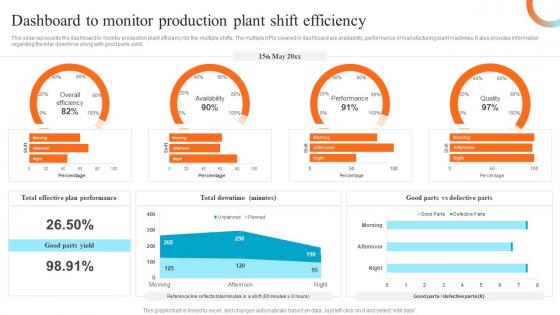
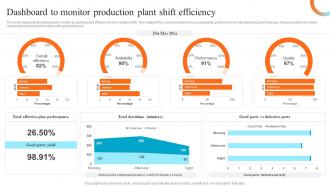
This slide represents the dashboard to monitor production plant efficiency for the multiple shifts. The multiple KPIs covered in dashboard are availability, performance of manufacturing plant machines. It also provides information regarding the total downtime along with good parts yield.
People who downloaded this PowerPoint presentation also viewed the following :
Dashboard To Monitor Production Preventive Maintenance For Reliable Manufacturing with all 7 slides:
Use our Dashboard To Monitor Production Preventive Maintenance For Reliable Manufacturing to effectively help you save your valuable time. They are readymade to fit into any presentation structure.





FAQs for Dashboard To Monitor Production Preventive Maintenance
Start with planned vs. unplanned maintenance ratio - that's huge. Equipment uptime/downtime is obvious but critical. Work order completion rates tell you if your team's actually getting stuff done. MTBF is solid too, though some of our older equipment makes that metric look depressing honestly. Preventive maintenance compliance shows whether you're sticking to your schedule or just fighting fires all day. Cost per maintenance hour gets messy to calculate but it's worth it. Oh, and don't sleep on schedule adherence and backlog metrics. Pick maybe 4-5 to start - you'll go crazy trying to track everything from day one.
Honestly, good data visualization will save your sanity with preventive maintenance dashboards. Nobody wants to stare at endless spreadsheet rows when a simple heat map shows you exactly which equipment is about to crap out. Charts make patterns jump out immediately - you'll catch stuff like that one machine that keeps breaking down or tasks that are always running late. I'm a big fan of color-coded visuals because they tell the story at a glance. Just pick the right charts for what you actually need to decide on each day, not what looks coolest.
Tableau and Power BI are the go-to picks for dashboards, though honestly Excel works fine if you're not trying to get fancy. CMMS platforms like Fiix or UpKeep have dashboard stuff built right in. Grafana's pretty solid but your team needs to be somewhat technical. I've actually seen people make really clean dashboards with basic tools - you don't need to overcomplicate it. Google Data Studio is decent if budget's tight. My advice? Start with whatever licenses you already have, then figure out what metrics actually matter before spending money on upgrades.
So instead of just fixing stuff when it breaks, predictive analytics looks at all your equipment data and basically tells you "hey, this thing's gonna fail next week." Pretty cool right? Your sensors pick up usage patterns and historical breakdowns, then the system gives you actual warnings before disasters happen. No more surprise equipment failures during your busiest production days - honestly that alone makes it worth it. You can plan maintenance around YOUR schedule instead of everything going to hell at once. It's like having a crystal ball for your machinery.
Look, real-time monitoring is what makes your preventive maintenance dashboard actually worth using. Live sensor feeds and equipment updates let you catch problems before they turn into disasters. Way better than those old clipboard rounds we used to do. The dashboard automatically adjusts maintenance schedules and fires off alerts when something's off. Honestly, the key is setting up your alerts right from the start - otherwise you'll miss those early wear patterns. Then you're stuck dealing with breakdowns instead of preventing them.
Look at your work order history and when stuff actually breaks down - that's where you'll find the sweet spot for scheduling. I'd start with whatever the manufacturer says, then tweak it based on how critical the equipment is and your real operating conditions. Your dashboard should pull this data automatically, but honestly it's garbage in garbage out situation. Past failure patterns are gold here - compare when things broke versus when you last did maintenance on them. I usually tell people to review and adjust these frequencies every quarter or so based on the trends you're seeing.
Grab an API gateway first to pull in all that sensor data, then run it through MQTT or Kafka for streaming. Time-series databases like InfluxDB work great here - trust me, regular databases will hate you once the data starts pouring in. Grafana's probably your best bet for dashboards, though you could build something custom with React if you're feeling ambitious. You can track equipment health, set up predictive alerts, the whole nine yards. Honestly though? Start with just a couple machines. Get that pipeline working solid before you go crazy with every sensor in the building.
Dude, user feedback is everything for dashboard design. Your maintenance teams will tell you straight up if critical alerts are hard to find or if the layout slows them down. I've watched so many "perfect" dashboards fail miserably because nobody bothered asking what users actually needed. Regular feedback sessions help you figure out which features matter and clean up messy interfaces. The goal is saving time, not creating more headaches. Oh, and definitely start with your power users - they'll give you the real dirt on daily pain points and what's broken.
Ugh, data consistency is such a pain. Your info comes from everywhere - sensors, work orders, inspections, inventory systems - and none of it matches up properly. Manual entry is the absolute worst for creating duplicates and weird errors. Field techs write stuff down however they want, which never matches what the system expects. Missing data and delayed updates happen constantly too. Honestly, I've seen maintenance histories that look like Swiss cheese because of gaps. Set up some automated checks if you can, and maybe create simple standards for how people should log things. Oh, and audit regularly - trust me on this one.
Dude, these dashboards are clutch for compliance stuff. When auditors show up, you can instantly pull maintenance records and inspection schedules instead of panicking. Everything's timestamped and documented, which regulators eat up. It automatically warns you about upcoming deadlines too. I've seen people get burned by cutting regulatory requirements too close - the dashboard catches those patterns before you're in trouble. Honestly saved my butt during our last review. Just set up those automated alerts now so you're not scrambling at 2am trying to find paperwork.
Predictive maintenance is getting wild with AI now - it actually spots problems before stuff breaks down. IoT sensors are everywhere too, pumping real-time data straight to your phone instead of those old scheduled reports. Speaking of phones, everything's mobile-first since techs aren't stuck at computers all day. The crazy part is AR overlays that show repair instructions right on the equipment itself. Feels like we're living in the future honestly. But here's the thing - don't get distracted by every cool feature. Focus on what'll actually play nice with whatever systems you're already running.
Dude, mobile access is seriously clutch for maintenance teams. Your guys can update work orders and check equipment status right from wherever they are - no more hiking back to a computer every time. Response times get way better because you spot problems instantly and assign work on the spot. Real-time updates from technicians are huge too. Having all your asset history and data right on your phone makes troubleshooting so much faster, though I still prefer a bigger screen for complex stuff. Start with mobile alerts for critical issues first - you'll notice the difference right away.
Definitely go with color coding - red for overdue/critical stuff, yellow when things are due soon, green for completed. Sort everything by priority so the urgent tasks are right at the top where you can't miss them. Heat maps are super helpful if you're managing multiple locations. Honestly, I've seen way too many dashboards that look nice but are useless when you need to actually prioritize repairs! Your high-priority items need to jump out immediately. Throw in due dates and countdown timers for the really critical maintenance - oh, and don't make people hunt for the important stuff.
Training your team is make-or-break for dashboard success. I've literally watched $50k systems collect dust because no one knew what the alerts meant or how to customize anything. Your people will either completely ignore it or worse - misread the data and make bad calls. The training doesn't need to be some elaborate program, but everyone has to understand the key metrics. Show them how to spot real issues versus false alarms. Once they get comfortable with it, you'll actually start preventing failures instead of just reacting to them. Otherwise you're just buying expensive wall art.
Just figure out what metrics actually matter for your specific industry first. Manufacturing? Focus on equipment uptime and production stuff. Healthcare? Patient safety and system availability are king. Most platforms have decent drag-and-drop features - honestly way easier than I expected when I first tried it. Alert thresholds are huge though. What freaks out a hospital team won't even register at a warehouse, you know? I'd literally write down your top 5 must-have metrics, then build everything around those. Don't overcomplicate it at first.
-
“Slides are formally built and the color theme is also very exciting. This went perfectly with my needs and saved a good amount of time.”
-
Their products can save your time, effort and money. What else you need. All in one package for presentation needs!