


Data transfers powerpoint presentation slides




Try Before you Buy Download Free Sample Product
 Impress Your
 Audience
 100%
100% Editable
 Save Hours
 of Time


Migrate the data without compromising the quality of the data using professionally designed Data Transfers PowerPoint Presentation Slides. Transport data between computers, storage devices or formats with the help of data transfers PPT templates. This professionally designed content-ready data transfers complete PowerPoint presentation comprises of topics such as data migration approach, data migration steps, data migration lifecycle, data migration process, and more. Minimize extended downtime, compatibility and performance issues by including data transfers PPT templates. Add content-ready data transfers PPT slides and take control of effective planning, technology, implementation and validation. Incorporate data transfers presentation slides to remove the unnecessary or repetitive data. These templates are completely editable. You can customize the slides as per your requirement. Edit color, text, icon, and font size as per the need. Include professionally designed data transfers PPT templates to make sure that the data is migrated quickly and effectively. Download data transfers complete presentation to improve the quality of the information in your system. Be in good hands with our Data Transfers Powerpoint Presentation Slides. Their dexterity is an absolute guarantee.
People who downloaded this PowerPoint presentation also viewed the following :
Content of this Powerpoint Presentation
Slide 1: This slide introduces Data Transfer. State Your Company Name an begin.
Slide 2: This slide showcases Agenda and use it to add your company agenda.
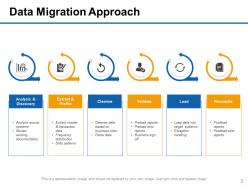
Slide 3: This slide presents Data Migration Approach. You can add the data and make use of it.
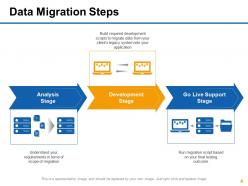
Slide 4: This slide showcases Data Migration Steps with these three stages- Go Live Support Stage, Development Stage, Analysis Stage.
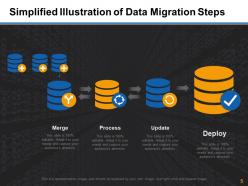
Slide 5: This slide presents Simplified Illustration of Data Migration Steps with these four steps- Merge, Process, Deploy, Update.
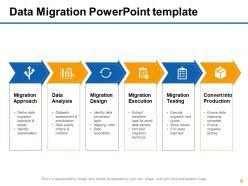
Slide 6: This slide showcases Data Migration PowerPoint template. You can use it accordingly.
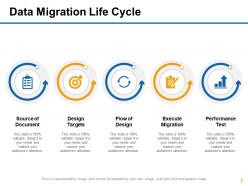
Slide 7: This slide presents Data Migration Life Cycle with these five stages- Source of Document, Design Targets, Flow of Design, Execute Migration, Performance Test.
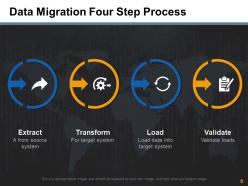
Slide 8: This slide showcases Data Migration Four Step Process with these four steps- Extract, Transform, Load, Validate.
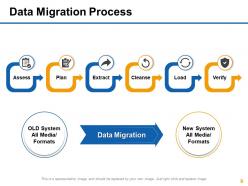
Slide 9: This slide presents Data Migration Process with six of the factors.
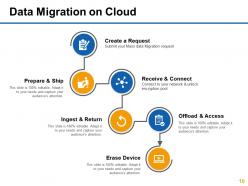
Slide 10: This slide showc Data Migration on Cloud with these six stages- Create a Request, Submit your Mass data Migration request, Offload & Access, Erase Device, Ingest & Return, Prepare & Ship, Receive & Connect, Connect to your network & unlock encryption pool.
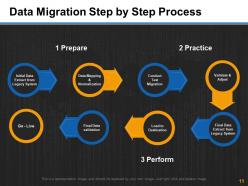
Slide 11: This slide presents Data Migration Step by Step Process with the procedure we have shown.
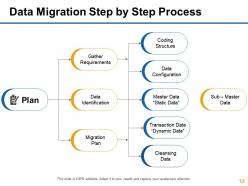
Slide 12: This slide showcases Data Migration Step by Step Process with these stages- Plan, Gather, Requirements, Data Identification, Migration, Plan, Master Data “Static Data”, Coding Structure, Data Configuration, Transaction Data “Dynamic Data”, Cleansing Data, Sub – Master Data,
Slide 13: This slide showcases Data Transfers Icons Slide.
Slide 14: This slide is titled Additional slides.
Slide 15: This slide helps depict Our Team with text boxes.
Slide 16: This slide displays a Bulb or idea image.
Slide 17: This is an About Us slide. State company or team specifications here.
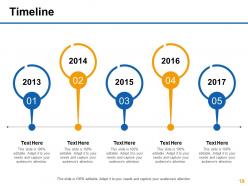
Slide 18: This slide presents a Timeline to show growth, milestones etc.
Slide 19: This is a Post it slide to mark reminders, events etc.
Slide 20: This is a Puzzle image slide to show information, specification etc.
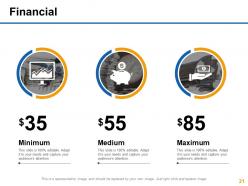
Slide 21: State your Financial score in this slide with relevant imagery and text.
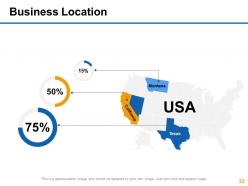
Slide 22: This is a Location slide to show global growth,presence etc. on world map.
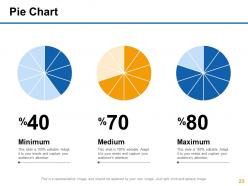
Slide 23: This slide presents Pie Chart. You can add the percentage and make use of it.
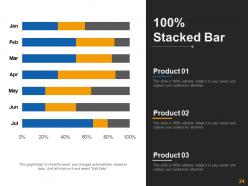
Slide 24: This slide shows a Stacked Line graph in terms of percentage and years for comparison of Product 01, Product 02, Product 03 etc.
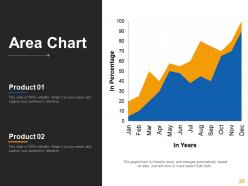
Slide 25: This slide Area Chart with which you can compare the products.
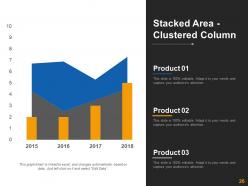
Slide 26: This slide shows a Stacked Line graph in terms of percentage and years for comparison of Product 01, Product 02, Product 03 etc.
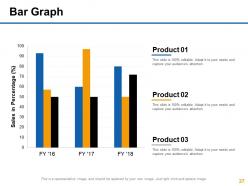
Slide 27: This slide presents Bar Graph with those of the comparing .
Slide 28: This is a Thank You slide with Address:# street number, city, state, Contact Numbers and Email Address.
Data transfers powerpoint presentation slides with all 28 slides:
Really worried about the next big presentation? Quality Data Transfers Powerpoint Presentation Slides are available to help make sure it goes smoothly.








FAQs for Data transfers
USB cables are still the fastest for big files if your devices are right there. Bluetooth works when you're desperate but it's so slow I want to scream. WiFi direct and AirDrop hit that sweet spot - pretty quick without needing cables. Cloud storage like Google Drive or Dropbox is clutch for moving stuff between different types of devices. Email works fine for small files too. Honestly though, just pick one cloud service and use it for everything - way less confusing than juggling multiple accounts.
Honestly, data transfer speed is usually what's killing your performance. Your CPU and RAM just end up waiting around when transfer rates suck - kinda like having a sports car with tiny wheels. Loading files takes forever, apps crawl when starting up, even simple stuff feels sluggish. I'd actually check your storage interface first before upgrading anything expensive. Network speeds matter too if you're doing cloud stuff. The whole system just feels way more responsive when data moves fast. It's probably the easiest performance fix that people overlook.
Honestly, start with encryption - that's your main defense. TLS/SSL for anything moving around, AES for stored data. HTTPS is obvious for web stuff. File transfers? SFTP or SCP only. Regular FTP is basically useless security-wise, like leaving your front door wide open. Multi-factor auth is clutch, plus certificate validation when you can swing it. VPNs are smart if you're sending sensitive data over public networks. I always just assume someone's snooping, so encrypt everything and double-check who you're actually sending to before you hit that button.
Yeah, file formats totally make a difference with transfer speeds. ZIP or RAR files fly through because they're compressed, but stuff like BMP images or WAV files? Those things are huge and will crawl. Some formats handle corruption better too - like if a video file gets a bit messed up it'll probably still play, but screw up a database file and you're screwed. Text files are pretty bulletproof though. I always compress big files first before sending them, saves so much time. Oh and definitely run a checksum after to make sure nothing got corrupted during transfer.
So compression shrinks your files down, which means way faster uploads and downloads. Think of it like cramming more stuff into a smaller bag. You'll save a ton of bandwidth too, especially if you're moving big files or stuck with crappy internet. Yeah, your computer has to work a bit harder to compress and uncompress everything, but it's totally worth it most of the time. Just don't bother with videos or photos since they're already compressed. For regular stuff though? Gzip works great - I usually see text files and databases drop by like 50-70%. Pretty solid improvement.
Honestly, compression is where I'd start - it makes the biggest difference right away for both speed and costs. CDNs help too since they cache stuff closer to your users. Skip the regular internet if you can and use something like AWS Direct Connect instead. Batch your transfers rather than doing them one at a time (learned that one the hard way). Oh, and deduplication saves you from moving the same data twice. Schedule big transfers at night when bandwidth's cheaper. I know it sounds like a lot, but compression alone will give you immediate results.
So basically, synchronous means both devices use the same clock signal - they're perfectly synced up. Way faster since there's no extra overhead. Asynchronous is the opposite - devices work at their own pace, which is honestly way more flexible. You can mix different speeds without headaches, though you'll need start/stop bits that slow things down a bit. I'd go synchronous for high-speed stuff over short distances. But if you need flexibility or you're dealing with devices that might run at different rates, asynchronous is your friend. More forgiving overall.
So basically it's like traffic during rush hour - everyone's trying to use the same roads at once. When your network gets congested, all that data has to fight for space. Your bandwidth gets split between whoever's online, which tanks your transfer speeds. Super annoying when you're moving big files! I've found it helps to do large transfers late at night or early morning when fewer people are hogging the connection. You could also check what else is running on your network first.
For data transfers, definitely use checksums like MD5 or SHA-256 to catch corruption. HTTPS and SFTP are way better than plain HTTP/FTP - trust me on this one. Break big files into chunks so they don't fail halfway through (so annoying when that happens). Set up retry logic too. If it's sensitive stuff, encrypt everything. Always validate on both ends - file sizes, checksums, whatever. Oh, and test the hell out of your process first. Nothing worse than discovering issues in production when you're already stressed about a deadline.
Think of it like choosing between overnight shipping vs ground - there's always a cost/speed tradeoff. First, audit what you're actually moving and if it needs to get there ASAP. I've definitely been guilty of rushing transfers that could've waited lol. Batch your non-critical stuff during off-peak hours when it's cheaper. For urgent data, yeah you'll pay more but it's worth it. Maybe do a hybrid thing - send 80% the slow/cheap way and prioritize the rest. Oh and set up some monitoring so you can actually see which transfers justify the premium costs. Most of the time you can compress files first too.
Oh man, data transfers are such a headache with GDPR. You'll need proper consent and legal justification every single time data moves - whether that's between your own systems, different countries, or third parties. Cross-border stuff gets really messy though. Moving EU data outside the EEA? You better have adequacy decisions or those standard contractual clauses sorted. I've seen companies get hit with massive fines over this - honestly gives me anxiety just thinking about it. Map out where your data actually goes first. Then document why each transfer is legal and get solid agreements with anyone processing that data.
Oh man, it's basically speed and where your data's going. Local stuff stays in your network so you get crazy fast speeds - like gigabit connections with almost zero lag. Remote transfers? Total different story. You're stuck with whatever internet speeds you've got, plus all the usual headaches like routing delays and random connection drops. Security's another thing too - remote transfers need encryption, VPNs, all that extra setup. Honestly, I always plan for remote transfers to take way longer than expected. Build in buffer time because something always goes wrong.
Dude, data transfer tech is getting insane right now. 5G's rolling out everywhere and 6G's coming next - wireless speeds are about to explode. Quantum networking might make everything unhackable eventually, which is wild to think about. But honestly? Edge computing is where it's at - you can process stuff right where it happens instead of sending everything to some server farm miles away. The speed gains are nuts. Oh, and optical transmission plus better compression are making everything way more efficient. You should definitely check out edge solutions for your current stuff since that tech actually works now.
Honestly, start by checking what data you're actually sending - you might be shocked at how much junk gets transferred. Compress everything with gzip (cuts file sizes by like 60-80%, it's ridiculous how much difference it makes). Cache the stuff people use repeatedly so they don't have to redownload it every single time. Connection pooling helps too when networks get spotty. Oh, and definitely add retry logic because mobile connections are... well, you know how they are. Those three things will make a huge difference without getting too complicated.
Oh man, moving that much data is such a headache. Your internet will basically cry trying to push terabytes - I've watched transfers that took literal days. Network hiccups will kill everything halfway through and you're back to square one. Plus you gotta check checksums so files don't get corrupted, which adds more time. Security's another thing to think about. Honestly? Anything over like 500GB and I'd just ship a drive overnight. Way faster and less painful than babysitting some transfer tool for 48 hours straight.
No Reviews