


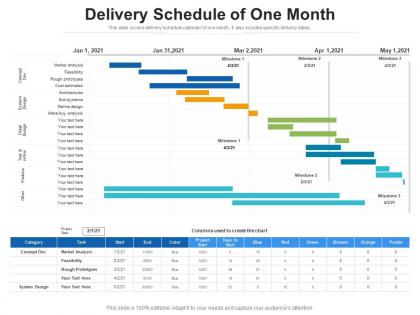
Delivery schedule of one month




Try Before you Buy Download Free Sample Product
 Impress Your
 Audience
 100%
100% Editable
 Save Hours
 of Time


This slide covers delivery schedule calendar of one month. It also incudes specific delivery dates.
People who downloaded this PowerPoint presentation also viewed the following :
Delivery schedule of one month with all 2 slides:
Use our Delivery Schedule Of One Month to effectively help you save your valuable time. They are readymade to fit into any presentation structure.

FAQs for Delivery schedule
Look, template turnaround really depends on what you're asking for. A basic 10-slide deck? Pretty quick. But if you want 50 slides with fancy custom graphics, that's gonna take way longer. Each round of revisions adds time too - which honestly can get annoying if the brief wasn't clear from the start. Our design team's workload affects things as well, especially when everyone's swamped. Best advice? Give them everything upfront - detailed specs, brand stuff, examples of what you like. Makes the whole process so much smoother. Oh, and be realistic about timelines!
Yeah, complex templates will definitely slow things down. You're looking at 2-5 extra business days depending on what you want. Simple text stuff? Ships in like 1-2 days, super easy. But once you start adding custom animations, interactive features, or third-party integrations, they need way more time to build and test everything. Dynamic content and conditional logic - that's where it gets tricky because they can't afford to have stuff breaking on you. Oh, and custom styling adds time too. Honestly, just be upfront about what you need so they can give you a realistic timeline from the start.
Dude, customer feedback is everything for getting your delivery timelines right. We used to promise two-week turnarounds that consistently took three weeks - total disaster. Your customers will tell you straight up if you're being way too optimistic or weirdly conservative. Pay attention to where the delays actually happen. Is it development? Testing? Usually it's testing, honestly. Once you spot those patterns, you can build in realistic buffers instead of just hoping everything goes perfectly. It's basically free data on how to stop overpromising and looking like an idiot.
Yeah, totally different timelines depending on what you're after. Standard templates? Super quick - like 1-2 days since they just swap in your content. Custom stuff though... that's more like 5-7 days because they're building everything from the ground up with your branding and all that. Honestly, I'd give yourself extra time if you're going custom, especially when they're swamped. Nothing worse than being stressed about a deadline. Just shoot them a message first to see how backed up they are before you commit to anything tight.
Oh just go to the tracking portal on their website or app and punch in your order number. Shows you everything - when it's confirmed, packed, out for delivery, all that stuff with timestamps. They'll text and email you updates too so you don't have to obsessively refresh (though let's be real, we all do it anyway lol). The live updates are actually pretty detailed which is nice. Oh and save the tracking link to your home screen - makes it way easier to check when you're being impatient about your delivery.
Honestly, they've got their system pretty dialed in. Standard stuff gets processed automatically - you're looking at about 24 hours max. Custom projects are where it gets interesting though. They actually assign real project managers (who aren't total disasters, surprisingly) and they'll hit you up every couple days with updates. Oh, and here's the thing - they keep extra inventory of popular templates sitting around, so if you need something fast, chances are good they can hook you up. Pro tip: just tell them upfront if it's urgent when you submit. They can usually rush it if they know ahead of time.
Oh man, seasonal demand totally messes with shipping times. Holidays are the worst - your normal 2-3 day delivery turns into like a week or more. December is absolutely insane, everyone's panic-ordering gifts at once. But here's the flip side: during dead periods like late January, stuff actually arrives faster than expected since trucks aren't packed. I learned this the hard way last Christmas when I waited until the last minute for my sister's present. Now I just order holiday stuff way earlier than I think I need to. Saves so much stress honestly.
Yeah they've got expedited shipping! You can bump it up to next-day or 2-day at checkout - costs extra but totally worth it when you're scrambling. Most regular stuff qualifies, though some custom or huge items might not. I'd just throw everything in your cart first and see what options pop up. The system's pretty good at showing you what's actually available. If nothing shows up or you're not sure about specific items, just ping customer service. They'll sort you out way faster than guessing.
So digital stuff usually shows up in your inbox within 24-48 hours, which is pretty clutch if you're procrastinating (guilty as charged). Physical materials are a different story though - you're looking at 3-5 business days minimum. That's because they actually have to print and ship everything, obviously. Rush shipping exists but it'll cost you extra, though sometimes you can get lucky with 1-2 day delivery. My advice? Give yourself at least a week for anything physical. Digital can totally save your butt last minute.
Oh totally, file formats can mess up your whole timeline if you pick wrong from the start. Those massive PSD files or raw video? They'll crawl during uploads and reviews. I once sent a client this huge InDesign package and... yeah, that was a disaster. Also your client might not even be able to open what you send, which means awkward back-and-forth while they download new software. My advice? Hash out the format stuff right when you kick off the project. Keep some backup formats ready too - saves you from that panicked scrambling later when deadlines are breathing down your neck.
So we've got three checkpoints before your template ships out. Technical review happens first - catches coding bugs and browser weirdness. Design audit comes next, and honestly this is where we find most problems because we're checking if everything matches your specs perfectly. Then functionality testing across different devices and screen sizes. The whole QA thing adds maybe 1-2 business days, which I know feels like forever when you're waiting. But trust me, you'd rather get something that works immediately than spend time fixing broken stuff later.
Time zones don't actually slow the shipping itself, but they totally screw with processing times. Like if you order at 5 PM and their warehouse is already closed for the night, you're waiting until tomorrow. Customer service gets weird too - good luck getting help when they're all asleep! I made this mistake ordering stuff late on Friday once and it didn't even get looked at until Monday. Super annoying. Just check what time zone the company's in before you hit buy, especially if you're in a hurry.
Oh definitely. Approval bottlenecks are the worst - like when templates need client or legal sign-off, you're looking at days or weeks depending on how many people are involved. Technical revisions mess things up too, especially after customers see the first draft and want changes. I swear the approval thing screws up maybe 70% of orders. Holiday periods obviously slow everything down. You'll want to pad your delivery quotes with buffer time and just be honest upfront about approval delays. Trust me, better to over-communicate than deal with angry customers later.
So we've got this tracking system that talks to route optimization software - drivers get the best paths updated on the fly. Automated texts and emails handle customer updates, which honestly is a lifesaver because manually doing that stuff would kill us. Our warehouse system syncs inventory with delivery schedules too, so you're not promising stuff that isn't ready. Everything connects pretty well, though setting it up was kind of a pain initially. The delivery dashboard shows how it all works together if you want to dig into it.
Look, delays happen and it sucks, but here's what should go down: your project lead will hit you up right away with what went wrong and new deadlines. No radio silence BS - we've all been there and it's the worst. They'll ask which templates you need most urgently so those get bumped to the front of the line. Most teams build in buffer time these days (thank god), but honestly? Jump on any delays the second you smell trouble brewing. Your PM can actually fix stuff when there's time to work with, instead of everyone panicking at the last minute.
-
Use of icon with content is very relateable, informative and appealing.
-
Innovative and attractive designs.
-
Great designs, really helpful.
-
Content of slide is easy to understand and edit.
-
Nice and innovative design.