


Digital Marketing Audit Of Website And Social Media Channels Powerpoint Presentation Slides





Try Before you Buy Download Free Sample Product
 Impress Your
 Audience
 100%
100% Editable
 Save Hours
 of Time


Digital audit is the performance assessment of the website and all the brands social media channels. The audit helps identify areas of development that companies can incorporate to strengthen their online presence. Grab our professionally designed Digital Marketing Audit of Website and Social Media Channels template that will help all those companies facing issues related to low website visits, low conversion rate, and high bounce rate. At first, this module emphasizes organizational digital presence in which we have covered the marketing goals of the company and performance assessment of current social media channels. Next, it focuses on the need for digital audit, highlighting its purpose. Furthermore, this module covers the structure, which includes the audit category with proper procedure and its timeline. It also discusses social media audits with key findings, including engagement rate, audience data, profile information, etc. Our module also gives you access to web analytics audits, including visitors information and conversion metrics identification. This module also suggests some areas of development to improve performance. Lastly, it covers a dashboard highlighting website visitors through bar graphs and pie charts. Download our digital marketing ppt now.
People who downloaded this PowerPoint presentation also viewed the following :
Content of this Powerpoint Presentation
Slide 1: This slide introduces Digital Marketing Audit of Website and Social Media Channels. State Your Company Name and begin.
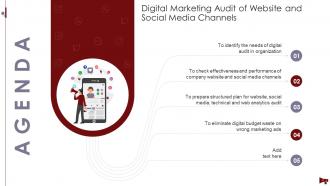
Slide 2: This slide states Agenda of the presentation.
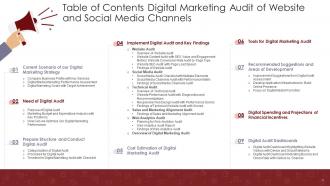
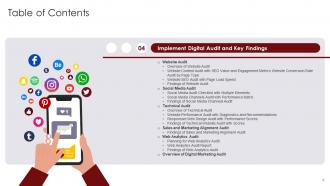
Slide 3: This slide presents Table of Content for the presentation.
Slide 4: This slide depicts title for three topics that are to be covered next in the template.
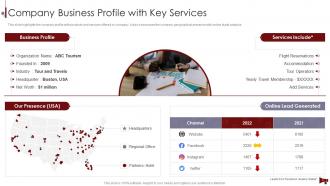
Slide 5: This slide highlights the company profile with products and services offered by company.
Slide 6: This slide highlights the digital media marketing performance assessment which highlights the different social media channels with visits, etc.
Slide 7: This slide showcases the companies digital marketing goals in tabular format which includes the travel intent, destination affinity, brand awareness, etc.
Slide 8: This slide depicts title for three topics that are to be covered next in the template.
Slide 9: This slide highlights the purpose or benefit of digital marketing audit which includes eliminate branding gaps, enhance campaign strength, etc.
Slide 10: This slide highlights the marketing budget spending analysis in statistical graph format which showcases key traditional marketing, online marketing, etc.
Slide 11: This slide highlights the various options to optimize our digital marketing performance which includes digital marketing software, etc.
Slide 12: This slide depicts title for three topics that are to be covered next in the template.
Slide 13: This slide highlights the categories of digital audit which includes social media assessment, baymard, SEO, SEM, and Heuristic assessment with its usage.
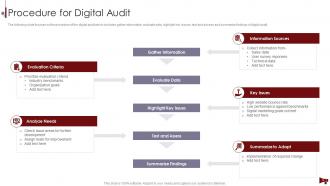
Slide 14: This slide focuses on the procedure of the digital audit which includes gather information, evaluate data, highlight key issues, test.
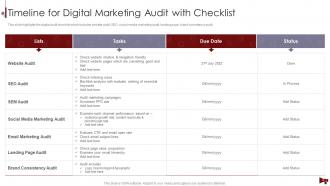
Slide 15: This slide highlights the digital audit checklist which includes website audit, SEO, social media marketing audit, landing page, brand consistency audit.
Slide 16: This slide depicts title for five topics that are to be covered next in the template.
Slide 17: This slide displays title for Website Audit.
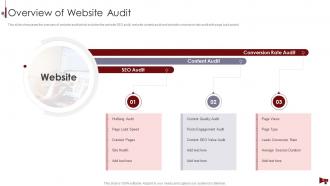
Slide 18: This slide showcases the overview of website audit which includes the website SEO audit, website content audit and website conversion rate audit.
Slide 19: This slide highlights the content auditing findings which includes engagement metrics of different posts, content quality and content SEO value.
Slide 20: This slide highlights the website conversate rate in accordance with page type, page view, conversion rate, and average session duration.
Slide 21: This slide highlights the SEO audit which showcases the page score, critical errors, warnings, crawled pages results, site health, etc.
Slide 22: This slide highlights the findings of the website audit which includes the detailed analysis of website SEO audit, website content audit.
Slide 23: This slide displays title for Social Media Audit.
Slide 24: This slide highlights the social media audit checklist which includes different element showcasing audience data, profile information, engagement rate, etc.
Slide 25: This slide highlights the social media performance auditing report which includes Facebook, Instagram, twitter and YouTube size, growth rate.
Slide 26: This slide highlights the social media audit which showcase the performance grade of presence with Facebook, Instagram, twitter and YouTube.
Slide 27: This slide displays title for Technical Audit.
Slide 28: This slide highlights the detailed overview of technical audit which focuses on the website performance audit with speed test and responsive web design audit.
Slide 29: This slide showcases the website performance audit which states website performance score diagnostics, website loaded seconds, first byte with API.
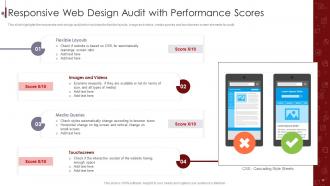
Slide 30: This slide highlights the responsive web design audit which includes the flexible layouts, image and videos, media queries.
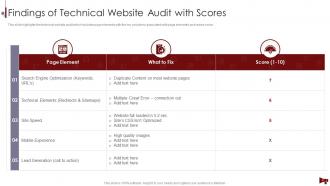
Slide 31: This slide highlights the technical website audit which includes page elements with the key problems associated with page elements and review score.
Slide 32: This slide displays title for Sales and Marketing Alignment Audit.
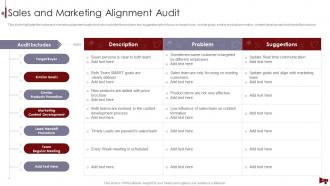
Slide 33: This slide highlights the sales and marketing alignment audit which also includes the problem and suggestion which focus on target buyer, etc.
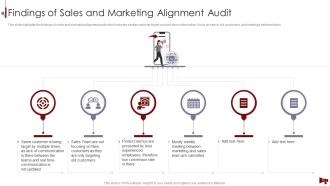
Slide 34: This slide highlights the findings of sales and marketing alignment audit which includes similar customer target, product demo information, etc.
Slide 35: This slide displays title for Web Analytics Audit.
Slide 36: This slide highlights the planning for web analytics audit which includes the configuration settings, visitor information and conversion metrics.
Slide 37: This slide highlights the web analytics audit report with website conversation rate, type of website visitors, site traffic website open rate.
Slide 38: This slide highlights the key findings for web analytics audit which includes the conversation rate score, purchase by device type, etc.
Slide 39: This slide highlights the overview of all sections of digital marketing audit which focuses on website audit, social media audit, technical audit, etc.
Slide 40: This slide depicts title for the topic that are to be covered next in the template.
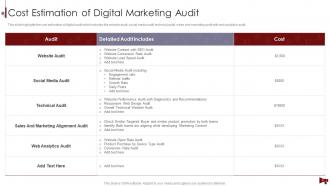
Slide 41: This slide highlights the cost estimation of digital audit which includes the website audit, social media audit, technical audit, sales, etc.
Slide 42: This slide depicts title for the topic that are to be covered next in the template.
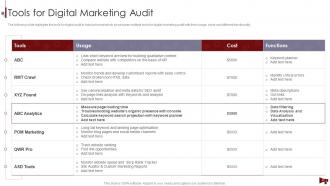
Slide 43: This slide highlights the tools for digital audit in tabular format which showcases multiple tools for digital marketing audit with their usage.
Slide 44: This slide depicts title for three topics that are to be covered next in the template.
Slide 45: This slide highlights the improvement suggestions from the digital audit assessment which showcase restructure paid search, etc.
Slide 46: This slide showcases the development of infrastructure and applications for the better digital awareness which includes hosting, website speed, etc.
Slide 47: This slide showcases the digital promotion as a prominent method for marketing which involves search marketing, multi channel, mobile and email marketing.
Slide 48: This slide depicts title for the topic that are to be covered next in the template.
Slide 49: This slide showcases the digital spending with organization revenue, and total savings of organization with proper digital spend on the marketing.
Slide 50: This slide depicts title for two topics that are to be covered next in the template.
Slide 51: This slide highlights the website visitors by different countries which also includes the users and session data from last 10 days, etc.
Slide 52: This slide showcases the dashboard of website digital audit which includes the visitors, leads, customers, MRR, lifetime value, etc.
Slide 53: This slide displays Icons for Digital Marketing Audit of Website and Social Media Channels.
Slide 54: This slide is titled as Additional Slides for moving forward.
Slide 55: This slide highlights the security audit which showcase the risks related to accounts.
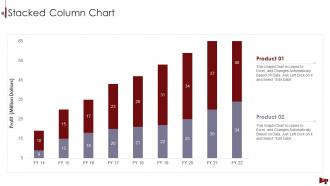
Slide 56: This slide represents Stacked Column chart with two products comparison.
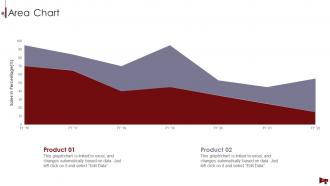
Slide 57: This slide depicts Area chart with two products comparison.
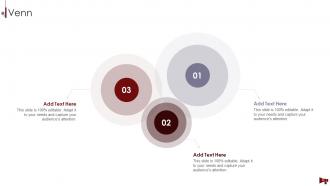
Slide 58: This slide depicts Venn diagram with text boxes.
Slide 59: This slide shows Post It Notes. Post your important notes here.
Slide 60: This slide contains Puzzle with related icons and text.
Slide 61: This is Our Target slide. State your targets here.
Slide 62: This slide showcases Magnifying Glass to highlight information, specifications, etc.
Slide 63: This is a Thank You slide with address, contact numbers and email address.
Digital Marketing Audit Of Website And Social Media Channels Powerpoint Presentation Slides with all 68 slides:
Use our Digital Marketing Audit Of Website And Social Media Channels Powerpoint Presentation Slides to effectively help you save your valuable time. They are readymade to fit into any presentation structure.
-

Digital Marketing Audit of Website and Social Media Channels
-
Digital Marketing Audit of Website and Social Media Channels
-
Digital Marketing Audit of Website and Social Media Channels
-
Current Scenario of our Digital Marketing Strategy
-
Company Business Profile with Key Services
-
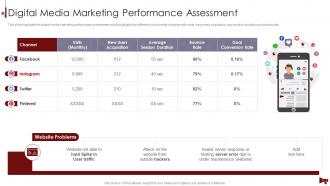
Digital Media Marketing Performance Assessment
-
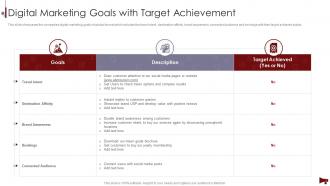
Digital Marketing Goals with Target Achievement
-
Need of Digital Audit
-
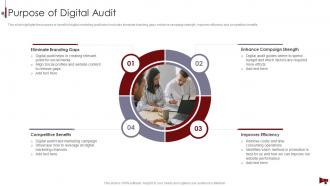
Purpose of Digital Audit
-
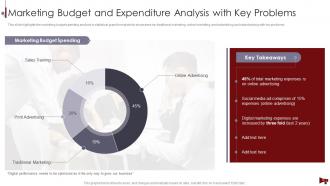
Marketing Budget and Expenditure Analysis with Key Problems
-
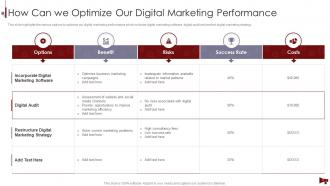
How Can we Optimize Our Digital Marketing Performance
-
Prepare Structure and Conduct Digital Audit
-
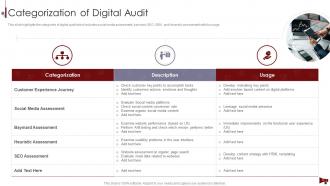
Categorization of Digital Audit
-
Procedure for Digital Audit
-
Timeline for Digital Marketing Audit with Checklist
-
Implement Digital Audit and Key Findings
-

Website Audit
-
Overview of Website Audit
-
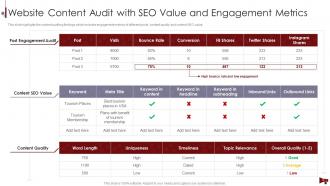
Website Content Audit with SEO Value and Engagement Metrics
-
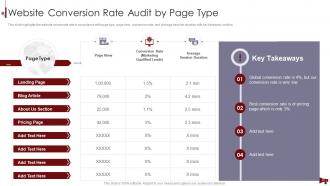
Website Conversion Rate Audit by Page Type
-
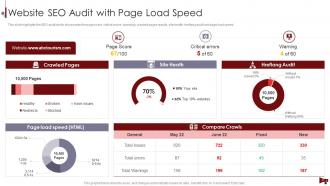
Website SEO Audit with Page Load Speed
-
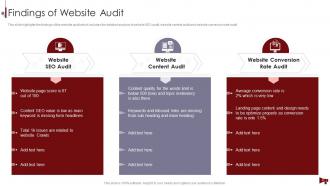
Findings of Website Audit
-

Social Media Audit
-
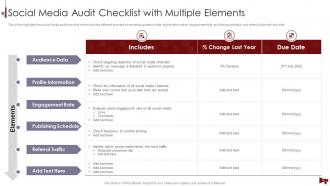
Social Media Audit Checklist with Multiple Elements
-
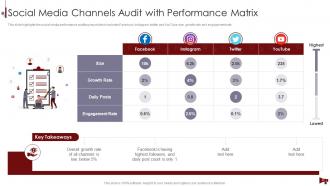
Social Media Channels Audit with Performance Matrix
-
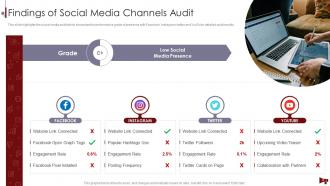
Findings of Social Media Channels Audit
-

Technical Audit
-

Overview of Technical Audit
-
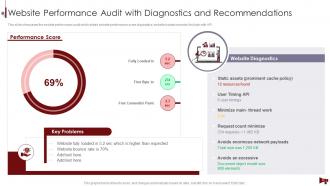
Website Performance Audit with Diagnostics and Recommendations
-
Responsive Web Design Audit with Performance Scores
-
Findings of Technical Website Audit with Scores
-

Sales and Marketing Alignment Audit
-
Sales and Marketing Alignment Audit
-
Findings of Sales and Marketing Alignment Audit
-

Web Analytics Audit
-
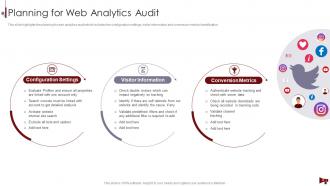
Planning for Web Analytics Audit
-
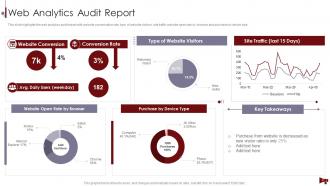
Web Analytics Audit Report
-
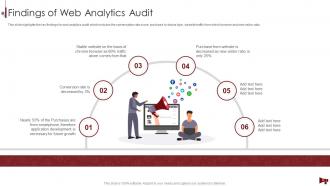
Findings of Web Analytics Audit
-
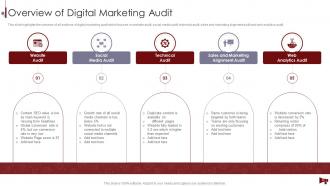
Overview of Digital Marketing Audit
-
Cost Estimation of Digital Marketing Audit
-
Cost Estimation of Digital Marketing Audit
-
Tools for Digital Marketing Audit
-
Tools for Digital Marketing Audit
-

Recommended Suggestions and Areas of Development
-
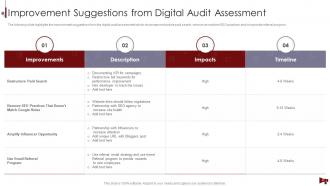
Improvement Suggestions from Digital Audit Assessment
-
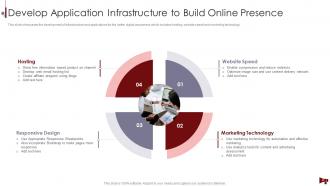
Develop Application Infrastructure to Build Online Presence
-
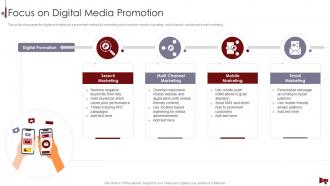
Focus on Digital Media Promotion
-
Digital Spending and Projections of Financial Incentives
-
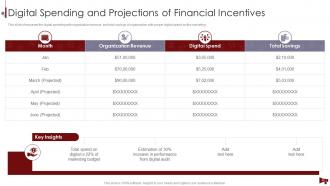
Digital Spending and Projections of Financial Incentives
-

Digital Audit Dashboards
-
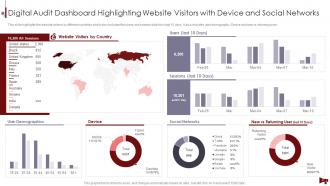
Digital Audit Dashboard Highlighting Website Visitors with Device and Social Networks
-
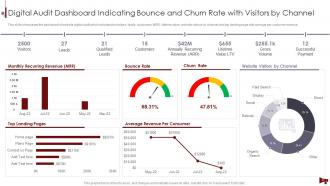
Digital Audit Dashboard Indicating Bounce and Churn Rate with Visitors by Channel
-

Icons Slide for Digital Marketing Audit of Website and Social Media Channels
-

Additional Slides
-
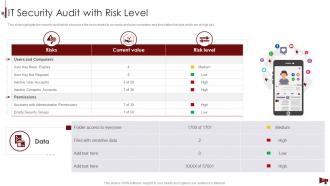
IT Security Audit with Risk Level
-
Stacked Column Chart
-
Area Chart
-
Digital Marketing Audit of Website and Social Media Channels
-
Post It Notes
-
Puzzle
-

Our Target
-
Magnifying Glass
-

Thanks for Watching
-

-

-

-

-

FAQs for Digital Marketing Audit Of Website And Social Media Channels
Honestly, start with your website traffic and where it's coming from - that's your foundation. Then look at conversion rates across everything, email open/click rates, and how your social posts are performing. SEO rankings for your main keywords matter too, obviously. Cost per acquisition is huge for paid stuff, and ROI by channel is what your boss actually cares about anyway. Oh, and don't skip bounce rates or page speed - those mess with everything else if they're bad. The real trick is comparing this month to last month and to your targets. That's how you spot what's crushing it versus what's just burning cash for no reason.
Check Google Analytics first to see your organic traffic trends. Then hit up Search Console - that's where you'll find what keywords you're actually ranking for (versus what you think you are). The gaps are always wild! Look at click-through rates and average position. Also check for crawl errors messing with your visibility. Site speed and mobile stuff matters too, plus make sure your pages are even getting indexed. Oh, and peek at what keywords your competitors are crushing that you're missing. Start there and the big wins will jump out pretty quick.
Look, social media analysis is like getting a reality check on whether your brand actually connects with people. I'm always digging into engagement rates and follower growth first. Then the real stuff - traffic and conversions from each platform. Honestly, audience insights are where I get a little nerdy because they tell you everything. You're basically figuring out if your content strategy matches where your people actually spend time. Some platforms will surprise you with results while others are just... pretty numbers that don't mean much. Focus on what's driving real business, not vanity metrics.
Honestly, you've gotta track two things - how people interact with your stuff AND whether it actually makes you money. So look at time on page, shares, comments, click-through rates... basically are people consuming it? Then - and this is where most people mess up - connect that to actual leads and sales. I mean, getting a million views is cool but doesn't matter if nobody buys anything, right? Don't forget SEO either. Check if you're ranking for keywords you care about. Just make sure you can actually trace which content pieces lead to real business results.
Start with Google Analytics and Search Console - they're free and give you the basics. Screaming Frog is amazing for catching technical stuff like broken links (seriously, it's saved me countless times). For keyword research, SEMrush or Ahrefs are worth the money. GTMetrix handles speed testing, and I actually like Hotjar for seeing how people move around your site. Social media wise, just use the native analytics - Instagram Insights, Twitter Analytics, whatever. Hootsuite works too if you're managing multiple accounts. Honestly though, master the Google tools first before you start throwing money at fancy dashboards.
Honestly, UX is everything when you're doing a digital marketing audit. Bad user experience shows up everywhere - your bounce rates tank, conversions suck, engagement is terrible. I always tell people it's like having a leaky bucket. You could have amazing ads and perfect SEO, but if people can't actually use your site? Your whole audit will show campaigns failing left and right. Map out the user journey first - trust me on this one. It makes reading all those other metrics so much easier. Plus you'll actually understand why things aren't working instead of just seeing bad numbers.
So for your email audit, start with the obvious stuff - open rates, click-through rates, conversions, and unsubscribes. Bounce rates are huge too because if you're hitting spam folders, you're basically screaming into the void. Track how fast your list is growing and whether your segmentation actually works. Revenue per email matters if you're selling stuff online. Oh, and definitely check mobile stats since literally everyone reads email on their phones now. Honestly, I'd pull 90 days of data instead of just looking at one campaign - trends tell you way more than random snapshots.
Check your ROAS and cost per acquisition first - those actually matter for your bottom line. CTR and quality scores are nice but honestly kinda useless if they're not driving sales. Pull reports from the last 3-6 months and compare how Google Ads performs against Facebook or whatever else you're running. Attribution data will show you which campaigns really work, not just the ones getting credit for last-click conversions. Oh, and conversion rates across platforms too. Start by finding your best and worst campaigns - makes it way easier to figure out where to put your money.
Honestly, competitor analysis is like peeking over the fence to see what your neighbors are up to. Check which keywords they're crushing that you're completely missing. Look at their content - what's getting engagement? How do they show up on social? You'll probably find some glaring weaknesses too, like terrible site navigation or content that's just... meh. I always get distracted looking at their design choices too. Anyway, compare your stuff to theirs and pick 2-3 areas where you can actually beat them. It's basically free intel.
Go for the quick wins first - broken tracking, high-traffic pages with obvious problems. That stuff shows results fast. Then hit the medium-effort things that actually matter to your business right now. Don't try fixing everything at once (trust me, I learned this the hard way). Pick 3-5 things max each quarter. Focus on what's hurting revenue, not just what looks ugly. Make a simple spreadsheet ranking effort vs impact. Work down that list. The messy stuff that doesn't affect sales? Yeah, that can wait.
Don't try auditing everything at once - you'll drown in data and miss the good stuff. Pick your biggest channel first and work through it completely. I learned this the hard way lol. Also, stop getting distracted by fancy metrics that don't actually matter to your bottom line. Connect everything back to real goals. Talk to other teams too! Sales and customer service usually know things about what's working that you'd never guess from looking at dashboards. Work systematically through each channel instead of bouncing around randomly. Trust me, it's way less overwhelming.
Honestly? Twice a year minimum, but quarterly if you can swing it. I used to think annual audits were fine until I realized how much stuff changes in just a few months - algorithms, competitor moves, your own campaigns shifting around. After big launches or budget changes, definitely do a quick check too. The trick isn't waiting until things are obviously broken. Even if you're swamped, maybe just tackle one channel each month? That's way better than ignoring it completely. Oh and actually put it in your calendar right now or you'll totally forget!
So customer feedback is like your wake-up call during a marketing audit - shows what's really happening vs what you think is happening. Pull reviews, surveys, social comments, support tickets from the past 3-6 months. Look for where people are getting stuck or pissed off in your funnel. I swear, half the time you'll find out your "brilliant" email campaign is actually driving people nuts. That's the whole point though! Their honest reactions show you which channels are broken and need fixing first. Way better than guessing what's wrong.
Oh man, GDPR and CCPA will definitely mess with your audit results. Your tracking probably grabs way more personal data than you're legally allowed to without consent - happens all the time. Cookie consent issues will pop up for sure, plus those third-party tools you're using might not be compliant. Data retention policies are another headache since most companies just keep everything forever. Cross-border transfers get messy too. I learned this the hard way with a client last year. Don't brush off these privacy findings because the fines are absolutely brutal.
Okay so first thing - you've gotta update how you're tracking people since cookies are basically dying. Privacy-first stuff is huge now. AI personalization and voice search optimization should definitely be on your radar too. Honestly? Static content looks so outdated at this point. Video and interactive experiences are pretty much expected now. Check where your audience might be moving to new platforms, and see what you can automate to make your life easier. Don't just audit what's working - look for gaps where these trends could fit. Which ones actually match how your customers behave though?
-
Great product with effective design. Helped a lot in our corporate presentations. Easy to edit and stunning visuals.
-
Editable, diversified, compatible with MS PPT and Google Slides, and on top of that finest graphics!! I mean in the words of the famous Ross Geller, “What more do you want!”