


Ecommerce Payment Gateways Powerpoint Presentation Slides




Try Before you Buy Download Free Sample Product
 Impress Your
 Audience
 100%
100% Editable
 Save Hours
 of Time


Explain the process of online credit and debit payments by using our visually appealing Ecommerce Payment Gateways PowerPoint Presentation Slides. You can showcase the different online payment platforms with the aid of this content ready online payment methodology PPT theme. Use the online payment gateways presentation template and highlight the steps to configure your payment process. With the help of the e-commerce payment processing cycle PowerPoint graphic, you can elaborate on the importance of the overall e-commerce structure. Take the assistance of this professionally designed internet payment gateway structure PPT visual and outline the different modes of payment. Employ the e-payment gateways PowerPoint layout and securely transfer the money to the respective merchant. Use the e-commerce payment gateway options presentation and talk about the several ways that accept your money online without any issue. Therefore, download our ready-to-use e-commerce payment PowerPoint deck to teach the ways of sending and receiving money electronically.
People who downloaded this PowerPoint presentation also viewed the following :
Content of this Powerpoint Presentation
Slide 1: This slide introduces Ecommerce Payment Gateways. State Your Company Name and begin.
Slide 2: This slide shows Content of the presentation.
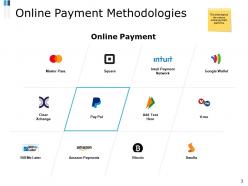
Slide 3: This slide presents Online Payment Methodologies depicting various online payment platforms.
Slide 4: This slide displays Online Payment Methodologies Options that are available for the user to select.
Slide 5: This slide represents Online Payment Methodologies Template with related imagery and payment options.
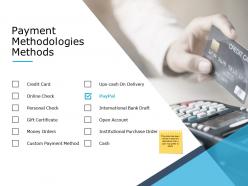
Slide 6: This slide showcases Payment Methodologies Methods including- Online Check, Personal Check, Gift Certificate, Money Orders, Custom Payment Method, Ups-cash On Delivery, International Bank Draft, Open Account, Institutional Purchase Order, Cash, Credit Card, PayPal.
Slide 7: This slide displays Online Payment Gateways Options.
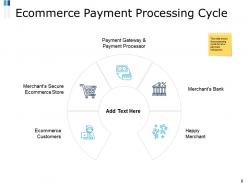
Slide 8: This slide shows Ecommerce Payment Processing Cycle as- Merchant’s Secure Ecommerce Store, Merchant’s Bank, Payment Gateway & Payment Processor, Happy Merchant, Ecommerce Customers.
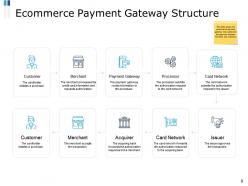
Slide 9: This slide presents Ecommerce Payment Gateway Structure describing- Customer, Merchant, Payment Gateway, Processor, Card Network, Issuer, Acquirer.
Slide 10: This slide displays E-Commerce Payment Image with text boxes.
Slide 11: This is another slide with Ecommerce Payment Image.
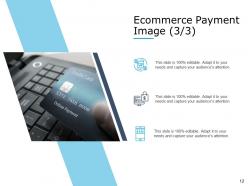
Slide 12: This is another slide displaying Ecommerce Payment Image with additional text boxes to show information.
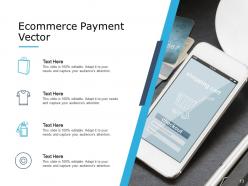
Slide 13: This slide represents Ecommerce Payment Vector with text boxes.
Slide 14: This slide displays Ecommerce Payment Gateways Icons.
Slide 15: This slide is titled as Additional Slides for moving forward.
Slide 16: This is Our Mission slide with related imagery and text.
Slide 17: This is Our Awesome Team slide with names and designation.
Slide 18: This is About us slide to show company specifications etc.
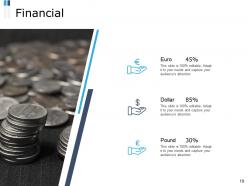
Slide 19: This is a Financial slide. Show your finance related stuff here.
Slide 20: This is a Comparison slide to state comparison between commodities, entities etc.
Slide 21: This is Our Target slide. State your targets here.
Slide 22: This is a Quotes slide to convey message, beliefs etc.
Slide 23: This is an optional slide for Quotes.
Slide 24: This is Our Goal slide. Show your firm's goals here.
Slide 25: This slide shows Magnifying Glass to highlight information.
Slide 26: This slide is titled as Post It. Post your important notes here.
Slide 27: This is a Thank you slide with address, contact numbers and email address.
Ecommerce Payment Gateways Powerpoint Presentation Slides with all 27 slides:
Use our Ecommerce Payment Gateways Powerpoint Presentation Slides to effectively help you save your valuable time. They are readymade to fit into any presentation structure.












FAQs for Ecommerce Payment Gateways
Security's your first priority - PCI compliance and fraud protection aren't optional. Make sure they support all the payment methods customers want: cards, Apple Pay, those buy-now-pay-later things that everyone's obsessed with now. Transaction fees add up fast, so definitely shop around there. The integration better be simple because dealing with buggy payment systems is honestly the worst. Don't skip checking their customer support either - when transactions break (and they will), you'll need actual help. Settlement times matter for cash flow too. I'd say pick your dealbreakers first, then test drive maybe three options.
Honestly, those transaction fees will eat you alive if you're not careful. PayPal's super easy to set up but they're expensive as hell - we're talking 2.9% to 3.5% plus extra fees per sale. Stripe's usually cheaper for most people. Do the math on your typical order size and monthly sales first though. Like if you're doing $10k a month, even a small percentage difference adds up to hundreds of dollars. I learned this the hard way with my first online store - went with the "convenient" option and got burned. Just run the numbers on 2-3 different gateways before you commit.
PCI DSS compliance is your starting point - can't mess around with that when you're handling card data. End-to-end encryption and tokenization are must-haves too. Fraud detection that catches sketchy transactions in real-time will save you headaches later. SSL certs are pretty standard now, so don't let anyone oversell you on that. Two-factor auth for admin access is clutch since that's where most breaches start. Oh, and definitely check their chargeback protection - some gateways are way better than others there. Make a quick checklist of these features and just go down the line when you're comparing options.
Most payment gateways are pretty smart about this stuff - they'll automatically detect where your customer is and show prices in their local currency. Stripe and PayPal are solid choices since they let you actually hold money in different currencies, which saves you from getting killed on conversion fees every time. They partner with banks globally so your customers won't get hit with those foreign transaction charges that make people abandon their carts. One thing though - definitely check which currencies they support before you go all-in on marketing to new countries. Some gateways have weirdly limited coverage that'll surprise you.
Dude, the checkout experience is everything. I learned this the hard way when my cousin's shop was bleeding customers at payment time. Mobile needs to work perfectly - most people shop on their phones now anyway. Quick loading, support for Apple Pay and stuff like that, minimal form fields. Trust me, people will bail if they have to click through five pages or can't use their preferred payment method. Test it yourself before you commit. Actually go through and buy something like a real customer would. Sounds obvious but you'd be surprised how many people skip this step.
Oh it's actually way easier than it sounds! Most platforms like Shopify or WooCommerce have plugins you just install - Stripe, PayPal, whatever. Takes maybe 15 minutes if you're not being lazy about it. You basically just grab their API keys and paste them into your payment settings. The gateway handles all the heavy lifting after that. I'd definitely mess around in sandbox mode first though - learned that the hard way once. Your site sends the payment info, gateway processes it, sends back whether it worked or not. Pretty much every major platform has tons of options now.
Honestly, just make checkout stupid simple. Cut down those form fields - nobody wants to fill out 20 boxes. Let people pay as guests and throw in Apple Pay, Google Pay, whatever. Mobile's huge now so test everything on your phone first. Show those security badges prominently (people get paranoid about entering card info). Progress bars help too so they know they're almost done. The worst thing? Hidden fees at the end - be upfront about shipping and taxes from the start. Oh, and auto-fill addresses when you can. I've seen 25% conversion bumps just from cleaning this stuff up.
So basically, hosted means your customers get sent to PayPal or whoever to punch in their card info, then come back to your site. Integrated keeps them on your page the whole time - you handle everything but send the data behind the scenes. Hosted is super easy to set up and you don't have to stress about PCI stuff as much. Way less headache honestly. Integrated gives you total control over how it looks and feels, but you'll need to do more coding work. If you're new to this, definitely start with hosted. You can always switch later once you get the hang of things.
Honestly, your payment gateway can make or break sales. I've watched conversion rates tank 20-30% when checkout pages load slow or look sketchy. Fast loading is everything - plus you want multiple options like Apple Pay, cards, buy-now-pay-later stuff. The worst gateways redirect people to some random third-party site that screams "scam." Mobile's usually where things get messy, so test your checkout flow there first. One-click payments for repeat customers are clutch too. Oh, and skip anything that makes people jump through hoops - nobody's got patience for that anymore.
Honestly, payment tech is moving crazy fast right now. AI fraud detection is crushing those old rule systems - way more accurate. Blockchain's making international payments cheaper and quicker too. The biometric stuff is actually pretty slick - you can pay with your face or fingerprint instead of fumbling with card numbers. Smart devices are getting payment features built in, which is kinda wild when you think about it. Buy-now-pay-later is everywhere now. When you're shopping around for providers, definitely grill them about their AI features and biometric options. Those aren't nice-to-haves anymore - they're basically required if you want to stay competitive.
Payment gateways are all over the place with fraud protection. Some just do basic rule filtering, others have fancy AI catching sketchy transactions. Stripe and PayPal? Pretty solid choices honestly. Square works fine if you're smaller but doesn't have all the enterprise bells and whistles. The real difference is whether they just warn you about potential fraud or actually block it from going through. Oh, and chargeback protection varies a ton too. I'd definitely compare their chargeback fees and dispute help before picking one - also check what data they're using for risk scoring.
PCI DSS compliance is the big one - you can't mess around with that when handling card data. GDPR kicks in if you've got EU customers too. Healthcare or finance? Yeah, there's gonna be even more stuff on top. Honestly, PCI compliance is such a pain that most people just use Stripe or PayPal instead of building their own thing. Way easier when someone else deals with the headaches. Oh, and European transactions need SCA support now. Here's what I'd do - figure out where your customers are first, then pick a gateway that covers those requirements. Saves you from scrambling later.
Yeah, so most payment gateways can handle this stuff automatically once you set it up. Monthly, quarterly, whatever - you configure it once and it just runs itself. Super convenient tbh. The trick is finding one with good subscription features, like when payments fail or customers want to change plans. Oh and definitely get one that lets customers manage their own accounts - trust me, you don't want to be dealing with "cancel my subscription" emails all day. Stripe's pretty solid for this, though there are other options too.
Dude, mobile payments are HUGE for gateways right now. Apple Pay and Google Pay are basically must-haves - people expect that one-tap checkout thing. I've watched businesses lose so many sales just because customers didn't want to punch in their card details on a tiny screen (can't blame them honestly). Your gateway needs to play nice with mobile apps if you've got one. The whole checkout flow should feel smooth, not clunky. Oh and here's what I always tell people - actually test it yourself on your phone before you sign anything. Use it like a real customer would. Trust me on this one.
Honestly, just focus on three things: fees, features, and how reliable they are. Map out ALL the costs first - transaction fees, monthly charges, setup fees, whatever hidden stuff they throw at you. Those little charges are brutal when they pile up. Then check what payment methods they take and how well they play with your current setup. Their uptime stats matter too, plus you want decent customer support when things go sideways. Oh, and definitely test their sandbox yourself - don't just watch their polished demo videos because the actual user experience might suck.
-
Informative design.