


Effective communication strategy for project management powerpoint presentation slides




Try Before you Buy Download Free Sample Product
 Impress Your
 Audience
 100%
100% Editable
 Save Hours
 of Time


Communication Strategy is considered a vital component for project success as it allows to discuss project progress and concerns to project stakeholders, team members, and leaders. Here is a professionally designed template on Effective Communication Strategy for Project Management that will be useful for project partners to achieve goals within the assigned timeframe and available resources through an effective communication plan. The deck covers details about lack of communication impacting overall project effectiveness, comparative assessment of project communication standards, statistics related to organizational communication, upcoming project details. It caters to information regarding essential parameters for effective communication, project communication strategies, target groups involved, and engagement in project communication. Key personnel involved in project communication are also showcased and their training schedule. Project communication channels internal or external and communication tools are presented. The deck covers the project communication plan for the target audience, stakeholder impact assessment, and calendar worksheet for communication. Various coordination activities, modes, and meetings for project management are presented. Moreover, the overall impact of effective project management is displayed along with cost assessment and performance dashboard to track project management activities. Get access to our 100 percent editable communication strategy template now.
People who downloaded this PowerPoint presentation also viewed the following :
Content of this Powerpoint Presentation
Slide 1: This slide introduces Effective Communication Strategy for Project Management. State Your Company Name and begin.
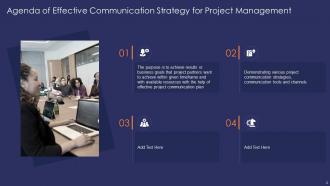
Slide 2: This slide shows Agenda of Effective Communication Strategy for Project Management.
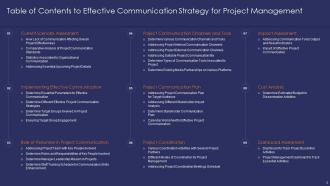
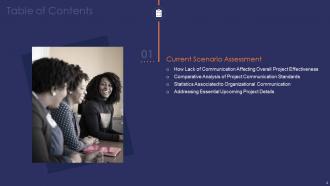
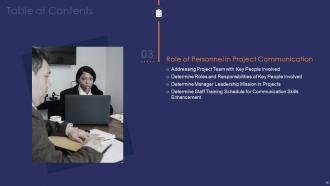
Slide 3: This slide presents Table of Contents to Effective Communication Strategy for Project Management.
Slide 4: This slide shows Table of Content highlighting Current Scenario Assessment.
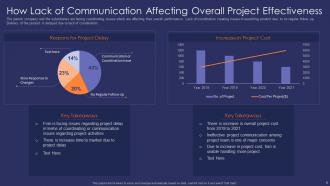
Slide 5: This slide displays How Lack of Communication Affecting Overall Project Effectiveness.
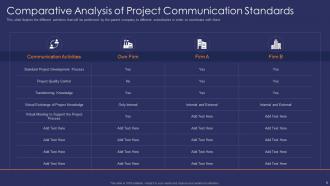
Slide 6: This slide represents Comparative Analysis of Project Communication Standards.
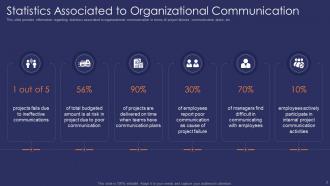
Slide 7: This slide shows Statistics Associated to Organizational Communication.
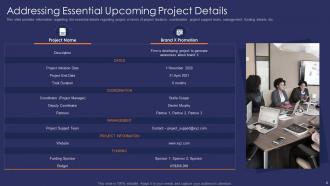
Slide 8: This slide presents essential details regarding project in terms of project duration, coordination, project support team, etc.
Slide 9: This slide shows Table of Content for the presentation.
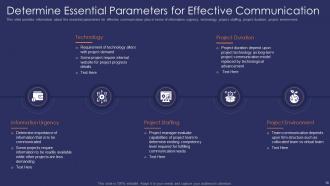
Slide 10: This slide displays essential parameters for effective communication plan in terms of information urgency, technology, project staffing, etc.
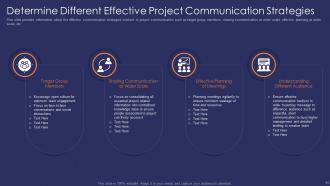
Slide 11: This slide represents Determine Different Effective Project Communication Strategies.
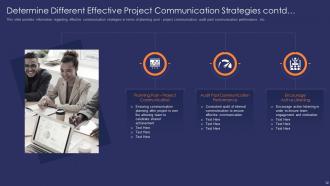
Slide 12: This slide shows effective communication strategies in terms of planning post - project communication.
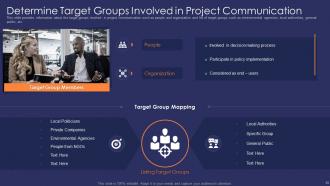
Slide 13: This slide presents target groups involved in project communication.
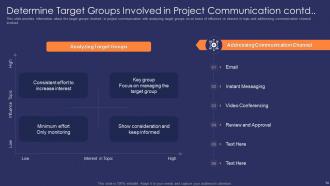
Slide 14: This slide shows Determine Target Groups Involved in Project Communication.
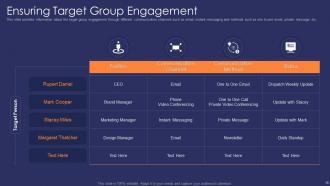
Slide 15: This slide displays target group engagement through different communication channels such as email, instant messaging, etc.
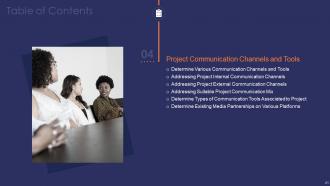
Slide 16: This slide represents Table of Content for the presentation.
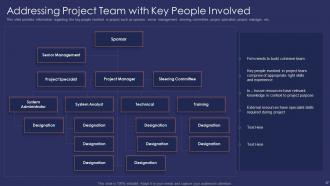
Slide 17: This slide shows key people involved in project such as sponsor, senior management, steering committee, etc.
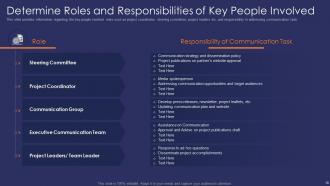
Slide 18: This slide presents Determine Roles and Responsibilities of Key People Involved.
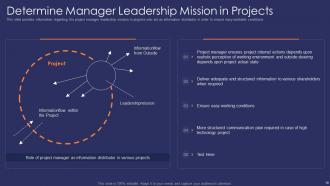
Slide 19: This slide shows project manager leadership mission in projects who act as information distributor in order to ensure easy workable conditions.
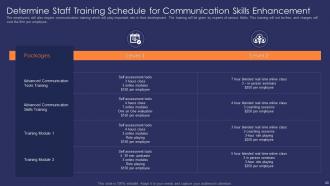
Slide 20: This slide displays Determine Staff Training Schedule for Communication Skills Enhancement.
Slide 21: This slide represents Table of Content for the presentation.
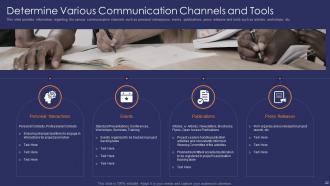
Slide 22: This slide shows various communication channels such as personal interactions, events, publications, etc.
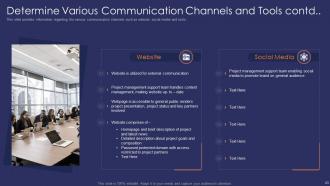
Slide 23: This slide presents Determine Various Communication Channels and Tools.
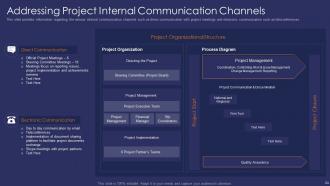
Slide 24: This slide shows various internal communication channels such as direct communication with project meetings and electronic communication such as teleconferences.
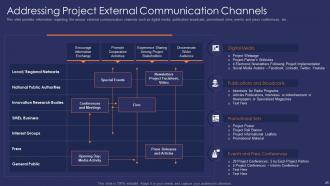
Slide 25: This slide displays various external communication channels such as digital media, publication broadcast, promotional sites, etc.
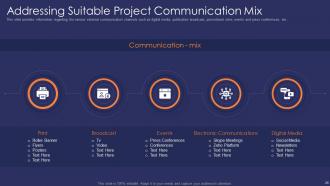
Slide 26: This slide represents Addressing Suitable Project Communication Mix.
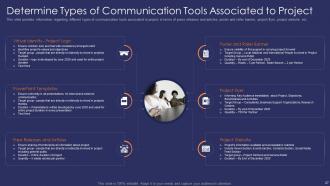
Slide 27: This slide shows Determine Types of Communication Tools Associated to Project.
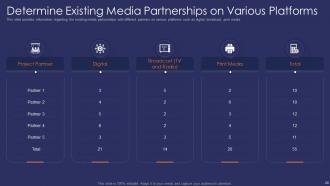
Slide 28: This slide presents Determine Existing Media Partnerships on Various Platforms.
Slide 29: This slide shows Table of Content for the presentation.
Slide 30: This slide displays Addressing Project Communication Plan for Target Audience.
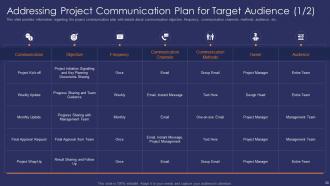
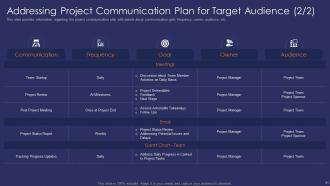
Slide 31: This slide represents project communication plan with details about communication goal, frequency, owner, audience, etc.
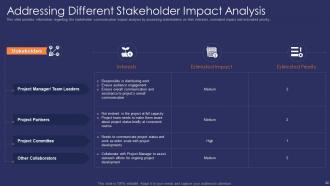
Slide 32: This slide shows stakeholder communication impact analysis by assessing stakeholders on their interests, estimated impact and estimated priority.
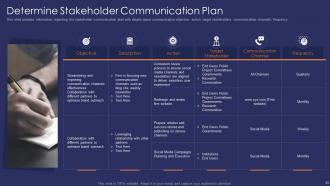
Slide 33: This slide presents stakeholder communication plan with details about communication objective, action, target stakeholders, etc.
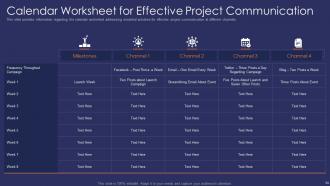
Slide 34: This slide shows Calendar Worksheet for Effective Project Communication.
Slide 35: This slide displays Table of Content for the presentation.
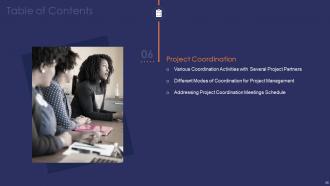
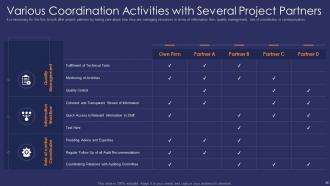
Slide 36: This slide represents Various Coordination Activities with Several Project Partners.
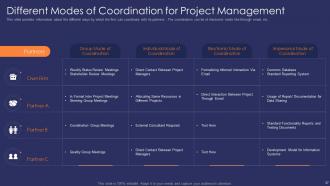
Slide 37: This slide shows Different Modes of Coordination for Project Management.
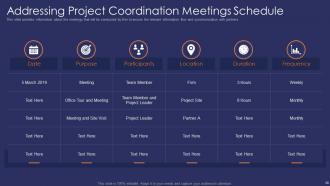
Slide 38: This slide presents Addressing Project Coordination Meetings Schedule.
Slide 39: This slide shows Table of Content for the presentation.
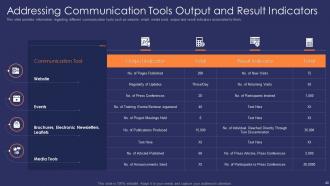
Slide 40: This slide displays Addressing Communication Tools Output and Result Indicators.
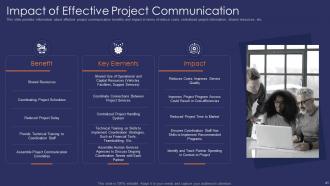
Slide 41: This slide represents effective project communication benefits and impact in terms of reduce costs, centralized project information, shared resources, etc.
Slide 42: This slide shows Table of Content for the presentation.
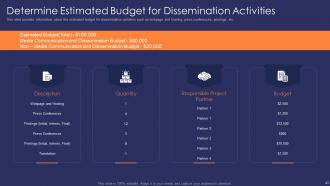
Slide 43: This slide presents Determine Estimated Budget for Dissemination Activities.
Slide 44: This slide shows Table of Content for the presentation.
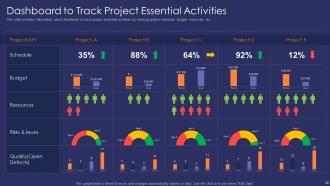
Slide 45: This slide displays dashboard to track project essential activities by tracking project schedule, budget, resources, etc.
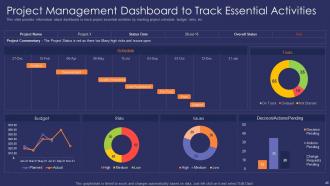
Slide 46: This slide represents Project Management Dashboard to Track Essential Activities.
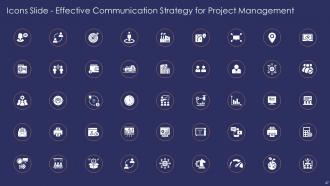
Slide 47: This slide shows Icons Effective Communication Strategy for Project Management.
Slide 48: This slide is titled as Additional Slides for moving forward.
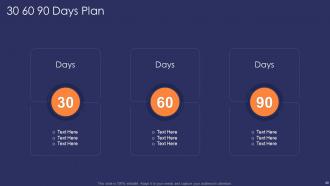
Slide 49: This slide shows 30 60 90 Days Plan with text boxes.
Slide 50: This slide displays Weekly Timeline with Task Name.
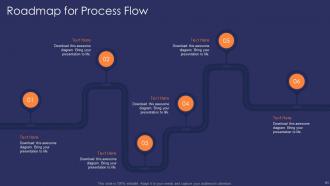
Slide 51: This slide represents Roadmap for Process Flow.
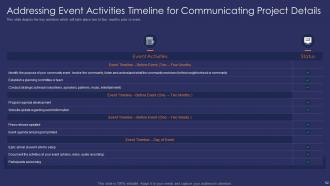
Slide 52: This slide shows Addressing Event Activities Timeline for Communicating Project Details.
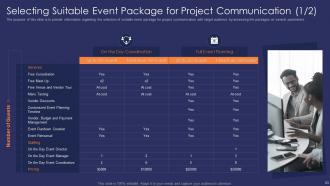
Slide 53: This slide presents Selecting Suitable Event Package for Project Communication.
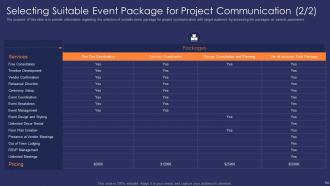
Slide 54: This slide shows Selecting Suitable Event Package for Project Communication.
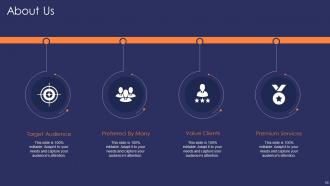
Slide 55: This is About Us slide to show company specifications etc.
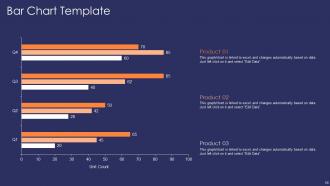
Slide 56: This slide represents Bar Chart Template with three products comparison.
Slide 57: This slide shows Venn diagram with text boxes.
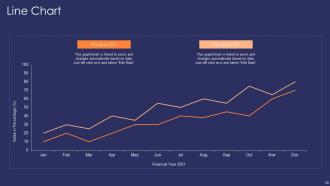
Slide 58: This slide presents Line Chart with two products comparison.
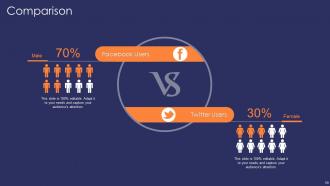
Slide 59: This is a Comparison slide to state comparison between commodities, entities etc.
Slide 60: This slide displays Puzzle with related icons and text.
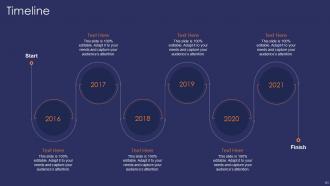
Slide 61: This is a Timeline slide. Show data related to time intervals here.
Slide 62: This is a Thank You slide with address, contact numbers and email address.
Effective communication strategy for project management powerpoint presentation slides with all 70 slides:
Use our Effective Communication Strategy For Project Management Powerpoint Presentation Slides to effectively help you save your valuable time. They are readymade to fit into any presentation structure.









FAQs for Effective communication strategy for project management
Figure out who you're talking to first - that's honestly the biggest thing most people mess up. Your message needs to be crystal clear about what you want them to actually do. Pick the right channels too, because blasting everyone on every platform is just noise. Oh, and timing is huge. Don't send updates when people are already drowning in emails. I'd start by looking at what you're doing now and pick just one thing to fix first. You can always build feedback loops later to see what's actually working. Consistency across everything helps, but don't overthink it initially.
Honestly, visual aids are clutch because people process info way better when they can see AND hear it. Breaking down complicated stuff with charts or diagrams just makes sense - plus nobody wants to stare at you talking for 20 minutes straight lol. Don't just read your slides out loud though, that's painful for everyone. Keep them simple and actually related to what you're saying. I always use the 6x6 thing - max 6 bullet points, 6 words each. Works pretty well most of the time.
Honestly, audience analysis is everything when it comes to communication strategy. It shapes your messaging, your channels, literally all of it. You've gotta figure out who you're talking to first - what keeps them up at night, how they like getting info, all that stuff. Otherwise you're basically screaming into the void (been there!). Once you nail down who they are, you can adjust your tone and timing to actually connect with them. Oh, and creating those detailed audience personas? Total game-changer. Reference them every single time you write something.
Build feedback loops right into your communication plan from day one - don't just add them as an afterthought. Regular pulse surveys work great, plus dedicated Q&A channels and follow-up sessions after big announcements. Make responding ridiculously simple though. One-click polls, quick team huddles, whatever. I've watched so many feedback systems crash because they were way too complicated! Actually show people how their input changed things too. Track what feedback you're getting and close that loop. It's gotta be a real conversation, not just you broadcasting stuff at everyone.
Oh man, don't try to tell everyone everything all at once - that's how messages get lost. Pick 2-3 channels tops and figure out where your people actually are first. The whole "set it and forget it" thing kills so many campaigns too. Build in check-ins from the start or you'll never know if it's working. Also? People hate when you assume they know stuff they don't. I learned that one the hard way lol. Start simple with one clear message and always have a way to track results. Otherwise you're just shouting into the void.
Yeah, cultural awareness makes a huge difference for global teams. Some cultures are super direct, others beat around the bush - knowing this prevents so many awkward misunderstandings. Time zones are obvious but there's way more to think about. Different cultures handle hierarchy totally differently, plus decision-making styles vary like crazy. Even feedback can be tricky - what feels constructive to you might come across as harsh to someone else. Honestly, just ask your teammates upfront how they prefer to communicate. Takes five minutes and saves you from stepping in it later.
Honestly, start simple with just a couple tools or you'll drive everyone crazy. Slack's perfect for quick team chats, and I'd grab Asana for tracking projects. Mailchimp handles email campaigns pretty smoothly. Oh, and Hootsuite is a total game-changer for social media - you can schedule everything ahead of time instead of scrambling daily. Zoom's obvious for video calls. Typeform makes surveys that don't suck, which is rare. The analytics side is where most people mess up though - you need something to actually track what's working. But seriously, don't go overboard initially.
Don't just throw one story at the start and call it good. Pick a scenario your audience actually deals with, then keep coming back to that same character as you go through your points. Think breadcrumbs - you're dropping little references throughout. Details and emotions are what make people remember stuff, not just the facts. Here's what I've noticed works: create some tension early on, then don't resolve it until your conclusion. Honestly, it's way more effective than I expected. Structure your whole presentation around one main story and you'll see how much more people pay attention. Short version - stories aren't just an opener, they're your thread.
Here's what works for me: start with your main point right away, then keep everything else short and simple. I used to write these crazy long emails that nobody understood - total disaster. Cut out the fancy business words, they're just annoying. Bullet points are your friend when you've got multiple things to cover. One trick that actually changed everything? Read your stuff out loud before sending. Seriously, if you trip over words while reading, everyone else will too. Also ask yourself what they really need to know, not what sounds impressive.
Honestly, just be straight with people from the start. Explain WHY you're making the change before getting into all the details - everyone hates being told what to do without context. Don't pretend it'll be easy either, because we all know that's BS. Mix up how you communicate too - some folks need the full presentation, others just want a quick chat. Oh, and actually listen when people have questions or pushback. They'll buy in way more if it feels like a real conversation instead of you just talking at them.
Remote teams need way more intentional communication - honestly, it's exhausting but necessary. Set up weekly one-on-ones and team check-ins that go beyond just work stuff so people can actually connect. Use Slack or Loom for async updates instead of cramming everything into meetings. Document literally everything since those random hallway chats are gone now. Mix up how you communicate too - video for complex discussions, quick messages for simple updates. Oh, and definitely track response times or stuff will slip through the cracks constantly.
Honestly, focus on engagement stuff first - open rates, clicks, social shares. Are people actually reading what you're sending? Then track the bigger picture: did awareness go up, behavior shift, more leads coming in? I get way too excited when those numbers start climbing lol. Set your benchmarks before launching anything though. Check monthly but don't go crazy - pick maybe 3-5 metrics that actually connect to your goals. Otherwise you'll drown in data that doesn't really tell you much.
Dude, yes! Show emotion - it makes presentations way better. I used to think being professional meant acting like a robot, which is honestly just boring everyone to death. Match how you feel to what you're saying. Worried about a problem? Let that show. Excited about your solution? Don't hide it. Use your voice differently for emphasis, pause when it feels right, and let your face do what it naturally does. The trick is being real, not putting on some big performance. Maybe start with smaller presentations first? You'll figure out your groove pretty quick.
Honestly, just don't lie or manipulate people - sounds basic but you'd be surprised how often that gets ignored. Be upfront about what you're doing and why. Don't prey on vulnerable groups either, that's just gross. I've seen way too many campaigns that think being sneaky is clever when it's actually just shady. Your messaging shouldn't perpetuate weird stereotypes or exclude people unnecessarily. Think bigger picture too - what happens beyond your immediate goal? Good test: would you be totally fine if your whole strategy got leaked tomorrow? If you're squirming at that thought, probably time to pivot.
Break complex stuff into smaller pieces first. I always use analogies - like explaining a car engine as a heart pumping blood. Works every time. Dump all the fancy jargon and test it on someone who knows nothing about your topic. They'll tell you real quick if you're making sense. Focus on why they should actually care instead of boring technical details. Visuals are clutch too, honestly. Keep checking if they're getting it - their face will tell you everything. Short sentences work better than you'd think. Adjust based on their questions and you're golden.
-
Use of icon with content is very relateable, informative and appealing.
-
Unique design & color.