

Employee Billable Hours Dashboard Kpis To Assess Business Performance




Try Before you Buy Download Free Sample Product
 Impress Your
 Audience
 100%
100% Editable
 Save Hours
 of Time


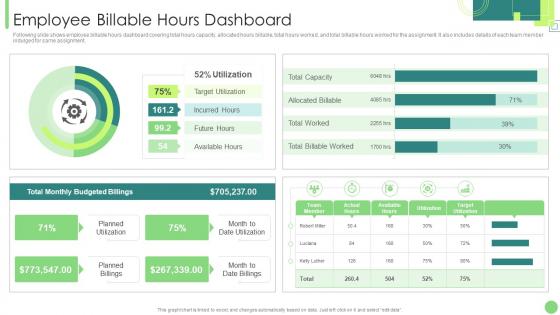
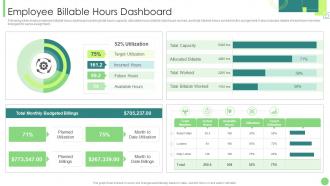
Following slide shows employee billable hours dashboard covering total hours capacity, allocated hours billable, total hours worked, and total billable hours worked for the assignment. It also includes details of each team member indulged for same assignment.
People who downloaded this PowerPoint presentation also viewed the following :
Employee Billable Hours Dashboard Kpis To Assess Business Performance with all 7 slides:
Use our Employee Billable Hours Dashboard Kpis To Assess Business Performance to effectively help you save your valuable time. They are readymade to fit into any presentation structure.






FAQs for Employee Billable Hours Dashboard Kpis To
So billable hours are basically any time you spend working directly on client stuff that you can charge for. Most firms live and die by these numbers since that's how they make their money. Quick math - if you're billing at $300/hour and rack up 1,800 hours in a year, you're pulling in $540k for the firm (before they pay you and cover expenses, of course). Higher billable hours = better profits for everyone. Just don't count admin stuff or internal meetings - that's not billable. Oh, and track everything obsessively because you'll forget half the work you did otherwise.
Track your time as you work, not later when you're trying to remember stuff. I always forget what I did two hours ago, let alone at 5pm. Start a timer right when you begin - Toggl's good, or just use your phone. Write specific descriptions like "client call about contract changes" instead of vague stuff like "meeting." Oh, and set up project codes for each client so you can sort everything easily later. I used to guess my hours and was way off every time. The trick is just building the habit of hitting start immediately when billable work begins.
Ugh, honestly the hardest part is just remembering to actually start the timer when you begin working. I'm terrible at this - I'll work for like 2 hours straight then realize I forgot to track any of it. Figuring out what's actually billable vs just admin stuff gets tricky too. Some clients will question your hours later which is awkward. Jumping between different projects makes everything worse since you lose track of time completely. Set phone reminders every hour, trust me. Yeah it's annoying but just log everything immediately or you'll forget what you even did yesterday.
Honestly, automation tools are a lifesaver for time tracking. You know how you always forget what you worked on Tuesday afternoon? These apps sync with your calendar and project tools to fill in those blanks automatically. RescueTime is pretty cool - it tracks which apps you're using without you thinking about it. Toggl can even start timers when you open certain files or hop on client calls. The reports are probably my favorite part though, since they break down hours by client without me having to sit there adding everything up. Try one of those two first - you'll be shocked at where your time actually goes versus where you think it goes.
Honestly, clients care way more about billable hours than most people think - it's literally the main thing they see on their invoice. You've got to be upfront about what you're billing and show real results. Nothing pisses clients off more than feeling like you're charging them for every little thing (been there, seen the angry emails). Make sure you actually communicate what got done during those hours. Short updates work. "Spent 2 hours researching X, found Y solution" - boom, they get it. The whole point is showing progress toward what they actually want, not just racking up time.
Look up what other firms charge first - that's your baseline. Then add up all your real costs: salary, benefits, rent, everything. Most places shoot for 3-4x the lawyer's hourly cost, but don't overthink the math initially. Market position matters too. What are clients expecting? How complex is the work? Here's my test - if you're winning every single bid, you're probably too cheap. That's usually a dead giveaway. Try different rates with new clients and see what sticks. The market will tell you pretty quickly what works.
Look, it's pretty straightforward - just bill what you actually worked on. Don't pad hours or charge clients while you're figuring out stuff you should've learned in law school (that one's huge). Never double-bill different clients for the same research either. Honestly, the worst thing lawyers do is drag projects out to rack up more hours. Clients can smell that BS from a mile away. Just be efficient and document everything you did with timestamps. Trust me, when someone questions a $500 charge, you'll want those detailed notes to back yourself up.
Dude, it's all over the place depending on what you do. Law firms are insane - they track every 6 minutes and expect like 1,800-2,400 hours a year. Consulting's similar with those 40-50 hour weeks, super detailed tracking. Freelancing though? You get to call the shots on rates and what counts as billable. Really comes down to industry culture. Law and consulting have these hardcore billing traditions already baked in. But freelancing lets you make your own rules, which honestly sounds way better. I'd look up what's normal in your field first before you decide anything.
Honestly, track your time as you go instead of trying to remember later what the hell you did at 2pm yesterday. Most teams bleed hours on bad project scoping upfront. Set boundaries with clients about scope creep - have actual processes for change requests or they'll walk all over you. Try batching similar tasks together. Context switching between projects kills productivity. Templates and automation are lifesavers for repetitive stuff. Oh, and audit where your time actually goes for like a week first. You'll probably find some weird time drains you didn't expect.
Track your non-billable stuff the same way you do billable hours - admin, biz dev, training, all that. Most firms shoot for 70-80% billable anyway, so don't stress about having some non-billable work. Just don't let it take over your life, you know? Block out specific times for admin crap and batch similar tasks together. I'd start by tracking everything for two weeks first - you'll probably be shocked where those hours actually go. Quick tasks are the worst time killers! Then you can figure out what's worth keeping and what's just busy work. The whole thing's about being deliberate instead of just letting random stuff eat your day.
Dude, transparent billing is a game changer for building trust. Break down your time clearly and explain rates upfront - clients feel way less anxious when they know what's happening. It's honestly like showing your work in math class (I know, nerdy comparison but whatever). You'll deal with fewer billing fights, get more repeat clients, and referrals actually increase because people trust your process. I always itemize everything and add quick notes about what I got done in each time block. Makes such a difference.
Just be straight up with them about it. Walk through exactly what you did during those hours they're questioning - don't get all defensive even though it's annoying when you know you did the work. Sometimes clients have legit concerns, so be ready to maybe adjust the bill if needed. The whole point is keeping that relationship intact while still getting paid fairly. Definitely write down what you talked about afterward. Oh, and maybe start tracking your time in more detail so this doesn't happen again - learned that one the hard way myself.
Track your realization rates first - that's how much billed time you actually collect. Fair warning, it's pretty brutal when you start measuring. Also watch utilization percentages (what hours are billable) and client satisfaction scores. Don't ignore burnout and turnover rates either, because pushing too hard on hours totally backfires. I'd probably check these monthly at first. The satisfaction piece matters more than people think - you need sustainable billing practices. Just base your policy changes on real data instead of guessing what's working.
Don't go crazy with the billable hours - most places that actually work well cap it around 1,800-2,000 annually. Way more important is letting people hit those numbers however works for them. Some want longer days then real time off, others prefer steady shorter ones. The "always on" thing is honestly what destroys people more than the actual work. Set boundaries around after-hours stuff and mean it when you say PTO is PTO. Oh, and if someone's constantly missing targets? Look at your workflow first before just telling them to work more hours. Usually there's something dumb happening with how work gets assigned.
Honestly, most people suck at the habit part way more than figuring out the software itself. I'd start with some basic tutorials and maybe templates for your usual billing stuff. Lunch sessions work pretty well - let people share what actually works for them instead of just lecturing. Oh, and pair newbies with someone who's already good at tracking, that mentoring thing really helps. Quick reference guides are clutch too, especially for different client rules. Once people see how their tracking affects profit margins, they'll get way more into it. Just pick one approach first though - don't overwhelm them with everything at once.
-
Great quality product.
-
I faced no difficulty while searching for the slide I wanted. Honestly, the website’s interface is easy to use and can be navigated easily!