Employee Attendance Tracking And Management Dashboard Ppt Information
Try Before you Buy Download Free Sample Product
Audience
Editable
of Time
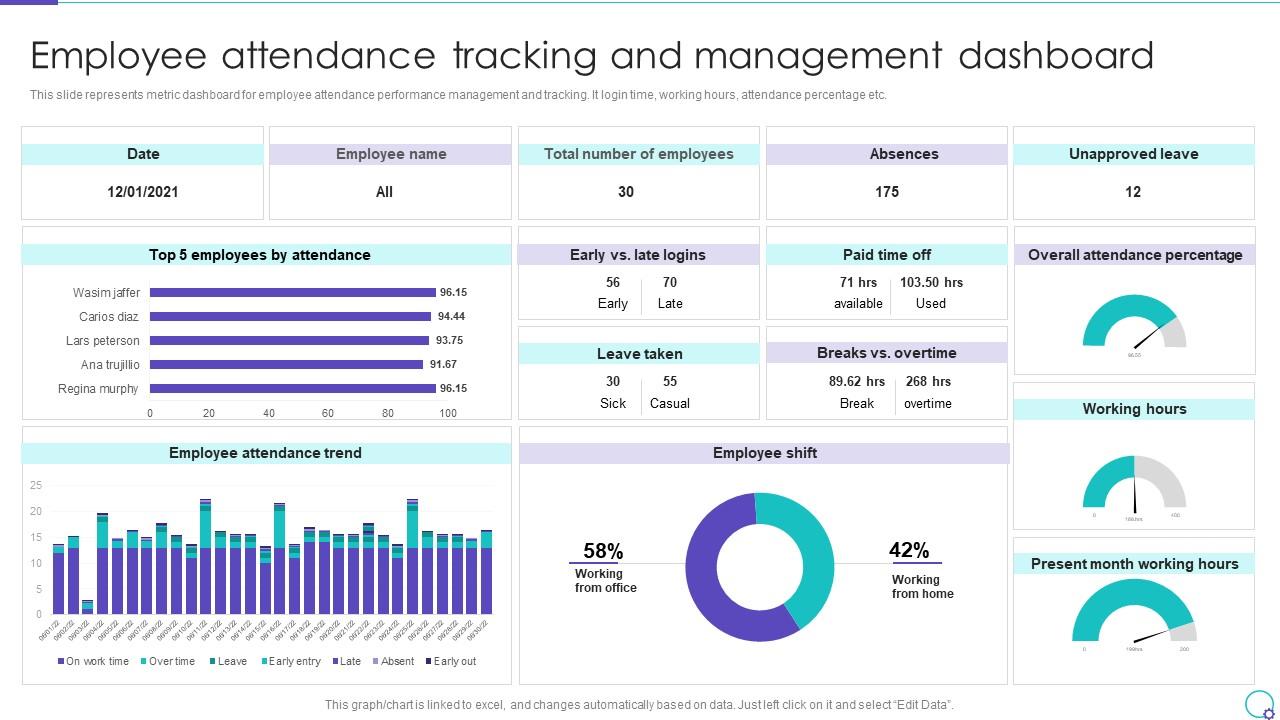
This slide represents metric dashboard for employee attendance performance management and tracking. It login time, working hours, attendance percentage etc.
People who downloaded this PowerPoint presentation also viewed the following :
Employee Attendance Tracking And Management Dashboard Ppt Information with all 7 slides:
Use our Employee Attendance Tracking And Management Dashboard Ppt Information to effectively help you save your valuable time. They are readymade to fit into any presentation structure.
FAQs for Employee Attendance Tracking And Management
Track attendance percentages and how often people show up late or leave early - that's your bread and butter. Unscheduled absences are huge too. I always compare actual hours worked against what was scheduled because honestly, that's where you catch the real issues. Break everything down by person and team so you can spot patterns early. Oh, and definitely keep tabs on sick days and vacation balances. Make it visual with color coding or whatever works. Trust me, you don't want to be stuck scrolling through endless spreadsheets trying to figure out who's becoming a problem.
So instead of waiting around for those annoying overnight updates, real-time integration means your attendance dashboard actually shows what's happening right now. Someone calls in sick? You'll see it instantly. Manager needs to find coverage for a no-show? Done. Honestly, it's pretty much a lifesaver when you're scrambling to fill shifts. You can catch patterns early and set up automatic alerts too. Just make sure you get those data feeds working right from day one - trust me, debugging connection issues while you're trying to manage people is the worst. Way better than staring at yesterday's numbers!
So priority one is making sure people can instantly see their hours and attendance status - like, super obvious visual hierarchy. Navigation needs to be brain-dead simple because honestly, most work software is a nightmare to use. Quick action buttons are clutch for stuff like time-off requests and clocking in. Oh, and filtering! Managers will thank you when they can actually sort by team or date range instead of scrolling through everything. But seriously, test this thing with real employees first - they'll spot the annoying parts you totally missed.
Start with your dashboard's trend reports - filter by departments, time periods, whatever makes sense. Monday patterns are super common (shocking, right?). Also watch for spikes around holidays or certain seasons. Weekly data reviews help you catch stuff early before it gets messy. Short frequent absences vs longer occasional ones need totally different fixes. Some employees just have different patterns. Set up alerts for weird trends so you're not constantly manually checking everything. Really helps to drill down by specific teams or managers too since sometimes it's more about leadership issues than individual problems.
Honestly, the integration stuff will make you want to pull your hair out - HR systems and payroll never want to talk to each other. People get weird about privacy too, like you're Big Brother or something. Bad data going in means garbage coming out, which is obvious but still catches everyone off guard. I'd probably start with just a few people first, see what breaks, then fix it before rolling out wider. Oh and definitely explain what you're actually tracking because otherwise people assume the worst.
Mobile compatibility is huge - you can check attendance stuff from anywhere instead of being stuck at your computer. Your managers can approve time-off requests on the train, employees clock in from job sites, HR pulls reports at Starbucks (honestly wherever). The real-time thing speeds up decisions big time. Just make sure you pick a dashboard that actually works well on phones, not one of those "technically mobile" disasters that's impossible to navigate. Oh and remote work makes this even more critical - trust me, you'll use it way more than you think.
Honestly, visual charts beat staring at spreadsheets any day. You'll spot patterns way faster - like when your marketing team suddenly starts calling in sick more, or if Sarah's always rolling in late. Seasonal trends pop right out too. I swear it's so much easier than scrolling through endless rows of data (though I still do that sometimes out of habit). Quick dashboards help you catch problems early instead of waiting until they're massive issues. Plus you've got actual visual proof when you need to have those awkward attendance conversations.
Dude, attendance dashboards are actually pretty cool - you can see who's showing up in real time and catch patterns before they blow up. Like, you'll spot the people who are always late or calling out, plus figure out who your rock stars are. Honestly, seeing it all laid out is wild sometimes. Weekly trends are where I'd start looking first - that's usually where you find the biggest issues affecting productivity. Then you can have actual conversations with people based on real data instead of just guessing. Way better than going off hunches, you know?
First thing - set up role-based access so only HR and managers can see their team's data. Multi-factor auth is a must for anyone logging into the dashboard. Encrypt everything in transit and storage because honestly, nobody wants to deal with a data breach mess. Audit logs are your friend here - track who's looking at what and when. Backup regularly and figure out your retention policy early (how long you keeping records?). Oh, and start with access controls since that's where you're most exposed. The encryption stuff can come after but don't wait too long.
So you know how you're constantly typing in the same attendance data over and over? Integration fixes that headache completely. Your attendance dashboard talks directly to your HR system, which means clock-ins and schedule changes automatically update everywhere at once. No more copy-pasting or dealing with records that don't match up. Honestly, the real-time sync across payroll and benefits is a game changer. Most platforms these days have APIs that make connecting them pretty simple - just figure out what systems you're working with first and go from there.
Honestly, attendance dashboards are perfect for remote teams - you get to see work patterns without being that micromanager everyone hates. I love how you can spot productivity trends and figure out who's maybe burning out or struggling with boundaries. The cool part? When you layer project timelines over attendance data, suddenly those missed deadlines make total sense. Your team can see their own patterns too, which is weirdly motivating. Oh, and different time zones become way less confusing. Just focus on bigger trends instead of obsessing over daily stuff. Trust me, that approach keeps everyone happy while you stay in the loop.
So predictive analytics basically turns your attendance dashboard into a crystal ball. You're not just seeing what already happened - you can spot trouble before it hits. The algorithms catch patterns we'd totally miss, like flagging employees who might start calling in sick more often or warning you when seasonal absences usually spike. Honestly, getting weeks of advance notice is a game changer. You can actually do something about it instead of scrambling after the fact. I'd start by figuring out your worst attendance headaches first, then see which predictive tools give you the most time to fix things.
Start with role-based views - managers want team stuff, HR needs the full company picture, and regular employees just want their own info. Date ranges are clutch because everyone tracks differently (weekly vs monthly vs whatever finance wants). Drag-and-drop widgets are pretty much mandatory now. Oh, and custom fields for remote codes or project stuff since every place does attendance weird. Export buttons too - trust me, someone's gonna want their precious spreadsheet no matter how good your dashboard is. These basics will handle most situations you'll run into.
Getting employee feedback on your attendance dashboard is a game-changer, trust me. People will spot stuff you completely missed - like field workers needing mobile access or confusing approval steps. I've watched entire dashboards get rebuilt because users pointed out the obvious things developers were blind to. Regular surveys work great, or just casual check-ins. The key is actually fixing what they complain about (within reason, obviously - you can't please everyone). Once employees see you're listening, they'll actually start using the thing instead of working around it.
Honestly, just automate the sync with your time tracking system first - that's what'll save you the most headaches. Manual updates are where everything goes wrong. Do quick weekly checks for weird stuff like 15-hour days or blank entries, those are dead giveaways something's broken. Monthly audits against payroll help too, but the weekly thing is more important imo. You want to catch problems fast before they multiply. Oh and figure out which data sources matter most - some of them probably aren't even worth the hassle of connecting automatically.
-
Nice and innovative design.
-
These stunning templates can help you create a presentation like a pro.Â