


Employee Leave Tracker Dashboard With Upcoming Schedule




Try Before you Buy Download Free Sample Product
 Impress Your
 Audience
 100%
100% Editable
 Save Hours
 of Time


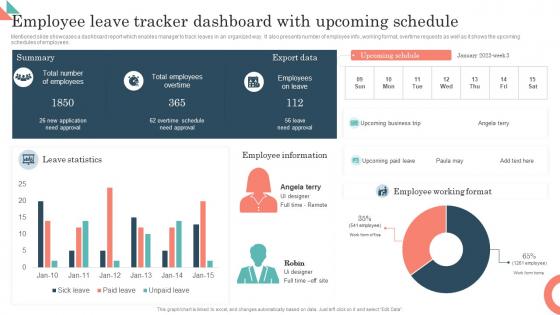
Mentioned slide showcases a dashboard report which enables manager to track leaves in an organized way. It also presents number of employee info.,working format, overtime requests as well as it shows the upcoming schedules of employees.
People who downloaded this PowerPoint presentation also viewed the following :
Employee Leave Tracker Dashboard With Upcoming Schedule with all 7 slides:
Use our Employee Leave Tracker Dashboard With Upcoming Schedule to effectively help you save your valuable time. They are readymade to fit into any presentation structure.





FAQs for Employee Leave Tracker Dashboard
Definitely get something with automated balance tracking and approval workflows - saves so much time. Calendar integration is huge too. Real-time reporting helps managers actually see who's out instead of digging through random spreadsheets (seriously, why do people still do that?). Mobile access is basically required now since everyone requests PTO from their phone. Make sure it handles different leave types - sick days, vacation, parental leave, all that. Auto notifications keep people updated without you chasing anyone down. Oh, and pick something that plays nice with your current HR stuff so you're not entering everything twice.
Dude, a leave tracker literally saves your sanity. No more panic when someone's randomly out and you're scrambling for coverage. You can actually see who's gone when and plan around it - crazy concept, right? Your team stops playing that awful guessing game of "wait, is Mike off today or what?" Resource planning gets way smoother. Projects don't get derailed by surprise absences. Honestly, employees love the transparency too - they're not nervous about requesting time off anymore. Just start with basic PTO tracking first. You'll immediately notice fewer scheduling disasters and your managers will thank you.
Start with the basics - vacation, sick days, personal time, plus whatever holidays you guys get. Maternity/paternity leave is huge obviously, along with FMLA and bereavement. Jury duty too. Don't skip unpaid leave either! Some places do mental health days or volunteer time now, which honestly sounds pretty nice. Really depends on your benefits though. I'd focus on whatever messes with scheduling and payroll first. Legal stuff you can't avoid anyway, then just add the things people actually end up using. Makes way more sense than tracking everything under the sun from day one.
So here's the thing - a decent leave tracker basically builds all the labor law stuff right into the system. It'll enforce minimum accrual rates and carryover limits automatically. Plus it flags issues before they happen, like if someone's hitting FMLA limits. The audit trail generation is honestly clutch if you ever get reviewed. Most systems will catch violations before they're actual problems - way better than tracking everything manually. Just don't mess up the initial setup because laws are crazy different depending on where you are and what industry you're in. Configure it wrong and you're back to square one.
Honestly, connecting your leave tracker to payroll is a game changer. No more entering the same data twice or dealing with those weird payroll mistakes where someone gets paid for days they called out sick. Everything syncs automatically - deductions, accruals on paystubs, the whole thing. Your employees can see their PTO balances right there, which means way fewer "wait, how many days do I have left?" emails clogging your inbox. Real-time syncing means you're not stuck doing math at month-end trying to figure out where things went wrong. Check what your payroll system can already connect to first.
Oh man, this stuff will save your sanity. Employees just throw their requests into an app, then it automatically goes to whoever needs to approve it based on your org chart. No more hunting people down! It checks their vacation balance, spots scheduling conflicts, sends reminders - basically handles all the annoying parts. Everything shows up in real-time too, so you can ditch those awful spreadsheets. I'd probably start with something that plays nice with whatever HR system you're already using. Makes the whole switchover way less painful.
So employee self-service is basically where your team goes to handle their own leave stuff. They can request time off, check how many days they have left, look at their history - all without constantly hitting up HR. Honestly, HR departments everywhere probably love this feature the most. It gives people control over their own info while keeping everything neat for you. The big plus? Total transparency. Everyone knows exactly what they've got for vacation days. Just make sure whatever portal you pick doesn't suck to use, because people will avoid confusing systems like the plague.
Oh trust me, leave trackers are game-changers for team morale. No more of that "wait, why did Jake get his vacation approved instantly?" drama. Everyone can see their PTO balance and actually plan trips instead of just daydreaming about them. Your managers will love spotting burnout patterns too - like when someone hasn't taken a day off in months and clearly needs a push. The transparency thing is huge honestly. Set up those automated "hey, use your vacation days!" reminders because people are weirdly bad at taking time off. Makes the whole process way less awkward for everyone.
Oh man, there's actually a ton you can track! Leave balances, total days taken per person, approval rates - the usual stuff. But here's what's really helpful: spotting patterns in when people take time off and which departments are burning through PTO fastest. Monthly reports are your friend here, trust me. The absenteeism trends alone will save you headaches during busy seasons. You can catch policy issues early too, which is clutch. Honestly didn't realize how detailed this stuff gets until I started digging into it myself.
Just map out how you guys currently handle time off, then set up the tracker to match that vibe. Startups can do simple approval flows - maybe auto-approve for certain people or skip the formal stuff entirely. I've seen companies add weird categories like "mental health days" or volunteer time, which honestly makes sense if that's your thing. Change who gets pinged, how much notice you need, all that. Oh and definitely customize the language in emails - nobody wants corporate-speak when they're asking for a day off. Way better than cramming everyone into some generic system that doesn't fit.
Honestly, the worst part is usually people freaking out about change. Like, I've literally watched entire teams lose their minds over switching from Excel - it's wild how attached people get! Data migration is also a nightmare since your old records never transfer cleanly. Plus training becomes this whole thing because some people pick it up fast while others... don't. Oh, and good luck getting it to actually sync with payroll without breaking something. I'd definitely start with your most tech-savvy people first, then slowly expand from there. Way less drama that way.
Your leave tracker data is actually gold for workforce planning. Summer and holidays? Everyone disappears, so you'll know exactly when to expect chaos. I'd dig into which departments burn through PTO fastest - some teams are way more leave-heavy than others. The patterns are honestly pretty fascinating once you start looking. Cross-train people before those predictable crunch times hit. Maybe adjust project deadlines around when half your team vanishes for Christmas break. Oh, and check if certain roles always leave you scrambling when someone's out - that's your cue to build in backup coverage ahead of time.
So the big thing is medical info getting leaked or stored badly. Employees share health details for leave requests, and that stuff can accidentally get passed around. Managers also love to play detective with leave patterns - super unprofessional but it happens constantly. You'll want to limit access to just HR and whoever absolutely needs to see it. Store everything in secure systems, obviously. Train your managers on keeping their mouths shut about medical stuff. Oh, and don't hoard the documents forever - set up policies for when to delete sensitive info so you're not sitting on it unnecessarily.
Honestly, leave tracking is way more useful than people think. Check if multiple team members are booking the same weeks off - that's a scheduling nightmare waiting to happen. Someone taking tons of sick days? They might need help but don't know how to ask. I've learned to scan the calendar regularly instead of just approving requests as they come in. The workaholics who never request time off are actually your biggest risk - they'll flame out hard. Redistribute work before it becomes a crisis, and proactively ask people about their recharge plans for the quarter.
So the whole "empty desk means they're on vacation" thing? Yeah, that's dead now. Can't tell if someone's actually taking time off or just working from their couch at 2pm on a Tuesday. Time zones make it even weirder - is Sarah offline because she's in Hawaii, or because she literally went to Hawaii? Most companies are still using those ancient spreadsheets which is honestly painful to watch. You definitely need something digital that actually shows who's out when, sends notifications automatically, and connects with Slack or whatever you guys use. Otherwise it's just chaos.
-
Helpful product design for delivering presentation.
-
Easily Editable.