


Enterprise Resource Planning ERP Transformation Roadmap Complete Deck




Try Before you Buy Download Free Sample Product
 Impress Your
 Audience
 100%
100% Editable
 Save Hours
 of Time


Every business needs to change and evolve with modern times. Thus upgrading organizational technology to improve business processes is a critical practice that many Industry leaders and innovators follow. Here is a competently designed Enterprise Resource Planning ERP Transformation Roadmap template that is helpful for IT Managers intending to improve upon their existing business practices. The digital transformation roadmap has multiple pre determined steps that serve as a blueprint for the organization. The roadmap can be divided into 4 key phases performing internal analysis for assessing organization change readiness, carefully analyzing each step of the roadmap, etc. For efficient delivery, the implementation process can be divided into 3 key stages. Thus, various data sources are identified to migrate data successfully, and a migration timeline is developed. Upskilling the employees also serves as a crucial point in the transformational process as the employees skills need to match the ever changing technology. In the end, a framework is developed that will help in successful implementation. Multiple KPIs or Key Performance Indicators are used with the help of a dashboard to track the transformational process. Get access now.
People who downloaded this PowerPoint presentation also viewed the following :
Content of this Powerpoint Presentation
Slide 1: This slide introduces Enterprise Resource Planning (ERP) Transformation Roadmap. State Your Company Name and begin.
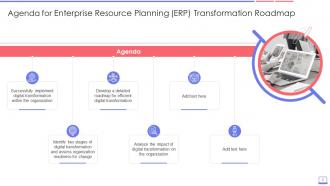
Slide 2: This slide states Agenda of the presentation.
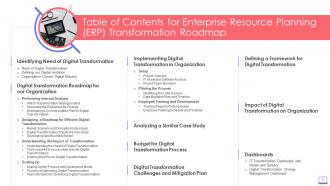
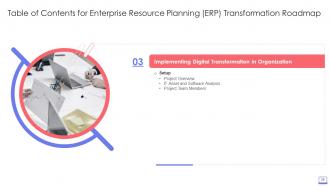
Slide 3: This slide shows Table of Content for the presentation.
Slide 4: This slide displays title for topics that are to be covered next in the template.
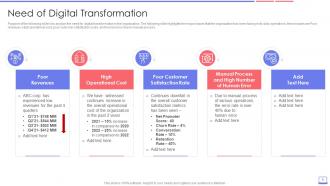
Slide 5: This slide presents need for digital transformation in the organization.
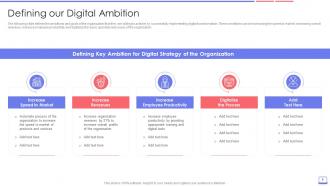
Slide 6: The following slide defines the ambitions and goals of the organization.
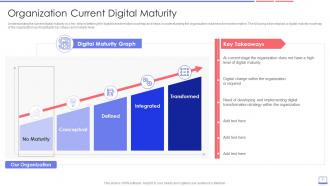
Slide 7: This slide represents Need of developing and implementing digital transformation strategy within the organization.
Slide 8: This slide shows title for topics that are to be covered next in the template.
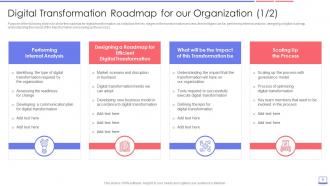
Slide 9: This slide showcases Digital Transformation Roadmap for our Organization.
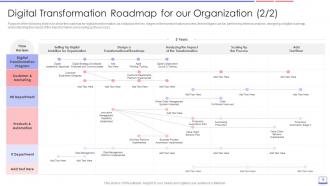
Slide 10: This is another slide continuing Digital Transformation Roadmap for our Organization.
Slide 11: This slide shows title for topics that are to be covered next in the template.
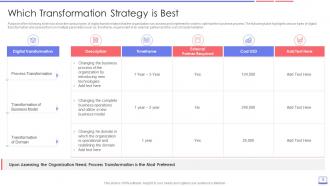
Slide 12: This slide presents various types of digital transformation that the organization can assess.
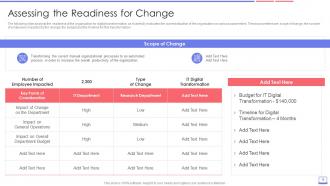
Slide 13: The following slide analysis the readiness of the organization for digital transformation.
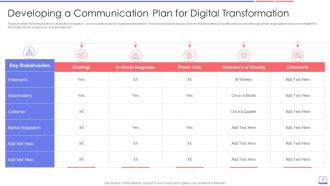
Slide 14: This slide displays Developing a Communication Plan for Digital Transformation.
Slide 15: This slide shows title for topics that are to be covered next in the template.
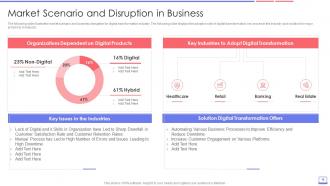
Slide 16: This slide illustrates market scenario and business disruption for digital transformation industry.
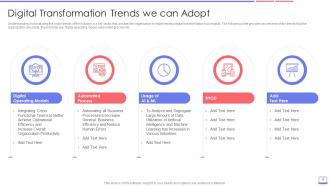
Slide 17: This slide presents Digital Transformation Trends we can Adopt.
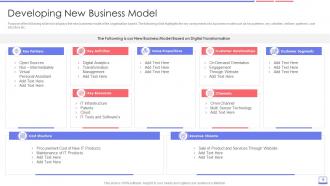
Slide 18: This slide displays new business model of the organization based.
Slide 19: This slide shows title for topics that are to be covered next in the template.
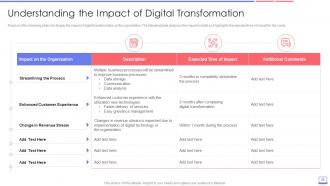
Slide 20: This slide represents Understanding the Impact of Digital Transformation.
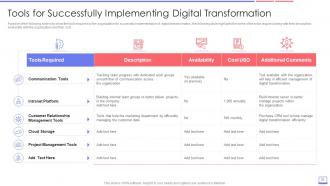
Slide 21: This slide showcases Tools for Successfully Implementing Digital Transformation.
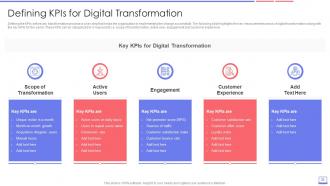
Slide 22: This slide shows key measurements areas of digital transformation along with the key KPIs.
Slide 23: This slide shows title for topics that are to be covered next in the template.
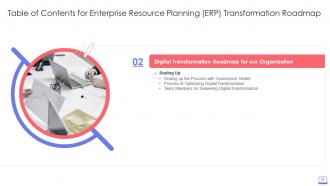
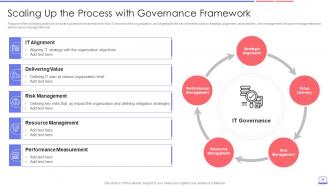
Slide 24: This slide presents Scaling Up the Process with Governance Framework.
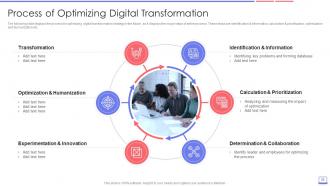
Slide 25: This slide displays process for optimizing digital transformation strategy in the future.
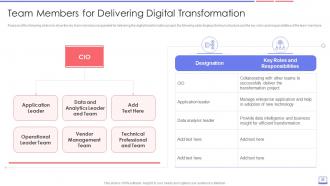
Slide 26: This slide represents Team Members for Delivering Digital Transformation.
Slide 27: This slide highlights title for topics that are to be covered next in the template.
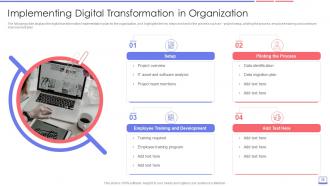
Slide 28: The following slide displays the digital transformation implementation plan for the organization.
Slide 29: This slide shows title for topics that are to be covered next in the template.
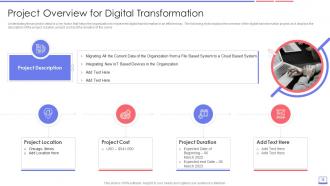
Slide 30: This slide presents Project Overview for Digital Transformation.
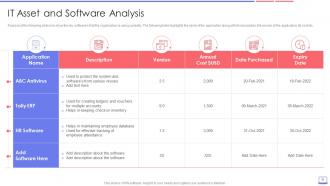
Slide 31: This slide displays key software's that the organization is using currently.
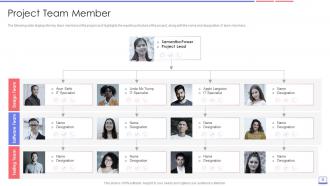
Slide 32: This slide represents key team members of the project as it highlights the reporting structure of the project.
Slide 33: This slide shows title for topics that are to be covered next in the template.
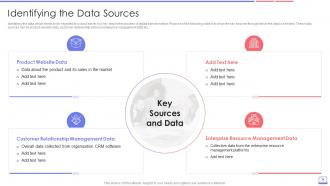
Slide 34: This slide presents key sources through which the data is selected.
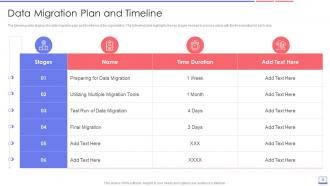
Slide 35: This slide displays data migration plan and timeframe of the organization.
Slide 36: This slide shows title for topics that are to be covered next in the template.
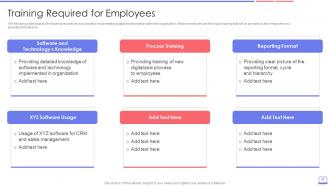
Slide 37: This slide represents training required for successfully implementing digital transformation.
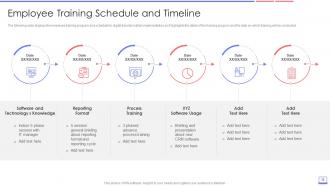
Slide 38: This slide showcases employee training program and schedule for digital transformation.
Slide 39: This slide shows title for topics that are to be covered next in the template.
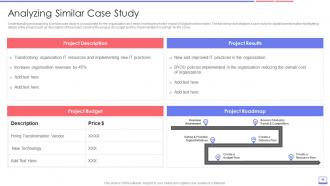
Slide 40: This slide presents case study for digital transformation as it highlights details of the project.
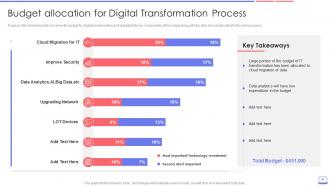
Slide 41: This slide displays Budget Allocation for Digital Transformation Process.
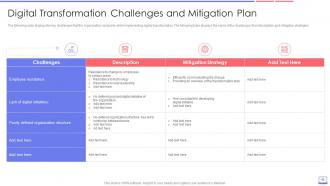
Slide 42: This slide represents Digital Transformation Challenges and Mitigation Plan.
Slide 43: This slide shows title for topics that are to be covered next in the template.
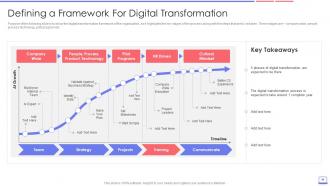
Slide 44: This slide showcases Defining a Framework For Digital Transformation.
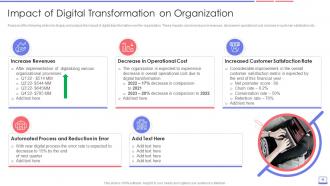
Slide 45: This slide presents impact of digital transformation over the organization.
Slide 46: This slide shows title for topics that are to be covered next in the template.
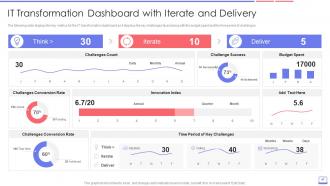
Slide 47: This slide displays IT Transformation Dashboard with Iterate and Delivery.
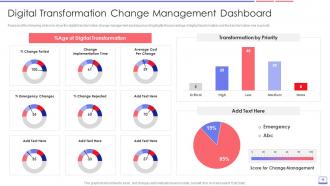
Slide 48: This slide represents Digital Transformation Change Management Dashboard.
Slide 49: This slide displays Icons for Enterprise Resource Planning (ERP) Transformation Roadmap.
Slide 50: This slide is titled as Additional Slides for moving forward.
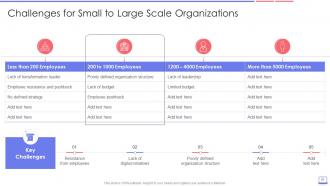
Slide 51: This slide presents Challenges for Small to Large Scale Organizations.
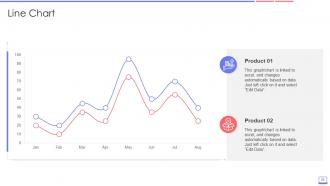
Slide 52: This slide describes Line chart with two products comparison.
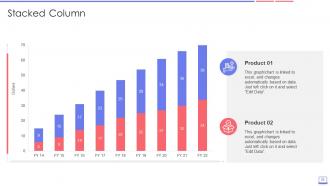
Slide 53: This slide represents Stacked Bar chart with two products comparison.
Slide 54: This is About Us slide to show company specifications etc.
Slide 55: This is Our Mission slide with related imagery and text.
Slide 56: This slide shows Post It Notes. Post your important notes here.
Slide 57: This is a Comparison slide to state comparison between commodities, entities etc.
Slide 58: This slide contains Puzzle with related icons and text.
Slide 59: This slide depicts Venn diagram with text boxes.
Slide 60: This is Our Team slide with names and designation.
Slide 61: This slide provides 30 60 90 Days Plan with text boxes.
Slide 62: This is another slide continuing 30 60 90 Days Plan.
Slide 63: This is a Thank You slide with address, contact numbers and email address.
Enterprise Resource Planning ERP Transformation Roadmap Complete Deck with all 68 slides:
Use our Enterprise Resource Planning ERP Transformation Roadmap Complete Deck to effectively help you save your valuable time. They are readymade to fit into any presentation structure.





FAQs for Enterprise Resource Planning ERP Transformation
Honestly, you'll know when those bandaid fixes just aren't cutting it anymore. Data's stuck in silos, everyone's drowning in manual work, and your old systems hate talking to anything new. The real kicker? When maintenance costs are eating your innovation budget alive. But here's the thing - and I can't stress this enough - your leadership has to actually want this, not just pretend they do for the board. You need real buy-in, actual budget, and people dedicated to making it happen. Oh, and don't even think about it if you're just trying to solve one department's problems. If most of this sounds familiar, start drafting that business case.
First thing - audit your current system's pain points and performance gaps. Talk to actual users across departments, not just IT people. They'll give you the real dirt on what's broken daily. Document all the bottlenecks, weird manual workarounds, and integration nightmares they're dealing with. You'll probably be shocked at how much stuff is held together with digital duct tape. Then compare what you have against newer ERP features and industry standards. Don't forget to calculate your total ownership costs - maintenance and customization expenses add up fast. User feedback is honestly more valuable than any technical assessment.
Okay so data migration is huge - if this goes wrong, your whole ERP is basically screwed from day one. First thing: audit your current data way earlier than you think you need to. It's always a disaster, seriously. Clean everything before you migrate, not after when you're panicking. Test migrations multiple times and get your business users to actually check the results each round. Don't dump everything at once though - do it in phases, critical stuff first. Map your fields super carefully between systems. Oh and definitely have a rollback plan ready because... yeah, you'll probably need it at some point.
Get your stakeholders involved from day one - seriously, this makes or breaks everything. Don't just grab the IT folks either. Pull in the actual users who'll be stuck with this system every day. Cross-functional teams work great because departments finally understand what each other actually needs. Regular working sessions let people complain early instead of sabotaging later (trust me on this one). Oh, and be upfront about both wins and failures - nobody likes being kept in the dark. Set up feedback loops that aren't just for show. Actually listen and make changes when you can.
Honestly, figure out what you actually need before you start shopping around for vendors. Too many companies fall for shiny features that won't help their bottom line. What does winning look like for you? Faster orders? Better inventory tracking? Start there and work backwards. Get your leadership bought in from day one - trust me on this one. You'll need them when things get messy. Oh, and don't just track tech stuff like "system deployed." Set up checkpoints that measure whether you're hitting those business goals you defined upfront. That's the only way you'll know if this whole thing was worth it.
Dude, the worst thing you can do is try recreating your old crappy workflows in the new system. Like, why would you want to keep the stuff that sucked? Poor change management kills projects too - get actual users involved, not just IT people who've never touched the day-to-day work. Don't skip data cleanup beforehand or you'll regret it big time. Timeline's huge - everyone always thinks it'll be faster than it is. Build in extra time because something will definitely go sideways. Training matters more than people think. I've watched teams rush to go-live and then spend months fixing what should've been caught in testing.
Track both hard and soft metrics - the numbers don't lie. Cost savings are obvious: less manual work, faster orders, lower IT costs. But also measure productivity stuff like report generation speed and monthly book closes. Employee satisfaction is huge too (seriously, unhappy users will kill your whole project). Get your baselines before launch, then check quarterly for at least a year. Automated dashboards are a lifesaver if you can swing them - keeps everyone honest and saves you from pulling data manually every month.
Honestly, I'd go cloud-first for your ERP setup - way easier to scale and you won't be stuck maintaining servers. The AI/ML stuff is actually worth the hype this time around since it handles boring workflow automation plus gives you decent predictive insights. Your team absolutely needs mobile access (learned that one the hard way during remote work). Oh, and prioritize API-friendly architecture so you can connect everything without headaches. Those low-code platforms are pretty solid now too - lets your business folks tweak things without constantly bothering IT. First step though? Audit what you've already got to see what plays nice together versus what needs the boot.
Don't treat change management like some last-minute add-on - that's where projects go to die. Map out your stakeholders first thing so you know who'll champion this and who's gonna fight you. Create different communication strategies for each group. Throughout the whole process, keep checking in with actual end users (not just during training). People need to feel heard, so build in feedback loops. Quick wins are gold for momentum. Oh, and make sure your executives aren't just saying they support it - they need to show up and deal with pushback when it happens. I've watched too many good projects crash because leadership went MIA.
Dude, user training can make or break your whole ERP project. Seriously. People hate change - especially when it messes with how they do their job every day. Without proper training, you'll see productivity tank and everyone complaining about the new system. Good training shows them why the change is worth it and gets them comfortable with the software. Oh, and don't skimp on support after go-live either. Users will panic when they can't figure something out. Budget real money for training - like, actual money, not leftovers. And definitely don't rush the rollout just because some executive is impatient.
Dude, cloud ERP is honestly a no-brainer for transformation stuff. No huge upfront costs, which is amazing. Implementation happens way faster than the old-school route, and you don't have to deal with IT nightmares since they handle all the maintenance crap. The scaling thing is huge too - grows with you instead of against you. What really sold me on it though is how you can actually experiment. Roll things out department by department, see what sticks. And it plays nice with whatever cloud tools you're already using. I'd say figure out what's driving you crazy first, then find something that fixes those specific problems.
Honestly, ERP transformation is a game changer for supply chains. Instead of dealing with outdated, scattered data from different systems, you get real-time visibility into everything - vendors, inventory, logistics, the whole mess. It connects procurement, warehouse management, and demand planning so you can spot problems before they blow up. Your suppliers will love you because everyone's finally working with the same accurate info. Yeah, there's definitely a learning curve (and some people hate change), but the results are worth it. Map out where your supply chain sucks now so you can actually measure the wins later.
Honestly, customization is tricky with ERP stuff. Sure, you get to make it work exactly how your business does things, which is nice. But man, the headaches later are brutal - updates become this whole expensive mess, and you're stuck maintaining all that custom code forever. Implementation takes way longer too. I'd say go with the standard setup first and see what you can live with. Only customize the stuff that really makes your company different from competitors. And yeah, document everything if you do go custom because future-you will thank you. Trust me on that one.
Look, first thing - don't let those slick demos fool you into buying features you'll never touch. Map what you actually need to what each vendor does best. The real money gets eaten up later, trust me. I've watched companies go cheap upfront then bleed cash on customizations for years. Check their 5-year costs, not just what's on the proposal. Get references from businesses your size in your space. Their roadmap should match where your industry's headed too. Honestly? Run pilots with your top 2-3 picks using real work scenarios before you commit to anything.
Look, your ERP will turn into a nightmare if you don't keep tweaking it. I learned this the hard way at my last job - we ignored ours for like two years and suddenly nobody could get anything done efficiently. Set up quarterly check-ins with the people who actually use the system daily. They'll tell you what's broken way before management notices. Regular updates keep everything running smooth and prevent those "why does this take forever?" moments. Business changes constantly, so your system needs to adapt too. It's honestly not glamorous work, but beats dealing with angry users later.
-
Qualitative and comprehensive slides.
-
Much better than the original! Thanks for the quick turnaround.