

Exemple de présentation de budget Diapositives de présentation Powerpoint






Try Before you Buy Download Free Sample Product
 Impress Your
 Audience
 100%
100% Editable
 Save Hours
 of Time


Vous vous inquiétez de créer un PPT budgétaire? Besoin de ne plus stresser. Nous vous proposons un exemple de présentation de budget de présentation PowerPoint de diapositives. Pilotez efficacement les performances de votre entreprise en utilisant nos exemples de modèles PowerPoint de qualité professionnelle prêts à l'emploi. Ces photos de stock PPT de prévision de capital peuvent également être utilisées pour donner une présentation sur des sujets variés tels que la stratégie opérationnelle du plan d'affaires, le coût des revenus, le plan financier, le budget de performance, les flux de trésorerie, la budgétisation des investissements, les coûts et dépenses, la comptabilité analytique, le compte de résultat, la finance, le volume des ventes, le financement des médias et bien d'autres. Nos visuels PowerPoint sur les dépenses d'investissement vous aideront à analyser explicitement où vous en êtes avec vos finances. Notre illustration de présentation d'allocation de trésorerie englobe tous les modèles adaptés tels que les ressources de l'entreprise, le coût de l'événement, la diapositive d'icône de budget, la comparaison de budget, le plan d'investissement de lancement de produit, etc. Téléchargez nos modèles PPT d'exemple de budget personnalisables et affichez le compte financier sans tracas !. Notre exemple de présentation de budget Les diapositives de présentation Powerpoint vous permettent de supporter les difficultés. Ils se présentent pour supporter le poids.
People who downloaded this PowerPoint presentation also viewed the following :
Contenu de cette présentation Powerpoint
Diapositive 1 : Cette diapositive présente un exemple de présentation de budget. Indiquez le nom de l'entreprise pour commencer.
Diapositive 2 : Cette diapositive affiche le modèle de budgétisation (mise en page 1). Utilisez-le pour montrer votre propre budget.
Diapositive 3 : Cette diapositive affiche également le modèle de budgétisation (mise en page 2) en pourcentage.
Diapositive 4 : Ceci est une autre diapositive montrant le modèle de budgétisation (Layout-2). Utilisez-le selon les besoins.
Diapositive 5 : Cette diapositive affiche le budget de marketing des canaux. Utilisez-le selon vos besoins.
Diapositive 6 : Il s'agit d'une diapositive relative à la budgétisation - comparaison prévue/réelle sous forme de graphique à barres/graphique pour indiquer une comparaison.
Diapositive 7 : Il s'agit d'une diapositive de plan budgétaire de lancement de produit sous forme de graphique à barres/graphique.
Diapositive 8 : Cette diapositive présente le budget de l'entreprise en termes de revenus, dépenses.
Diapositive 9 : Cette diapositive affiche le budget de l'événement. Utilisez-le pour montrer votre propre budget d'événement, etc.
Diapositive 10 : Cette diapositive présente le modèle de budget marketing de lancement de produit. Utilisez-le pour afficher les éléments suivants : relations publiques, marketing Web, publicité, garanties.
Diapositive 11 : Cette diapositive affiche le modèle de budget des médias sociaux. Utilisez/modifiez-le selon vos besoins.
Diapositive 12 : Ceci est un exemple de diapositive d'icône de présentation de budget. Utilisez/modifiez les icônes en fonction des besoins de votre entreprise.
Diapositive 13 : Cette diapositive montre les graphiques et graphiques. Vous pouvez changer/modifier le contenu selon vos besoins.
Diapositive 14 : Il s'agit d'une diapositive Pause café pour arrêter. Vous pouvez le modifier selon les besoins.
Diapositive 15 : Cette diapositive présente la ligne empilée avec des marqueurs pour montrer la croissance du produit/entité, la comparaison, etc.
Diapositive 16 : Il s'agit d'un graphique à barres/diagramme groupé pour présenter la comparaison des produits/entités, les spécifications, etc.
Diapositive 17 : Il s'agit d'une diapositive Volume - Ouvert - Haut - Bas - Clôture - Graphique pour présenter la comparaison produit/entité, les spécifications, etc.
Diapositive 18 : Il s'agit d'une diapositive de colonnes à zones empilées pour présenter la comparaison produit/entité, les spécifications, etc.
Diapositive 19 : Ceci est une diapositive Open-High-Low-Close-Chart pour présenter la comparaison produit/entité, les spécifications, etc.
Diapositive 20 : Cette diapositive s'intitule Diapositives supplémentaires pour avancer. Vous pouvez changer/modifier le contenu comme vous le souhaitez.
Diapositive 21 : Cette diapositive énonce notre mission et notre vision avec des images.
Diapositive 22 : Il s'agit d'une diapositive À propos de nous montrant le public cible, les valeurs client et les préférés de nombreux à titre d'exemples.
Diapositive 23 : Il s'agit d'une diapositive Notre équipe avec un nom, une image et des zones de texte pour mettre les informations requises.
Diapositive 24 : Cette diapositive Nos objectifs. Indiquez ici les objectifs, les cibles, les aspirations, etc.
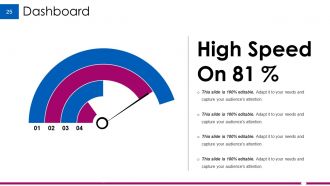
Diapositive 25 : Il s'agit d'une diapositive de tableau de bord pour afficher des informations en pourcentage, etc.
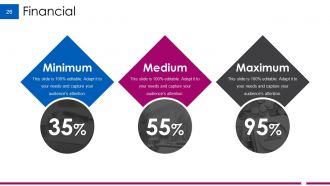
Diapositive 26 : Cette diapositive présente les scores financiers à afficher.
Diapositive 27 : Il s'agit d'une diapositive de citations pour mettre en évidence ou indiquer quelque chose de spécifique.
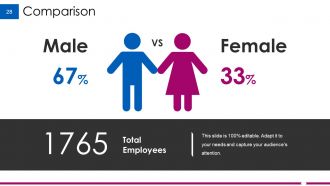
Diapositive 28 : Il s'agit d'une diapositive de comparaison pour montrer la comparaison de deux entités.
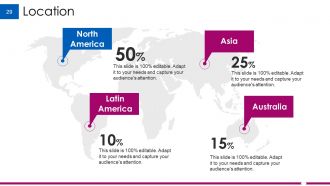
Diapositive 29 : Ceci est une diapositive de localisation de la carte du monde pour montrer la présence mondiale, la croissance, etc.
Diapositive 30 : Ceci est notre diapositive cible. Indiquez ici vos cibles, objectifs, etc.
Diapositive 31 : Il s'agit d'une diapositive Puzzle pour afficher des informations, des spécifications, etc.
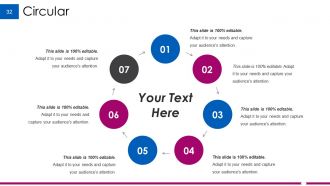
Diapositive 32 : Il s'agit d'une diapositive d'image circulaire pour afficher des informations, des spécifications, etc.
Diapositive 33 : Il s'agit d'une diapositive créative de blocs Lego pour présenter des informations, des spécifications, etc.
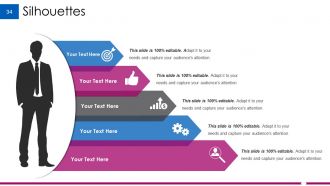
Diapositive 34 : Il s'agit d'une diapositive Silhouettes pour présenter des informations spécifiques aux personnes, des spécifications, etc.
Diapositive 35 : Il s'agit d'une diapositive de hiérarchie pour présenter l'équipe, les spécifications, etc.
Diapositive 36 : Il s'agit d'une diapositive d'image du diagramme de Venn pour afficher des informations, des spécifications, etc.
Diapositive 37 : Cette diapositive montre une carte mentale pour représenter des entités.
Diapositive 38 : Cette diapositive affiche une loupe avec des images pour indiquer les informations, les spécifications, etc.
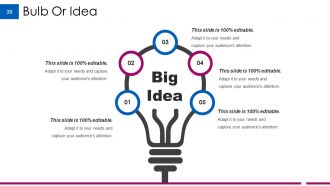
Diapositive 39 : Ceci est une diapositive Bulb ou Idea pour énoncer une nouvelle idée ou mettre en évidence des spécifications/informations, etc.
Diapositive 40 : Il s'agit d'une diapositive de remerciement avec le numéro de rue, la ville, l'état, le numéro de contact, l'adresse e-mail.
Exemple de présentation de budget PowerPoint avec les 40 diapositives :
Bloquez vos distractions avec nos exemples de diapositives de présentation PowerPoint de présentation de budget. Acquérir la capacité d'obtenir une mise au point précise.
-

Example Budget Presentation
-
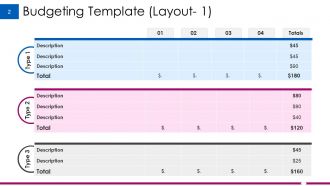
Budgeting Template Layout 1
-
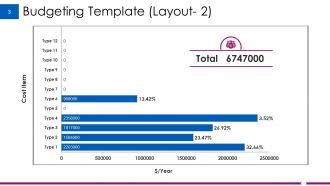
Budgeting Template Layout 2
-
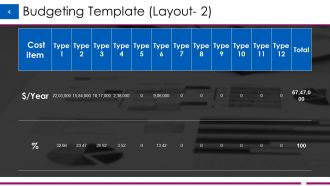
Budgeting Template Layout 2
-
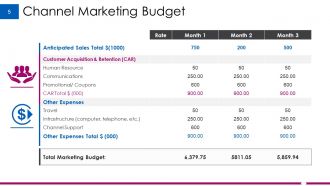
Channel Marketing Budget
-
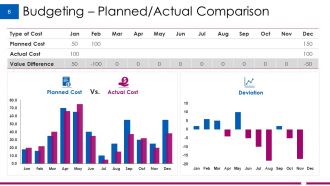
Budgeting Planned Actual Comparison
-
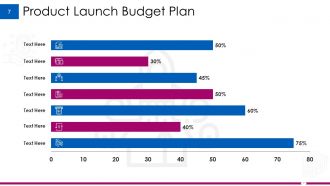
Product Launch Budget Plan
-
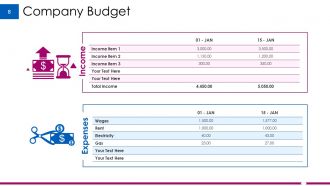
Company Budget
-
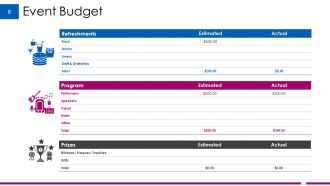
Event Budget
-
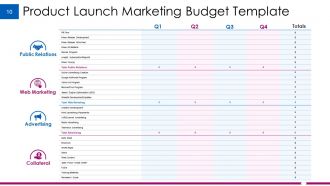
Product Launch Marketing Budget Template
-
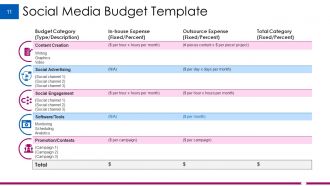
Social Media Budget Template
-
Example Budget Presentation Icon Slide
-

Charts Graphs
-

Coffee Break
-
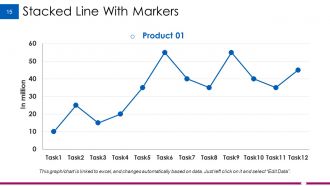
Stacked Line With Markers
-
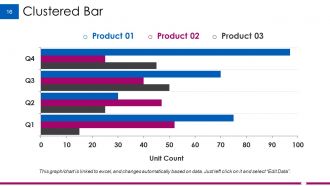
Clustered Bar
-
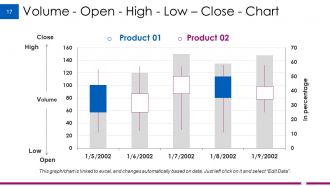
Volume Open High Low Close Chart
-
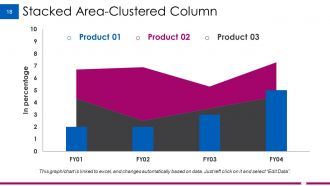
Stacked Area Clustered Column
-
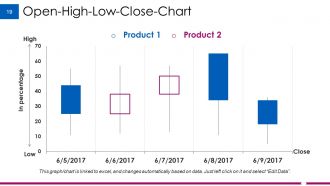
Open High Low Close Chart
-

Additional Slides
-
Our Mission Vision
-
About Us
-
Our Team
-
Our Goal
-
Dashboard
-
Financial
-

Quotes
-
Comparison
-
Location
-
Our Target
-

Puzzle
-
Circular
-
Lego
-
Silhouettes
-
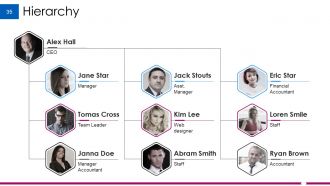
Hierarchy
-
Venn
-
Mind Map
-
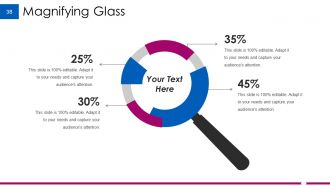
Magnifying Glass
-
Bulb Or Idea
-

Thank You
FAQs for Example Budget Presentation
Okay so start with an executive summary - gets everyone on the same page right away. Then break down your revenue and expenses (obviously), but here's the thing - charts are your best friend because nobody wants to stare at spreadsheet rows for 20 minutes. Include variance analysis showing where you hit or missed your targets. Oh, and definitely add your key assumptions so people understand how you got these numbers. Best/worst case scenarios are clutch too. Don't dump every tiny detail on them though - you want enough credibility without making their eyes glaze over. End with what you actually need from them and when.
Dude, visual aids will save your life in budget meetings. Nobody wants to stare at spreadsheet cells - trust me on this one. Bar charts work great for comparisons, line graphs show trends, pie charts break down categories. Keep each visual focused on one main point and make them big enough so people in back can actually see. The whole point is turning those boring number rows into something that clicks instantly. Oh, and pick charts that actually tell a story - don't just throw random graphs at people. Makes such a difference when you can spot patterns without squinting.
Don't cram every detail onto slides - people literally can't read tiny spreadsheet text from the back of the room. Start with the big picture first instead of diving straight into line items. What's your strategy? Why did you make these budget choices? I've seen people present last year's numbers as next year's goals which is... awkward. Charts and graphs are your friend here. Focus on explaining major changes rather than every single detail. Oh, and keep backup info handy for questions but don't dump it all in your main presentation or you'll lose everyone.
Dude, turn your budget into a story! Begin with where you were last year, then dive into current problems and opportunities. Your budget becomes the hero that solves everything and gets you to your goals. Numbers by themselves are mind-numbing, but connect them to actual outcomes and suddenly people care. Instead of boring line items, try "Here's what happens when we invest in..." Paint a picture of what winning looks like. I swear this approach works way better than just rattling off spreadsheet data. Makes the whole thing feel less like accounting homework.
Dude, your audience is literally everything when presenting budgets. Executives want the big picture stuff, department heads need nitty-gritty operational numbers, board members care about strategy. Each group has different financial knowledge too - some will get lost in the weeds, others want all the details. I've seen great budgets bomb because people didn't match their presentation style to the room. Switch up your language and visuals based on who's there. Quick tip: always ask yourself what decision they're actually trying to make with your info.
Tell a story with your data instead of just throwing numbers at people. Charts and graphs are your best friend - they make trends super obvious. Start with the "so what" every time. Why should they actually care? Ditch all the finance jargon (honestly, nobody knows what EBITDA means anyway). Plain English works way better. Connect the numbers to their department or company goals directly. Think ahead about what'll freak them out or get them excited. You'll want backup slides ready if someone wants to dive deeper into something specific.
Hey! So for budget presentations, match your chart type to what you're showing. Bar charts work great when comparing different budget categories. Line graphs are perfect for trends over time. Pie charts can show spending breakdowns, but honestly they get super messy once you have like 8+ categories. Keep things clean - don't jam everything onto one chart. Stick with the same colors throughout so it looks cohesive. Always label everything clearly because people will just stare blankly otherwise. Oh, and definitely talk through each chart out loud rather than letting people figure it out themselves. Trust me on that one.
First thing - take a breath and repeat their question back. Buys you time to think. Don't know something? Just admit it and say you'll circle back later. Way better than bullshitting your way through it. When someone's being hostile, I like to neutralize it: "So you're asking about our Q3 variance..." then just walk through the facts. Numbers are your friend here since they can't really argue with data. Sometimes you gotta redirect too - like "good point for next quarter's planning, but today we're focused on..." Have your main points ready so you can pivot without it being obvious.
Dude, the story is everything with budget presentations. Numbers alone will put people to sleep - I've watched it happen. Start with where you were, show where you are now, then paint the picture of where this budget takes you. Frame it like you're building a case for why they should care. What problems are you fixing? What smart bets are you making? Honestly, half these presentations fail because they just vomit spreadsheets without any context. Craft your narrative first, then slot the data in to support it. Way more effective than the other way around.
So for department budgets, you want line items broken down by category - personnel, operations, equipment, that kind of stuff. Project budgets are different though. Those work better when you organize by milestones or phases since you're tracking costs as things progress. Honestly? I've watched people get way too caught up in making spreadsheets look perfect when basic formatting works fine. The main thing is departmental ones focus on yearly recurring costs. Project ones are all about timelines and what you're actually delivering. Check if your finance team already has templates first - way easier than starting from scratch. Then just tweak whatever they give you.
Actually collect feedback right after each presentation instead of guessing what worked. I learned this the hard way after bombing the same way like three times in a row lol. Keep a simple doc tracking patterns - "needs more visuals" or "too much jargon" stuff like that. Tackle the most common feedback first since it'll make the biggest difference. Don't overhaul everything at once though. Test one or two tweaks next time, see what sticks. Honestly, this approach saved me from so many cringey moments. Keep what works, toss what doesn't.
PowerPoint or Google Slides for the actual presentation, obviously. But honestly? Do your data work in Excel first - way easier to build budget models and charts there, then just copy them over. PowerPoint's chart editing is kinda terrible tbh. If you want to get fancy, Tableau makes your numbers look really professional (though might be overkill depending on your audience). Google Workspace is solid for collaborating with people. Oh and Power BI's another option if you're already in the Microsoft ecosystem. Trust me, prep everything in Excel first then move it over - saves so much formatting headache later.
Be super specific with the numbers and dates - like actually say "we have $50K and need it done by March." Vague explanations just piss people off, honestly. Show them charts or simple comparisons so they can see exactly what gets axed or pushed back. Connect everything to stuff they actually care about: "this delays launch by three weeks" or "we're cutting two team members." Don't just dump bad news on them though. Always bring backup plans or ways to do it in phases. Makes the whole conversation way more productive than just being like "welp, we're screwed."
Look, just be brutally honest about everything - your assumptions, limitations, all the scary risks. I know it sucks when stakeholders don't want to hear about budget problems, but present every scenario anyway. Never massage the numbers to make things look better than they are. That always comes back to bite you. Give the same info to everyone, no playing favorites between departments. Oh, and admit when you're not sure about something! Some projections are basically educated guesses. Better to let people make decisions with the real picture than sugarcoat it.
Start with the money stuff right up front - ROI numbers, payback periods, all that. Don't bury it in some spreadsheet because honestly, executives won't dig through that mess. Charts work great for showing cost vs revenue over time. Each budget item needs to connect to something they actually care about (not just vague "improvements"). I always do realistic timelines too - nobody believes those overly optimistic projections anymore. Oh, and end with a simple ROI summary slide. They'll reference it later when deciding, so make it dead simple to understand.
-
Nice
-
Excellent
-
excellent
-
good
-
EXCELLENT
-
EXCELLENT
-
Best Representation of topics, really appreciable.
-
Visually stunning presentation, love the content.