

Ejemplo de presentación de Kaizen Diapositivas de presentación





Try Before you Buy Download Free Sample Product
 Impress Your
Audience
 100%
Editable
 Save Hours
of Time


Presentación de diapositivas de PowerPoint de la Presentación de Ejemplo de Kaizen que se centra en la mejora continua de las prácticas de trabajo. Mejorar los procesos puede aumentar directamente la rentabilidad. Presenta el concepto de kaizen y su implementación en varios aspectos con estas diapositivas de PowerPoint del círculo de calidad. El conjunto completo de diapositivas de PowerPoint del proceso de Kaizen incluye diapositivas listas con contenido como el significado de Kaizen, el marco de Kaizen 5S, los 3 Mus de Kaizen, la lista de verificación 4M, los tipos de desperdicio, Kaizen vs innovación, el ciclo PDCA, la declaración del problema, el plan de acción, el tiempo de entrega y el tiempo del ciclo, el ciclo de recopilación de datos, el análisis de causa y efecto, el análisis de Pareto, la solución al problema, la reevaluación de los objetivos, la plantilla antes y después, el formulario de informe, etc. Además, el diseño de la presentación de Six Sigma se puede utilizar para representar temas como la reingeniería de procesos empresariales, el aprendizaje experiencial, el control de procesos, el mantenimiento productivo total, la estrategia de mejora, la gestión lean y muchos más. Descarga el diseño de la presentación del Enfoque Kaizen para la Eficiencia Operativa para presentar iniciativas de mejora para tu negocio. Tómate el tiempo para hacer que tu presentación sea perfecta. Nuestras asequibles Diapositivas de Presentación de Ejemplo de Kaizen de PowerPoint están a un latido de distancia.
People who downloaded this PowerPoint presentation also viewed the following :
Contenido de esta presentación de Powerpoint
Diapositiva 1: Esta diapositiva muestra la Presentación de Ejemplo Kaizen. Indique el nombre de su empresa y comience.
Diapositiva 2: Esta diapositiva muestra la Agenda de su empresa. Añádalas aquí y utilícelas en consecuencia.
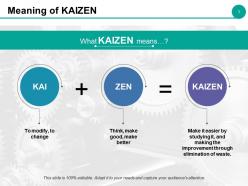
Diapositiva 3: Esta diapositiva establece el Significado de KAIZEN.
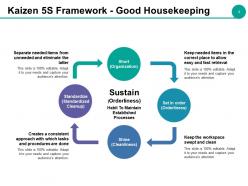
Diapositiva 4: Esta diapositiva muestra el Marco Kaizen 5S - Buen Mantenimiento del Orden que incluye los siguientes puntos: Corto (Organización), Ordenar (Orden), Brillar (Limpieza), Estandarizar (Limpieza Estandarizada), Mantener (Orden).
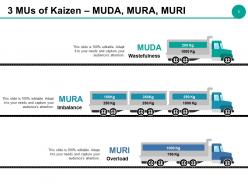
Diapositiva 5: Esta diapositiva presenta las 3 MUs de Kaizen: MUDA, MURA, MURI como Derroche, Desequilibrio, Sobrecarga.
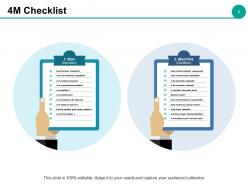
Diapositiva 6: Esta diapositiva muestra la Lista de Verificación 4M categorizada como: 1. Hombre (Operador) ¿Sigue los estándares? ¿Es aceptable su eficiencia laboral? ¿Es consciente de los problemas? ¿Es responsable/responsable? ¿Está calificado? ¿Tiene experiencia? ¿Se le asigna el trabajo correcto? ¿Está dispuesto a mejorar? ¿Mantiene buenas relaciones humanas? ¿Está en forma y saludable? 2. Máquina (Instalaciones): ¿Cumple con los requisitos de producción? ¿Cumple con las capacidades del proceso? ¿Es adecuada la lubricación? ¿Es adecuada la inspección? ¿Se interrumpe la operación debido a problemas con la máquina? ¿Cumple con los requisitos de precisión? ¿Hace algún ruido inusual? ¿Es adecuada la disposición? ¿Hay suficientes máquinas/instalaciones? ¿Todo está en buen estado de funcionamiento?
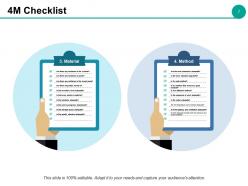
Diapositiva 7: Esta diapositiva también muestra la Lista de Verificación 4M categorizada como: 3. Material: ¿Hay errores en el volumen? ¿Hay errores en el grado? ¿Hay errores en el nombre de la marca? ¿Se mezclan impurezas? ¿Es adecuado el nivel de inventario? ¿Hay algún desperdicio de material? ¿Es adecuado el manejo? ¿Se abandona el trabajo en curso? ¿Es adecuada la disposición del almacenamiento? ¿Es adecuada la norma de calidad? 4. Método: ¿Son adecuadas las normas de trabajo? ¿Se actualiza la norma de trabajo? ¿Es un método seguro? ¿Es un método que asegura un buen producto? ¿Es un método eficiente? ¿Es adecuada la secuencia de trabajo? ¿Es adecuada la configuración? ¿Son adecuadas la temperatura y la humedad? ¿Son adecuadas la iluminación y la ventilación? ¿Hay un contacto adecuado con los procesos anteriores y posteriores?
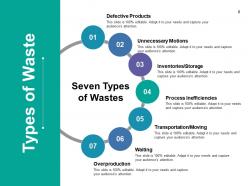
Diapositiva 8: Esta diapositiva muestra los Tipos de Desperdicios. Hemos mencionado siete de ellos que son los siguientes: Productos Defectuosos, Movimientos Innecesarios, Inventarios/Almacenamiento, Ineficiencias de Proceso, Transporte/Movimiento, Espera, Sobreproducción.
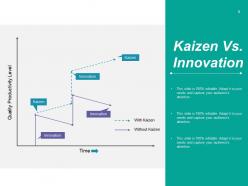
Diapositiva 9: Esta es una diapositiva de gráfico de Kaizen Vs. Innovación. Utilícela según las necesidades de su negocio.
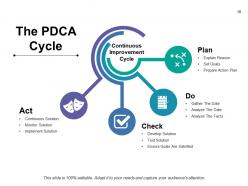
Diapositiva 10: Esta diapositiva muestra el Ciclo PDCA subtitulado como Ciclo de Mejora Continua, subdividido además en: Explicar la Razón, Establecer Metas, Preparar Plan de Acción, Recopilar los Datos, Analizar los Datos, Analizar los Hechos, Desarrollar Solución, Probar Solución, Asegurar que se Cumplan las Metas, Implementar Solución, Monitorear Solución, Solución Continua, Actuar, Verificar, Hacer, Planificar.
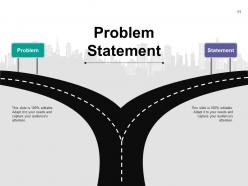
Diapositiva 11: Esta diapositiva presenta el Planteamiento del Problema con una imagen de hoja de ruta.
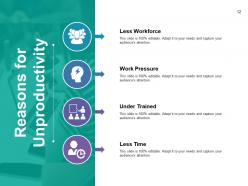
Diapositiva 12: Esta diapositiva establece cuatro Razones principales de la Improductividad: Menos Fuerza Laboral, Presión Laboral, Capacitación Insuficiente, Menos Tiempo.
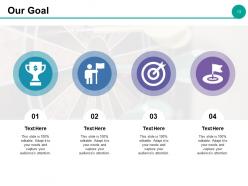
Diapositiva 13: Esta es la diapositiva de Nuestra Meta con una imagen de icono. Indique sus metas aquí.
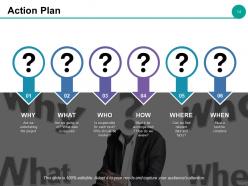
Diapositiva 14: Esta diapositiva muestra un Plan de Acción con: POR QUÉ emprendemos el proyecto, QUÉ vamos a hacer, QUÉ datos se requieren, QUIÉN es responsable de cada tarea, QUIÉN debe participar, CÓMO debe realizarse, CÓMO revisamos, DÓNDE podemos encontrar datos y hechos relevantes, CUÁNDO debe completarse una tarea.
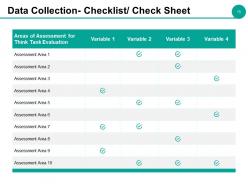
Diapositiva 15: Esta diapositiva muestra la Recopilación de Datos: Lista de Verificación/Hoja de Verificación.
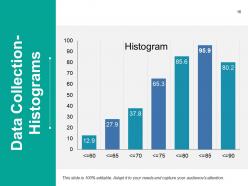
Diapositiva 16: Esta diapositiva presenta la Recopilación de Datos en forma de Histograma.
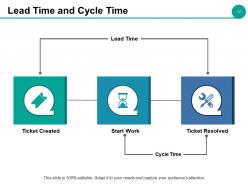
Diapositiva 17: Esta diapositiva muestra el Tiempo de Entrega y el Tiempo de Ciclo según el Ticket Creado, Ticket Resuelto, Tiempo de Ciclo, Tiempo de Entrega, Inicio del Trabajo.
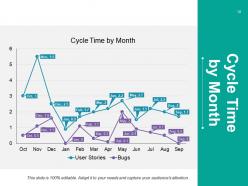
Diapositiva 18: Esta diapositiva muestra el Tiempo de Ciclo por Mes de productos/entidades, etc. gráficamente.
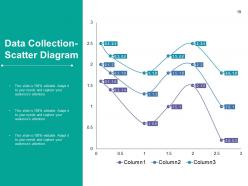
Diapositiva 19: Esta diapositiva muestra la Recopilación de Datos utilizando un Diagrama de Dispersión.
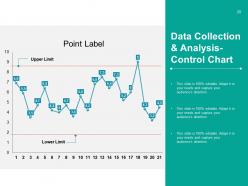
Diapositiva 20: Esta diapositiva presenta la Recopilación y Análisis de Datos: Gráfico de Control para mostrar: Límite Superior, Etiqueta de Punto, Límite Inferior.
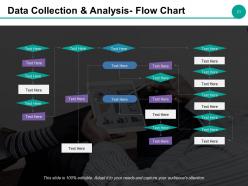
Diapositiva 21: Esta diapositiva muestra la Recopilación y Análisis de Datos en forma de Diagrama de Flujo.
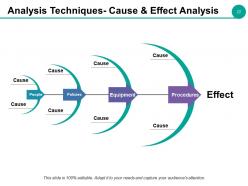
Diapositiva 22: Esta diapositiva presenta las Técnicas de Análisis: Análisis de Causa y Efecto en forma de diagrama de espina de pescado para mostrar: Causa, Equipo, Procedimientos, Personas, Políticas, Efecto.
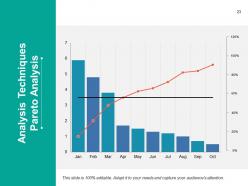
Diapositiva 23: Esta diapositiva muestra las Técnicas de Análisis: Análisis de Pareto.
Diapositiva 24: Esta diapositiva muestra Soluciones a los Problemas proporcionadas con imágenes creativas.
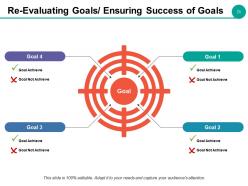
Diapositiva 25: Esta diapositiva ayuda a Reevaluar Metas/Asegurar el Éxito de las Metas. Muestre aquí sus Metas: para lograr y no lograr.
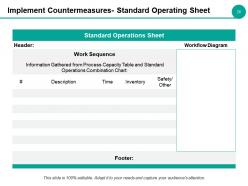
Diapositiva 26: Esta es una diapositiva de Hoja de Operación Estándar de Implementación de Contramedidas. Complete la información relevante y utilícela.
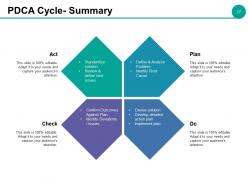
Diapositiva 27: Esta diapositiva presenta el Ciclo PDCA: Resumen con los siguientes componentes: Planificar, Hacer, Verificar y Actuar. Planificar: Definir y Analizar el Problema, Identificar la Causa Raíz. Hacer: Idear la solución, Desarrollar un plan de acción detallado, Implementar el plan. Verificar: Confirmar los Resultados frente al Plan, Identificar Desviaciones/Problemas. Actuar: Estandarizar la solución, Revisar y definir los siguientes problemas.
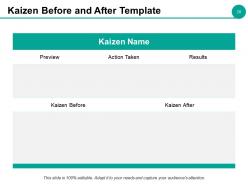
Diapositiva 28: Esta diapositiva presenta la Plantilla Antes y Después de Kaizen con el Nombre de Kaizen para agregar.
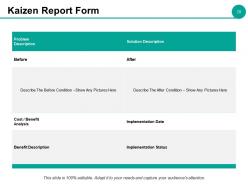
Diapositiva 29: Esta es una diapositiva de Formulario de Informe Kaizen. Agregue los detalles necesarios y utilícela.
Diapositiva 30: Esta es una diapositiva de imagen de Descanso para Café. Puede modificar el contenido según sea necesario.
Diapositiva 31: Esta es una diapositiva de Presentación de Ejemplo Kaizen con varios iconos. Modifíquela según sea necesario.
Diapositiva 32: Esta diapositiva se titula Diapositivas Adicionales. Puede cambiar el contenido de la diapositiva según sea necesario.
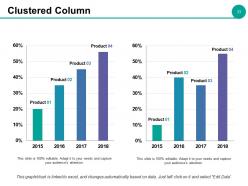
Diapositiva 33: Esta es una diapositiva de Columnas Agrupadas para presentar comparaciones de productos/entidades, especificaciones, etc.
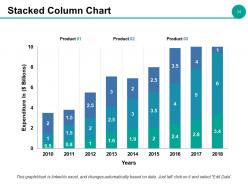
Diapositiva 34: Esta es una diapositiva de Gráfico de Columnas Apiladas para presentar comparaciones de productos/entidades, especificaciones, etc.
Diapositiva 35: Esta diapositiva se titula Nuestra Misión con una imagen de fondo.
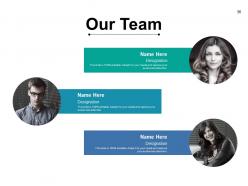
Diapositiva 36: Esta diapositiva presenta Nuestro Equipo con nombre y cargo.
Diapositiva 37: Esta es una diapositiva Sobre Nosotros donde puede mostrar los aspectos Profesionales, Creativos o Talentosos de su empresa.
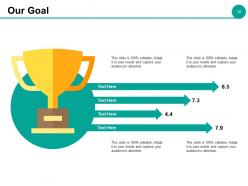
Diapositiva 38: Esta es una diapositiva de Nuestra Meta. Indique sus metas aquí.
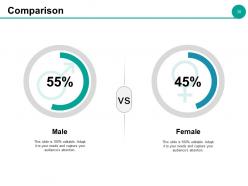
Diapositiva 39: Esta diapositiva muestra una Comparación por Género. Muestra la imagen masculina y femenina comparada en términos de porcentajes.
Diapositiva 40: Esta es una diapositiva de Citas. Inserte una cita o lo que desee aquí.
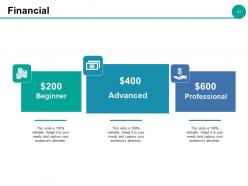
Diapositiva 41: Esta diapositiva muestra la Puntuación Financiera según los niveles Avanzado, Profesional y Principiante.
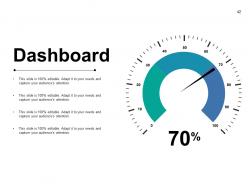
Diapositiva 42: Esta es una diapositiva de Panel de Control con números para usar para presentar KPI, métricas, etc.
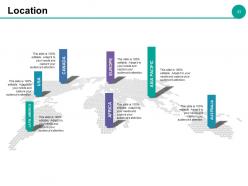
Diapositiva 43: Esta es una diapositiva de Mapa Mundial para fijar/presentar Ubicación para mostrar presencia global, crecimiento, etc.
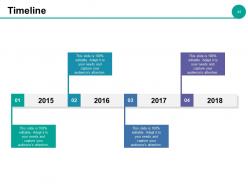
Diapositiva 44: Esta es una diapositiva de Línea de Tiempo. Puede presentar el crecimiento anual, etc. con ella.
Diapositiva 45: Esta diapositiva muestra Notas Adhesivas para fijar hechos importantes, avisos, etc. relacionados con la empresa.
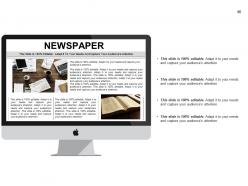
Diapositiva 46: Esta es una diapositiva de PERIÓDICO para representar cualquier texto resaltado/resumido.
Diapositiva 47: Esta es una diapositiva de Rompecabezas para mostrar información, especificaciones, etc.
Diapositiva 48: Esta es la diapositiva de Nuestro Objetivo. Indique sus objetivos aquí.
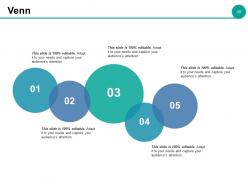
Diapositiva 49: Esta es una diapositiva de imagen de Diagrama de Venn para mostrar información, especificaciones, etc.
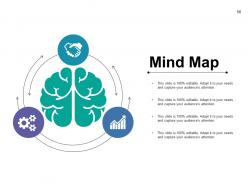
Diapositiva 50: Esta diapositiva muestra un Mapa Mental. Indique la información, especificaciones, etc. aquí.
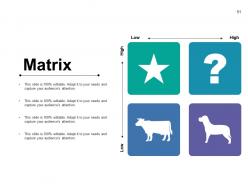
Diapositiva 51: Esta diapositiva presenta una Matriz con alto, bajo y viceversa. Puede agregar o modificar el texto según sea necesario.
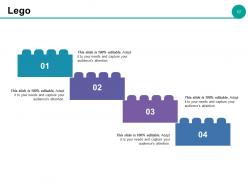
Diapositiva 52: Esta es una diapositiva de Lego para presentar información, especificaciones, etc.
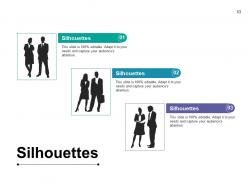
Diapositiva 53: Esta es una diapositiva de Siluetas para presentar información, especificaciones, etc. específicas de las personas.
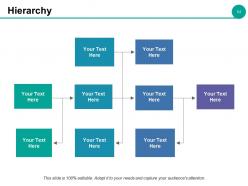
Diapositiva 54: Esta es una diapositiva para la representación Jerárquica. Muestre la gestión de arriba hacia abajo en los cuadros de texto dados.
Diapositiva 55: Esta es una diapositiva de Idea en forma de bombilla creativa.
Diapositiva 56: Esta diapositiva presenta una imagen de Lupa para mostrar información, especificaciones, etc.
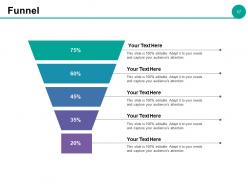
Diapositiva 57: Esta es una diapositiva de imagen de Embudo para mostrar aspectos de embudo, etc.
Diapositiva 58: Esta es una diapositiva de Gracias con Dirección # número de calle, ciudad, estado, Dirección de correo electrónico, Números de contacto.
Presentación de diapositivas de PowerPoint de Ejemplo Kaizen con las 58 diapositivas: Presentación de diapositivas de PowerPoint de Ejemplo Kaizen con las 58 diapositivas
Cubrir el circuito con nuestras Diapositivas de Presentación de Powerpoint de Ejemplo Kaizen. Le permiten ir a cualquier lugar que desee.









FAQs for Example Kaizen Presentation
So Kaizen is basically about tiny improvements adding up over time - way better than trying to fix everything at once, honestly. Get your team spotting little inefficiencies daily and throwing out ideas, no matter how small. Quick regular meetings work great for this. You don't need big budgets or approvals, which is nice. Just standardize what works, track results, and make tweaking stuff part of your routine instead of some big project. Pick one workflow this week and ask everyone how to make it even 1% better. Those small changes really do compound.
Just grab a couple volunteers and pick one annoying problem to tackle first. Look for obvious waste - like people waiting around or doing the same task twice. That stuff's free to spot anyway. Weekly 15-minute huddles work great where everyone throws out one improvement idea. Honestly, changing how people think is way harder than the actual process. Sticky notes and whiteboards are fine - you don't need expensive software or anything. Make it routine instead of some big deal project. Oh, and definitely pick something you can measure so you've got wins to show off early.
Honestly, your employees make or break Kaizen - no joke. They're on the floor every day seeing stuff management totally misses. You need them feeling comfortable enough to actually speak up about improvements, even tiny ones. The trick is making sure people aren't scared they'll get dumped with extra work for suggesting changes. I'd probably start small - ask everyone to find just one thing they could tweak this week. Once people see their ideas matter, that's when things really start clicking. It's kinda like building trust first, then the improvements follow naturally.
Track the obvious stuff first - cycle times, defect rates, cost savings. Those numbers don't lie. But here's what I've learned: the team engagement piece is actually huge. Are people submitting more improvement ideas? Do they feel like they can actually change things? Survey them regularly. Oh, and measure before each Kaizen event, then check back months later to see if changes actually stuck around. That follow-up part is where most companies drop the ball, honestly. You can't just implement something and assume it's working forever.
Honestly, the biggest pain is just people hating change. Everyone's comfortable with their routine and thinks kaizen means extra work dumped on them. Leadership often wants magic overnight results too, which is super frustrating since it's really about tiny improvements building up. Plus teams are already swamped - where's the time for improvement stuff? Start with easy wins first, get some momentum going. Make sure your boss is actually on board and visible about it. Celebrate the small stuff! Don't try fixing everything at once either. Pick one area and nail that before moving on. Quick wins really do help people buy in.
So basically kaizen is about making tiny tweaks every single day instead of waiting for some massive company restructuring. Get everyone involved - like literally everyone from the warehouse guys to upper management. Those small 1% improvements? They stack up crazy fast, which honestly blew my mind when I first learned about it. The trick is making people feel comfortable speaking up about annoying little things without getting shot down. Rather than those quarterly "improvement initiatives" that everyone forgets about by month two, you're just baking it into how work actually gets done. Start simple: ask your team what one tiny thing drives them nuts during their shift.
Yeah, totally! Hospitals use it all the time for stuff like cutting down wait times or fixing how they handle meds. Schools do it too - tweaking how they teach or figuring out better ways to use their budgets. The whole point is making tiny improvements instead of huge overhauls, which honestly makes way more sense than trying to change everything at once. You can literally pick any process that's bugging you. Maybe just grab one annoying thing in your department and try fixing it this week? Even something super small works.
Here's the thing - Kaizen is way more accessible than the other two. You don't need a statistics degree or huge process overhauls. Six Sigma is super data-heavy and goes after specific defect problems (works great but kinda intense). Lean cuts waste but can get pretty rigid. With Kaizen, your whole team just looks for small daily improvements instead of waiting for some big initiative. Sure, Six Sigma might slash defects by 99%, but honestly? Kaizen builds this culture where people naturally think "how can we do this better?" Start there if you want quick wins without the headache.
Honestly, you've gotta walk the walk first - actually join those kaizen sessions instead of just preaching about them. When your team finds better ways to do stuff, celebrate it publicly. I see way too many leaders who say they want improvement but then get all pissy when things change or aren't perfect right away. Give people room to mess up without getting in trouble. Budget some time each week for this work - maybe even small experiments. Oh, and flip your questions around. Instead of "why didn't this work?" try "what'd we learn from this?" Makes a huge difference in how people approach failures.
So for Kaizen tools, you've got 5 Whys for digging into root causes, plus value stream mapping to see your whole process. A3 reports are solid for problem-solving. PDCA cycles are honestly addictive once you get the hang of them - my old boss was obsessed with Plan-Do-Check-Act everything. Gemba walks get you out there seeing what's really happening on the floor. Then there's 5S for workspace organization, standard work docs, and fishbone diagrams. I'd start with 5 Whys and PDCA though - they're dead simple but work on literally any problem you throw at them.
Oh, this is actually pretty cool - kaizen works because it gives people real input on their own work stuff. Instead of just being told what to do, employees get to spot problems and fix them. That feeling when your idea actually gets used? Pretty awesome. Everyone becomes a problem-solver rather than just going through the motions. I've seen it work best when you start super small though - like ask your team what one tiny thing annoys them daily and tackle that first. People naturally care more when they're helping shape how things run. It's way better than the old "shut up and work" approach honestly.
You need standardization before Kaizen can do anything useful. Think of it this way - how do you know if you're actually improving without a baseline? Everyone doing things their own random way makes it impossible to spot real problems or measure progress. Plus (and this drives me crazy) improvements just vanish when people drift back to old habits. Document whatever your best current process is first. That becomes your starting point. From there you can actually build on something solid instead of just throwing changes at chaos and hoping they stick.
Look, you can't just run Kaizen as a one-time thing and expect it to stick. Build it into how your team actually works - like weekly improvement sessions that become as routine as Monday meetings. Leadership needs to walk the walk too (which honestly is the hardest part). Pick one process first and make small tweaks part of their daily routine, not something extra they have to remember. Track what's actually working after 6+ months because initial wins don't mean much if people revert back. You want those little improvements happening automatically. Set up ways to measure if changes are really sticking - that's where most companies drop the ball.
So Toyota's the obvious answer - they literally invented Kaizen and still use it everywhere. 3M does it too, giving employees time to mess around with ideas (Post-it Notes came from this!). Canon cut their camera production time in half using it. Even Southwest Airlines applies the same thinking to their operations, which honestly makes sense when you think about it. My advice? Don't overthink it. Just grab your team and pick that one annoying process everyone complains about. Start there and see what happens.
So basically, tech makes Kaizen way less of a pain than those old paper systems. Digital suggestion boxes and mobile apps let your team drop ideas instantly - which honestly saves so much time. Real-time dashboards show you actual data instead of just hoping your changes worked. Remote teams can jump in too, which wasn't really possible before. Even basic stuff like shared digital boards speeds up those PDCA cycles. My advice? Don't go crazy with tools right away. Just grab one that fixes whatever's slowing you down most.
No Reviews