

Expense Tracking Report Powerpoint Ppt Template Bundles




Try Before you Buy Download Free Sample Product
 Impress Your
 Audience
 100%
100% Editable
 Save Hours
 of Time


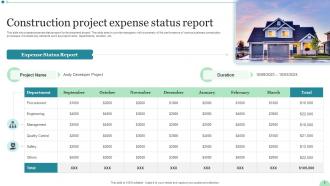
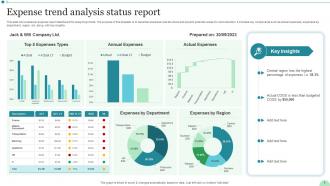
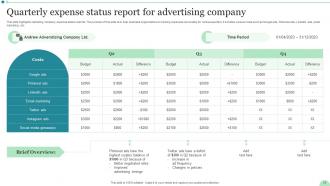
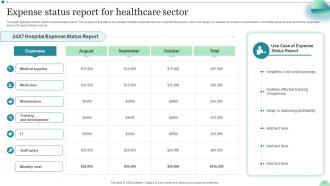
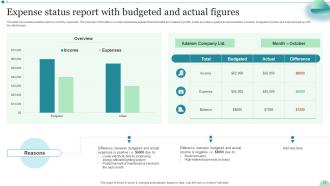
Introducing our comprehensive Expense Status Report PowerPoint PPT presentation your ultimate solution for efficient expense management. This power packed PPT equips businesses with an in depth analysis of their financial landscape through three vital components the Expense Progress Report, Expense Tracking Report, and Expense Analysis Report. With these powerful features, effortlessly monitor expense trends, identify cost saving opportunities, and track expenditure milestones. Seamlessly designed for clarity and accuracy, this PPT is an invaluable asset for financial executives, project managers, and business owners alike. Stay ahead of the curve and make informed decisions by harnessing the potential of our Expense Status Report PPT your pathway to optimized financial performance and enhanced business success.
People who downloaded this PowerPoint presentation also viewed the following :
Expense Tracking Report Powerpoint Ppt Template Bundles with all 14 slides:
Use our Expense Tracking Report Powerpoint Ppt Template Bundles to effectively help you save your valuable time. They are readymade to fit into any presentation structure.

FAQs for Expense Tracking Report Powerpoint
So you'll need the basics first - date, vendor, amount, and what category it falls under. Always snap pics of your receipts because trust me, nobody wants to hunt those down later. Add why you spent the money (business purpose or project code) and how you paid - company card, your own money waiting for reimbursement, whatever. For travel stuff, track your mileage too. Tax details if that applies to your situation. I usually organize everything by date but some people prefer grouping by project - just pick whatever won't make your finance team grumpy when they're reviewing everything.
Look at your last few months of spending first - that'll show you the natural patterns. Then make categories that actually match what you buy: "office supplies," "software subscriptions," "travel" instead of dumping everything into "miscellaneous." Honestly, I've seen so many budgets where half the stuff ends up in "other" and it's completely useless. Break things down further too. Like split marketing into "digital ads," "events," "content creation." Way more helpful when you're trying to figure out what's actually eating your budget. The subcategories are where the real insights happen.
QuickBooks or Xero are your best bet - they handle everything and integrate with your actual accounting. FreshBooks works well if you're freelancing or keeping things simple. Honestly, I'd avoid Excel unless you love building spreadsheets for fun (which, why would you?). Expensify's pretty decent for just capturing receipts and basic reports without the full accounting setup. Receipt Bank does similar stuff. My advice? Just try QuickBooks Online's free trial first. It'll probably do everything you need and then some. Most people end up sticking with it anyway.
I'd go with monthly reports - that's the sweet spot for most people. You get enough data to see real patterns without drowning in daily details. Plus it lines up with your bills and paychecks anyway. If you're dealing with tons of transactions or really watching every penny, weekly might work better. But honestly? I've watched too many friends do quarterly reports and then act shocked when they're broke. Monthly keeps you aware without being obsessive. You can always adjust if your spending gets crazy during certain periods.
Honestly, the biggest mess-ups are mixing your personal stuff with business expenses - so tempting when you're using the same card. Don't go crazy with categories either. I learned this the hard way - having like 50 different expense types just makes everything a nightmare to sort through later. Grab those receipts immediately or they'll vanish into thin air. Set up some kind of regular update schedule too, because catching up after months is brutal. Oh, and actually look at the data sometimes instead of just hoarding it - that's where you get the good insights.
Honestly, visuals are a game-changer for expense presentations. People can spot trends and budget issues instantly instead of squinting at endless spreadsheet rows. Bar charts work great for comparing categories, line graphs show monthly patterns, and pie charts break down department spending. I always use red for anything over-budget - it's like a warning sign nobody can ignore. The difference is night and day. Your audience will actually pay attention instead of checking their phones, plus you'll get way better support for budget decisions. Trust me, it beats reading numbers aloud any day.
Honestly, start with solid processes from day one - standardize your expense categories and make people submit receipts for anything over like $50. Our Q3 report was an absolute disaster because I didn't do this! Weekly spot checks save your sanity too. Don't wait until month-end to review stuff. Get expense software that catches duplicates automatically (seriously, humans miss this constantly). Train everyone on the same coding system so you're not playing translator later. Monthly reconciliation meetings sound boring but they'll catch problems early. Way better than scrambling during busy season.
Looking at expense reports is like having a roadmap for your future budgets - you'll see exactly where money disappeared so you can plan better next time. Pull your last 6 months of data first. Seasonal patterns jump out pretty quickly, plus you'll catch those random expenses that somehow keep happening (seriously, how do office supplies cost so much?). The real win is spotting which categories always blow past your budget. Then you can actually set realistic numbers instead of just winging it. Historical spending becomes your baseline for what's actually realistic, not just hopeful.
Focus on the big four: total spend vs budget, spending by category/department, variance analysis, and trends over time. Average cost per employee is solid too if it fits your company - bosses eat that stuff up. Flag any policy violations or weird spikes that need explaining. The variance piece is key though - call out anything over 10% off target with a quick explanation of why it happened. Really, you want to show not just what got spent, but whether it makes sense strategically. Oh and don't just dump numbers on them - include some narrative so they actually understand what's going on.
Check your expense reports monthly - don't wait for budget time. Hunt for recurring charges you forgot about (guilty of this myself with random subscriptions). Notice which costs keep climbing without good reason. If one department's office supply bill is triple another's, dig into why. Look for vendor contracts you can renegotiate too. I flag anything that jumps 20%+ compared to last month. Honestly, most companies just let expenses drift upward without questioning them. Quick monthly reviews catch this stuff before it gets out of hand.
Dude, automation totally changed my expense game. My phone scans receipts now and dumps everything straight into my accounting software - no more digging through random paper scraps in my wallet (thank god). It'll categorize stuff automatically and catch when you're breaking company policies. Reports happen instantly instead of me spending hours on spreadsheets. Honestly, the pattern tracking is pretty cool too. You just set up the rules once and it handles the boring work. I'd say grab one tool first, then add more as you get comfortable with it.
Honestly, it's all about giving people what they actually need. Executives want the big picture - budget vs actual, major trends, that's it. Department managers need way more detail about their team's spending and where the money's going by category. Finance teams are gonna want everything - every single transaction, compliance stuff, coding details, the works. Your accounting people also need it formatted differently for their reconciliation thing. I always ask each group upfront what specific numbers they're looking for. Saves so much back-and-forth later. Match the data depth to how they make decisions and you're golden.
Ugh, the paperwork nightmare is real - IRS wants you keeping receipts for 3+ years minimum. If you're public, SOX compliance is a massive pain with all those internal controls over expenses. Entertainment and gifts get super sketchy with anti-bribery laws like FCPA breathing down your neck. Healthcare companies have it even worse honestly, with all those extra physician payment restrictions. Your industry might have random other rules too. Definitely bug your compliance people to figure out what actually applies to you guys specifically - way better than guessing.
Skip the PDF dump approach - nobody learns that way! Get people actually clicking around in the system with real expense scenarios from your company. Cover the basics they'll hit every day, like common categories and how approvals work. After a couple weeks, do quick check-ins since that's when the real questions pop up. Honestly, cheat sheets save everyone's sanity for the routine stuff. Pick a few tech-savvy people as your unofficial help desk. The goal? Don't make it feel like learning rocket science on day one.
Honestly, start with super clear policies so nobody can claim they "didn't know." Random audits are your friend here - keeps everyone on their toes. I'd require receipts for anything over $25 (learned that one the hard way). Good expense software makes a huge difference too - when it's easy to report, people actually do it on time. Oh, and this might sound obvious but managers need to be totally transparent with their own expenses. Sets the whole vibe, you know? Just look at where your current system's breaking down first - that'll show you exactly what needs fixing.
-
Easily Understandable slides.
-
The design is very attractive, informative, and eye-catching, with bold colors that stand out against all the basic presentation templates.