Department Budget Template Powerpoint Ppt Template Bundles
Try Before you Buy Download Free Sample Product
Audience
Editable
of Time
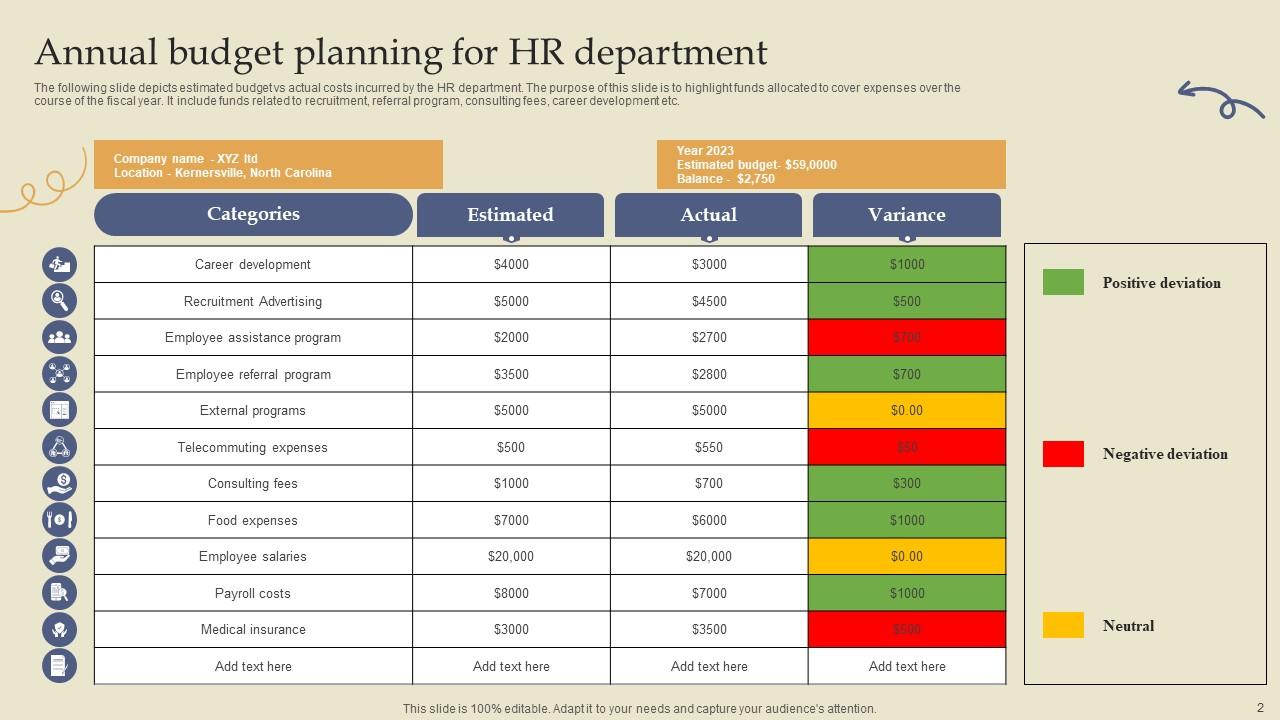
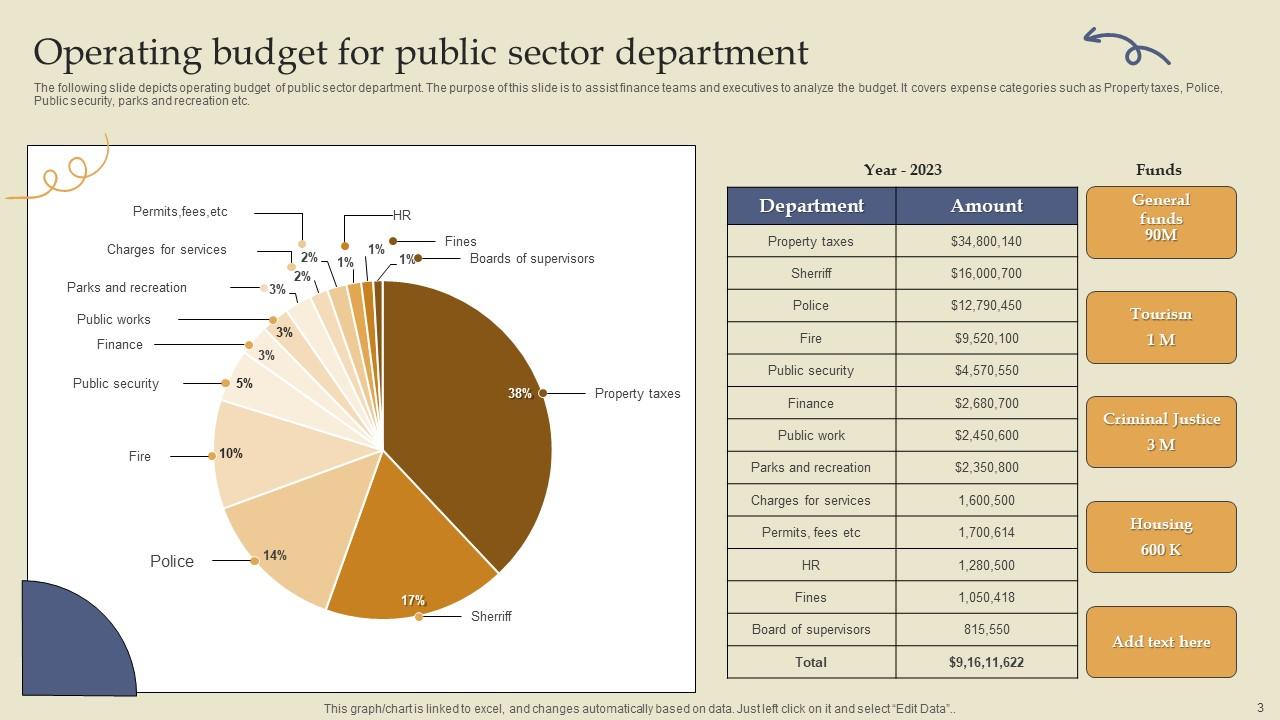
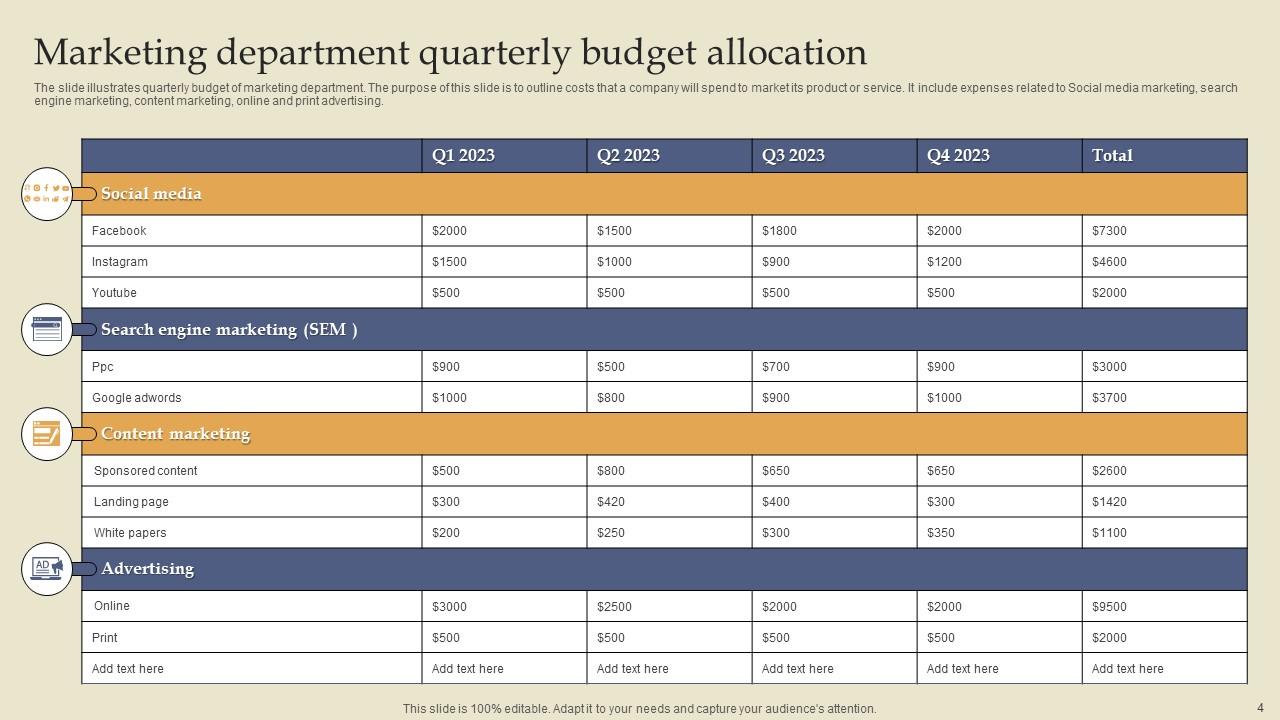
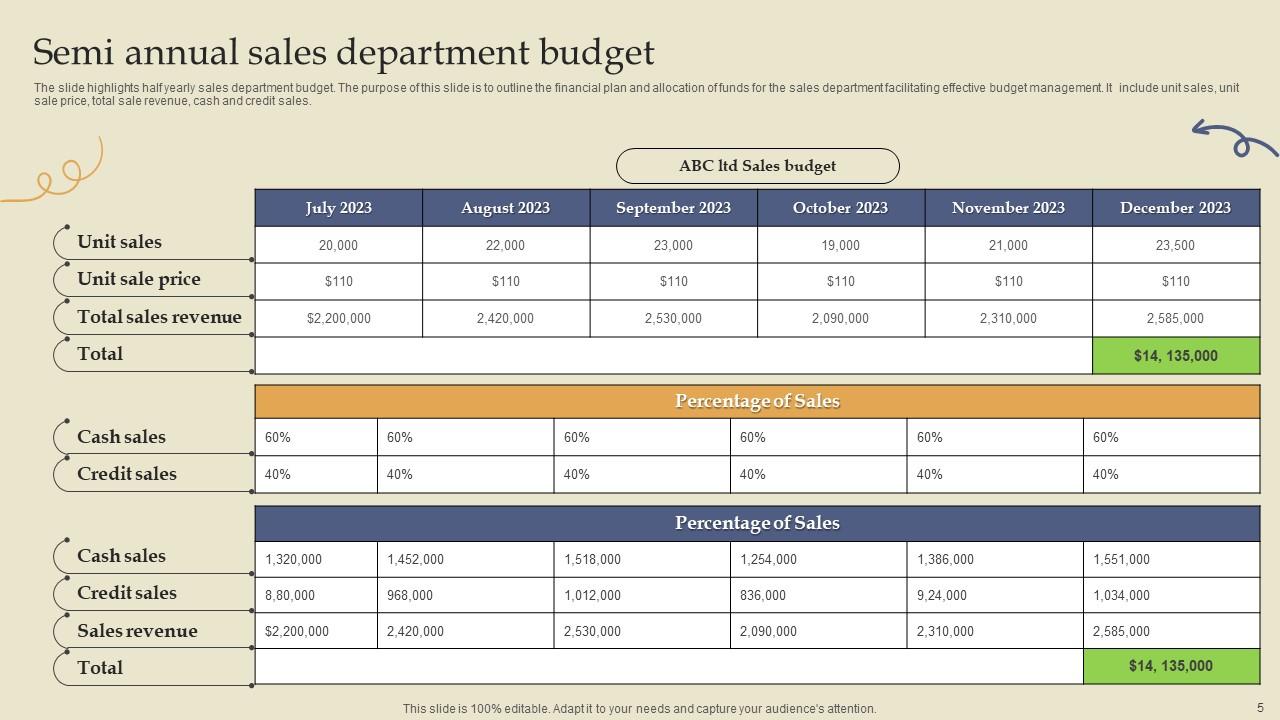
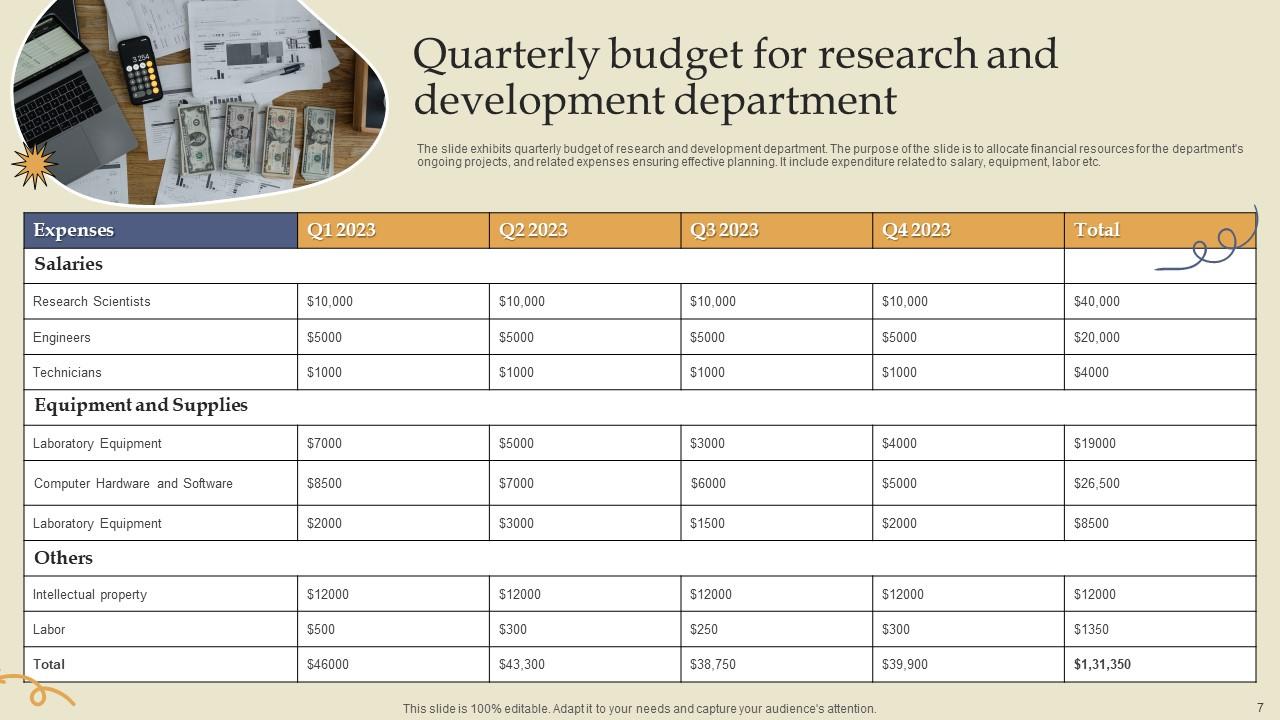
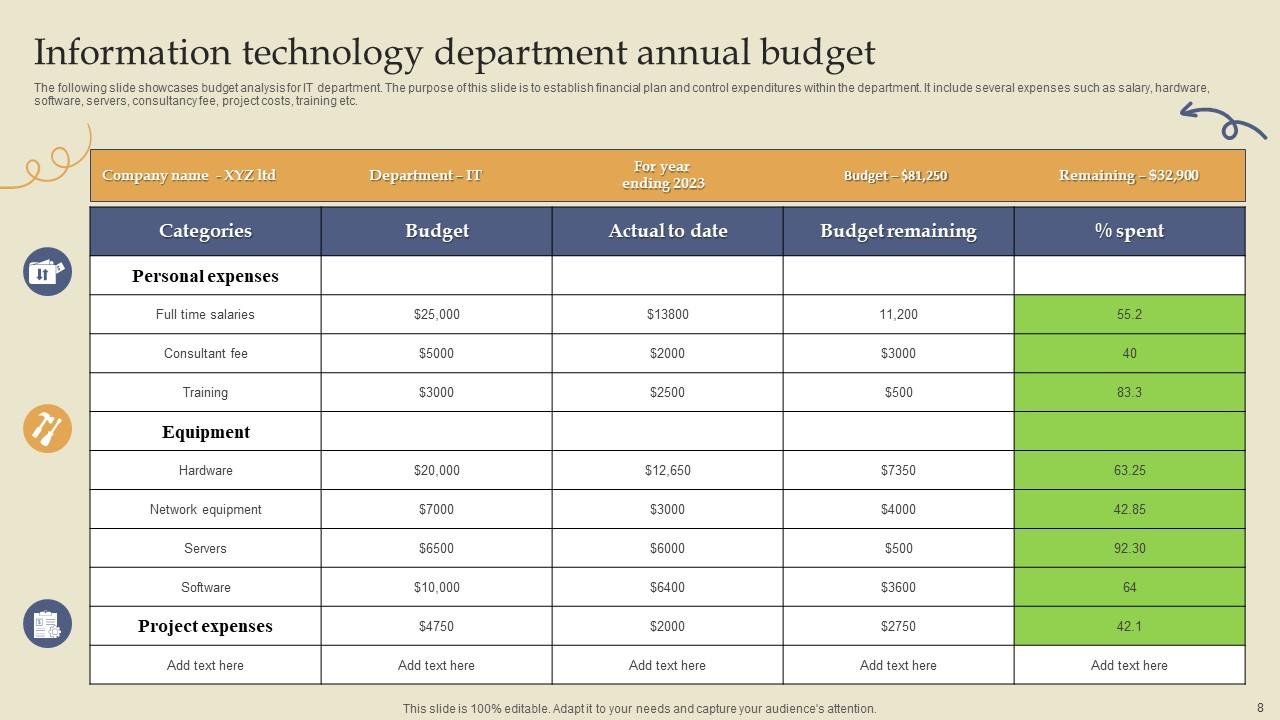
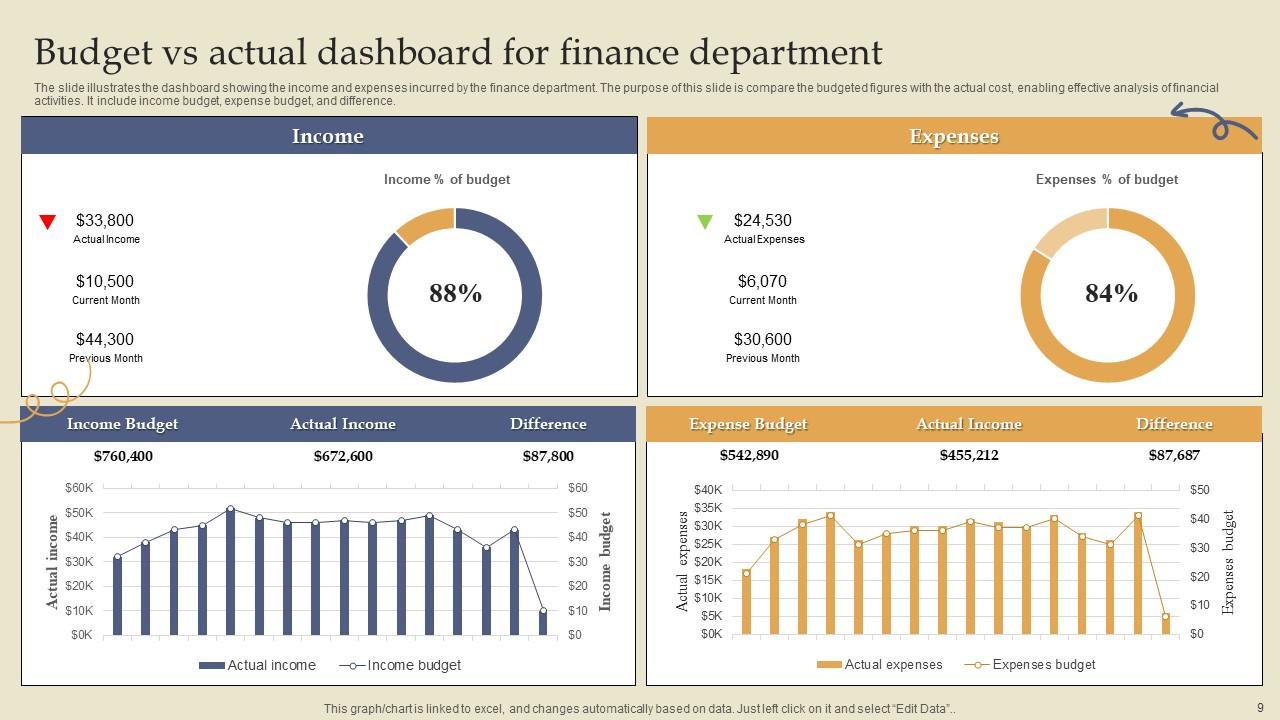
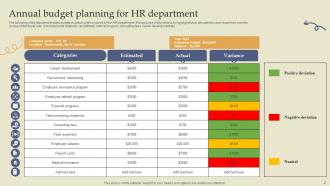
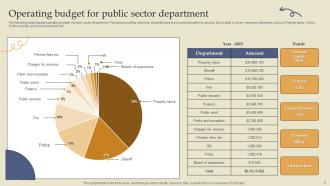
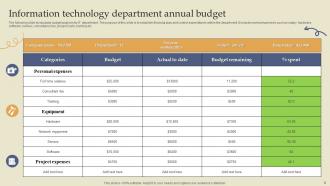
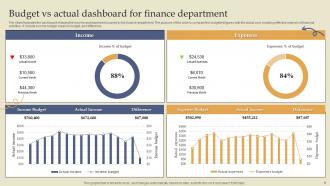
Introducing our comprehensive and user friendly PPT on department budget, designed to streamline your budgeting process and optimize financial management. Whether you are responsible for the HR department budget, quarterly budget for marketing, sales budget, this tool has you covered. With a focus on budget planning and allocation, our PPT provides valuable insights into effective financial decision making. It offers detailed guidelines on creating and managing budgets, ensuring you stay on track and achieve your organizational goals. From tracking expenses to forecasting revenue, this PPT empowers you to make informed and strategic choices. Additionally, our PPT also caters to the evolving landscape of digital marketing, highlighting key budget considerations in this domain. Gain a competitive edge by leveraging insights into digital marketing trends, optimizing your budget allocation, and maximizing returns on investment. Upgrade your budget presentation, and unlock the potential for enhanced financial control and success across your departments.
People who downloaded this PowerPoint presentation also viewed the following :
Department Budget Template Powerpoint Ppt Template Bundles with all 17 slides:
Use our Department Budget Template Powerpoint Ppt Template Bundles to effectively help you save your valuable time. They are readymade to fit into any presentation structure.
FAQs for Department Budget Template Powerpoint
So start with last year's numbers as your baseline - that's always the easiest way. You'll need sections for revenue, personnel costs (salaries, benefits, contractors), operational stuff like supplies and software, plus any big equipment purchases. Overhead allocations are annoying but you can't skip them or they'll come back to haunt you later. Definitely add variance tracking and quarterly breakdowns. Oh, and create an assumptions page! Seriously, document why you chose certain numbers because leadership will 100% ask during reviews and you don't want to be scrambling for answers. Include approval workflows too.
Look, customization is where these templates actually become worth using. Your marketing team needs campaign and event categories, while IT cares about software licenses and hardware costs. Pretty different stuff, right? You can add whatever line items make sense, tweak the formulas, change reporting periods - basically stop forcing your budget into categories that don't match reality. I'd start by figuring out your top 5-7 expense types first. Then build from there. Way better than trying to make generic templates work when they clearly weren't designed for how your team operates.
Honestly? Just use Excel or Google Sheets. They're perfect for department budgets - handle all the formulas and pivot tables you'll need. Google Sheets is better if you're working with a team since everyone can edit at the same time. QuickBooks is great too if you want to pull in actual spending data to see how you're doing against budget. I've watched people waste so much time trying fancy budgeting software when a simple spreadsheet does the trick. My advice - go with whatever your team already knows. Why make it harder than it needs to be?
Honestly, budget templates are game-changers for transparency. Everyone gets the exact same view of where money's allocated - projects, staff, equipment, whatever. No more of that weird telephone game with financial info where details get twisted. When budget meetings roll around (ugh, inevitable), at least you're all staring at identical numbers instead of working off random spreadsheets. Those awkward moments where people talk past each other? Gone. Just don't let it become another forgotten file - actually share the thing with your team and keep it current or you've wasted your time.
Honestly, biggest thing is people just fill in template blanks without thinking about their actual department. Super lazy approach. You'll want buffer money for random stuff that pops up - trust me on this one. Also don't get too optimistic with revenue numbers, and seasonal spending always hits different than you expect. Your team knows the real daily costs way better than you do, so ask them first. I'd start with last year's actual numbers, then mess with the template from there. Templates make people's brains turn off sometimes.
Just add quarterly columns next to your annual ones - way easier to spot problems early instead of scrambling at year-end. I'd make separate tabs for Q1-Q4, then use formulas to auto-sum everything into your main annual view. Actually works so much better than the old way. Keep your categories identical across both views though, otherwise you'll be comparing random stuff. Oh and use dynamic formulas that adjust when you add new line items - saves tons of headache later. Honestly just duplicate what you've got now and tack on those quarterly columns this week.
Honestly, just focus on the basics first - track your actual spending vs what you budgeted, plus month-to-month changes for your big expense buckets. Headcount costs are usually the biggest chunk, so definitely include those. Leadership always wants to see efficiency stuff too, like cost per employee or how much of the total budget you're eating up (kinda annoying but whatever). Oh, and throw in your burn rate and how accurate your forecasts have been. Don't go crazy with metrics - maybe 5-7 max that actually matter. Review them monthly and you'll be golden.
Honestly, charts and graphs are total game-changers for budgets. Way better than staring at boring spreadsheet rows forever. Bar charts show your spending habits across different categories, and line graphs help you see what's happening over time. I'm obsessed with color-coding sections - makes it super obvious when you're overspending somewhere. Pie charts work great for seeing how you split up your budget. Dashboards are cool too if you want real-time updates. Just pick whatever actually makes sense for your situation. Don't overthink it - start simple with one visual thing and add more later.
Look, forecasting is what keeps your budget from being a total mess. It predicts future expenses and revenue using your past data - stuff like staffing costs, equipment, whatever you need next period. Without it you're basically guessing and praying things work out (spoiler: they won't). Your template needs different scenarios built in - best case, worst case, and realistic projections. Oh, and definitely add quarterly checkpoints so you can tweak things when real numbers come in. Trust me, future you will thank present you for planning ahead properly.
Honestly? I'd check it monthly if you can manage it. Quarterly is the bare minimum but your spending shifts way more than you'd expect - seasonal stuff, random expenses that come out of nowhere. Personally I think catching problems early beats scrambling later. Maybe do a quick scan whenever something feels weird with your spending too. Oh and set up a calendar reminder for like the first week of each month. Trust me, it becomes automatic after a while and you'll thank yourself when you're not dealing with budget disasters down the road.
Honestly, those collaboration tools are a game-changer for budgets. Multiple people can jump in the same spreadsheet at once - no more of that nightmare where everyone's working off different versions. Real-time comments make it super easy to ask "hey, why is this line item so high?" without having to schedule another meeting. Plus you can actually see who made what changes, which is clutch when something looks off. The best part? Finance can still have final approval while department heads edit their own stuff. We started using shared access last quarter and I swear it cut our budget prep time in half.
Dude, you need to make the switch. Manual spreadsheets are such a pain - I wasted so many hours tracking down formula errors and dealing with everyone working on different versions. Digital templates fix all that automatically. They catch mistakes, sync everything instantly, and have approval workflows built right in. Budget season used to stress me out completely until we switched over. The time you'll save is crazy. Oh and the reporting features actually make reviews bearable instead of torture. Try it on your next quarterly review first, then you'll be ready for the annual budget madness.
Budget templates are honestly game-changers for catching money leaks. You'll see exactly what you planned vs what actually happened - like when you discover you're paying for three streaming services but only watch one. Trends become super obvious over time too. I always tell people to start with their top three expense categories since that's where the real money usually is. Everything's in one spot, so spotting duplicate charges or finding cheaper options gets way easier. My sister saved like $200/month just doing this once.
Ugh, those generic budget templates are the worst for nonprofits. Restricted funds are a nightmare - you can't just move money around like regular businesses. Grants make everything worse with their super specific reporting requirements that never match normal categories. Your income is basically a rollercoaster since you're depending on donations and fundraising instead of predictable sales. Oh, and don't get me started on tracking program outcomes alongside finances - most templates completely ignore that. Honestly? Find a nonprofit-specific template or prepare to do some serious customization. You'll need sections for fund restrictions and impact metrics.
So here's the thing - aligning your budget with company goals creates this direct connection between what you're spending and what actually matters. Makes quarterly reviews way smoother since you can show exactly how your dollars support the big picture stuff. Leadership eats that up, honestly. You'll spot waste faster and can move money to things that actually drive results. I'd start by just mapping what you're already spending to their main priorities - the gaps become super obvious right away. It's kinda wild how much clearer everything gets once you see those connections.
-
I am really satisfied with their XYZ products. Used their slides for my business presentations and now I am taking their help for my son's high-school assignments. Super satisfied!!
-
Commendable slides with attractive designs. Extremely pleased with the fact that they are easy to modify. Great work!