

Budget Tracker Powerpoint Ppt Template Bundles




Try Before you Buy Download Free Sample Product
 Impress Your
 Audience
 100%
100% Editable
 Save Hours
 of Time


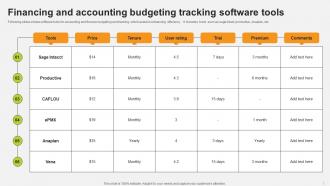
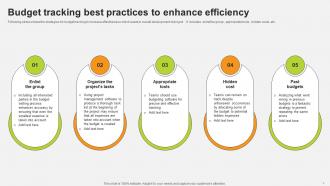
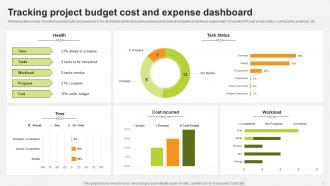
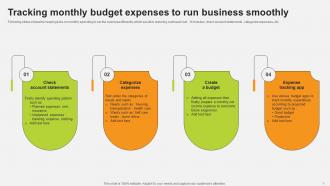
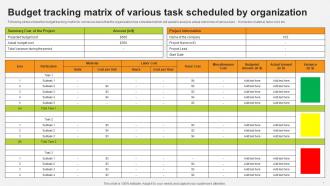
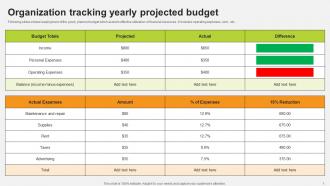
Introducing our revolutionary Budget Tracker PowerPoint PPT presentation the ultimate solution for efficient financial management. Take control of your finances with ease using this comprehensive Expenditure Tracker and Budget Analysis tool. Our Budget Tracker empowers you to effortlessly monitor your expenses, allocate budgets wisely, and stay on top of your financial goals. With the Monthly Tracker feature, you can track your spending patterns over time, identify trends, and make informed decisions. Designed with user-friendliness in mind, this PPT showcases user friendly Tracking Apps that streamline expense recording and budget allocation processes. Whether for personal finance or business use, our budget presentation is your gateway to financial success. Transform your financial journey today and achieve financial stability and prosperity.
People who downloaded this PowerPoint presentation also viewed the following :
Budget Tracker Powerpoint Ppt Template Bundles with all 19 slides:
Use our Budget Tracker Powerpoint Ppt Template Bundles to effectively help you save your valuable time. They are readymade to fit into any presentation structure.









FAQs for Budget Tracker Powerpoint
Honestly, the best budget templates have income and expense sections you can customize - we all spend money on weird stuff, right? Auto-calculations are clutch so you don't have to do math every time. Month comparisons help you see if you're getting better or worse at this whole budgeting thing. Make sure it handles both your rent (fixed) and groceries (which somehow cost more each week??). Charts or color coding saves you from drowning in spreadsheet hell. But seriously, pick something simple or you'll abandon it after two weeks like that gym membership.
Honestly, budget trackers are kind of a reality check - you'll see where your money actually goes vs where you *think* it goes. Pretty wild difference sometimes! Set up savings goals for stuff like vacations or your emergency fund, then watch your progress each month. The real magic is catching those sneaky spending patterns. Like, I had no idea my coffee runs were hitting $150 monthly until I tracked it. When you're going off track, you can tweak things right away instead of waiting till month-end to panic. Just pick one small goal and track it for 30 days to start.
Okay so personal trackers like Mint or YNAB are pretty straightforward - they focus on budgeting and tracking where your money goes. Business ones though? Totally different beast. QuickBooks, FreshBooks, stuff like that handles invoicing, taxes, profit/loss reports, the whole nine yards. I made the mistake of trying a business tracker for my personal expenses once - way too much. You don't need all that complexity unless you're actually running a business. Personal apps are designed for saving habits and basic budgeting, while business versions are all about compliance and financial reporting. Just pick whatever matches what you're actually doing, you know?
Honestly just pick whatever matches how you actually handle stuff. Love apps and always on your phone? Digital's probably your thing - you can track spending the second it happens and it does all the math for you. But if you're more of a pen-and-paper person, go with that. There's something weirdly satisfying about crossing stuff off by hand, plus it never glitches on you. The truth is, the "perfect" system is whatever you'll stick with for more than two weeks. Maybe try both for a month? One will feel more natural.
Honestly, most people get way too obsessed with tracking every little thing perfectly. Miss a couple days and they just quit entirely. Also - and this drives me crazy - they'll set these completely unrealistic budgets. Like who spends $50 on groceries when you're normally dropping $150? Don't forget about those random expenses either (car repairs, subscriptions). Those hit hard when you're not expecting them. Start with basic categories first. You can always add more detail later. Oh, and actually look at your data occasionally - otherwise what's the point?
Yeah, most budget apps can connect straight to your bank accounts and credit cards through secure connections - saves you from typing in every single transaction which honestly would drive me insane. You can also link stuff like Venmo or PayPal if you use those a lot. The main ones like Mint and YNAB are pretty solid for this, or you could always export everything to Excel if that's more your style. Just check what your app actually supports before you get too deep into it. I'd start with your main checking account first, then slowly add the rest once you get the hang of it.
Start with income vs expenses - that's your foundation. Then add monthly spending by category because honestly, that's where the real eye-opening moments happen. I'd track your savings rate too (mine's always worse than I think lol). Emergency fund balance is crucial, and debt-to-income ratio if you've got loans. Net worth gives you the big picture view. Maybe throw in some month-to-month comparisons so you can see if you're actually improving. Don't overcomplicate it at first though - you can always add fancier stuff once tracking becomes a habit.
Honestly? Try for daily if you can manage it. I update mine every morning with coffee - takes like 2 minutes. Weekly works fine too though, maybe Sunday nights when you're meal prepping or whatever. Daily just keeps you on top of those random $4 purchases that somehow add up to $200 by month-end. You know how it goes. Monthly updates are kinda useless because you'll forget half your spending. Start wherever feels doable - even weekly is way better than nothing. Once it becomes automatic, you can always do it more often. The key is just being consistent with whatever schedule you pick.
Dude, charts and graphs are game-changers for budgets. Like, seeing a pie chart that shows you're blowing 40% on takeout hits way harder than just staring at "$1,200" in some cell. Makes patterns super obvious too - I didn't realize my grocery bill was climbing every month until I graphed it out. Your brain just processes visual stuff faster than spreadsheet rows. Plus it's easier to show your partner what's going on without them glazing over at numbers. Honestly, start with basic bar charts comparing what you planned vs what you actually spent. You'll probably hate what you find but at least you'll know!
Yeah totally! Budget trackers are pretty flexible these days - you can set up custom categories for each debt and track your minimum vs extra payments. Some even have those debt snowball/avalanche methods built right in. The visual stuff is actually super motivating too, like seeing progress bars fill up as you knock down balances. I'd say start by writing down all your debts and how you want to tackle them first. Then find an app that doesn't try to squeeze you into boring preset categories. Way better than generic budgeting when you're focused on debt payoff specifically.
Oh man, this is such a real issue! Most budget apps are built for like, typical American spending habits and totally ignore cultural stuff. If you're sending money to family overseas or need to track cash transactions, you're screwed with most trackers. Religious stuff matters too - tithing, halal investing, whatever applies to you. Some families make financial decisions together instead of everyone doing their own thing. I'd look for apps that actually let you customize categories and handle multiple currencies. The group budget sharing feature is clutch if your culture does more communal money management. Don't force yourself into some cookie-cutter Western framework.
Honestly, celebrate the tiny stuff first - even twenty bucks saved is worth acknowledging! I learned this the hard way after setting these insane goals and just feeling like crap when I'd miss them. Make your targets actually doable. Check in weekly, not every single day (that's just stress you don't need). Track something fun too, like money going toward that trip you want. Life's gonna mess with your budget sometimes - that's just reality. Don't scrap the whole thing because of one bad month, just adjust and keep going.
So basically, budget trackers show you where all your cash disappears each month - super eye-opening tbh. Once you see it laid out, you can figure out what to cut and funnel that money straight into retirement savings instead. I actually got weirdly addicted to watching my retirement numbers climb! You can also mess around with different scenarios, like bumping your 401k up 2% or whatever. My advice? Create a retirement category and try boosting it by 1% every few months. Small steps but they add up fast.
So family trackers are way more complicated - you need multiple people accessing it, splitting up who bought what groceries, tracking kids' allowances. Individual ones? Way simpler. Just track your own spending habits and debt goals. Honestly, families need those visual chart things because nobody wants to stare at boring spreadsheets except maybe your dad lol. Either way though, start basic with categories and goals first. You can always make it fancier once people actually use the damn thing instead of abandoning it after a week.
Honestly, budget templates are kinda smart about income levels. Lower income ones stick to the basics - rent, groceries, utilities - with simple percentage splits like 50% for needs. Higher income templates go nuts with investment tracking and like five different savings buckets. They'll have subcategories for everything from wine to weekend trips (which, fair). The percentage breakdowns shift too since you can actually afford to put more toward fun stuff and savings when you're making decent money. Just grab whatever matches how you actually spend, not some perfect version of yourself.
-
Wonderful templates design to use in business meetings.
-
You guys are life-saver when it comes to presentations. Honestly I cannot do much without your services. Thank you!!!