

Fishbone Diagram For Root Cause And Actions Analysis




Try Before you Buy Download Free Sample Product
 Impress Your
 Audience
 100%
100% Editable
 Save Hours
 of Time


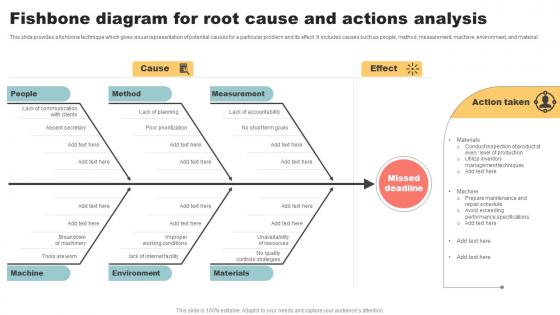
This slide provides a fishbone technique which gives visual representation of potential causes for a particular problem and its effect. It includes causes such as people, method, measurement, machine, environment, and material.
People who downloaded this PowerPoint presentation also viewed the following :
Fishbone Diagram For Root Cause And Actions Analysis with all 6 slides:
Use our Fishbone Diagram For Root Cause And Actions Analysis to effectively help you save your valuable time. They are readymade to fit into any presentation structure.





FAQs for Fishbone Diagram For Root Cause
So basically you put your main problem at the "head" of the fish, then draw these big bones coming off it for different categories - stuff like people, processes, materials, equipment, environment. Then you brainstorm all the possible causes under each one. The cool part is when you start seeing connections between different categories - that's where you usually find the real culprit. Get different people involved since they'll spot things you miss. Don't shoot down ideas while you're brainstorming (even the weird ones sometimes pan out). Focus on actual root causes, not just surface-level symptoms. Once it's all mapped out, tackle the most likely and impactful causes first.
So fishbone diagrams are actually pretty cool - they help you map out what's causing a problem instead of just randomly guessing. You break everything down into categories like people, process, materials, environment. That way you don't miss the obvious stuff (which honestly happens more than you'd think). Start with your main problem, then work backwards through each "bone" to figure out what's really going on. It's like organized brainstorming but way more effective. Teams love using them because everyone can see the connections visually. Beats the hell out of just throwing solutions at the wall and hoping something sticks.
Fishbone diagrams are huge in manufacturing - especially when you're trying to figure out why stuff keeps breaking at the same point in production. Healthcare teams use them all the time for patient safety issues. Software developers swear by them for debugging (though honestly, some devs just like drawing diagrams). They work great in service industries too. The whole point is getting your team to dig deeper instead of just slapping band-aids on problems. Any business with multi-step processes can benefit. Try one at your next team meeting when something goes wrong.
Yeah, the textbook answer is the 6 M's - Man, Machine, Material, Method, Measurement, and Mother Nature. But honestly? Just adapt them to whatever you're actually dealing with. Manufacturing problem? Stick with the classics. Service issue? Try People, Process, Policy, Place instead. Software's acting up? People, Process, Technology, Data works better. Pick 4-6 categories that actually fit your situation - don't force the traditional ones if they don't make sense. Start broad when you're brainstorming, then drill down into specifics under each branch. The framework's just there to keep your team organized, not box you in.
You definitely want your whole team involved when doing fishbone diagrams. Different people see different problems - like someone from ops will catch stuff management totally misses. I've found you get way more comprehensive results when everyone's throwing ideas around together. Working alone on these things is honestly a recipe for missing obvious causes because you're probably too close to see them clearly. Oh and make sure you grab people from all the departments that actually deal with whatever process you're analyzing. Those different viewpoints really help fill out all the branches properly and spot your blind spots.
Oh there's loads of good options! Lucidchart and Creately have ready-made fishbone templates that work great. Microsoft Visio's solid too if your company already pays for it - though honestly it's kinda overkill for simple diagrams. You could also just use Miro, Canva, or even Google Drawings. I've watched coworkers throw together decent ones in PowerPoint when they needed something quick. My advice? Start with whatever you've already got access to. The tool doesn't matter nearly as much as actually getting your team's thoughts organized properly.
Yeah, they work great together! During Agile retrospectives, fishbone diagrams help teams really dig into what went sideways with a sprint. Lean projects love them too - perfect for spotting waste and process bottlenecks. The visual aspect is clutch since everyone can jump in and add causes on the spot. Just don't let these sessions run wild, keep them timeboxed or you'll be there all day. Honestly, I've seen teams get way too into the weeds with these things. Try one at your next retro and see what happens.
Don't turn it into a finger-pointing session - focus on what broke in your process instead. Biggest mistake I see? Teams rush it and barely scratch the surface, then wonder why problems keep happening. Make sure everyone gets to speak up during brainstorming, not just whoever talks loudest. Keep asking "why" until you're actually at the root cause (trust me, it's usually deeper than you think). Oh, and pick something that's actually worth fixing - I've sat through way too many postmortems about minor annoyances. Once you find the real causes, figure out which ones to tackle first.
Start by measuring your current situation before you fix anything - that's your baseline. Pick 2-3 simple metrics that match your problem (like if it's customer complaints, track how many you get and how fast you resolve them). After making changes, check the same numbers weekly for the first month, then monthly. Honestly, some solutions take forever to show results so don't panic if nothing changes right away. The whole point is comparing before vs after to see what actually worked. I'd avoid getting fancy with too many metrics - it just gets confusing and you'll stop tracking them anyway.
You definitely need real data before making that fishbone diagram - can't just wing it with guesses. Grab whatever info you can find: error logs, customer complaints, production numbers, survey results. Look at when the problem happens, who's dealing with it, which processes get hit. I learned this the hard way once when our team spent hours on assumptions that turned out totally wrong. The data shows you which causes are actually worth digging into instead of chasing random theories. Get this stuff together before your meeting so everyone's working with facts, not just brainstorming wildly.
Fishbone diagrams are perfect for this! Have your students put a complex issue at the "head" - like "Why did the Civil War happen?" Then they brainstorm causes across different categories. Political factors go on one "bone," economic on another, social causes somewhere else. It's way better than just asking them to write an essay because they actually see how everything connects. Start with current events since kids get fired up about those anyway. Climate change works great too - they'll map out environmental, political, and economic factors. The visual format clicks for students who'd normally just give you surface-level answers.
Dude, color coding is a game changer for fishbone diagrams - makes them way less overwhelming. I like using different colors for each cause category and maybe some icons to help people remember stuff. Building it step-by-step on screen works better than dumping everything at once (trust me on this one). Bold colors for the critical paths, bigger fonts for main categories. Callout boxes are clutch for highlighting your key points. A plain black-and-white fishbone just looks like a hot mess to most people. Oh, and animations help too - reveal branches progressively so you don't lose your audience.
Here's the thing - nail down your exact problem first, that's your starting point. Then brainstorm causes that could realistically create that specific issue. Don't chase every single possibility though, you'll drive yourself crazy. Focus on stuff your team can actually do something about. Cover the usual suspects - people, processes, materials, environment - but honestly, only dive deep on subcauses that make sense for your situation. Keep testing each one: "would this actually cause our problem?" If not, skip it. You want thorough coverage without going overboard. Better to have actionable stuff than a massive list of maybes.
So Toyota basically made fishbone diagrams famous by using them whenever defects popped up on their assembly lines - they'd map out every single possible cause. Boeing does the same thing for aircraft safety stuff, and hospitals use them to figure out why patients keep coming back. McDonald's even used them for drive-thru wait times and wonky fries (honestly, who knew fries were that complicated?). The trick is making it a regular thing, not just a one-time fix. None of these companies did it once and called it good - they built it into how they actually work. Just start small with your team and see what happens.
Honestly, combining fishbone diagrams with 5 Whys works really well for this stuff. Start by sketching out your fishbone - brainstorm everything that could be causing the problem across people, process, environment, whatever. Then grab the most promising causes from each branch and run those through 5 Whys to go deeper. It's kinda like zooming out first, then zooming way in. The fishbone shows you the big picture while 5 Whys helps you drill down. Oh, and map your 5 Whys findings back to the original fishbone branches - you'll often spot patterns you missed the first time around.
-
It saves your time and decrease your efforts in half.
-
I've been looking for a good template source for some time. I'm happy that I discovered SlideTeam. Excellent presentations must try!