

Fishbone Diagram To Determine The Root Cause Quality Assurance Plan And Procedures Set 1




Try Before you Buy Download Free Sample Product
 Impress Your
 Audience
 100%
100% Editable
 Save Hours
 of Time


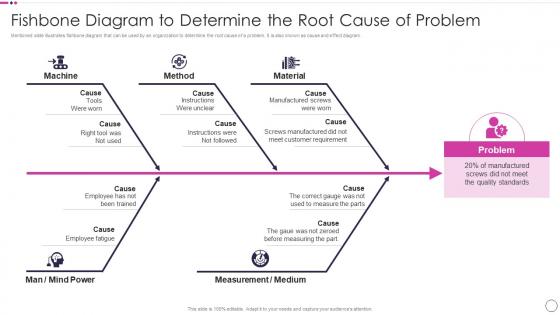
Mentioned slide illustrates fishbone diagram that can be used by an organization to determine the root cause of a problem. It is also known as cause and effect diagram.
People who downloaded this PowerPoint presentation also viewed the following :
Fishbone Diagram To Determine The Root Cause Quality Assurance Plan And Procedures Set 1 with all 6 slides:
Use our Fishbone Diagram To Determine The Root Cause Quality Assurance Plan And Procedures Set 1 to effectively help you save your valuable time. They are readymade to fit into any presentation structure.





FAQs for Fishbone Diagram To Determine The Root Cause Quality Assurance Plan And
So basically, a Fishbone Diagram helps you find all the possible reasons something went wrong - instead of just guessing at the first thing that pops into your head. You draw out categories like people, processes, materials, environment as the main branches. Then brainstorm specific causes under each one. Honestly? It's pretty satisfying to see everything mapped out like that. My old manager was obsessed with these things, but they actually work. You won't miss the obvious stuff (or weird random factors you'd never think of). Next time you're dealing with a messy problem, get your team together for 20 minutes and try it. You'll be shocked what comes up.
Fishbone diagrams are actually pretty cool for getting everyone focused. You know how meetings usually turn into chaos? This gives people a clear structure to follow - equipment issues here, process problems there, etc. What I love is that shy people can just write directly on the diagram instead of fighting to speak up. Short sentences here, longer thoughts flow naturally when you're building it together. Also catches those obvious blind spots when certain sections look way too empty. Oh, and here's a pro tip - give each person their own "bone" to manage during the brainstorm. Way better than the usual meeting mayhem.
So the classic ones are Man, Machine, Method, Material, Measurement, and Environment. Though I always forget if we're supposed to say "People" now instead of "Man" - depends on your workplace I guess. You can totally switch these up based on what you're dealing with. Service stuff might need Policy or Procedure instead. Pick 4-6 that actually fit your problem. Don't get stuck on the textbook version if it doesn't make sense. Start with the standards and tweak from there. Really, the categories just need to cover where things could go wrong in your specific situation.
Yeah, you can definitely switch up those main categories depending on what you're working with. Manufacturing usually sticks with the 6 M's - Man, Machine, Material, Method, Measurement, and Mother Nature. But healthcare? Totally different. Think Patient factors, Provider issues, Communication, Equipment, Environment, Policies. I've seen IT teams get creative with Hardware, Software, Network, User Error, Process - honestly whatever makes sense for the problems they're dealing with. The whole point is picking 4-6 categories that actually cover where things go wrong in your field. Then just brainstorm under each branch and you're set.
Oh, the Fishbone Diagram! Yeah, it's this visual brainstorming tool that Six Sigma teams use during the Analyze phase. Super handy for root cause analysis. You draw out all potential causes of your problem into buckets - people, process, materials, environment, that kind of stuff. Honestly looks deceptively simple at first glance. But when your whole team gets together and really starts mapping everything out, you'd be shocked what comes up. I've seen teams discover causes they never would've thought of otherwise. It keeps you from making those quick assumptions we're all guilty of. Worth trying next time you're dealing with a quality headache.
Yeah, definitely! They're actually better for the brainstorming stuff first - like mapping out all your potential causes. But you can totally add numbers later. Once you've got your diagram sketched out, go back and throw percentages or frequencies on the different branches. That way you can see which causes are actually worth chasing down. Honestly, I'd always start qualitative though - get all the possible reasons down first, even the weird ones. Then layer your data on top to figure out priorities. It's pretty satisfying seeing it all laid out visually like that.
Don't be too vague with your problem - that's the worst mistake. Ask "why" like five times instead of stopping at surface stuff. Oh and seriously, don't let the loudest person take over the whole brainstorming thing. I've watched teams completely miss obvious answers because everyone just nodded along with whoever seemed most confident. Throwing random ideas around without thinking through each branch systematically? Yeah, that's another trap. Focus on actual facts, not what people think might be happening. Always double-check your suspected causes with real data before you commit to anything.
So first thing - draw that fish head and nail down exactly what problem you're solving. Walking through the 6 Ms works great (Method, Machine, Material, Manpower, Measurement, Mother Nature), but honestly just use whatever categories actually fit your situation. One bone at a time though - don't let people bounce around everywhere or it turns into chaos. Let everyone throw out crazy ideas first, then start digging with those "why" questions. Oh, and seriously get someone writing this stuff down visually as you go. You'll forget half the brilliant ideas otherwise, trust me.
Honestly, Lucidchart's probably your best bet - their templates are solid and it's made for this stuff. Miro's great too if you're doing team brainstorming. Your company have Microsoft already? Visio works but feels kinda outdated tbh. Free route: diagrams.net (used to be Draw.io) does the job perfectly fine. Google Drawings is super basic but gets you there. Oh and Canva has some fishbone templates that actually look decent - didn't expect that from them. I'd just grab Lucidchart's free trial first since you can't really go wrong with it.
So basically, Fishbone Diagrams are for brainstorming every possible cause - like people, materials, processes, whatever. They cast a super wide net. 5 Whys is totally different though. You pick one specific cause and keep asking "why" until you drill down to the actual root problem. I actually think 5 Whys can get a bit repetitive sometimes, but it works. Here's what I'd do: start with a Fishbone to map out all the potential causes first. Then grab the most promising ones and run them through 5 Whys to really dig deep. They're honestly perfect together.
Honestly, fishbone diagrams are clutch for messy problems with tons of moving parts - like when quality control goes haywire or your team keeps hitting the same roadblocks. The visual setup forces you to check all the usual suspects (people issues, broken processes, crappy environment, whatever). Super helpful for group brainstorming too since it keeps everyone on track instead of wandering off topic. I mean, I've seen meetings go completely sideways without some kind of structure. Skip them for obvious cause-and-effect stuff though. But next time you're pulling your hair out over a "wtf happened here" situation, definitely try the visual approach first.
Dude, these things actually work! Toyota used them when their paint jobs kept coming out weird - found out it was humidity plus equipment issues plus training problems all at once. Hospitals use them all the time too, like one traced medication errors back to bad labeling and messy shift changes. I've seen manufacturing places cut defects by 40% just mapping everything out. Oh, and healthcare orgs are obsessed with them for patient safety stuff. The trick is getting everyone on your team brainstorming together - you'll miss causes that seem obvious to someone else.
Get the right people in the room first - operations, quality, maintenance, anyone who actually deals with this stuff daily. Your team probably doesn't know everything (mine never does). Start with the usual suspects: people, process, equipment, materials, environment, measurement. But honestly? Add whatever categories make sense for your specific mess. After you map it out, take a step back. Ask "what did we miss?" because you definitely missed something. Then go walk the actual process to double-check your diagram. I've watched so many teams skip this and wonder why their fishbone sucked.
Walk through the problem first, then hit each major category left to right. Focus on the biggest root causes your team found - honestly, if you try covering every little branch you'll put people to sleep. I always color-code the priority stuff beforehand so it stands out. Make it interactive too - ask if they're seeing gaps or think you missed the mark on priorities. That's the whole point, right? Getting everyone problem-solving together instead of just dumping your analysis on them. Wrap up by nailing down which causes you'll tackle first and who's doing what.
Honestly, these things work with whatever PM method you're already doing. Agile teams? Throw them into retrospectives when stuff breaks. Six Sigma folks use them in the Analyze phase - makes sense before you start collecting data. They're basically perfect for Lean too when you're tracking down waste. Even old-school waterfall projects can use them during risk planning sessions. The trick is timing, though. Don't just slap one on every single problem - wait for those "okay what the hell happened here" moments when your team's actually stumped. That's when they're gold.
-
“Thanks to SlideTeam. Now I can make smart presentations in a fraction of time without any hassle.”
-
Their professional templates are very impressive, even my manager was curious about the source. I am very grateful.