


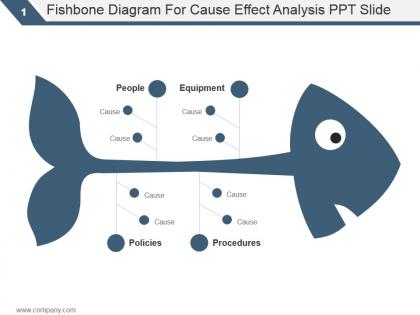
Fishbone diagram for cause effect analysis ppt slide




Try Before you Buy Download Free Sample Product
 Impress Your
 Audience
 100%
100% Editable
 Save Hours
 of Time


Commence correctly with our Fishbone Diagram For Cause Effect Analysis Ppt Slide. They allow you a functional edge.
People who downloaded this PowerPoint presentation also viewed the following :
Fishbone diagram for cause effect analysis ppt slide with all 5 slides:
Get across to the best with our Fishbone Diagram For Cause Effect Analysis Ppt Slide. Force them to accept your brilliance.


FAQs for Fishbone diagram for cause effect
Honestly, it's all about mapping out every possible cause before you start fixing stuff. You break it down by categories - people issues, process problems, materials, environment, whatever applies. Way better than just throwing solutions at the wall. My team does this thing where we jump straight to the "obvious" answer and totally miss what's actually broken. The visual layout really helps though - you end up catching stuff you'd never think of otherwise. Last week we spent like 20 minutes on one and found three causes we completely overlooked. Saves you from that annoying cycle where you "fix" something but the problem keeps coming back.
So fishbone diagrams are actually pretty genius for this stuff. You basically map out your problem with all the potential causes branching off into categories - people, process, equipment, materials, whatever makes sense. Way more organized than just randomly brainstorming ideas (which honestly never works anyway). The visual part is huge because you'll spot connections and patterns you'd totally miss otherwise. Plus it keeps everyone focused on actual facts instead of just guessing. Once you've got everything mapped out, you can prioritize which areas to dig into first and start gathering real data to figure out what's actually causing the issue.
So basically you draw the fish head with your main problem, then add a horizontal spine. Branch off your major categories - people, process, materials, equipment, environment, methods. Though honestly these can change depending on what you're working on. Each branch gets smaller sub-branches where you dump all the specific causes you can think of. I always start with the problem and work backwards since it stops you from fixating on the obvious stuff. Way better for catching things your team might miss otherwise. The whole thing just helps you think more systematically about what's actually going wrong.
So basically you set up your main categories first - those are like the big branches coming off your fishbone. Most people use the 6 M's: Methods, Machines, Materials, Measurements, Mother Nature, and Manpower. Kinda cheesy names if you ask me, but whatever works. You can totally switch these up though. Like for tech problems, I'd probably go with Process, Technology, People, Environment instead. Pick maybe 4-6 categories that actually fit your situation. Then just brainstorm all the specific causes under each branch. Start with whichever category feels most obvious to your team.
Oh totally! Fishbone diagrams are actually super useful for project management. When stuff goes wrong - missed deadlines, budget issues, scope creep - you can map out all the potential causes. Break it down by categories like people, processes, tech, resources. It looks deceptively simple but honestly makes you dig way deeper than just the obvious problems. Perfect for team brainstorming too since everyone can see the whole picture at once. I always forget how good these are until I actually use one. Next time you're doing a project retrospective, try throwing one of these at whatever major issue you're analyzing.
Car companies and manufacturers use fishbone diagrams constantly - honestly they're obsessed with them for tracking defects. Healthcare relies on them too, especially when patient safety stuff goes sideways. You'll find them in food production, pharma, aerospace... basically anywhere where screwing up could be really bad news. Banking and IT teams have jumped on the bandwagon lately for system failures and complaint spikes. They're weirdly good at getting everyone's theories organized instead of just throwing around random guesses. Next time something breaks at work, try one out - beats the usual chaos of blame-storming.
Fishbone diagrams are game-changers for messy team discussions. Instead of everyone shouting random ideas, you assign people to different "bones" or categories. This keeps things structured and stops those annoying meetings where like two people talk the whole time while everyone else zones out. The visual setup helps your team spot connections they'd probably miss otherwise. Oh, and try this - have people write ideas on sticky notes first, then build it together. Really brings out the quiet ones who usually don't speak up. It's wild how much better the conversations get.
Don't rush the brainstorming part - that's huge. People get way too vague with categories or make them overlap like crazy. You gotta keep digging deeper instead of just scratching the surface. Ask "why" multiple times to find the real root causes. Oh, and don't let that one guy who always talks too much take over the whole session (you know the type). Get everyone involved for different perspectives. Keep it focused on just one specific problem too. I learned this the hard way - always check your findings with actual data before you start fixing stuff.
So fishbone diagrams are great because you can get everyone around a whiteboard throwing out ideas - people, process, materials, all that stuff. Way different from 5 Whys which just goes deep on one thing. I actually prefer it for team brainstorms since everyone can jump in at once. Though honestly, it can turn into a hot mess without someone keeping things on track. Plus it stays pretty surface level compared to fault tree analysis (which gets way too technical for most situations). I'd say start with fishbone to get all the ideas out, then pick your top few and hit them with 5 Whys.
Honestly, brainstorming is what makes fishbone diagrams actually work instead of just looking pretty on a whiteboard. You'll need it twice - when figuring out your main categories (people, process, equipment, whatever fits) and then when digging into specific causes under each one. The real breakthrough happens when everyone just throws ideas out there without worrying if they sound stupid. Those weird, random suggestions? They're often where the actual root cause is hiding. Give yourselves plenty of time for each session too. Don't rush it, because the obvious answers usually aren't the ones that'll solve your problem.
Absolutely! Just swap out the manufacturing stuff for service categories. Instead of "machines" and "materials," think "people," "processes," "policies," "tech," and "environment." Say you're dealing with crazy long customer wait times - you'd map causes under each branch. Maybe "short-staffed" goes under people, "crappy booking system" under tech. I've honestly seen this work for everything from restaurants to IT issues. The restaurant one was kind of a mess but we figured it out. Start with your specific problem, then get your team to brainstorm what's actually causing it using categories that make sense for your business.
Honestly, I'd check those fishbone diagrams every 2-4 weeks or whenever something new pops up. Don't make my mistake from last year - I let one sit way too long and it became totally useless. Update it when you test solutions or find new root causes. The whole point is keeping it fresh, not creating some dusty document nobody looks at. Maybe set a team reminder? Oh, and definitely revisit it at major project milestones. Your understanding of the problem will shift as you dig deeper, so the diagram should shift with it. Short version: treat it like a living thing, not a one-and-done task.
Lucidchart and Miro are solid choices - both have drag-and-drop templates that don't suck. If you've got Microsoft Office already, Visio's pretty solid too. Weirdly enough, Canva has decent fishbone templates now (who knew?). For free stuff, try draw.io or Google Drawings works in a pinch. But honestly? Pick whatever your team's already comfortable with. You'll get way better buy-in that way instead of making everyone learn something new. The brainstorming part matters way more than which tool you use anyway.
Don't just slap the whole fishbone diagram up there - people's eyes will glaze over. Start with your problem statement, then build it piece by piece. Walk through each category and explain what causes your team found. Honestly, I've seen too many presentations where they show everything at once and everyone just stares blankly. Build it progressively or highlight sections as you go. Also, make sure you tie it to what you're actually doing next. Show how this analysis led to real action items your team's working on.
Dude, fishbone diagrams are legit game-changers. Toyota used them to slash manufacturing defects by mapping every possible cause of quality issues. Hospitals do this too - when patients kept falling, they'd chart everything from staffing to equipment placement to medication side effects. Amazon does it for delivery delays, restaurants for food safety disasters. What I love about them is they push you past the obvious stuff you'd normally blame. My old manager was obsessed with these things, but honestly? They work. Next time you're dealing with some problem that keeps happening, just map out all the potential causes. You'll catch something you totally missed.
-
Out of the box and creative design.
-
Understandable and informative presentation.