

Four Percentage Charts For Comparison Powerpoint Slides





Try Before you Buy Download Free Sample Product
 Impress Your
 Audience
 100%
100% Editable
 Save Hours
 of Time


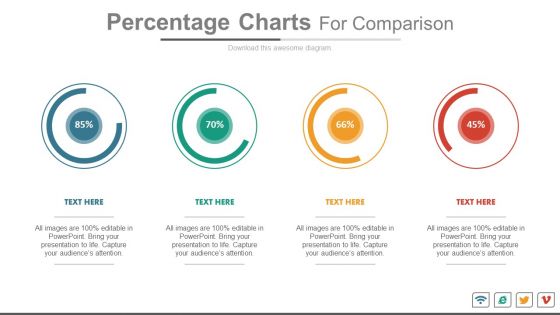
Beat the challenge of communicating the complex business analysis in a professional and easy to understand manner with the Slide Team's pre-designed percentage chart PowerPoint slides. The crucial task of execution is substantially dependent upon notifying the staff accurately. Rule out the barriers emerging in your business communications with skilled Ppt mechanism and strive to formulate effective financial strategies. Employ the ready-made percentage meter slides in conducting the inter-departmental comparisons, sales performance, customer retention, cash inflows and outflows, profit margins and what not! You have reached the place that offers a complete Ppt mechanism of cohesive slide projection in your business boardrooms, whereby simply dropping the company content into readymade templates will do the complete justice to your company's image and make your presentation a grand success. Perform the simple act of downloading the flawless template to gather the commendable reviews in exchange by your clients and investors. Go beyond client expectations with our Four Percentage Charts For Comparison Powerpoint Slides. They help deliver that extra bit.
People who downloaded this PowerPoint presentation also viewed the following :
Four Percentage Charts For Comparison Powerpoint Slides with all 4 slides:
Our Four Percentage Charts For Comparison Powerpoint Slides emit the right frequency. They strike a chord with the audience.
FAQs for Four Percentage Charts For
Honestly, just stick to bar or pie charts - don't overthink it. Make sure your percentages add up to 100% (seriously, half the charts I see are broken). Use colors that actually contrast so people can tell things apart. Always put the actual numbers on there because nobody wants to squint and guess. 3D effects look terrible and mess with the data, so skip those completely. Oh, and test it on someone else first - if they look confused for more than two seconds, you probably need to simplify it more.
Dude, percentage charts are a game changer. People can instantly see how things stack up without having to calculate stuff in their heads - which honestly, most won't bother doing anyway. Raw numbers just sit there looking intimidating, but percentages? They tell a story. You'll spot the big players and weird outliers right away. Pie charts might be a bit overdone, but they still work better than cramming everything into spreadsheet tables. I've seen presentations where someone throws up a wall of numbers and half the room just zones out. Switch to percentage visuals and people actually pay attention to your data.
Honestly, go with stacked or grouped bar charts - they're way better for multiple variables. Grouped bars are perfect when you want side-by-side comparisons. Stacked ones work great for showing how each piece adds up to the total. I used to love pie charts but they turn into a hot mess with more than 3-4 variables, trust me. Small multiples can work too if you've got the space. Whatever you do, don't touch 3D charts - they look cool but make everything impossible to read. Start simple with grouped bars and see how your data looks.
Percentage charts work best when you're breaking down how parts relate to a whole - like market share, budget splits, or survey results. Leadership loves them because they can spot the big picture instantly. I've found they're clutch for translating messy data into something non-technical people actually understand. Just make sure everything adds up to 100% (obvious but you'd be surprised). Don't overcrowd it with tiny slices either - that gets messy fast. Oh, and arrange your biggest chunks first so it flows logically when people scan it.
Honestly, colors can totally tank your percentage charts if you're not careful. You need real contrast between segments - I've watched people pick these "aesthetic" gradients that look nice but make the data impossible to read. Super frustrating. Go for actually different colors, not just light blue vs dark blue. Oh, and don't forget about colorblind folks - red/green combos are a no-go for like 8% of guys. ColorBrewer's pretty helpful for this stuff. Quick test: squint at your chart. If everything blurs together, time to start over.
Honestly, Excel or Google Sheets work fine for most percentage charts - they're already on your computer anyway. Tableau makes really slick interactive stuff if you want to get fancy, and Power BI's solid too. I've been using Canva lately for quick visual charts when I don't want to mess around with formulas. Most of the time I just stick with Excel though, probably like 80% of projects. Oh, and Flourish is pretty cool for web charts if you're doing presentations. Just start with whatever you've got and see if you need something fancier later.
Check your data first - seriously, this saves so much headache later. Make sure your math's right and percentages add up to 100% when they should. Cross-reference with other sources if you can find them. Sample sizes matter too, btw - tiny samples make for sketchy conclusions. I've watched people present charts only to get torn apart because they skipped the boring validation stuff. Oh, and label everything clearly! Include where you got the data and when. Trust me, spending 15 minutes double-checking beats having to explain why your numbers are wrong in front of everyone.
Ugh, the worst thing you can do is mess with the scale to make your data look more dramatic than it actually is. Also make sure percentages add up to 100% - sounds obvious but people screw this up constantly. Don't cram like 15 different categories into one chart because it'll look like a rainbow exploded. Keep colors simple so people can actually tell segments apart. I hate those cheesy 3D effects too, they're so 2005. Label your data source clearly and make sure it's current. Bottom line: someone should be able to glance at it and get the point without doing math in their head.
So basically you gotta know your audience first. Executives want super clean charts - like, bare minimum data points and just the big picture stuff. Tech people? They can handle all the detailed breakdowns and wonky terminology. But regular folks need simple language and maybe little explanation boxes because honestly, who knows what "QoQ revenue variance" means without context? Also think about colors - older people usually need higher contrast while younger audiences don't mind subtle palettes. Just ask yourself what they actually need to decide and how comfortable they are with data stuff.
Honestly, typography can totally make or break your percentage charts. Keep font sizes consistent across all your labels - maybe bump up the most important numbers just a bit. Sans-serif fonts are your friend here since they're way easier to scan. Don't mess around with too many different font weights (seriously, I've seen some disasters). Make sure there's good contrast between your text and background. Oh, and size those percentage symbols right so they don't fight with the actual numbers for attention. Test it at whatever size people will actually see it - that's huge.
Hover tooltips are clutch - they'll show exact percentages when people mouse over. Clickable segments work great too if you want users drilling into subcategories. Toggle buttons are super useful for switching between time periods or different datasets. Load animations make everything feel way more polished, honestly. Oh, and filtering options let people zero in on specific segments they actually care about. Just don't go crazy with it though. Pick maybe 2-3 features that your audience will genuinely use instead of throwing in every bell and whistle you can think of.
Honestly, they're everywhere once you notice them. Market share stuff is super common - like how Netflix vs Disney+ split the streaming world. Survey results work great too, breaking down customer ratings or whatever. I use them a lot for budget breakdowns, showing where money actually goes. Political polls love these things (though let's be real, those are sketchy half the time). Website traffic sources, sales by region, demographics - all perfect fits. Basically any time you need to show "hey, here's what makes up this whole thing" they're your go-to. Really useful for that kind of analysis.
Oh man, color choices can really screw you over with charts! Like, we automatically think red = bad, green = good, right? But in places like China, red is actually lucky and positive. So your "helpful" red-to-green chart might confuse half your audience. I learned this the hard way once. Anyway, you've got two options: either go with boring neutral colors that work everywhere, or just spell out what each color means in your legend. Honestly, the legend thing is probably safer - people appreciate when you don't make them guess what your colors represent.
So it's mostly about readability tbh. Long category labels? Go horizontal - way less awkward since text flows naturally left to right. Short labels work fine vertically, plus people just *get* that "bars going up" vibe. I'm probably doing horizontal like 80% of the time because let's be real, category names are usually pretty wordy. You can also cram more categories in without it looking terrible. Quick test: if your labels are more than 2-3 words, just go horizontal. Saves you the headache of squinting at sideways text later.
Honestly, just think of your charts as mini-stories! Don't just say "sales went up 25%" - tell it like "our March campaign boosted us from 40% to 65% market share by year-end." Add little notes pointing out the good stuff, like when competitors showed up or you pivoted strategy. Makes it way more interesting than boring bar charts, trust me. Structure it as before/after or show progress toward some goal. People remember stories better than random percentages anyway. The trick is getting viewers to actually care about what your numbers mean instead of just glazing over.
-
Great designs, really helpful.
-
Editable templates with innovative design and color combination.
-
Good information.
-
Good information.