

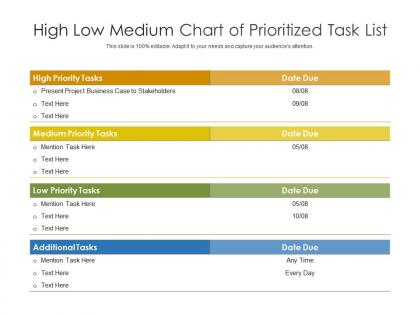
High low medium chart of prioritized task list




Try Before you Buy Download Free Sample Product
 Impress Your
 Audience
 100%
100% Editable
 Save Hours
 of Time


Our High Low Medium Chart Of Prioritized Task List are topically designed to provide an attractive backdrop to any subject. Use them to look like a presentation pro.
People who downloaded this PowerPoint presentation also viewed the following :
High low medium chart of prioritized task list with all 2 slides:
Use our High Low Medium Chart Of Prioritized Task List to effectively help you save your valuable time. They are readymade to fit into any presentation structure.
FAQs for High low medium chart of
Basically, it helps you rank stuff based on actual criteria instead of just going with whoever yells the loudest in meetings (which happens more than it should, tbh). Plot your tasks against things like impact vs effort or cost vs urgency. Makes it way easier to see what needs to happen first and what can wait. Perfect for when you're drowning in competing priorities or need to show stakeholders why you're spending time on X instead of Y. It's honestly a lifesaver - turns those endless "but this is more important" debates into something you can actually point to and say "here's why."
So basically, prioritization charts stop your team from just arguing about random opinions all day. You plot stuff based on impact vs effort, which honestly makes it super obvious what to tackle first. The visual part is clutch - when everyone can see where things actually land on the chart, discussions get way less heated and more productive. I mean, it's kind of genius how something so simple works. Instead of everyone pulling in different directions with their pet projects, you get consensus pretty fast. Just try a basic 2x2 grid next time you're stuck on team decisions.
Honestly, just start with impact vs effort - that's your bread and butter. How much value does it give you compared to how painful it'll be to actually do? I usually toss in timeline stuff too, like what's urgent and what can wait. Oh, and definitely think about your resources and whether it fits your bigger strategy. But seriously, don't make it too complicated or your team will hate using it. Maybe add risk level if you're feeling fancy. I'd say stick to 2-3 things max at first. You can always make it more complex later once people get the hang of it.
Definitely go with color coding - different colors for priority levels or categories. Heat maps are solid too, where darker = higher priority. Bubble charts rock because the size shows impact or effort needed. Icons help with quick scanning, and keep things consistent (high priority stuff at the top, urgent on the right). Honestly, heat maps might be my personal favorite since they're so intuitive. The goal is making patterns obvious at a glance. Anyone should be able to look at it and instantly know what needs attention first.
Work prioritization is way more structured - you're looking at revenue, deadlines, all that corporate stuff. Personal charts? Total opposite. I literally use napkin sketches sometimes lol. With personal prioritization, it's more about your energy and what actually matters to you. Work charts have to consider stakeholders and formal metrics. Way less fun but necessary. Both help when everything feels urgent though. Start basic - just do importance vs effort and see what stands out. Works every time, even if my personal ones look like a mess compared to the polished work versions.
Miro and Mural are your best options here - they're made for dragging stuff around visually so you won't get frustrated. Lucidchart works great too if you're already using it. Honestly? Even basic Excel or Google Sheets gets the job done if you don't care about it looking fancy. I've seen teams overthink this and spend weeks debating tools when they could've just started. Pick whatever your team can all access and edit together. Start with what you're already using - chances are it'll work fine and you can always upgrade later if needed.
Honestly, these charts are like a sanity check for when everything feels urgent but isn't. You just plot tasks by how important they are vs how urgent they feel. Game changer. It stops you from obsessing over that perfect email while your actual deadline sits there judging you. The visual part makes it super obvious what deserves your best energy first. I started plotting my next day's tasks the night before - sounds nerdy but you wake up ready to go instead of staring at your to-do list like "...now what?" Short bursts work better than bouncing around randomly.
Look, you absolutely need stakeholder input for prioritization charts or you're basically flying blind. Interview the key people first to understand what they actually care about - business goals, user needs, all that stuff. Don't just assume you know what's important (I've made that mistake before). Get their take on how to weight different criteria and score initiatives. Their perspective will catch things you'd totally miss otherwise. Oh, and validate your framework with them before you lock anything in - saves you from having to redo everything later when they inevitably have "feedback."
Break it into separate columns for each data type - way easier to track. Hard numbers like revenue or user counts go straight in. Qualitative stuff like strategic fit? Convert to 1-5 scale or whatever works. Honestly, the soft factors usually matter more than people realize (learned that the hard way). Weight everything based on what actually drives decisions in your company. Get your team to agree on the scoring upfront though - saves so much arguing later. Maybe start 60/40 quantitative vs qualitative, then tweak it. Being upfront about your weighting system keeps everyone sane.
Honestly, the worst thing you can do is just dump everything on there without knowing what you're measuring. Like, what does "high impact" even mean for your project? Define that stuff first with your team or you'll argue forever about where things go. Quick wins are addictive - I get it, they feel great - but don't ignore those big meaty projects that actually move the needle. Oh, and here's something people mess up: they put stuff on there they can't even control. Why torture yourself? Stick to things you can actually do something about.
I'd say every 2-4 weeks, usually at your big milestones. Projects are chaotic - budgets change, stakeholders suddenly have "brilliant" new ideas, deadlines get moved around. Your chart has to keep up with all that mess. Quick updates work too when you get major feedback that shifts things. Just don't go overboard and constantly reshuffle everything or you'll drive yourself nuts. Find that sweet spot where it stays useful but you're not updating it every other day. Oh, and set a calendar reminder because you'll definitely forget otherwise.
Yeah, they're super helpful for sprint planning! Honestly, I've watched teams argue in circles for hours without any clear way to decide what comes first. Keep it simple though - impact vs effort grids work well, or try MoSCoW if your team likes categories better. Don't overthink the scoring system. Update it as you go since priorities shift when you learn new stuff about users. Maybe test it out with your product owner before the next planning session? Oh, and avoid those crazy weighted matrices - they're way more hassle than they're worth.
Walk them through your scoring method first - how you weighted everything and why. Put the chart up after that, give people a sec to look at it. One slide only though, cramming stuff together just makes it messy. Hit the outliers hard - your obvious wins and the stuff that scored way lower than expected. Those low ones usually surprise people. Don't try defending every single thing you put where you put it. Instead ask "what would X need to change to move higher?" Way better than just lecturing at them about your conclusions.
You basically need to tweak the criteria to match what your industry actually cares about. Healthcare folks obsess over patient safety and compliance stuff. Tech teams? They're all about user impact and how much dev work something takes. Manufacturing companies weight cost savings super heavily - makes sense when margins are tight. The trick is getting your team together to figure out those 3-5 factors that really make or break projects in your space. Then you just adjust the weightings based on whatever your company's trying to achieve this year.
Make it visual and super easy to scan - that's honestly the biggest thing. Rank your top priorities on one page with quick explanations for why stuff landed where it did. Always connect back to business impact because nobody cares about pretty charts that don't tell a story (learned this the hard way lol). Different people need different views too - execs want the big picture themes while your team needs the nitty-gritty details. Colors and icons help people find what they're looking for fast. End with clear next steps and deadlines so everyone knows what's actually happening next.
-
Great product with effective design. Helped a lot in our corporate presentations. Easy to edit and stunning visuals.
-
Great quality slides in rapid time.
-
Attractive design and informative presentation.
-
Informative presentations that are easily editable.
-
Much better than the original! Thanks for the quick turnaround.