

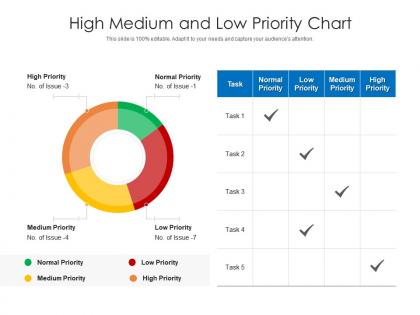
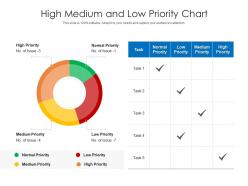
High medium and low priority chart




Try Before you Buy Download Free Sample Product
 Impress Your
 Audience
 100%
100% Editable
 Save Hours
 of Time


Our High Medium And Low Priority Chart are topically designed to provide an attractive backdrop to any subject. Use them to look like a presentation pro.
People who downloaded this PowerPoint presentation also viewed the following :
High medium and low priority chart with all 2 slides:
Use our High Medium And Low Priority Chart to effectively help you save your valuable time. They are readymade to fit into any presentation structure.
FAQs for High medium and
Oh, the Priority Matrix! It's just a simple 2x2 grid where you sort your tasks by how urgent and important they are. Four boxes: urgent AND important, important but not urgent, urgent but not really important, and then the stuff that's honestly neither (why are we even doing this?). When I'm managing projects, I throw everything into these buckets first. The magic happens in that "important but not urgent" quadrant - that's where you actually get strategic work done instead of just putting out fires all day. Start with the urgent/important stuff obviously, but don't ignore that strategic quadrant or you'll be stuck in crisis mode forever.
Honestly, Priority Matrix is a game-changer for when you can't decide on anything. You pick two things that matter - like how urgent something is vs how important, or effort vs impact. Then you plot your options on this grid instead of just having them bouncing around your brain randomly. The cool part? Those quadrants show you exactly what needs your attention right now and what you should probably just forget about. I mean, sometimes seeing it visually makes the choice obvious. Try it with whatever's stressing you out - grab 3 or 4 options and see where they land. You'll be surprised how much clearer things get.
So basically there are four boxes - urgent/important stuff goes in "do now," important but not urgent gets "scheduled for later," urgent but not important you can "delegate to someone else," and honestly the last box is just crap you should probably delete from your life entirely. Most people screw this up by throwing everything into urgent (guilty of this myself tbh). But the sweet spot? That second box where important stuff lives before it becomes a crisis. Just dump all your current tasks on paper first, then be brutally honest about where they actually belong. You'll probably surprise yourself with how much isn't really urgent.
Focus on impact first - will this actually move your revenue or customer happiness? Effort comes next (time, resources, complexity). Some teams throw in urgency for real deadlines, though honestly half the time everything gets labeled "urgent" anyway. Strategic alignment matters too if you're into that. Don't overcomplicate it with like 10 different scoring categories - that just creates analysis paralysis. I'd test whatever criteria you pick on a few sample projects first. See if they actually help you figure out what's worth doing versus what can wait.
So Priority Matrix is basically just the Eisenhower Matrix but as an actual app. You know that urgent/important quadrant thing? Same concept, except now you can collaborate with your team, track progress, sync with other tools - all that good stuff. Other methods like MoSCoW or Value vs Effort use totally different criteria for ranking tasks. Honestly, if you're already thinking in urgent/important terms anyway, Priority Matrix just makes it way more organized than scribbling quadrants on napkins. Plus your whole team can see what's going on.
Color coding is your best friend here - I do red for urgent stuff, yellow for important but can wait, you get the idea. Sticky notes work great if you're old school, or Trello if you want to go digital (honestly both are solid). Keep task descriptions short and specific, maybe add deadlines as little labels. The whole point is you should be able to glance at it and instantly know what's up without reading a novel. Oh, and actually put it somewhere you'll see it - mine's on my laptop because I'm always staring at that thing anyway. Update it regularly or it becomes useless pretty fast.
Honestly, priority matrices are a lifesaver for project management and healthcare teams - they're always drowning in "urgent" stuff. Tech companies swear by them too. Manufacturing and consulting use them a lot because they help you see what's actually critical vs. what just *feels* important. They're especially clutch when you've got different stakeholders arguing about what matters most (which, let's be real, happens constantly). I'd start by taking whatever work problem is stressing you out most and just throw those issues onto the matrix first. You'll probably be surprised by what you discover.
Honestly, I'd check it weekly at minimum - but it really depends on your project's pace. Sprint mode or crazy shifting deadlines? Look at it daily during standups. Longer projects can get away with weekly or even bi-weekly reviews. The whole point is catching priority shifts before you waste hours on outdated stuff (been there, done that!). Set a calendar reminder or you'll definitely forget - I always do. Start weekly and adjust from there. Some teams barely change priorities, others are chaos incarnate.
Honestly, the biggest trap is being way too subjective when you score stuff. You'll just dump everything into "urgent and important" and then what's the point, right? Plus people get obsessed with making the perfect matrix - I've totally done this - instead of actually getting shit done. Don't forget to update it regularly either. Your priorities change constantly. Oh, and define what "urgent" actually means for YOU specifically, not just some generic definition. Otherwise you're just guessing. Keep it simple and review weekly. It's supposed to help you decide what to do, not give you another reason to avoid doing it.
Honestly, Priority Matrices are game-changers for teams. You plot everything by urgency vs importance, and suddenly everyone stops asking "what do I work on next?" It's wild how fast people get on the same page when they can actually see the priorities laid out visually. New requests come in? Your team knows exactly where they fit instead of treating everything like it's on fire. I mean, we've all been there with the constant crisis mode, right? But yeah, definitely try mapping out your current projects this way in your next meeting. You'll be surprised how much clearer things get.
So the Priority Matrix works because it splits things into urgent vs important - totally different things. Most "urgent" stuff is honestly just distractions from what actually matters for your goals. I used to stress about every email like it was life or death! Focus mainly on important but not urgent tasks - that's where real progress happens. Strategic planning, skill building, that kind of stuff. The urgent-but-unimportant junk? Delegate it or just don't do it. Start by going through your current to-do list and honestly asking: is this actually moving me forward or just keeping me busy?
Yeah, they're perfect for personal stuff! I've been doing this for months and honestly it cuts through so much daily BS. The urgent/important grid is clutch - urgent + important goes in quadrant 1 (do now), important but not urgent in quadrant 2 (schedule it), etc. What really opened my eyes was seeing how much time I waste on quadrant 3 stuff - things that feel urgent but don't actually matter. Like responding to every text immediately or whatever. Start with just mapping one day's tasks to get used to it. You'll be surprised what you discover.
Get stakeholder input before you even touch that matrix - trust me on this one. Send them a survey to rate criteria like impact, urgency, resource needs. I love doing workshops where everyone votes on priorities. Yeah it gets chaotic, but honestly that's where you find the gold. Use their feedback to weight everything properly. Then circle back with key players to validate the final version. The real trick? Making everyone feel heard without getting stuck in endless analysis mode. Nobody wants that headache.
Okay so I've actually tried this and it works pretty well. Like "launch marketing campaign" goes in urgent/important, but "update team bios" can sit in the low priority corner forever lol. For personal stuff - client presentation prep is obviously both urgent AND important, while organizing desktop files is just important. Email's where this gets interesting though. Client complaints? Deal with immediately. Random newsletter signups? They can wait. The trick is being real about what's actually urgent vs what just FEELS urgent in the moment. Honestly just try sorting your current to-do list this way and you'll probably be surprised what you discover!
Honestly, going digital with your Priority Matrix is a game changer. You can just drag stuff between quadrants instead of erasing and rewriting constantly - way less messy. Plus you get automated reminders for the urgent things (which I definitely need or I'll forget). The color-coding is oddly satisfying too. Real-time collaboration is clutch if you're working with others. Everything syncs across devices so you're not scrambling to remember what you wrote down when you're out somewhere. I'd start with Trello or Notion - they're pretty user-friendly and won't overwhelm you right off the bat.
-
Really like the color and design of the presentation.