

Honeycomb hexagonal slides ppt sample download




Try Before you Buy Download Free Sample Product
 Impress Your
 Audience
 100%
100% Editable
 Save Hours
 of Time


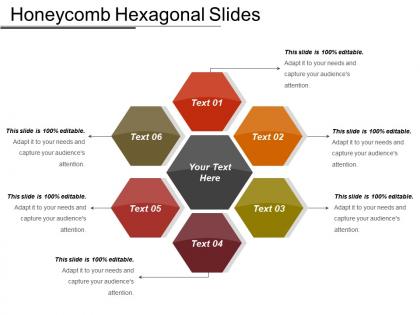
Present the information to the audience in a creative way with the help of Honeycomb Hexagonal Slides PPT Sample Download. The slide sample consists of an interesting honeycomb pattern that helps you represent different aspects of your company and how they are linked to a central element. The honeycomb hexagons are a great way to explain that every entity in an organization is connected to each other. This ready to use honeycomb slide PPT has various usages and it also saves time by covering up all the aspects in one model. You can easily use the hexagonal slide to elaborate the ideas, topics, and processes. It is a highly professional PowerPoint template and can be used to describe any topic as per the requirement. Each honeycomb depicts a different part which is ultimately connected to a central part and each one has a different color that can be edited according to the topic. Download this great PPT sample of honeycomb hexagonal slides and make your presentations worthy of attention.
People who downloaded this PowerPoint presentation also viewed the following :
Honeycomb hexagonal slides ppt sample download with all 5 slides:
Expose exaggerated claims with our Honeycomb Hexagonal Slides Ppt Sample Download. Identify any attempts at cheating.
FAQs for Honeycomb hexagonal slides
Honeycomb hexagonal PowerPoint templates feature interconnected hexagonal shapes, geometric patterns, gradient color schemes, modular layouts, and clean typography that creates visual cohesion. These design elements streamline complex data presentation by enabling compartmentalized information display, seamless content flow, and professional aesthetics, with many organizations finding that hexagonal structures enhance audience engagement while delivering clear, organized communications.
The honeycomb structure enhances information organization by creating logical visual groupings, establishing clear hierarchical relationships, and enabling modular content arrangement that guides audience attention systematically. Through hexagonal clustering, presenters can demonstrate interconnected processes, categorize complex data sets, and build compelling narratives that flow naturally, with many organizations finding this approach significantly improves comprehension and retention rates.
Honeycomb hexagonal templates excel in presenting interconnected processes, organizational structures, team collaborations, strategic frameworks, and multi-step workflows where relationships between elements matter most. These designs prove particularly powerful for consulting presentations, project management overviews, and business strategy sessions, with many organizations finding that the natural clustering effect enhances audience comprehension while delivering visually compelling narratives.
Effective color strategies for honeycomb hexagonal PowerPoint designs include establishing visual hierarchy through gradient schemes, using complementary colors to differentiate content sections, maintaining brand consistency with corporate palettes, and applying the 60-30-10 rule for balanced distribution. Strategic color application enhances information flow between interconnected hexagonal elements, with many presenters finding that monochromatic schemes with accent colors deliver maximum visual impact while maintaining professional credibility.
Content that works best with honeycomb hexagonal layouts includes interconnected processes, team structures, strategic frameworks, comparative analyses, and multi-step workflows. These layouts excel at presenting customer journey maps, organizational hierarchies, product features, service offerings, and project phases, with many businesses finding that the interlocking design enhances visual flow while emphasizing relationships between different elements.
Hexagonal shapes enhance audience engagement by creating visual intrigue, improving information retention through geometric clustering, and establishing clear hierarchical relationships between content elements. These structured patterns guide viewers' attention systematically across presentation flows, with many organizations finding that hexagonal layouts increase comprehension rates, facilitate better discussion dynamics, and ultimately deliver more memorable presentations than traditional rectangular formats.
Honeycomb templates offer superior visual hierarchy, enhanced information organization, modular content flexibility, and natural clustering capabilities that traditional linear layouts cannot match. These hexagonal structures enable presenters to showcase interconnected processes, create memorable visual storytelling, and facilitate audience engagement through intuitive information flow, with many organizations finding that honeycomb designs significantly improve comprehension and retention rates.
Presenters can maintain clarity by establishing visual hierarchy through consistent sizing, strategic color coding, and logical spatial arrangement of hexagons across the slide. These design principles work by grouping related concepts, using directional flow patterns, and maintaining adequate white space between elements, with many business professionals finding that limiting hexagons to 5-7 per slide ultimately delivers better audience comprehension and engagement.
Users should look for layered design capabilities, color palette customization, text formatting controls, shape modification tools, and animation features when customizing honeycomb hexagonal templates. These software features enhance presentations by enabling brand alignment, content hierarchy adjustments, and visual flow optimization, with many organizations finding that advanced editing tools deliver more engaging stakeholder communications and professional outcomes.
A honeycomb hexagonal template adapts to different presentation styles by adjusting content density, visual hierarchy, and messaging approach within each hexagonal segment. For informative presentations, hexagons display detailed data, statistics, and comprehensive explanations, while persuasive formats emphasize compelling headlines, emotional triggers, and clear calls-to-action, with many presenters finding that the modular structure enables seamless transitions between analytical depth and strategic storytelling.
Balancing text and visuals in honeycomb hexagonal designs requires strategic placement through alternating content-heavy and visual-focused hexagons, maintaining consistent font sizes across cells, and using white space effectively within each section. This approach enables presenters to create digestible information flows while preserving visual appeal, with many professionals finding that limiting text to 3-5 words per hexagon maximizes audience engagement and comprehension.
Cultural perceptions of hexagonal shapes vary significantly across global audiences, with Western cultures associating them with efficiency and nature, while Eastern cultures may emphasize harmony and balance in their geometric interpretations. Through strategic design choices, presenters can leverage these cultural nuances by adapting color schemes, contextual framing, and visual emphasis, ultimately enhancing cross-cultural communication and ensuring their hexagonal templates resonate authentically with diverse international stakeholders.
Images can be incorporated into honeycomb hexagonal presentations through photo masking within hexagonal shapes, creating mosaic-style galleries, using hexagons as picture frames for team profiles, and designing layered visual storytelling sequences. These creative approaches enable dynamic product showcases, compelling case study presentations, and engaging brand narratives, with many marketing teams and creative agencies finding that hexagonal image layouts deliver more memorable visual impact than traditional rectangular formats.
The honeycomb design leverages interconnected hexagonal cells to visualize team member roles, project phases, departmental contributions, and collaborative workflows, making complex team structures immediately comprehensible. This geometric approach enables project managers to demonstrate how individual responsibilities connect and support overall objectives, while team members can clearly see their interdependencies, ultimately enhancing coordination and accountability across cross-functional initiatives.
Common mistakes include overcrowding hexagons with excessive text, using inconsistent colors that clash with the honeycomb structure, ignoring proper spacing between elements, and failing to maintain visual hierarchy across connected sections. Many presenters also struggle with balancing content distribution across hexagonal shapes and creating seamless flow between interconnected concepts, ultimately undermining the template's natural organizational strength and visual clarity.
-
Wonderful templates design to use in business meetings.
-
Good research work and creative work done on every template.