


Information System Audit Powerpoint Ppt Template Bundles




Try Before you Buy Download Free Sample Product
 Impress Your
 Audience
 100%
100% Editable
 Save Hours
 of Time


Our Information System Audit Powerpoint Ppt Template Bundles are topically designed to provide an attractive backdrop to any subject. Use them to look like a presentation pro.
People who downloaded this PowerPoint presentation also viewed the following :
Information System Audit Powerpoint Ppt Template Bundles with all 21 slides:
Use our Information System Audit Powerpoint Ppt Template Bundles to effectively help you save your valuable time. They are readymade to fit into any presentation structure.
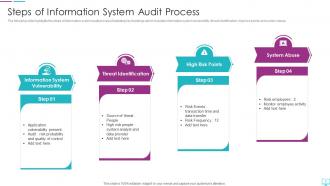
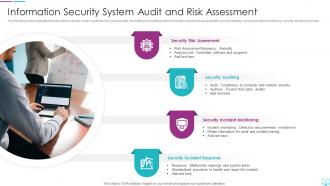
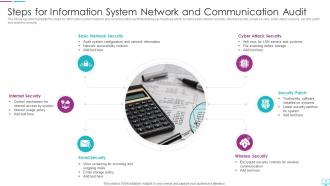
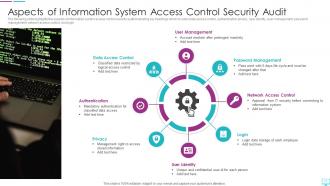






FAQs for Information System Audit Powerpoint
So basically you're doing a health check on all your IT stuff - checking if your security actually works, data's protected, and you're hitting compliance targets. Think of it like getting blood work done but for computers lol. You'll want to see if systems are running smooth and actually helping the business instead of just existing. Honestly, the smart move is focusing on the sketchy areas first since that's where problems usually hide. Find those weak spots before they bite you in the ass. It's way better than scrambling when something breaks.
So basically, financial audits are all about the money - checking if your numbers add up and transactions are legit. IS audits? Totally different beast. They're digging into your tech stuff - like whether your systems are secure, if people have proper access controls, backup procedures, all that cyber security jazz. Honestly, IS auditors probably give me more anxiety because they're looking for ways hackers could get in. Financial folks just want to see if your revenue's accurate, but IS auditors are asking "could someone steal this data?" If you're prepping for an IS audit, forget the spreadsheets - you'll need your IT policies and documentation ready instead.
Okay so you'll want five main things for your IS audit plan. Define your scope and objectives first - what systems are you actually auditing and why? Risk assessment comes next to figure out where to focus. Then map out your procedures and testing methods. Timelines and resources are tricky (seriously, double whatever time you think it'll take). Communication protocols for reporting findings round it out. Oh, and get stakeholder buy-in on the scope before you do anything else - learned that one the hard way. It's way easier than trying to backtrack later when everyone's confused about what you're actually doing.
Start by figuring out which regulations actually apply to you - SOX, HIPAA, GDPR, whatever. Make a checklist that connects your audit steps directly to those requirements so you're not frantically googling stuff later. Document everything because auditors are obsessed with paper trails. I learned this the hard way lol. Keep your legal team in the loop too - they'll catch things you miss. Don't wait until audit season to stress about this. Schedule quarterly reviews instead. Way better than scrambling at the last minute when everyone's already swamped and panicking about gaps.
So internal controls are like your roadmap for IS audits - they show you what the company's doing to protect their data and systems. You'll dig into stuff like who has access to what, backup procedures, security protocols. Test whether they actually work or if they're just there on paper (spoiler: sometimes it's just paper). Controls that are broken or missing? That's where you spend your time making recommendations. Honestly, half the job is just documenting what exists first. Then you figure out what's busted and needs fixing to keep their risk down.
For your audit, start with reconciliation between systems - that's where you'll catch the biggest issues fast. Test input controls and field validations to see what bad data gets through. Hash totals are great for spotting unauthorized changes. Access controls matter too (seriously, most problems live there). Don't skip testing backup procedures either. Oh, and range limits - boring but they'll save you headaches later. The reconciliation stuff usually shows red flags right away, so I'd tackle that first.
Think of it like a checkup for your company's tech stuff. Auditors dig through your networks, apps, and data to find security holes before hackers do. They'll test your firewalls, user access, patches - you know, all that backend stuff most people ignore. Honestly, you'd be shocked at how many problems are just sitting there waiting to bite you. They also make sure you're hitting compliance standards (super boring but necessary). Best part is getting that ranked list of what to fix first instead of just panicking about everything. Do it yearly or whenever you make big changes.
Honestly, access is your biggest headache - getting permissions and data from different systems is brutal. Documentation? Half the time it's wrong or doesn't exist. People get super defensive when you're poking around their systems, which I get but it's still annoying. Time's always tight, especially with critical systems where you can barely touch anything. Oh, and tech changes so fast you're constantly figuring out new audit methods on the fly. Best thing you can do is buddy up with the IT folks early on. They'll save your butt later. Also, whatever timeline you think sounds reasonable? Double it.
So auditors basically want to see if your IT governance actually works in real life, not just on paper. They'll dig into how your IT strategy lines up with business goals and check out your risk management stuff. Your IT steering committee structure matters too. Honestly, the compliance part can be a pain - they verify you're actually following your own procedures. They also look at incident response and business continuity planning. The trick is making sure your daily operations match what you've documented. Don't just have pretty policies sitting in a drawer somewhere.
So I'd definitely start with automated scanners - Nessus and Qualys are solid for finding security gaps. Wireshark's great for analyzing network traffic too. SIEM platforms are honestly a lifesaver for log analysis because doing that stuff manually is brutal. You'll want pen testing tools in your toolkit as well. For structure, frameworks like COBIT or ISO 27001 help keep everything organized. Don't laugh, but I still use spreadsheets for documentation sometimes - they just work. The real trick is mixing automated scanning with manual testing since machines miss things humans catch.
So you basically get a clear game plan for fixing all your security holes - that's huge. The audit shows exactly where you're vulnerable, like outdated permissions or compliance stuff you missed. Think of it as someone walking through your house pointing out every unlocked window. What I really like is how they prioritize everything, so you're not just throwing money around randomly. Documentation helps tons with compliance reports later, and honestly? Some insurance companies will actually cut your rates. I'd definitely tackle the scary high-risk stuff first though.
Think of risk assessment as your GPS for auditing. You map out which systems and processes could really hurt the company, then hit those areas hardest. Short on time? This tells you exactly where to dig deep versus where you can breeze through. Honestly, skipping this step is like throwing darts blindfolded - maybe you'll hit something important, maybe you won't. I learned this the hard way on my second audit when I spent weeks on low-risk stuff while missing a major control gap. Map the risks first and you'll thank yourself later.
Auditors will dig into whether your backup plans are documented and up-to-date. They check if you're actually testing backups regularly - not just saying you do it. Recovery time goals matter too. The awkward question always comes: when did you last run a full disaster drill? "Soon" doesn't cut it, trust me. They'll want proof your critical systems get priority treatment. Staff training records, offsite storage, communication plans - all fair game. Oh, and they hate when plans only exist on paper. You've got to show everything works in real life, which honestly makes sense.
When you're writing up audit findings, prioritize them by risk level first. Nobody wants to wade through technical jargon, so explain the actual business impact in plain English. I swear, half the audit reports I've read are basically useless checklists that just sit in someone's inbox forever. Break down each finding into four parts: what's wrong, why it happened, what risk it creates, and how to fix it with realistic deadlines. Always throw in some quick wins alongside the bigger projects - stakeholders get excited when they can check something off their list right away. Schedule your follow-up meeting within a week while everything's still fresh.
So instead of getting that annual audit surprise where everything's already broken, continuous monitoring lets you catch problems while they're happening. Think of it like watching a live stream vs looking at old photos. You'll get alerts about security issues and compliance stuff in real time, which honestly saves so much stress later. Set up automated notifications for your most critical stuff - you don't want to be buried in every tiny alert. The best part? You can actually see patterns developing and fix things before they turn into massive fires. Way better than scrambling during audit season.
-
Topic best represented with attractive design.
-
No second thoughts when I’m looking for excellent templates. SlideTeam is definitely my go-to website for well-designed slides.