

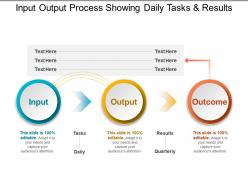
Input output process showing daily tasks and results





Try Before you Buy Download Free Sample Product
 Impress Your
Audience
 100%
Editable
 Save Hours
of Time


Introducing Input Output Process Showing Daily Tasks And Results template that will assist you in depicting the steps involved in the input output process. Showcase the working of any event or model. Illustrate how the major components interact with each other. Business professionals, software engineers, IT consultants and other professionals can get this slide. Display how the information is processed through different phases. Various process diagrams can also be presented with the assistance of this readily available PowerPoint slide. By incorporating this PPT slide it becomes easy to illustrate the data flow presentations. Process flow can also be illustrated using this PPT slide. It plays a crucial role in system analysis as well. Our designers at SlideTeam have created this PPT template for your convenience so download the slide now and create engaging presentations in no time.
People who downloaded this PowerPoint presentation also viewed the following :
Input output process showing daily tasks and results with all 5 slides:
Arise to a fresh dawn with our Input Output Process Showing Daily Tasks And Results. Your thoughts will create a beautiful day.


FAQs for Input output process showing daily
Honestly, start by figuring out what's actually urgent vs what just *feels* urgent - that distinction will save your sanity. Break big projects into bite-sized pieces. I'm a sticky notes person myself, but whatever system clicks with your brain. Always pad your deadlines because life happens. Check your task list weekly and ruthlessly delete stuff that doesn't matter anymore (you'll be surprised how much falls into this category). Pick one approach and give it two solid weeks before you decide it sucks. Most people jump around too much and never let anything actually work.
So basically, prioritization stops your team from drowning in random tasks that feel "urgent" but aren't actually important. Have everyone dump their current work into a list, then rank stuff by impact and urgency - I usually just do high/medium/low because fancy systems are overkill. This way people aren't stepping on each other's toes or working on totally different things. You'll know exactly where to put your strongest team members too. Honestly, it's one of those simple things that makes a huge difference once you start doing it consistently.
Honestly, just pick something everyone will actually stick with - that's the hardest part. Asana's pretty solid for visual stuff, and Monday.com has good timeline views. I'm kind of obsessed with Notion lately since you can dump everything there (tasks, docs, random notes). Whatever you choose, make sure it plays nice with Slack because nobody wants to check five different apps. Oh, and definitely do free trials first - let people mess around with 2-3 options before committing. Trust me, there's nothing worse than forcing a tool on your team that they hate using.
Dude, visual task management is a game changer. Your brain can actually process what's going on when tasks are laid out as cards or color-coded instead of buried in some endless list. Bottlenecks become obvious. You'll spot overdue stuff instantly. Moving things from "working on it" to "finished" feels way better than just crossing items off - keeps you motivated, you know? It's like comparing a messy spreadsheet to a clean dashboard. I mean, I still sometimes go back to plain lists when I'm lazy, but visual boards just work better. Try it for a week and you'll see what I mean.
Look, deadlines basically save us from ourselves - without them we'd just bounce between whatever seems interesting that moment. They make you actually break stuff down instead of staring at some massive project feeling overwhelmed. Plus there's something about that ticking clock that just gets you moving, you know? I used to be terrible at this until I started working backwards from the due date. Set little checkpoints along the way so you're not scrambling at the end. Just don't make them so tight you hate your life. There's a sweet spot between "eh, plenty of time" and total panic mode.
Dude, I swear by breaking stuff down into smaller chunks. Your brain doesn't freak out when it's just "write intro paragraph" instead of "finish entire essay." You actually get addicted to checking things off - sounds dumb but it works. Each little win makes you want to tackle the next piece. Oh, and be super specific about what counts as "done" for each step. Like, don't just write "research" - make it "find 3 sources about X topic." I used to be the worst procrastinator until I started doing this. Try it on your next big thing - you'll probably surprise yourself with how quickly you dive in.
Ugh, procrastination is the worst! What works for me is breaking stuff down into ridiculously small pieces - like 5-10 minutes max. Way less scary than staring at the whole monster project. Set a timer and just commit to that tiny block. There's also this "two-minute rule" thing where if something takes under two minutes, you just do it immediately instead of adding it to your mental pile of doom. Oh, and figure out when you actually have energy during the day - I'm useless after 3pm honestly. Tackle your hardest stuff during those peak hours. Try one of these tomorrow!
Honestly? Agile breaks those huge scary projects into chunks you can actually wrap your head around. Two-week sprints are perfect - you're constantly checking if you're on track instead of finding out you screwed up after three months. Daily standups sound annoying but they're weirdly helpful for catching problems early. You'll actually ship working stuff regularly rather than doing the whole "big reveal that nobody wants" thing. I'd start with two-week cycles and just see what happens. Makes priorities way less messy than whatever chaos you're doing now.
Dude, communication literally makes or breaks everything with task management. I've seen projects go completely sideways because someone wasn't clear about deadlines or who's doing what. You know those awful moments where everyone's pointing fingers like "I thought YOU were handling that"? Yeah, that's what happens when communication sucks. Be super specific about assignments - vague stuff just kills productivity. Tell people exactly what you need and when it's due. Honestly, half the battle is just making sure everyone's on the same page from the start. It saves so much headache later.
Honestly, just set up regular check-ins from the start - don't wing it. I use Trello for everything (probably obsessively), but any shared board works so you can track progress without breathing down their necks. Be super specific about what you want upfront, then let them figure out how to get there. Weekly updates work for bigger stuff, quick milestone checks for smaller tasks. Here's what I've learned: start small to build trust first. Once you see how they work, you can dump bigger projects on them. Freedom with clear boundaries is where the magic happens, if that makes sense.
Honestly, the worst thing you can do is say yes to everything - I learned that the hard way. Also, don't try keeping track of stuff mentally because you'll forget something important. Write things down! A basic to-do list saved my life. Focus on your top 3 priorities each day instead of jumping around between random tasks. That scattered approach never works. Set deadlines you can actually meet too. Oh, and block out time for deep work - even if it's just an hour. Trust me, you'll get way more done.
Honestly, it's like night and day. Solo work? You're the boss of everything - your timeline, your methods, your chaos. But team projects... ugh, sometimes I swear you spend more time in meetings than actually working. You've got to coordinate with everyone, figure out who's doing what (and when), plus deal with Sarah's vacation right when you need her part done. Tools are different too - I can get away with sticky notes for myself, but teams need those shared boards where everyone can see what's happening. My advice? Pin down responsibilities from day one or you'll hate your life later.
Honestly, feedback is your sanity check for whether your system actually works or just makes you *feel* productive. Ask your team weekly what's slowing them down and what would help things run smoother. Then - and this is key - actually change stuff based on what they say. You'll start noticing patterns, like tasks always getting stuck in the same spots or everyone being confused about the same deadlines. It's kind of like debugging, but for workflows instead of code. Without it, you're basically flying blind and wondering why nothing gets done efficiently.
Okay so SMART goals are seriously a lifesaver for task management. They make you get super specific about what you're actually trying to do instead of just wandering around aimlessly. Like instead of "make the website better" you'll end up with "boost page load speed by 2 seconds before Friday." Way more actionable, right? The whole Specific, Measurable, Achievable, Relevant, Time-bound thing just works. I used to hate goal-setting frameworks but this one's different. Try taking one of your vague goals and converting it - you'll be shocked how much clearer your to-do list becomes afterward.
Honestly, just batch your stuff together - like do all emails at once instead of checking them every 5 minutes. Time-blocking changed everything for me. I used to bounce around like a pinball between random tasks and got nothing done. Block out chunks for similar work and you'll actually see how long things take (spoiler: usually longer than you think). Do your hardest work when you're most awake - mornings work best for me but maybe you're a night owl? Try blocking just 2-3 focused sessions tomorrow and see what happens.
-
Easily Editable.
-
Design layout is very impressive.