

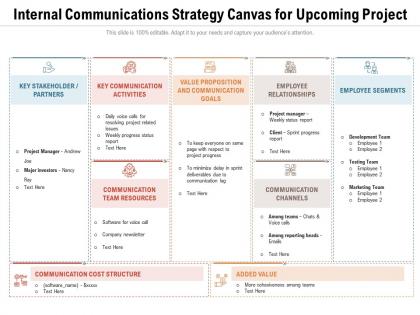
Internal communications strategy canvas for upcoming project




Try Before you Buy Download Free Sample Product
 Impress Your
 Audience
 100%
100% Editable
 Save Hours
 of Time


Our Internal Communications Strategy Canvas For Upcoming Project are topically designed to provide an attractive backdrop to any subject. Use them to look like a presentation pro.
People who downloaded this PowerPoint presentation also viewed the following :
Internal communications strategy canvas for upcoming project with all 2 slides:
Use our Internal Communications Strategy Canvas For Upcoming Project to effectively help you save your valuable time. They are readymade to fit into any presentation structure.
FAQs for Internal communications strategy canvas
So you'll want four key things: clear objectives, knowing your audiences, picking the right channels (email, Slack, whatever), and feedback loops. That last one's critical - I've watched so many communication plans crash because leaders just talk at people instead of listening. Also gotta have consistent messaging and timing that fits your company vibe. Oh, and actually track if it's working through surveys or engagement stuff. Honestly, I'd start by looking at what you're doing now and fixing the biggest problems first. Way easier than overhauling everything at once.
First thing - survey your people about how communication's actually working. Ask about clarity, timing, what channels they prefer. Then dig into those boring metrics everyone ignores, like email open rates and intranet traffic. Those numbers tell you more than you'd think! Do some focus groups too, maybe grab coffee with a few employees. What's really wild is how often there's a huge gap between what leadership thinks they're saying and what people are hearing. You need that baseline data though, otherwise you'll never know if your changes actually worked.
Honestly, you can't just wing internal comms and hope for the best. Ask your people what they actually want! I made that mistake once - spent weeks on these gorgeous newsletters that literally nobody read. Feedback shows you which channels people check (spoiler: probably not email), what messages click with them, and where they're getting confused. Plus you'll catch those blind spots where half your team feels totally out of the loop. Run quick pulse surveys or just grab coffee with folks. But here's the thing - you've got to actually use what they tell you, not just collect it.
Honestly, the right tech makes such a huge difference for remote teams. Slack or Teams work great for quick messages. Video calls are obvious but necessary for real face time. I'm kind of obsessed with Loom lately - you can record detailed updates without the scheduling nightmare. Shared dashboards keep everyone in the loop on company stuff and metrics. But here's the thing: don't just pick whatever's popular. Ask your team what they actually like using first. Nobody wants to fight with clunky software all day. Maybe audit what you've got now and see what's working?
Oh man, the worst thing is just drowning people in messages - like when your inbox hits 50 unread and you just give up, you know? Timing's huge too. Don't drop major news when everyone's slammed with deadlines. And honestly? Most leaders just talk AT people instead of actually listening back. My advice: be picky about what you send out. Wait for the right moment when people can actually focus. Always give them a way to respond or ask questions - even if it's just "hit reply if this doesn't make sense." Before sending anything, ask yourself what you actually need back from them.
Honestly, ditch the boring policy announcements and tell actual stories instead. Like when Sarah from manufacturing had that safety idea that prevented accidents - that's way better than "we're implementing new protocols." Nobody cares about bullet points, but everyone loves a good story. Try framing your next company update around real employee wins or behind-the-scenes project moments. Customer success stories work great too, especially from your team's POV. I'd just pick one announcement and give it the story treatment - beginning, middle, end. Makes people actually want to read your emails for once.
Look at your email open rates and intranet views first - that's basic stuff but it matters. Employee satisfaction scores from pulse surveys are gold though, way more telling than people think. Town hall attendance is weirdly revealing too about how engaged folks actually are. Quick polls after big announcements work great for testing if messages stuck. Honestly, don't go overboard with metrics - pick like 3 or 4 that match what you're trying to do. I'd start small and add more later once you've got the basics down.
Internal comms is seriously your best friend during change management. People freak out when they're left in the dark, so communicate early and be transparent about timelines and how their roles might shift. Multiple channels work best - some folks prefer emails while others need to hear it in person at town halls. I'd map out your key messages for each phase first and figure out who needs what info when. Honestly, change goes so much smoother when people feel included rather than blindsided. Oh, and don't just send one email and call it done - you'll need to repeat things more than you think.
Look, your company's vibe totally shapes how you should communicate internally. More traditional places? You're gonna want formal messages flowing down from the top. But if you're one of those flat, collaborative spots, two-way chats work better - everyone's throwing around memes in Slack, even the boss. The culture tells you what tone to hit, which tools actually get used, how often people want updates. Oh, and don't just go by what's on the careers page - that's usually BS. Figure out how things really work day-to-day first, then match your communication style to that reality.
Dude, visuals are a game changer for cutting through all that info overload. Charts, infographics, even basic diagrams work so much better than walls of text. There's this crazy stat about people processing visuals 60,000 times faster than words – probably made up but whatever, it feels true lol. PowerPoint or Canva make it super easy to whip up quick visual summaries. Honestly, I was skeptical at first but the engagement difference is nuts. People actually pay attention instead of skimming past your stuff. Next time you're sending an update, try making it visual instead of just another boring email paragraph.
You've gotta hit people multiple ways - email, Slack, meetings, even those old school bulletin boards if your office has them. Seriously learned this the hard way when I sent something super important via email only and like half the team never saw it. People just process information differently, you know? Send follow-ups and reminders too because honestly, everyone's drowning in messages these days. Having managers mention stuff in their team meetings helps a lot since face-to-face actually sticks. Oh, and track it somehow - read receipts or quick polls work great for seeing if anyone's actually paying attention.
Honestly, start with simple stuff that gets people talking across departments. Lunch and learns work great - teams can show off what they're actually doing (which is half the battle since most people have no clue). Set up Slack channels by project instead of department so conversations happen naturally. Cross-functional project updates help too. I'd throw in some department spotlights because people are weirdly curious about other jobs. The big thing is making it two-way communication, not just boring announcements from above. Pick one cross-department thing to test first, then expand. Don't overthink it.
Honestly, speed beats perfection here. Jump on communication fast, even when you're still figuring things out yourself. Tell people what you know AND what you don't - that transparency thing actually works. I've watched companies totally blow this by waiting too long... then employees hear rumors from Twitter or whatever before leadership says anything. Brutal mistake. Set up regular check-ins so your team knows when updates are coming. Use everything - email, Slack, those big all-hands meetings. Oh, and prep your managers because they'll get hit with questions. People are stressed during crises, so acknowledge that reality upfront.
Yeah totally! Private Facebook groups or LinkedIn groups work really well for this stuff. Even Slack if you make it feel less... corporate-y. Your people already know how to use these platforms, so they'll actually engage instead of deleting another boring company email. Start with whatever platform your team's already on - maybe survey them first? I'd honestly just pick one department and test it out. Company updates, celebrating wins, that kind of thing. Just don't make it sound like HR wrote everything. Keep it real and you'll be good.
Honestly, leadership makes or breaks the whole thing. When they're actually involved and not just sending emails from on high, people listen. Your strategy gets real credibility when the boss is walking the walk, you know? But here's what I've noticed - it can't be fake corporate speak. Leaders need to actually engage, ask questions, respond to feedback. Not just broadcast mode. People can smell inauthenticity from a mile away. Get your leadership team genuinely invested in two-way conversations, otherwise you're just creating another thing everyone will ignore. Trust me on this one.
-
Easily Understandable slides.
-
Innovative and Colorful designs.
-
Presentation Design is very nice, good work with the content as well.
-
Colors used are bright and distinctive.
-
Unique research projects to present in meeting.
-
Great quality product.
-
Unique research projects to present in meeting.