

Key process for developing candidate journey map




Try Before you Buy Download Free Sample Product
 Impress Your
 Audience
 100%
100% Editable
 Save Hours
 of Time


Our Key Process For Developing Candidate Journey Map are topically designed to provide an attractive backdrop to any subject. Use them to look like a presentation pro.
People who downloaded this PowerPoint presentation also viewed the following :
Content of this Powerpoint Presentation
Description:
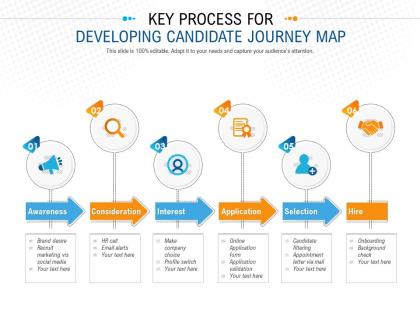
This image presents a structured diagram known as the "Candidate Journey Map," illustrating the key process for developing a roadmap for prospective employees as they move through the stages of acquiring a job. The journey is segmented into six distinct steps:
1. Awareness:
This is the starting point where a potential candidate becomes aware of the company, often through brand marketing efforts and social media presence.
2. Consideration:
At this stage, the candidate considers the company as a potential employer. This might involve HR interactions, such as calls or receiving email alerts with job postings to prompt further interest.
3. Interest:
The candidate makes the company a choice for employment. They may take actions like updating their profile to better match the job listings or actively further engage with the company’s content.
4. Application:
This is the formal engagement step where the candidate submits an application, which then goes through an evaluation or validation process.
5. Selection:
Following application review, the candidate may be filtered and shortlisted. Finalists typically receive communication, such as an appointment letter, to move forward.
6. Hire:
The last step includes important procedures like onboarding and background checks to officially employ the candidate.
Use Cases:
These slides can be applied in various industries tailored to their recruitment processes, such as:
1. Human Resources:
Use: Streamlining recruitment strategies.
Presenter: HR Manager or Talent Acquisition Specialist.
Audience: HR Team, Recruiters, Company Executives.
2. Education:
Use: Educating students on career planning and the employment process.
Presenter: Career Services Advisor.
Audience: Students, Graduates.
3. Healthcare:
Use: Hiring process for medical and administrative staff.
Presenter: Healthcare Recruiting Manager.
Audience: HR Department, Hiring Committees.
4. Information Technology:
Use: Recruitment of technical professionals.
Presenter: IT Recruiting Lead.
Audience: IT Managers, Recruitment Teams.
5. Retail:
Use: Staffing for various retail positions.
Presenter: Retail HR Lead.
Audience: Store Managers, HR Teams.
6. Manufacturing:
Use: Recruitment of skilled workers for production.
Presenter: Talent Acquisition Manager.
Audience: Plant Managers, HR Staff.
7. Hospitality:
Use: Hiring for hotel, restaurant, and frontline staff.
Presenter: Hospitality Talent Consultant.
Audience: General Managers, HR Department.
Key process for developing candidate journey map with all 2 slides:
Use our Key Process For Developing Candidate Journey Map to effectively help you save your valuable time. They are readymade to fit into any presentation structure.
FAQs for Key process for developing
Okay so basically it breaks down like this: candidates first hear about your company (awareness), then they apply, you screen them with calls or whatever, do the actual interviews, make your decision, and finally onboard the good ones. Honestly, a lot of companies forget about the rejection experience but that stuff sticks with people. Each part has its own headaches - like maybe your application process is too long or interviews are weird. I'd definitely survey people who recently got hired AND the ones who bailed halfway through. That's where you'll find the real problems in your funnel.
Honestly? Just apply to one of your own jobs first - I bet you'll find it way more annoying than you expected. Get feedback from people who've been through it recently, plus check your exit surveys and ask your recruiting team what they're hearing. Most candidates bail because of poor communication, crazy long processes, or they have no clue what to expect. Figure out which problems are hitting the most people (or making you look bad online), then try small fixes before you go nuclear and change everything. The whole "walk in their shoes" thing actually works here.
Your employer brand is basically the first impression that makes or breaks everything else. Think about it - if someone sees your company culture looks cool online, they'll tolerate a longer interview process. But promise innovation and then use a clunky application system? Instant turnoff. Candidates judge every single interaction through that initial brand lens you've created. Map out what you're actually promising people first, then make sure your hiring process doesn't contradict it. Authenticity matters way more than perfection here - people can smell BS from a mile away.
Honestly, the data tells such a different story than what people say in surveys. You'll see where candidates actually bail in your application process, which job pages they're obsessing over, how they bounce between roles. Pretty wild stuff. I was shocked when I first started looking at this - what I thought was happening vs reality? Totally different. The numbers help you find those annoying friction points that kill applications. My advice? Start with your biggest drop-off spots first. That's where the good stuff usually is, and you can actually do something about it.
Miro's probably your best bet - the drag-and-drop stuff is pretty smooth and everyone can jump in easily. Mural's similar if you want an alternative. Lucidchart's more structured, which some people prefer. If you've got budget for the fancy stuff, Greenhouse and Workday have journey mapping built right in, but honestly? You could start with Google Slides and be fine. I know that sounds basic but it works. Free Miro account's where I'd start though - test it out before dropping money on anything expensive. Main thing is getting your team to actually stick with whatever you pick.
Honestly, candidate feedback is like having a cheat sheet for what's broken in your hiring process. People will straight-up tell you if your application sucked or if they felt ghosted after interviews - that's gold. I've watched companies do complete 180s after getting roasted in feedback surveys (painful but so worth it). You'll spot where candidates are bailing and why they're frustrated. The trick? Don't wait until the end to ask. Send quick surveys after each step. Way better than guessing what went wrong when your top choice accepts somewhere else.
Honestly, most candidates bail because of three main things. First - those insanely long application processes where you're basically retyping your entire resume into their crappy system. Like, why?? Then companies just ghost people completely, which is so unprofessional. Job descriptions are another huge problem - they're either way too vague or sound like they were written by a robot. You'll see "dynamic team player" but have zero clue what you'd actually DO all day. My advice? Walk through your hiring process like you're the one applying. Find where it gets annoying or confusing and fix those spots first.
Honestly, start collecting real stories from your current employees - that's gold. Instead of boring job descriptions, tell candidates what Sarah's Tuesday actually looks like or how Mike went from intern to team lead. During interviews, get your team to share their own journey stories. People eat that stuff up way more than corporate fluff. Video testimonials work great too, but even just weaving these stories into your career page makes a huge difference. Candidates want the real deal, not polished marketing speak. Grab 2-3 authentic stories from different roles and test it out - you'll probably be surprised how much better candidates respond.
Honestly, I'd focus on the whole funnel - application completion rates, time-to-hire, where people are dropping off. Candidate satisfaction scores are huge too (way more telling than most people think). Also worth tracking offer acceptance rates and interview no-shows. The trick is connecting these numbers to specific points in your process so you can actually see what's broken. Don't go crazy measuring everything though - pick like 4-5 key ones first and build from there.
You've gotta map each channel differently because candidates behave totally different depending on where they come from. Social media people usually know your company culture already - they've been following you. Job board folks? They just want a fast, simple process since they're actively hunting. LinkedIn candidates are trickier though, they're not really looking so you need to court them more. I've watched companies screw this up by using the same approach for everyone, which is honestly just lazy. Match your messaging and follow-up speed to their mindset. Oh and definitely track which channels actually convert best for different roles.
Start by grouping candidates based on role and experience - that's everything. Junior people need way more hand-holding, while senior folks just want you to cut to the chase. Most companies are terrible at this and blast everyone with identical emails (so annoying). Hit them up on whatever platform they actually use. Pull specific skills from their resume when you follow up - shows you're not completely lazy. Oh, and definitely adjust your interview process depending on what role they're going for. Make every interaction feel personal, not like some generic recruiting spam.
Honestly, just treat people like actual humans from day one. Your job posts should sound welcoming, not like legal documents. During interviews, let them meet different team members - diversity matters here. Skip the corporate BS and tell them what working there is really like. I always think the personal touches work best - customize your emails, explain what happens next, that kind of stuff. Train your interview team on bias too (trust me on this one). Share real stories about how people settled in. It's pretty straightforward - they're potential teammates, not just resumes.
Honestly, remote hiring is weird because you lose all those random coffee conversations that actually tell you about someone. Everything happens through screens now, so first impressions matter way more than they used to. I'd over-communicate timelines since there's no quick desk pop-over to clarify stuff. Video calls exhaust everyone - maybe try some async things like recorded company tours? The cool part though is you can find amazing people anywhere geographically. Oh, and you'll need to get creative about showing your culture digitally since they can't just vibe-check the office.
Honestly, mapping out your hiring process is a game-changer for spotting bias. You'll see exactly where underrepresented candidates bail - maybe it's confusing job descriptions that accidentally exclude people, or interview panels with zero diversity. Long processes hurt candidates who can't take multiple days off work too. When you visualize everything, patterns jump out that you'd totally miss otherwise. Like certain groups consistently dropping at the same stage? That's your red flag right there. Then you can fix the actual problems instead of just guessing what's wrong.
Look, good communication honestly makes or breaks the whole thing. Candidates just want to know what's happening - acknowledge their application, explain next steps after interviews, give them realistic timelines. Don't ghost people! That's probably the worst thing you can do for your company's reputation. I'd set up some automated messages for the basic stuff, but make them sound human, not like a robot wrote them. Even rejection emails are better than silence. Be upfront about delays too - people get it, hiring takes forever sometimes. Transparency goes a long way.
-
It saves your time and decrease your efforts in half.
-
Excellent products for quick understanding.
-
Awesome presentation, really professional and easy to edit.