

Key timelines and deadline and roadmap ppt templates




Try Before you Buy Download Free Sample Product
 Impress Your
 Audience
 100%
100% Editable
 Save Hours
 of Time


Ensure a cracker of an event with our Key Timelines And Deadline And Roadmap Ppt Templates. Give them all a burst of fun.
People who downloaded this PowerPoint presentation also viewed the following :
Content of this Powerpoint Presentation
Description:
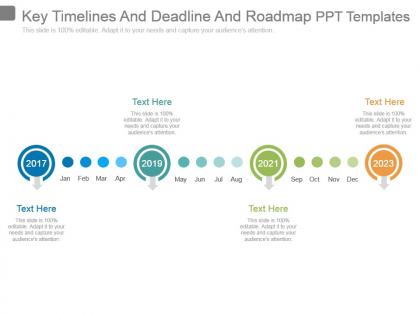
The image is a PowerPoint slide titled "Key Timelines And Deadline And Roadmap PPT Templates." It depicts a horizontal timeline with key years highlighted in larger circles with drop shadows, indicating milestones or significant events. Each year is labeled with a larger colored circle, and smaller circles denote the months, arranged in chronological order. The years shown are 2017, 2019, 2021, and 2023, with 2017 and 2023 emphasized with a brighter color and a lifted appearance. There are text boxes with placeholder text below each key year, indicating where descriptive text can be entered. The overall design suggests this template is for illustrating project timelines, deadlines, or strategic planning roadmaps.
Use Cases:
This type of slide is versatile and can be used across various industries for planning, presenting progress, and setting expectations:
1. Consulting:
Use: Mapping out project phases
Presenter: Management Consultant
Audience: Corporate Clients
2. Education:
Use: Planning academic and administrative timelines
Presenter: Academic Administrator
Audience: Faculty and Staff
3. Technology:
Use: Showcasing product development lifecycles
Presenter: Product Manager
Audience: Development Team
4. Marketing:
Use: Outlining campaign schedules
Presenter: Marketing Strategist
Audience: Marketing Team
5. Construction:
Use: Tracking construction project milestones
Presenter: Project Manager
Audience: Investors and Contractors
6. Event Planning:
Use: Detailing event preparation timelines
Presenter: Event Coordinator
Audience: Event Stakeholders
7. Pharmaceuticals:
Use: Presenting drug development and approval timelines
Presenter: Research Scientist
Audience: Regulatory Authorities
Key timelines and deadline and roadmap ppt templates with all 7 slides:
Our Key Timelines And Deadline And Roadmap Ppt Templates can be fairly catchy. It forces folks to be attentive.
FAQs for Key timelines and deadline and
Start with your end date and work backwards - that's honestly the only way I don't mess up timelines. Map out your big milestones first, then figure out who's doing what and when. Dependencies are huge too - like, what has to finish before the next thing can start? Always build in buffer time because I swear something random always breaks. Oh, and mark your critical path stuff clearly - those deadlines that'll tank the whole project if you miss them. Throw in regular check-ins and note any external stuff you're waiting on. Trust me on adding a risk column somewhere.
Honestly, visuals are a game-changer for timelines. Nobody wants to stare at a boring wall of text. Color-code your project phases, throw in some icons for milestones, maybe add progress bars. Our brains just eat up visual stuff way faster than reading dates and descriptions - it's wild how much difference it makes. Arrows and shapes help guide people through everything logically. Just don't get carried away with crazy graphics that'll distract from your actual content. Stick to 2-3 colors tops and use simple icons that actually make sense. Clean beats cluttered every time.
Honestly, work backwards from your deadline - it's the only way to avoid that last-minute panic we've all been there for. Break everything into big milestones first. Then add buffer time because stuff always takes way longer than you think it will. Don't schedule things that can't actually happen at the same time - I learned that one the hard way. Keep it visual so you can actually see what's happening. Update it when things change (and they will). Share it with your team early and get their feedback - they'll spot timing problems you totally missed plus they'll actually care about hitting those dates.
Yeah so basically companies just tweak their templates around what actually matters for their work. Construction folks obsess over permits and weather delays - makes sense. Software teams throw in sprints and testing phases. Healthcare is honestly brutal with all the regulatory stuff you have to hit. Manufacturing's all about supply chain timing and quality checkpoints. Start by figuring out what always goes wrong in your industry, plus whatever compliance hoops you gotta jump through. Then bake those into your template so you're not reinventing the wheel every single project. Way easier than forgetting the obvious stuff that derails everything.
Honestly, just start with whatever your team's already using. PowerPoint or Google Slides work fine - I've seen some ridiculously good roadmaps made in basic PowerPoint that blow away the fancy stuff. If you want something more visual, Visio, Lucidchart, and Miro are solid choices. Monday.com and Smartsheet are good if you need the whole collaboration thing with real-time updates. There's also specialized tools like ProductPlan, but honestly? Don't overthink it at first. Get your format down, then you can always switch to something fancier later. The content matters way more than the tool anyway.
Honestly, visual timelines are your best friend here. Color-code different workstreams and assign clear owners to every task - saves so much confusion later. Put everything in one central spot where people can actually see updates and leave comments. Buffer time is huge too, like seriously plan for delays because they always happen. Regular updates are non-negotiable though. I've seen projects completely derail because the timeline was three weeks behind reality and nobody trusted it anymore. Oh, and set realistic expectations from day one. Way better than scrambling to explain why you're behind schedule later.
Dude, timeline optimism is the killer here - we always think things'll take way less time than they actually do. Add buffer time to everything, like 20% minimum. Also make sure you loop in the actual people doing the work when setting deadlines, otherwise you're just guessing. Dependencies are huge too - one delayed thing screws up everything after it. Oh and don't jam every tiny detail into the roadmap or it gets messy and nobody wants to look at it. Honestly learned this the hard way on my last project.
Dude, you should totally use timeline templates - studies show they bump success rates by like 30-40%. They make you think about dependencies early instead of getting blindsided later. Your stakeholders will actually thank you because they'll have that visual clarity (no more constant "what's happening?" messages). Templates give you solid structure but you can still tweak them for whatever project you're working on. Honestly, I wish I'd started using them sooner. Your deadlines become way more realistic and you'll actually know if you're making progress. Just grab a basic one and modify it as you figure out what clicks with your team.
Yeah, just chop up those timeline templates into sprint chunks - way easier to manage. Focus on sprint goals instead of those crazy rigid deadlines that never work anyway. Build in retrospective points after each sprint so you can actually learn from what went wrong (or right!). Burndown charts are pretty clutch for tracking progress visually. Buffer time between sprints is a lifesaver when things inevitably go sideways. Oh, and don't forget backlog priorities shift constantly - that's just how it goes. Keep everything flexible since stakeholders will definitely change their minds at least three times per project.
Dude, you NEED milestones - trust me on this one. They're like checkpoints that keep you sane when everything's chaos. I learned this the hard way on my last project. Without them, you'll have no clue if you're on track until it's too late. Plus your boss will keep bugging you for updates and you'll just be like "uh, we're making progress?" Set them at obvious spots - when you finish a phase or hand off something big. Your team gets those little victory moments too, which honestly makes a huge difference on long projects. Way better than staring at some random percentage bar.
Dude, color coding is seriously a lifesaver for timelines. I use red for urgent deadlines, blue for milestones, green when stuff's done - you get the idea. Your brain just picks up on the patterns way faster than reading through everything. Way faster. You can organize by department, priority, whatever works for your project. Just stick with the same colors each time or you'll confuse everyone (learned that the hard way). Honestly once you start doing this you won't go back to those boring black and white timelines.
Look at your old projects - that's where the real gold is. I used to be SO bad at estimating timelines, like embarrassingly off. But going back through completed work from the past year? Game changer. You'll spot patterns in how long things actually took vs. your original guess. Those delays that keep happening? They're probably gonna happen again. Same with bottlenecks - if design reviews always take two weeks instead of three days, plan for two weeks. Calculate averages for similar tasks and use those as your baseline. Way better than pulling numbers out of thin air. Oh, and start documenting this stuff now if you're not already!
Honestly, deadlines can totally make or break your team's vibe. Realistic ones? They actually help - gives people focus and that good kind of pressure. But unrealistic timelines are the worst. Your team feels defeated before they even start, which leads to burnout and that whole "screw it" mentality. I've seen it happen so many times. The trick is finding that sweet spot where it's challenging but doable. Oh, and definitely get your team involved in setting those dates. When they help create the timeline, they'll actually care about hitting it instead of just rolling their eyes at another impossible deadline.
Timelines are honestly game-changers for presentations. Instead of drowning people in bullet points, show your project phases or company milestones visually. I always reveal sections bit by bit while talking - keeps people engaged. Color-code different teams or priorities, throw in some icons to make things pop. Oh, and matching your style to the audience matters big time. Executives want that high-level quarterly stuff, but project teams need the nitty-gritty sprint details. Next time you're prepping slides, just swap out one boring section with a timeline. You'll see the difference immediately.
So Gantt charts are way more detailed - they show who's doing what, when stuff depends on other stuff, and all that project management granularity. Timeline roadmaps? Much simpler. Just the big milestones and dates without drowning everyone in details. Honestly, I'd go with Gantt charts when you're actually running a project and need to track how everything connects. But for presenting to executives or mapping out long-term strategy, timeline roadmaps are cleaner. Nobody wants to squint at a million task bars during a board meeting. Really depends on whether you need the nitty-gritty or just the highlights.
-
Topic best represented with attractive design.
-
Perfect template with attractive color combination.