

Diapositivas de presentación de PowerPoint para la reunión inicial






Try Before you Buy Download Free Sample Product
 Impress Your
 Audience
 100%
100% Editable
 Save Hours
 of Time


Impresione a sus clientes definiendo claramente los elementos básicos del proyecto y otras actividades de planificación del proyecto utilizando nuestras diapositivas de presentación en PowerPoint para la reunión inicial. Esta plantilla de PowerPoint para la reunión inicial de gestión de proyectos consta de un total de 28 diapositivas listas para usar, como la agenda de la reunión, la descripción del proyecto, el alcance del proyecto, el equipo central, el equipo de gestión del proyecto, la matriz de asignación de responsabilidades, el ciclo de gestión del proyecto, la estructura de desglose del trabajo, la estimación del costo del proyecto , plan de comunicación del proyecto, diagrama de Gantt de gestión del proyecto, plan de seguimiento del proyecto y muchas diapositivas similares. Todas las diapositivas en la agenda de la reunión de inicio de este proyecto son completamente editables y se pueden ajustar según los requisitos y necesidades individuales. Ya sea para explicar sus servicios al cliente o a su equipo interno, este paquete de PPT de gestión inicial se puede utilizar para una explicación nítida, breve y muy precisa. Los diagramas y las imágenes utilizados en esta presentación de diapositivas de la agenda inicial son atractivos y se explican por sí mismos para colocar el contenido de una manera elegante. Desarrolle sobre la curación holística con nuestras diapositivas de presentación de PowerPoint para la reunión inicial. Dé la debida importancia al elemento humano.
People who downloaded this PowerPoint presentation also viewed the following :
Contenido de esta presentación de Powerpoint
Diapositiva 1 : esta diapositiva presenta la reunión inicial. Indique el nombre de su empresa y comience.
Diapositiva 2 : esta diapositiva muestra la tabla de contenido de la presentación.
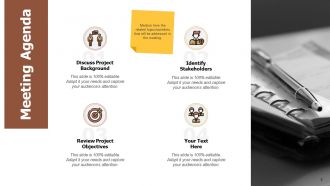
Diapositiva 3 : Esta diapositiva presenta la agenda de la reunión como: discutir los antecedentes del proyecto, identificar las partes interesadas, revisar los objetivos del proyecto.
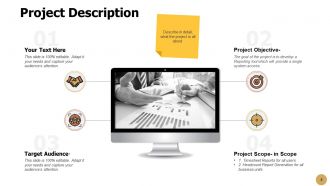
Diapositiva 4 : Esta diapositiva representa la Descripción del proyecto, que incluye: Objetivo del proyecto, Público objetivo, Alcance del proyecto.
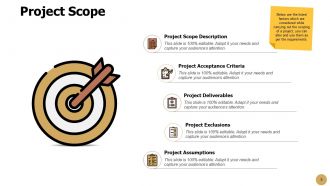
Diapositiva 5 : Esta diapositiva muestra el alcance del proyecto que describe: criterios de aceptación del proyecto, descripción del alcance del proyecto, exclusiones del proyecto, supuestos del proyecto, entregables del proyecto.
Diapositiva 6 : Esta es la diapositiva del Equipo Central con nombres y designaciones.
Diapositiva 7 : Esta diapositiva muestra al equipo de gestión de proyectos que abarca a todas las personas que serían responsables de la implementación del proyecto.
Diapositiva 8 : Esta diapositiva muestra la Matriz de asignación de responsabilidad - RACI que describe los cuatro tipos de asociación de un rol a una tarea.
Diapositiva 9 : Esta es otra diapositiva que continúa con la Matriz de asignación de responsabilidades: RACI.
Diapositiva 10 : Esta diapositiva presenta la Matriz de asignación de responsabilidades: RAPID, que describe los cinco tipos de asociación de un rol a una tarea.
Diapositiva 11 : Esta diapositiva muestra el ciclo de gestión de proyectos que describe: concebir, desarrollar, ejecutar, finalizar.
Diapositiva 12 : Esta diapositiva representa la Estructura de Desglose del Trabajo que define el Plan de Acción de Roles y Responsabilidades según las Tareas o Fases.
Diapositiva 13 : Esta diapositiva muestra la Estimación del costo del proyecto para medir la productividad y el costo de los proyectos a lo largo del ciclo de vida del proyecto.
Diapositiva 14 : Esta diapositiva presenta el Plan de comunicación del proyecto en forma de tabla. Puede cambiar los datos según sus necesidades.
Diapositiva 15 : Esta diapositiva muestra el diagrama de Gantt de gestión de proyectos que cubre todo el plan de trabajo del proyecto dividido en diferentes meses.
Diapositiva 16 : Esta es una diapositiva opcional para el diagrama de Gantt de gestión de proyectos.
Diapositiva 17 : Esta diapositiva muestra la asignación de prioridad de trabajo en forma tabular para asignar tareas de proyecto con la escala de priorización.
Diapositiva 18 : Esta es otra diapositiva para la asignación de prioridad de trabajo con un gráfico de hitos para administrar la escala de tiempo de las actividades del proyecto.
Diapositiva 19 : Esta diapositiva representa el plan de seguimiento del proyecto con cuatro objetivos de KPI comunes para realizar un seguimiento de las tareas atrasadas.
Diapositiva 20 : Esta es la diapositiva Nuestra misión con imágenes y texto relacionados.
Diapositiva 21 : Esta es una diapositiva financiera. Muestre sus cosas relacionadas con las finanzas aquí.
Diapositiva 22 : Esta es una diapositiva de comparación para establecer una comparación entre productos básicos, entidades, etc.
Diapositiva 23 : Esta es la diapositiva Acerca de nosotros para mostrar las especificaciones de la empresa, etc.
Diapositiva 24 : esta es una diapositiva de Venn con cuadros de texto para mostrar información.
Diapositiva 25 : Esta es una diapositiva de Bombilla o Idea para enunciar una nueva idea o resaltar información, especificaciones, etc.
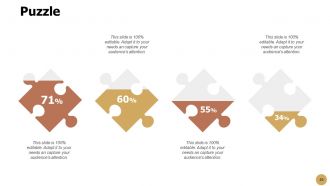
Diapositiva 26 : esta es una diapositiva de rompecabezas con cuadros de texto.
Diapositiva 27 : esta diapositiva muestra una lupa para resaltar información.
Diapositiva 28 : Esta es una diapositiva de agradecimiento con dirección, números de contacto y dirección de correo electrónico.
Diapositivas de presentación en PowerPoint de la reunión inicial con las 28 diapositivas:
Nuestras diapositivas de presentación en PowerPoint para la reunión inicial garantizan un evento excelente. A todos les resultará una feria divertida.
-

Kickoff Meeting
-
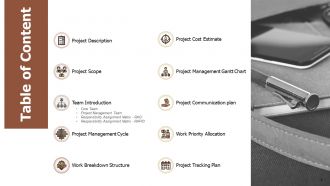
Table of Content
-
Meeting Agenda
-
Project Description
-
Project Scope
-

Core Team
-
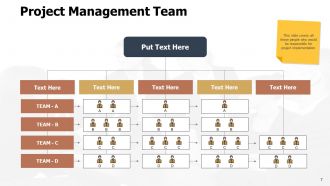
Project Management Team
-
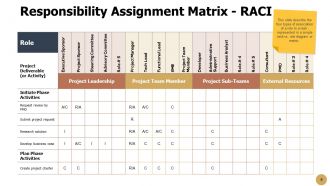
Responsibility Assignment Matrix RACI
-
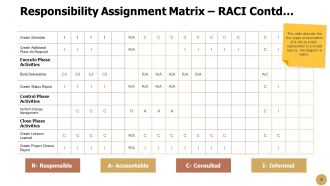
Responsibility Assignment Matrix RACI Contd
-
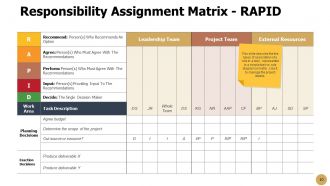
Responsibility Assignment Matrix RAPID
-
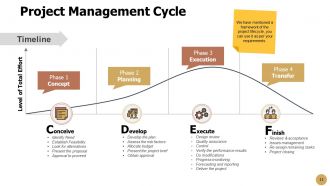
Project Management Cycle
-
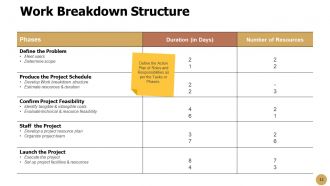
Work Breakdown Structure
-
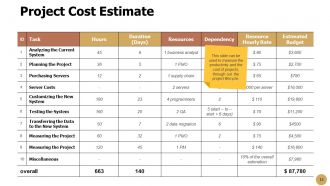
Project Cost Estimate
-
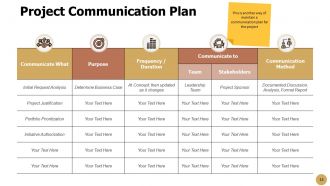
Project Communication Plan
-
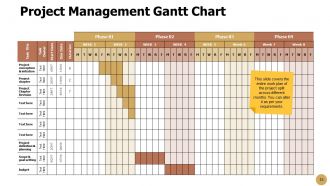
Project Management Gantt Chart
-
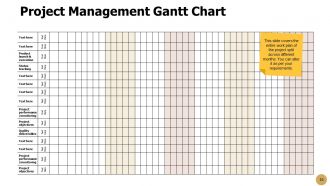
Project Management Gantt Chart
-
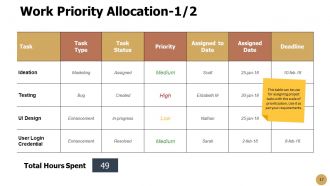
Work Priority Allocation 1 2
-
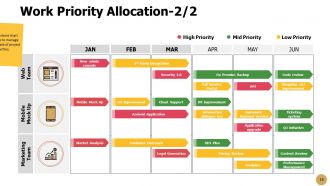
Work Priority Allocation 2 2
-
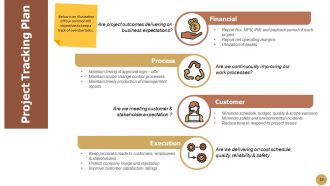
Project Tracking Plan
-
Our Mission
-
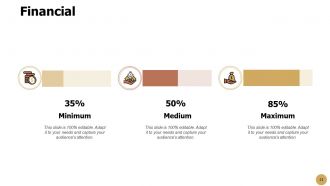
Financial
-
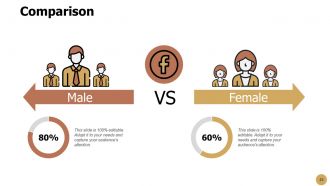
Comparison
-
About Us
-
Venn
-
Bulb or Idea
-
Puzzle
-
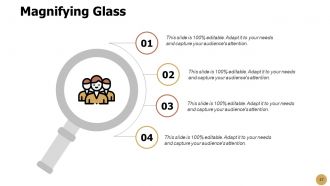
Magnifying Glass
-

Thank you
FAQs for Kickoff Meeting
Okay so basically you want to get everyone on the same page about what you're actually trying to accomplish and who's doing what. Introduce the team members - sounds obvious but you'd be surprised how often people skip this. Go over timelines and major milestones so nobody's caught off guard later. Communication is huge too, like how often you'll check in and what tools you're using. I always think it's better to spend extra time upfront answering questions than dealing with chaos down the road. Oh and definitely end with concrete next steps assigned to specific people, otherwise nothing gets done.
Honestly, send an agenda beforehand so people aren't caught off guard. Then call on the quiet ones by name - don't just wait for someone to speak up. Switch things around with breakout groups or quick polls, maybe even go around the room so everyone says something. Nobody wants to sit through someone droning on for an hour (seriously, that's how you lose people). Keep the energy up by cutting down on long presentations. Oh, and always end with specific next steps. People need to walk out knowing exactly what they're supposed to do, otherwise it was just a waste of time.
So for your kickoff meeting, definitely hit the main stuff - project overview, who's doing what, timeline with key dates. Don't skip the communication plan because that's where projects usually go sideways. I always add a risks section too, sounds boring but it'll save you later. Budget overview if people need those numbers. Oh, and leave decent time for Q&A - someone will definitely ask something you didn't think of. Time-box everything or you'll be there forever. Send the agenda out a day or two before so people can actually think about it first.
Honestly, just throw up a simple Gantt chart or timeline graphic that people can actually see. Work backwards from your big milestones and explain why each chunk needs the time it does. Whatever you do, don't read dates out loud - it's torture for everyone listening. Instead, focus on when each person's piece fits in and why their timing matters. Show how one delay screws up everything else downstream. Oh, and definitely pad your timeline with buffer time. Be honest about it too. Trust me, you'll need those extra days when stuff inevitably goes sideways.
Honestly, just spell everything out from day one - who's doing what, deadlines, the whole thing. I make this simple one-page doc that covers all that stuff because future me always thanks present me for it. Get people to actually confirm they understand their role, not just those polite "mm-hmm" responses. Oh, and have them explain back what they heard in their own words - that's where you catch the disconnect before it bites you later. Also nail down how you'll communicate and make decisions. Sounds boring but trust me, it prevents so much drama down the road.
Oh this is totally doable! Start with something quick like two truths and a lie - people actually enjoy that one. Having everyone share their communication styles works great too, plus you'll need that info for the project anyway so it's not just fluff. Maybe break into small groups to brainstorm potential roadblocks, then report back? I always keep these things under 15 minutes or people start checking their phones. The trick is picking activities that actually connect to your project. Don't overthink it - just match whatever feels right for your group's energy.
Dude, visuals seriously save kickoff meetings from being total snoozefests. People actually get what you're saying when they can see it - like timelines for milestones, diagrams for workflows, charts showing who does what. Way better than death by PowerPoint bullet points. I swear stakeholders pick up complex stuff so much faster when it's visual. Plus we're all wired to remember pictures better than text anyway. Just don't go overboard - one solid visual per main point you're making. Trust me, your team will thank you for not making them sit through another text-heavy presentation.
Set aside like 15-20 minutes in your kickoff just for this stuff. Get everyone to throw out what might go sideways - there's always someone sitting there with a worry they won't share otherwise. Make it clear nobody's getting judged for bringing up concerns. Once you've got a list, figure out which risks are actually scary and put names next to them. Write it all down somewhere everyone can see it later (I learned this the hard way). Honestly, the biggest thing is just making this feel normal instead of something you ignore until you're already screwed.
Honestly, round-robin intros work great - have everyone share their role plus one project concern. Gets the ball rolling fast. Ask open-ended questions (not yes/no stuff) and actually wait after asking. People need thinking time! I know icebreakers feel cheesy but they help, trust me. Make it clear that different viewpoints matter, and shut down anyone who's hogging all the airtime. Oh, and definitely circle back with your quiet teammates afterward. They might've had thoughts but just didn't speak up in the moment.
Get those meeting notes out within 24 hours - action items, who's doing what, deadlines. The whole deal. Then I'd reach out to each person individually to make sure they actually get what they're supposed to do. Honestly, people zone out in meetings more than they admit. Set reminders to check in halfway through each deadline (trust me, saves you from that last-minute panic). A shared tracker works great so everyone can see the full picture, not just you keeping tabs on everything. Follow-up meeting in a week or two to see how things are going.
Honestly, I'd track two waves of stuff. First, the obvious immediate things - who showed up, how engaged people seemed, whether action items actually got owners (not just vague "we'll figure it out" nonsense). But the real test comes in the next week or two. Are people hitting their deadlines? Some follow-up questions are actually a good sign - means they're really thinking about it. Check if your timeline's still realistic after everyone's had time to process. I always do a quick temperature check with team leads around day 7 to see if people left feeling pumped or confused.
Oh man, remote kickoffs are tricky! You've gotta send stuff ahead of time so people aren't going in blind. Breakout rooms are your best friend - nobody talks in those giant group calls, it's like talking to a wall. Throw in some polls or shared docs to keep things moving. Energy dies so fast on video calls, honestly it's frustrating. I always record mine because half the team zones out anyway. The big thing? Follow up within a day with actual next steps while people still remember what happened. Otherwise it's just another forgotten meeting.
You definitely want to nail down who's doing what in that kickoff meeting. Trust me, nothing kills a project faster than everyone assuming someone else handled the important stuff. Write down who owns which deliverables and who gets to make the big decisions - honestly, people work way better when they actually know their role instead of guessing. Also figure out communication stuff, like who updates the client or whatever. Short sentences work here. Then shoot everyone a summary afterward so nobody can claim they "forgot" what they signed up for. Saves you so many headaches later.
Honestly, dig into your last few project retrospectives first - there's usually gold in there that everyone ignores. Look for patterns in what went sideways. Communication issues? Build in dedicated time to hash out roles upfront. Timeline confusion? Address that head-on in your agenda. Most teams just wing it and wonder why they keep hitting the same problems (guilty of this myself). Quick chat with stakeholders helps too - ask what felt messy last time. Then craft your kickoff around fixing those specific pain points. I'd make a simple checklist from past disasters and actually use it when planning. Way better than starting from scratch every time.
For the video call itself, just use Zoom or Teams - pretty standard. But here's what actually matters: get Miro or Mural set up for brainstorming together. Those visual boards keep people way more engaged than just talking at screens. Definitely use breakout rooms too, nobody wants to sit there with 12 people staring awkwardly at each other. I'd grab Mentimeter for quick polls during the meeting - always gets good participation. Set up a Slack channel afterward for follow-up stuff. Oh, and don't go crazy with tools. Like maybe pick three max? I've seen projects die from tool overload before they even start.
No Reviews