

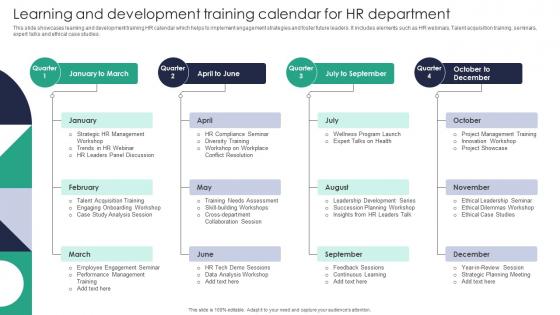
Learning And Development Training Calendar For HR Department




Try Before you Buy Download Free Sample Product
 Impress Your
 Audience
 100%
100% Editable
 Save Hours
 of Time


This slide showcases learning and development training HR calendar which helps to implement engagement strategies and foster future leaders. It includes elements such as HR webinars, Talent acquisition training, seminars, expert talks and ethical case studies.
People who downloaded this PowerPoint presentation also viewed the following :
Learning And Development Training Calendar For HR Department with all 9 slides:
Use our Learning And Development Training Calendar For HR Department to effectively help you save your valuable time. They are readymade to fit into any presentation structure.








FAQs for Learning And Development Training Calendar
Training deadlines are the obvious ones, but don't forget cert renewals - those always sneak up on people. Throw in your skill workshops and compliance stuff (ugh, but necessary). New hire onboarding dates need to be on there too. I'd add buffer time everywhere because someone's always rescheduling something last minute. Quarterly reviews should go in since they usually connect to development goals anyway. Oh, and any conferences or external training your team might hit up. The biggest thing? Actually put it somewhere people will see it, not buried in some random shared drive.
Look at your company's biggest goals this year first. Then build training around those - sounds simple but most places just randomly throw courses at people. Going digital? Focus on tech skills. Expanding overseas? Cultural training matters more than leadership seminars right now. I'd pick 3-5 main objectives max, otherwise you'll spread too thin. The timing thing is huge too - train people right before they actually need the skills, not months later when it's useless. Connecting those dots between what the company wants and what people learn makes all the difference.
Honestly, Google Calendar or Outlook are probably your best bet to start - they handle recurring stuff really well and everyone already knows how to use them. If you need something beefier, check out learning management systems like Cornerstone OnDemand or TalentLMS. They've got scheduling built right in. Project management tools work great too - Asana, Monday.com, that whole crew. You can track assignments and progress at the same time. I'd say go with whatever your team's already using though. Getting people to actually adopt new software is like... half the headache right there. Don't overthink it.
Honestly? Monthly updates are your best bet, though quarterly works if you're swamped. Business priorities shift constantly - way more than any of us want to deal with. I do a quick monthly check to shuffle timing or throw in new sessions, then every quarter I actually dig into what's bombing vs what's killing it. Pro tip: build flexibility right into your calendar from day one or you'll be scrambling constantly. Seasonal stuff always sneaks up on you too. Just set a monthly phone reminder and you won't get blindsided by changes.
Dude, you've gotta actually ask your team what they need instead of just throwing random training at them. Feedback from surveys, reviews, or just chatting with people shows you the real skill gaps. Way more accurate than guessing! If your whole team sucks at project management but only Sarah needs Excel help, boom - there's your priority right there. Performance reviews are gold for this stuff too. I mean, it seems obvious but so many managers skip this step and wonder why their training budget gets wasted. Regular check-ins will save you tons of headaches later.
Definitely! Different backgrounds mean different skill gaps and learning styles that you'd never think of otherwise. Some people want technical training, others need soft skills help. Ages and career stages matter too - what works for new grads won't click with seasoned folks. Honestly, the biggest mistake is guessing what people want instead of just asking them. Run quarterly surveys or casual focus groups to get real input. I've seen companies waste budget on training nobody actually needs because they never bothered to check. Let your diverse teams tell you what they're missing - they'll come up with way better ideas than you will.
Honestly, convenience is everything. Schedule stuff mid-morning when people aren't dead tired, and always send those calendar invites way ahead of time. Free lunch sessions work like magic - I'm telling you, food gets butts in seats every time. Make sure the agenda clearly shows what they'll actually get out of it, not just vague learning goals. Having managers actively push attendance makes a huge difference too, way better than those generic "please attend" emails. Oh, and definitely ask people what they want to learn about first. Recording sessions helps for the folks who can't make it. Multiple time slots don't hurt either.
So you need to track the obvious stuff first - attendance, completion rates, those post-training surveys. But honestly? That's just surface level. What really matters is whether people actually change how they work. I'd do skill assessments before and after, then watch their performance metrics for a few weeks. Are they using what they learned? Follow up with surveys maybe 30-60 days later - sometimes it takes a while for things to click. The satisfaction scores are nice but they don't mean much if productivity stays flat.
Look, the biggest trap is cramming too much stuff in without checking if your team can actually handle it. People won't show up if they're drowning in deadlines - learned that one the hard way. Survey them first about what they want to learn instead of just winging it. Buffer time is crucial because everything takes way longer than you think. Leadership needs to see how training connects to actual business goals or they'll axe your budget fast. Honestly, I'd start with just 2-3 skills that matter most and work backwards from there.
Yeah, totally doable! Mix up live virtual workshops with recorded stuff people can watch later - honestly, the recorded sessions are clutch for time zones. Survey your team first about what they actually want and when they're free. Virtual coffee chats work great, plus online lunch-and-learns and digital mentoring. Don't just do webinars though, that gets old fast. Collaborative projects are solid too since everyone can contribute without being in the same room. The trick is giving people options so remote folks aren't stuck with whatever format you picked.
Time zones are gonna be your biggest nightmare, so tackle those first. Religious and national holidays will mess up your schedule too – plus different cultures have totally different meeting styles. Interactive stuff works great in some places but completely flops in others. Oh, and internet can be super unreliable depending on the region, so definitely have backups ready. I'd start planning like 6-8 weeks out minimum. Pro tip from my own screwup last year with our Asia team – always put multiple time zones on those calendar invites or people will show up at random times!
Honestly, mixing up your calendar formats is a game changer. Visual people love workshops and infographics. Kinesthetic learners need hands-on stuff - simulations, role-playing, that kind of thing. Don't forget auditory folks who do better with discussion groups or podcasts. Timing matters too - I'm useless after 3pm but some people are total afternoon rockstars. You could run the same content in different formats throughout the quarter. Survey your team first though! Find out what actually works for them instead of just doing the usual boring lecture thing. Trust me, variety keeps everyone way more engaged.
Honestly, soft skills training is a game-changer for your L&D calendar. Technical skills are great, but they won't save you when someone's a terrible communicator or can't lead a team meeting without drama. We've all been there, right? Building these skills consistently creates better managers and stronger team dynamics. Employees actually love this stuff because it feels like real career development, not just job training. Oh, and retention goes way up too - people stick around when they feel invested in. Start by figuring out what's actually broken on your teams first.
Honestly, I'm obsessed with stalking competitors - sounds creepy but it works. Check what skills they're prioritizing and you'll spot trends before they hit mainstream. Industry reports are solid too, plus following the big names on LinkedIn gives you insider perspective. Here's what I do: scan job postings in your field monthly because suddenly everyone's asking for the same skill? That's your cue. Map it straight to your calendar - remote work blowing up means Q2 becomes virtual collaboration boot camp. Trade publications help but they're sometimes slow to catch on. Being ahead of the curve beats scrambling to catch up every time.
Put it everywhere - your intranet, monthly email highlights, get managers talking it up in meetings. Seriously, most L&D calendars just die a slow death in some forgotten corner! Focus on the "what's in it for me" stuff - what skills they'll actually get, how it helps their career. Post pics from past sessions to create some FOMO (works every time). Keep registration dead simple and send those reminder texts. Oh, and try badges or learning streaks - people eat that gamification stuff up. The key is making it feel less like mandatory training and more like something they'd actually want to attend.
-
I can say with full confidence that all your business, academic, or professional work requirements will be sufficed with SlideTeam. Their gallery is as rich as 2Million+!!
-
They had the topic I was looking for in a readymade presentation…helped me meet my deadline.