

Employee Monthly Training Calendar Training And Development Program To Efficiency




Try Before you Buy Download Free Sample Product
 Impress Your
 Audience
 100%
100% Editable
 Save Hours
 of Time


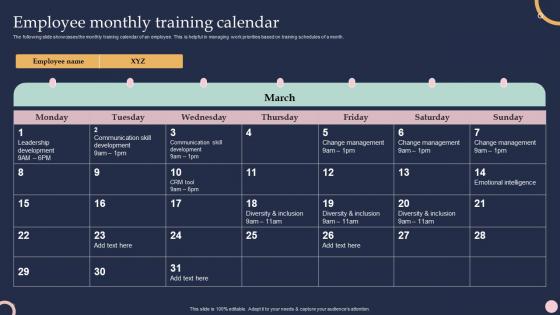
The following slide showcases the monthly training calendar of an employee. This is helpful in managing work priorities based on training schedules of a month.
People who downloaded this PowerPoint presentation also viewed the following :
Employee Monthly Training Calendar Training And Development Program To Efficiency with all 6 slides:
Use our Employee Monthly Training Calendar Training And Development Program To Efficiency to effectively help you save your valuable time. They are readymade to fit into any presentation structure.





FAQs for Employee Monthly Training Calendar Training And Development
Ok so definitely include the basics - training title, date/time, location (or virtual), who needs to attend, and learning objectives. Prerequisites are huge too because nobody wants people showing up totally lost. Add the trainer's name and how long it'll run. Oh and what materials they need to prep or bring. Honestly, a quick description helps so people aren't going in blind. Make everything scannable since managers are always rushing and need to see what their team needs fast. Color-coding by department is actually pretty smart - makes the whole thing way easier to read at a glance.
Start with a skills gap analysis - what does your team have now vs what they actually need? Ask employees directly what training would help them most. People are surprisingly honest about where they suck. Then dig into performance reviews and exit interviews for clues. Don't forget compliance stuff that's coming down the pipeline - that's always a pain but necessary. Industry trends matter too since nobody wants to fall behind competitors. Honestly, the hardest part is prioritizing everything once you have all this data. Space out the most critical needs throughout the year so you're not overwhelming everyone at once.
Mix things up with workshops and group stuff instead of boring slide shows. People tune out fast with those. Make it about their actual work - let them talk about what they've dealt with before. Maybe throw in some snacks too (works every time lol). Don't schedule when everyone's brain-dead, like right after lunch. Get them doing things, not just sitting there. The whole point is showing how this makes their job easier, right? Short sessions work better than marathon ones. Send out a quick survey after to see what actually stuck.
Look, quarterly reviews are a good baseline, but it really depends on what you're training people on. Tech stuff and compliance? Those change so fast you'll probably need updates every few months - regulations are constantly shifting and don't even get me started on software updates. Leadership workshops and soft skills training can chill for like 6-12 months though. Honestly, I just set different calendar reminders for each type of program based on how quickly that industry moves. Way better than playing catch-up when your team's already scrambling because everything's outdated.
Look, training calendars are basically all tech now. Learning management systems handle the scheduling automatically and track who shows up vs. who conveniently "forgets." Most platforms use AI to suggest training based on your actual skill gaps too. Calendar integration saves you from accidentally booking two things at once - learned that one the hard way. The analytics piece is where it gets really useful though. You can finally see completion rates and figure out what training people actually find helpful instead of just assuming that PowerPoint on workplace synergy was a hit.
Honestly, just mix them together instead of doing separate trainings. Like when you're teaching new software, throw in the data security stuff at the same time. Or build harassment prevention right into your leadership workshops - kills two birds with one stone. Try alternating your schedule too. Do one heavy compliance month, then follow it with two months of actual skill building. Way less painful for everyone. Your people won't feel like they're just going through the motions to check some HR box, and you'll actually get both done without making everyone's eyes glaze over. Trust me, it's so much better than the old way.
Start with the obvious stuff - attendance, who actually finishes, quiz scores. Satisfaction surveys are fine but honestly, people sometimes love useless training if it's entertaining. What really matters? Whether they're doing things differently at work afterward. I'd track actual performance changes over 3-6 months - fewer mistakes, better numbers, whatever connects to what you taught them. Just throw it all in a spreadsheet so you can spot patterns. The behavioral stuff takes longer to show up but that's where you'll see if training actually stuck.
Definitely mix things up - some people need hands-on workshops, others just want to see charts and visuals. Discussion groups work great for the talkers on your team. Oh, and podcasts are weirdly huge right now, way more than I expected! Try offering the same stuff in different ways too. Like do a live session but record it so people can go back later. Survey your team first though - they'll tell you exactly what works for them. Short bursts hit different than long sessions. Give them options and let them pick what actually sticks.
Honestly, treat it like any other training - block out actual time slots instead of hoping people figure it out randomly. Schedule it when it makes sense with your workflow, like right after someone's onboarded or when you're changing processes. Pair newbies with experienced people who don't hate mentoring (trust me, this matters). Real work always takes forever, so build in buffer time. Oh, and actually track their progress with clear milestones. Otherwise you'll just be guessing if anyone's learning anything. Way better than the "sink or swim" approach most places do.
Honestly, just mix up your training groups instead of doing the usual department silos. Throw marketing people in with IT folks, or pair up sales with customer service for workshops. We did this at my old job and it was pretty cool - people would actually hang out after and grab drinks or whatever. Oh, and here's something that worked well: rotate who's running the sessions so different departments take turns facilitating. That way everyone gets exposed to how other teams think. The trick is being deliberate about it though. Don't just hope collaboration happens - make it part of what you're trying to accomplish.
Honestly, I'd start with post-training surveys since they're easy to set up digitally. Focus groups work well too, or just grab people for quick one-on-ones. The real gold though? Follow up 30-60 days later to see if they're actually using what you taught them - that's when you know if it stuck. You can do pulse surveys for something more casual, or honestly just listen during coffee breaks and team meetings. People say stuff then they won't put in formal feedback. Pick whatever feels right for your team first, then add more methods once you've got a groove going.
Honestly, timing is everything with training. Don't schedule big programs when your team's drowning in work - like retail during holidays or tax firms in April (I've seen companies mess this up, it's painful). Check your busy vs. slow periods from last year. Block out the crazy times for quick, bite-sized training only. Save the heavy stuff for when people can actually concentrate. Your quiet months are perfect for skill-building since employees won't be distracted by deadlines and customer chaos. Makes such a difference in what they actually retain.
Depends what you're working with budget-wise, but there's definitely stuff out there. TalentLMS and Cornerstone are solid if you want the full tracking experience. Already using Asana or Monday.com? Those work pretty well for training coordination too. Google Calendar with some color-coding is honestly underrated - I've seen small teams crush it with just that. TrainingPeaks and Bridge are more specialized if you need something built specifically for training. My take? Start with whatever you've already got access to. You can always upgrade later once you figure out what bells and whistles you actually care about.
Oh man, I learned this stuff the hard way! Always add buffer time - like 10-15% extra between sessions. Cross-train multiple people to facilitate because you'll get burned when someone calls out sick (trust me on this one). I keep a list of "moveable" topics that can shift to virtual if things go sideways. Communication is huge - tell people about changes ASAP or they'll be annoyed. Having backup venues ready saves your butt. Honestly, hybrid options are a lifesaver these days. Start your next quarter's planning with all this baked in from day one.
Okay so here's the thing - leadership can't just sign off on training and call it a day. They need to actually show up. Get your CEO to attend those Excel workshops (seriously, I've seen this work!). Have executives kick off sessions and share what they're trying to learn too. Block time for development talks. Celebrate learning wins at all-hands. When people see their boss investing real time in growth, it stops feeling like busy work. The culture shift is pretty dramatic once leaders are physically there alongside their teams. Start small though - just ask one exec to sponsor your next session and see how it goes.
-
Kudos to SlideTeam for achieving the high success rate in delivering the top-notch slides.
-
SlideTeam just saved my project! Thank you so much. The variety of templates helped me showcase multiple perspectives easily.