


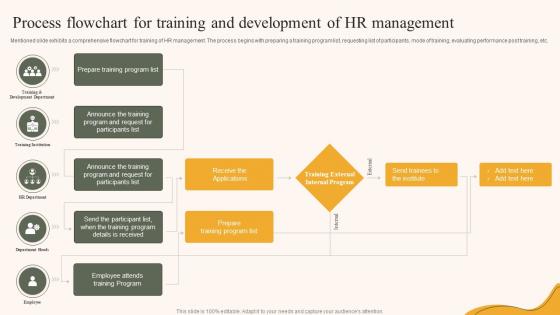
Process Flowchart For Training And Development Of HR Management




Try Before you Buy Download Free Sample Product
 Impress Your
 Audience
 100%
100% Editable
 Save Hours
 of Time


Mentioned slide exhibits a comprehensive flowchart for training of HR management. The process begins with preparing a training program list, requesting list of participants, mode of training, evaluating performance post training, etc.
People who downloaded this PowerPoint presentation also viewed the following :
Process Flowchart For Training And Development Of HR Management with all 6 slides:
Use our Process Flowchart For Training And Development Of HR Management to effectively help you save your valuable time. They are readymade to fit into any presentation structure.





FAQs for Process Flowchart For Training And Development
So you'll need the basic stuff: needs assessment, learning objectives, design phase, picking how to deliver it, implementation, and evaluation. Nothing crazy there. But here's what actually matters - connect everything with clear decision points and feedback loops. Don't skip the stakeholder approval gates between phases (learned that one the hard way). Your flowchart should show evaluation results feeding back into future needs assessments. That's where real improvement happens. Oh, and start by mapping what you're already doing. Then spot where things usually fall apart.
Honestly, flowcharts are a game-changer for training needs assessment. Instead of drowning in messy data and endless stakeholder meetings, you get this clear visual map of your whole process. Shows you exactly how identifying performance gaps connects to root cause analysis, then to figuring out if training's even the right fix. Short sentences work here. The visual format makes it super obvious when you're about to skip a step or miss some crucial decision point. Plus your managers will actually understand what you're doing when you need their budget approval - which, let's be real, is half the battle. Trust me, sketch it out first and you won't be scrambling to fix things later.
Honestly, feedback is what makes the whole training thing actually work. You've got trainees telling you if the content sucks, managers reporting back on whether people are using their new skills, and trainers constantly tweaking things. The flowchart has all these arrows looping back to needs assessment and program design - makes sense when you think about it. Don't just wing it and hope people will randomly volunteer their thoughts though. Set up actual collection points where you ask for feedback directly. Otherwise you're basically shooting in the dark and crossing your fingers.
Start with what skills each role actually needs, then figure out where people currently stand through surveys or manager reviews. Create decision points like "meets benchmark or not?" - pretty straightforward stuff. Honestly, most companies overthink this and make it way more complex than it needs to be. Route people into different training based on their gaps. The part everyone forgets? Build in feedback loops so you can actually tell if the training worked. Otherwise you're just throwing money at programs that might be useless. Keep it simple and you'll get better results.
Honestly, the worst part is nobody knows who owns what. Half your time gets eaten up just figuring out roles while stakeholders contradict each other left and right. Mapping dependencies between departments is a nightmare too - there's always some random connection you missed. Oh, and don't get me started on "documentation" that's either missing or from 2019. You're basically playing detective most days. My take? Pick one simple process first, get the main people to actually agree on something (good luck), and forget about covering every weird scenario right away. That perfectionist stuff will kill your timeline.
Honestly, tech can slot into almost every part of your flowchart. Digital surveys work great for spotting training gaps upfront. Then LMS platforms handle content delivery and track everything automatically - saves so much manual work. AI personalization is where it gets interesting though, adapting learning paths based on how people actually perform. Real-time analytics beat those old manual reviews every time. My advice? Don't go crazy and digitize everything at once. Pick one or two pieces first, see how they work, then expand from there. Way less overwhelming that way.
So for your flowchart, mix immediate stuff with long-term tracking. Participation rates and completion scores are easy wins to start with. Pre/post tests work really well for checking if people actually retained anything. Then track whether they're applying skills back at work - that's honestly where most training falls apart. ROI calculations are great if you can figure them out (total pain sometimes though). The trick is baking these checkpoints right into your process from the start. Don't just tack measurement on at the end. Oh, and assign someone specific to actually collect each metric with clear deadlines, otherwise it never happens.
So the flowchart basically makes you connect your company's actual needs with whatever training you're rolling out. Start by figuring out your business goals first, then map how each training piece supports those. Honestly, it's pretty smart - no more random workshops that sound nice but don't actually help anything. You can trace a clear path from "we need happier customers" straight to specific skills and real results. The visual part makes it crazy easy to catch problems before you blow your budget. I'd use it during planning meetings to keep everyone focused on what actually matters, not just busy work that looks good on paper.
Blues and greens are your best bet - they're calming and actually help people retain info better. I'd suggest a system like blue for processes, green for decisions, orange for big milestones. Made a rainbow disaster once that nobody could follow lol. Clean design wins over fancy every time. Arial or Calibri fonts, consistent shapes, tons of white space. Oh and definitely test it on someone fresh - they'll catch confusing spots you're totally blind to. Keep it simple, skip the creativity here.
Try swim lanes - they're honestly a game changer for showing who does what. Each stakeholder group gets their own lane (managers, HR, learners, etc). Different colors work great for input vs approval steps. Decision diamonds are clutch when you need stakeholder sign-off before moving on. Oh, and dotted lines between the main process and stakeholder touchpoints? Chef's kiss. Makes communication flows super obvious. The whole point is people should look at it and immediately know when they're needed. Nobody wants to guess their role in training development - been there, it's messy.
Okay so flowcharts are actually pretty brilliant for this stuff. You know how everyone's always confused about who's doing what? A good visual map fixes that instantly. Management loves seeing the big picture, trainers know exactly where their pieces fit, and your team finally gets what they're supposed to do (and when). No more of those awkward "oh wait, I thought YOU were handling that" moments. Honestly, I was skeptical at first but it works. Next time you're rolling out training, just try sketching the whole process visually first. Your meetings will be so much clearer.
Dude, seriously make a flowchart for your training timeline. Those spreadsheets we always default to? Total mess. With a flowchart you can actually see which modules depend on each other and where things might get stuck. Your stakeholders won't zone out trying to follow along either. When delays happen (and they will), it's way easier to show the ripple effects. Oh and you'll know exactly when to book your subject matter experts instead of scrambling last minute. Just grab a basic template and start simple.
Honestly, flowcharts are game-changers for onboarding. They map out everything new hires need to learn step-by-step - orientation stuff, job-specific training, all of it. Nothing falls through the cracks that way. When you're dealing with multiple new people (which happens more than you'd think), having that visual roadmap keeps everyone on track. Both you and they know what's next. The best part? It standardizes everything so one person doesn't get amazing training while another gets whatever their manager remembers to cover. Make one template and tweak it for different roles. Trust me on this one.
Think of continuous improvement as what stops your training from getting stale. After each session, you're collecting feedback and performance data - then actually using it to tweak things. Feedback loops should happen everywhere: post-delivery, during evaluations, even when you're figuring out what people need in the first place. Honestly, most people skip this part and wonder why their training sucks. Short bursts work better than marathon sessions, by the way. The key is closing those loops instead of just collecting dust-gathering surveys. Otherwise you're stuck repeating the same outdated stuff forever.
Draw curved arrows that loop back to earlier steps - like from "evaluation results" straight back to "training design." I always use dotted lines for feedback stuff since it keeps things from looking messy. Label those arrows too, something like "participant scores" or whatever data you're actually getting back. Each evaluation point should connect to where changes would happen upstream. Honestly, don't overthink it at first - just pick 2-3 main feedback spots and get those working. The whole point is showing how your evaluations can actually improve things instead of just sitting there. You can always add more arrows later once you've got the basic flow mapped out.
-
They helped us design the pamphlets for our church’s food drive! The people loved the design, and I’m happy to say it was successful. Thank you, SlideTeam!
-
I was never satisfied with my own presentation design but SlideTeam has solved that problem for me. Thank you SlideTeam!