

Limitations and opportunities presentation deck





Try Before you Buy Download Free Sample Product
 Impress Your
 Audience
 100%
100% Editable
 Save Hours
 of Time


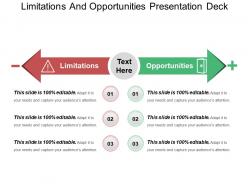
Do you want to display business limitations and challenges in PowerPoint? If yes, then don’t worry, we are presenting our limitations and opportunities presentation deck template to do it without any trouble. List out limitations and opportunities of system development, business growth with the high-resolution graphics used in PPT design. Design layout includes a list view representation of business strengths and weaknesses, which affect business growth. PPT design is extremely helpful to achieve business goals as analyzing weaknesses in advance will provide a way to reduce it and take necessary actions. Today most successful companies do business in a very different way as compared to earlier times. They recognize opportunities and list of weaknesses at workplace in advance, so that business goals can be achieved without any trouble. The layout is simple and can easily be understood by the audience. So, without giving a second thought, download this PPT design and highlight business opportunities and threats and in the most comprehensive manner. Up the ante with our Limitations And Opportunities Presentation Deck. Raise the stakes in the corporate game.
People who downloaded this PowerPoint presentation also viewed the following :
Limitations and opportunities presentation deck with all 5 slides:
Fiascoes are averted with our Limitations And Opportunities Presentation Deck. Figure out the faults before they have an effect.

FAQs for Limitations and
Honestly, the worst part is when templates look amazing with their sample text but completely break once you put in real content. Your layout gets all messed up if you have a longer title or need extra bullet points. Font and color options are usually pretty limited too. Adding charts or images? Good luck - half the time everything shifts around weirdly. Oh, and most templates are super rigid, so they don't adapt when your content changes. I learned this the hard way lol. Always test with your actual content first and maybe have a backup template ready just in case.
Honestly, knowing a template's weak spots upfront saves you so much headache later. Say Template A is great for simple stuff but terrible with complex data - don't try forcing it into something complicated just because it looks nice. You'll hate yourself. I always write down what I actually need first, then see which template won't fight me on those things. Way better than picking something pretty that becomes a nightmare to work with. Trust me, I've been there and it sucks. Simple layouts need simple templates, complex projects need the heavy-duty ones.
Think of templates as your story's visual skeleton - they keep everything looking cohesive with matching fonts and colors. Your audience can actually follow along instead of getting distracted by messy design. Good ones have progress bars and dividers that guide people through your narrative. Just don't pick something boring (I've seen some real snoozefests out there). The trick is matching your template to your story's vibe. Figure out your main message first, then grab a template that boosts it instead of working against you. Makes the whole thing way more polished.
Templates that you can actually customize are a game-changer, honestly. Different industries have totally different needs - like healthcare has to deal with HIPAA stuff, finance has all those regulatory reports to file. Legal firms structure documents way differently than marketing teams do, obviously. The cool part is you're not building everything from zero each time, but you're also not stuck using some basic template that doesn't fit how your industry actually works. I'd start by figuring out what tasks you do over and over again - that's probably where custom templates will save you the most time.
Honestly, templates are pretty genius for getting kids engaged - just don't think of them as restrictive boxes. They're more like training wheels that let students focus on the actual content instead of panicking about design. I always throw in interactive stuff like polls or "complete this thought" sections that basically force participation (in a good way). When kids aren't stressed about formatting, they get surprisingly creative with their ideas. The trick is picking templates that actually match what you're teaching, then letting students make it their own within that framework. Try one interactive template next week - I bet you'll notice the room feels different.
Honestly, accessibility can make or break your presentation templates. You want good color contrast and fonts that don't make people squint. Also, structure your slides so screen readers can actually follow them - I've watched people struggle with gorgeous templates that were basically unusable for anyone with vision issues. Don't just rely on color to show important stuff, add alt text spots for images, and use proper headings. Oh, and test without your mouse sometime - it's eye-opening. Navigation should feel intuitive, not like solving a puzzle.
Start with modular pieces instead of locked-in layouts. Seriously, I can't tell you how many templates from like 2019 look ancient now because they were built around whatever was trendy then. Make everything swappable - colors, fonts, visual stuff - without breaking the whole thing. Your users should be able to customize without hiring a designer. I usually tell people to review their template library every 6 months or so. Toss anything that's getting stale. Stick to solid design basics rather than chasing trends, and you'll save yourself tons of headaches later.
Presentation templates are about to get insane. AI will suggest designs based on your actual content, plus you'll get live polls and Q&A built right in. Your charts will auto-update from spreadsheets—no more manually fixing outdated numbers. Interactive hotspots let people click around and explore deeper. Voice navigation and AR demos are coming too, which honestly sounds a bit gimmicky but could be cool for product launches. I'd start playing with templates that have basic interactive features now. That way you won't be scrambling when all the fancy stuff drops.
Honestly, templates are tricky. If you just slap your content into some generic template, people will check out because it feels boring and predictable. But a good template can actually help your audience follow along better - the visual consistency makes everything easier to process. The trick is treating it like a starting point, not a prison. Take the structure but then mess with the colors, tweak the layout, maybe rearrange slides completely. I've seen too many presentations that looked identical because everyone used the exact same template without changing anything. Your content should drive the design, not the other way around.
Match the template to your audience and brand first - that's huge. If you're doing lots of charts and graphs, some templates handle data way better than others. Busy designs get annoying fast in longer presentations, trust me on this one. Check if it works with your company's fonts too - I've seen everything go sideways when fonts don't match up. Oh, and test a few slides before you commit! Nothing worse than realizing halfway through that your content gets lost in all the template's fancy stuff. Keep it clean so people actually focus on what you're saying.
Honestly, the worst thing people do is just slapping their content into templates without changing anything. Like, why keep all 20 slides when you only need half? Your presentation will be boring as hell. Also - and this drives me crazy - they ignore their own brand colors and fonts, so everything looks super generic. Templates aren't meant to be copied exactly, you know? They're just a starting point. Don't cram tons of text onto slides just because there's white space either. Customize that stuff to actually fit your message instead of letting the template control you.
Honestly, multimedia changes everything for templates. Your audience goes from just reading boring text to actually watching videos, clicking around, listening to stuff. Way more engaging. Different people learn differently too - some need visuals, others audio, whatever. The interactive bits are my favorite though. Like when you add clickable hotspots or polls, it feels less like you're lecturing and more like having a real conversation. I'd start super simple - just throw in one video or interactive thing next time and watch your engagement numbers jump.
Everyone's doing interactive stuff now - polls, breakout room slides, that kind of thing. Also seeing lots of async-friendly designs since half the team's probably multitasking anyway (let's be honest). Companies are building these modular libraries where you can just grab different sections depending on your meeting type. Way easier for weekly standups and stuff. Oh, and definitely go more visual than text-heavy because people's attention spans are totally shot on video calls. I'd check your company's template library first. If you're starting from scratch though, focus on getting people to actually participate instead of just talking at them.
Oh man, this is such a big thing people miss! Colors alone can totally mess you up - red means luck in China but mourning in South Africa. Crazy, right? Your text density matters too. Some cultures want everything spelled out, others prefer minimal info. Even chart styles hit different depending on where you are. I'd definitely run templates by local teams before going wide with them. They'll catch stuff that seems weird or off-putting that you'd never think of. What works in New York might bomb in Tokyo, and you don't want to find that out the hard way.
Dude, user feedback is everything for templates. People show you what actually breaks when they use your stuff - like text boxes that can't fit real content or colors that clash with their branding. Designers (myself included sometimes lol) totally miss obvious problems. You'll find out what features people are dying for too - better charts, more layouts, whatever. Set up surveys or just watch people use your templates. The tricky part? Actually listening and making changes instead of defending your original design choices.
-
Very unique and reliable designs.
-
Amazing product with appealing content and design.