


Marketing gantt chart activities




Try Before you Buy Download Free Sample Product
 Impress Your
 Audience
 100%
100% Editable
 Save Hours
 of Time


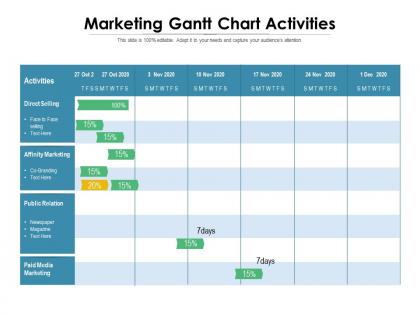
Plan and schedule marketing tasks as project deadlines by using Marketing Gantt Chart Activities template. Easily illustrate a project schedule by utilizing this PPT visual. This readily available PowerPoint slideshow helps team members to manage their time efficiently while creating projects. The project Gantt chart allows you to understand the key milestones in a project by breaking projects into manageable tasks. Showcase the benefits of the Gantt chart for marketing campaigns, such as improved communication, better utilization of time, and clear task dependencies. Discuss the methods to create a Gantt chart with the help of an attention-grabbing PowerPoint theme. Demonstrate the effective usages of the Gantt chart by employing our PowerPoint template. Elements of the Gantt chart, including task lists, timeline, dateline, bars, milestones, dependencies, and progress, can be presented by utilizing the event chain methodology PowerPoint template. Manage the dependencies between the tasks using our content-ready PPT theme.
People who downloaded this PowerPoint presentation also viewed the following :
Marketing gantt chart activities with all 2 slides:
Use our Marketing Gantt Chart Activities to effectively help you save your valuable time. They are readymade to fit into any presentation structure.
FAQs for Marketing
So a marketing Gantt chart is just a visual timeline showing all your campaign tasks and deadlines laid out with bars. Really handy when you're managing multiple launches at once. The best part? You'll catch bottlenecks before they wreck everything. Like when Sarah's content is holding up Mike's design work - you can see that coming. Keeps everyone on the same page too. Honestly, stakeholders eat up the visual format during presentations. Makes you look super organized even if you're winging half of it. Just start with one campaign and map out the big milestones first. Don't overthink it.
Honestly, Gantt charts are a game changer for keeping everyone on the same page. You'll see exactly who's doing what and when - no more of those awkward moments where tasks fall through the cracks. Dependencies become super obvious too, like knowing the design has to wrap before marketing can jump in. The timeline thing is clutch because people actually get how their delays mess with others (which sounds harsh but it's true). I'd say update it weekly in your standups, maybe even make it part of your routine? Short sentences mixed with longer explanations work best. Trust me, once your team starts using it consistently, you won't go back to the chaos.
So for your marketing Gantt chart, definitely map out campaign timelines and who's doing what. Include all the key milestones and show which tasks depend on others - like how your content has to be done before design can even start. Budget phases and review checkpoints are huge too. Honestly, I learned the hard way to always add buffer time because projects never go smoothly. Track your creative stages, approval hell (we've all been there), launch dates, and don't forget the post-campaign analysis stuff. Keep updating it so everyone knows what's actually happening.
Honestly, Gantt charts are super flexible once you figure out the right scale. Break down short campaigns into daily tasks with hourly chunks if you need to. Longer campaigns? Go monthly with weekly checkpoints. I'm obsessed with color-coding different campaign types - it just makes scanning so much easier. The trick is matching your detail level to how complex things actually are. Don't make a simple two-week sprint look like you're launching a rocket, but also don't oversimplify massive launches. Start by sketching out your main phases first, then get into the weeds with tasks and what depends on what.
Honestly, I'd go with **Asana** or **Monday.com** first - both are really easy to pick up and your team won't hate using them. **Microsoft Project** is powerful but way too much unless you're managing something massive. **Smartsheet** is decent if your team loves spreadsheets but wants timeline views too. There's also **TeamGantt** which is pretty clean and, well, does exactly what it says. I've used a few of these and honestly the interface matters more than you'd think. Just grab free trials for like 2-3 options and see what feels right for how you guys actually work.
Honestly, Gantt charts are game-changers for marketing stuff. You can see your whole campaign timeline at once - when everything starts, when it's due, all laid out visually. The best part? It shows you how tasks connect to each other. So if your blog posts are running behind, you'll instantly spot how that screws up your social media posting schedule. I probably sound like a total project management nerd, but seriously - set one up once and you'll never stress about missing deadlines again. It's like having a roadmap instead of just winging it.
Don't cram every tiny detail in there - nobody can read those cluttered messes. Also, your team will hate you if the timeline's too rigid because campaigns always get weird and need tweaks. I learned this the hard way lol. Make sure you actually update it regularly or it becomes pointless decoration after two weeks. Build it WITH your team, not for them - they know way better than you how long stuff actually takes. Honestly, I've seen more dead Gantt charts than living ones. Keep yours simple and treat it like a working doc, not some masterpiece you frame on the wall.
So your marketing goals are basically what shape your whole Gantt chart. Like, if you're focused on lead gen, you'd prioritize content creation and email campaigns first. Brand awareness? Then social media and PR stuff moves to the front. Honestly, I think most people overthink this part. The goals help you figure out realistic deadlines too - and which tasks depend on others. I'd start by writing down your top 3 goals, then work backwards from there to map out what needs to happen when.
Yeah, totally works! It's kinda weird at first because Gantt charts feel so rigid compared to Agile's whole flexibility thing. But here's what I've seen work - use Gantt for the big picture stuff like quarterly milestones or release planning, then stick with your sprint boards for daily work. My old team actually did sprint-level Gantt charts which was... interesting lol. Don't get bogged down in detailed task tracking with the Gantt though. Think broader strokes. You'll still keep your standups and iterations, just add that higher-level view on top.
Oh dude, Gantt charts are actually pretty clutch for this stuff. They show you everyone's workload at a glance, so you can catch those moments where one person's drowning while another's basically watching Netflix. Super helpful for redistributing tasks before anyone has a breakdown. You can also spot exactly when you'll need freelancers or extra hands. Plus they make it obvious which skills you're missing and when – honestly wish I'd started using them sooner. Just throw your current projects on there first and the problems will jump out immediately.
Okay so milestones are like checkpoints for your marketing campaign - stuff like "launch day" or "got client approval on the creative." Space them out every couple weeks or so, depending how long your project is. They're honestly a lifesaver when you're drowning in tiny tasks because you can actually see the big wins happening. Make the names super specific too, not just "phase 1 complete" or whatever. And definitely celebrate when you hit them! Sounds cheesy but it really does keep everyone motivated. Way better than just staring at an endless to-do list.
I'd check it every few days honestly, especially during busy campaigns. Weekly at minimum though. Marketing moves so fast - budgets change, deadlines shift, someone decides they want to pivot the whole thing on Tuesday. Been there! For big launches or short sprints? Daily updates might be necessary. Don't get trapped spending more time updating charts than actually doing the work though. Set a calendar reminder so you won't forget. And definitely update it right away when big changes happen - trust me on that one.
Just draw arrows between your tasks - super simple. Most tools like Asana or Monday let you connect the bars visually. So if your blog needs to be done before social posts, arrow from blog to social. Color coding is honestly a lifesaver, makes scanning so much easier. I usually do solid lines for must-haves and dotted for flexible stuff. Oh and start with your critical path first - those tasks that'll totally derail everything if they're late. Then you can add the less crucial connections after.
Honestly, the visual aspect is game-changing - you'll see exactly how tasks connect and when delays mess everything up downstream. Regular timelines just show dates, but Gantt charts reveal the actual relationships. Your email campaign waiting on creative assets? You'll spot that dependency immediately. Design team running behind? Watch everything shift in real time instead of playing guessing games. Resource allocation helps too since you can catch team overload before it happens. Oh, and the progress tracking beats constantly asking "where are we on this?" Start simple - try Asana or Monday.com first.
Gantt charts are honestly a lifesaver for this stuff. Your stakeholders get a visual timeline of the whole campaign, so they can see what's happening when without constantly texting you "hey where are we with X?" Color-code different phases and show how tasks connect to each other. Delays become obvious before they blow up into real problems. The real-time sharing thing is clutch too - everyone stays updated without those endless status meetings that nobody actually wants to sit through. Trust me, it'll save you so many headaches down the road.
No Reviews