


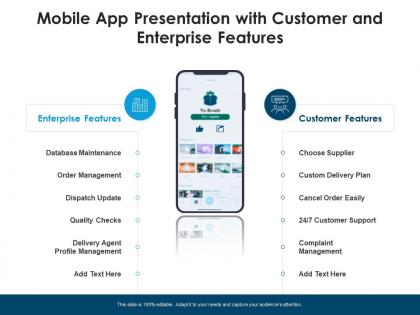
Mobile app presentation with customer and enterprise features




Try Before you Buy Download Free Sample Product
 Impress Your
 Audience
 100%
100% Editable
 Save Hours
 of Time


Our Mobile App Presentation With Customer And Enterprise Features are topically designed to provide an attractive backdrop to any subject. Use them to look like a presentation pro.
People who downloaded this PowerPoint presentation also viewed the following :
Mobile app presentation with customer and enterprise features with all 2 slides:
Use our Mobile App Presentation With Customer And Enterprise Features to effectively help you save your valuable time. They are readymade to fit into any presentation structure.
FAQs for Mobile app presentation with customer
Honestly, start with the boring stuff that actually matters. Fast loading and navigation that doesn't make people think too hard. Your app needs to work on different phones obviously, and don't get creative with gestures - people hate learning new ways to swipe around. Push notifications are great but seriously, timing matters. Nobody appreciates random alerts during dinner. Offline mode for basic features is clutch. Clean signup process too. Oh and search! Everyone forgets about search but it's huge if you've got any content worth finding. Skip the flashy stuff until you nail these basics first.
So basically, you want to personalize them based on what people actually do in your app. Time them right too - like when someone abandons their cart or might actually care about the content. Most companies are honestly terrible at this and just spam users into oblivion. I'd start super light, maybe 1-2 per week max. Test different messages and see what doesn't make people want to delete your app immediately. The trick is making each one actually useful instead of just annoying background noise. Track your engagement rates and adjust from there.
Dude, personalization is huge for keeping users around - like 20-30% better retention when you nail it. Your app starts feeling like it actually knows them instead of just throwing random stuff their way. Basic things work great to start: custom onboarding, decent content suggestions, maybe remembering their preferences. Then build up from there as you learn more about how people use it. Honestly, users can tell when an app "gets" them vs when it's just generic garbage. Makes all the difference between someone deleting it after a week or actually sticking around.
Honestly, performance can totally make or break your app. Users are so impatient now - like, if something takes more than 2-3 seconds to load, they're already hitting the back button. I've seen it happen with apps I actually wanted to use! Fast loading, smooth animations, and not killing someone's battery are basically non-negotiable. Poor performance just leads to angry reviews and people deleting your app. Focus on optimizing those load times and memory usage first. Oh, and responsive taps - nothing's more annoying than tapping something and waiting. Your retention rates will definitely improve.
Dude, social sharing is like having a bunch of unpaid marketers working for you. Your users post their achievements or cool stuff from your app, and boom - all their friends see it. Way better than ads since people actually trust recommendations from friends, you know? It creates this snowball effect where new people find your app, try it, share it themselves. Oh and make the sharing super easy - like two taps max. Nobody's gonna jump through hoops to post something, trust me on that one.
Start with encryption - both for stored data and stuff moving around. MFA is basically required now, nobody's getting away without it. Session management keeps people logged in without drama. Honestly, code obfuscation is kinda like putting a bike lock on a Ferrari - it'll slow down casual snooping but won't stop anyone serious. Certificate pinning for your API calls is clutch though. Biometrics are nice if they fit your app. Regular security audits catch problems early. I'd prioritize the encryption and MFA first since those handle like 80% of your biggest headaches right there.
So offline features mean people can still use your app when their internet sucks or completely cuts out. Think about being on the subway - half the apps on your phone become useless, right? Super annoying. What you do is cache the important stuff so users can still read content, fill out forms, whatever they need. When their connection comes back, everything syncs up. People won't just bail on your app the second they hit a dead spot, which honestly happens way more than you'd think. I'd start by figuring out what features people absolutely need when they're offline first.
Honestly, in-app analytics are a game changer - you'll see exactly how people use your app in real time. Way better than web analytics since it's all contained. Track which features people actually love vs ignore, plus where they bail out completely. The heatmaps are pretty cool too, showing every tap and swipe. Session recordings let you watch users struggle (kinda brutal but super helpful). I'd start simple with basic stuff like button clicks and screen views. Don't go crazy with complex funnels right away - figure out what questions you need answered first.
Good navigation is honestly everything for an app. When people don't have to think about where stuff is, they'll actually explore more features instead of bouncing. It's like your house - you want the kitchen logically connected to the dining room, not hidden behind three doors. Keep your menus clear and buttons where users expect them. Map out how people move through your most common tasks first (that's where I'd start anyway), then cut any weird steps that make them pause and go "wait, what?" Less confusion means people stick around longer and you get fewer angry emails.
Start with screen reader support and high contrast colors - those are non-negotiables. Voice control is massive too, plus alternative navigation for people who struggle with touch gestures. Audio content needs captions obviously. Apple and Google's accessibility docs are actually really good (saves you from going down random research rabbit holes). Built-in testing tools will catch most issues if you use them early. Way easier than fixing everything after launch. Oh, and make sure text scales properly - my mom cranks hers up super high and half the apps break.
Dude, you definitely want to get payment gateway integration sorted out. Your users won't have to deal with getting bounced around to different sites or typing in their card info every single time. The gateway handles all the security headaches and compliance stuff that would be brutal to code yourself. Plus your customers get saved payment methods and super smooth checkout - honestly makes such a difference for conversions. I'd set it up sooner rather than later, maybe even before you think you need it? One-tap purchases are pretty much expected these days.
Mobile search is all about speed and being super relevant. I'd set up autocomplete with debounced queries so you're not hammering your API constantly. Show recent searches or trending stuff when the search bar's empty - people actually use that more than you'd think. Voice search is pretty much mandatory now since typing on phones still kinda sucks. Make sure it handles typos well and lets users filter by category. Keep the UI clean: big search bar, results that don't look cluttered, fast loading times. Oh and test on real devices, not just your computer - simulators lie about performance.
So gamification basically hijacks your brain's reward system - you know, points, badges, all that stuff. People get little dopamine hits from completing tasks, same reason mobile games are so addictive. I'd start with simple things like daily streaks or achievement badges when users do key actions. Leaderboards work great too if your app has a social element. The trick is making boring functional stuff feel rewarding instead. Oh, and don't go overboard at first - pick one or two features and see if your engagement actually improves. Progress bars are weirdly satisfying for some reason, might be worth testing those too.
So most apps let you upload photos, write a little bio, pick your display name - the usual stuff. Privacy settings are huge too, plus notification toggles and themes. Location visibility and contact preferences matter depending on what your app does. Honestly? Users eat this stuff up - the more control you give them, the stickier your app becomes. Just don't go crazy with options right away or you'll overwhelm people. I'd start simple with photo and bio features, then build out from there based on what users actually ask for.
Definitely test on both iOS and Android - they're weirdly different with screen sizes, gestures, all that stuff. We had this nightmare where Android users got totally lost because we designed everything around iOS navigation patterns. Make your touch buttons big enough for actual human fingers, not just your designer's perfectly manicured ones lol. Also responsive design is clutch since screens vary so much. Don't assume everyone's running the latest OS either. Figure out which versions you'll support upfront, then focus your testing on whatever devices your users actually have instead of just the shiny new ones.
-
Topic best represented with attractive design.
-
Out of the box and creative design.