

Mobile Strategy Powerpoint Presentation Slides




Try Before you Buy Download Free Sample Product
 Impress Your
 Audience
 100%
100% Editable
 Save Hours
 of Time


Our Mobile Strategy PowerPoint Presentation Slides will provide you step by step guide of successful mobile marketing. Mobile marketing PowerPoint complete deck contains content ready slides such as product/ service overview, mobile app users worldwide/ key statistics, dependencies and competitors, key elements to focus on the company's overall strategy, mission-vision values, targets for next business quarter, establish a value proposition, strategic objectives, understanding competitive landscape, product feature comparison, current customer journey, SWOT Analysis, elevator pitch, idea, mobile strategy roadmap, resources needed for execution, budget required to implement strategy, enterprise mobility stack, agile methodology, right product strategy, product poisoning, target audience, key business metrics dashboard, hybrid and native applications, determine the platform etc. Showcase marketing strategy and plan, product launch marketing process, launch planning key steps, buzz, momentum and launch tactics, lead generation activities, marketing budget, product management implementation strategy, testing strategy, post product support with this enterprise mobile strategy PPT slides. Assess demands for infrastructure with our Mobile Strategy Powerpoint Presentation Slides. Evaluate how to facilitate faster growth.
People who downloaded this PowerPoint presentation also viewed the following :
Content of this Powerpoint Presentation
Slide 1: This slide introduces Mobile Strategy. State your company name and begin.
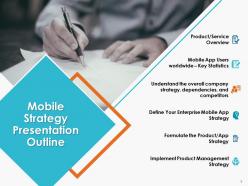
Slide 2: This slide presents Mobile Strategy Presentation Outline with the following points- Product/Service Overview, Mobile App Users worldwide – Key Statistics, Understand the overall company strategy, dependencies, and competitors, Define Your Enterprise Mobile App Strategy, Formulate the Product/App Strategy, Implement Product Management Strategy.
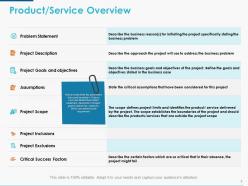
Slide 3: This slide presents Product/Service Overview. We have identified a few parameters that could be added in Product overview details like problem statement, description of project, goals & objectives, scope etc. which can be altered as per requirement.
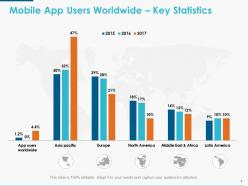
Slide 4: This slide shows Mobile App Users Worldwide – Key Statistics in a graphical form.
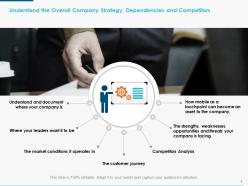
Slide 5: This is Understand the Overall Company Strategy, Dependencies and Competitors slide with the following points- Understand and document where your company is, Where your leaders want it to be, The market conditions it operates in, Competitors Analysis, The strengths, weaknesses, opportunities and threats your company is facing, How mobile as a touchpoint can become an asset to the company, The customer journey.
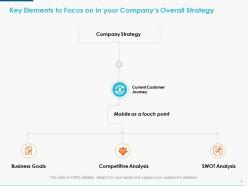
Slide 6: This slide shows Key Elements to Focus on in your Company’s Overall Strategy- Company Strategy, Current Customer Journey, Business Goals, Competitive Analysis, SWOT Analysis, Mobile as a touch point.
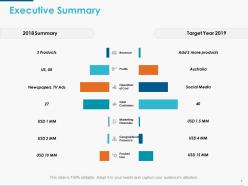
Slide 7: This slide shows the Executive Summary.
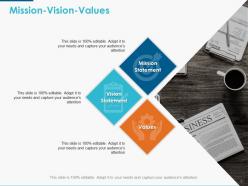
Slide 8: This is Mission-Vision-Values slide which shows- Mission Statement, Values, Vision Statement. Add the relevant text and use it.
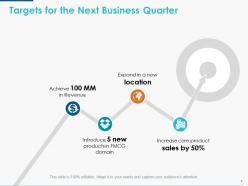
Slide 9: This slide shows Targets for the Next Business Quarter like- Achieve 100 MM in Revenue Introduce 5 new products in FMCG domain Expand in a new location etc. State your own business targets here.
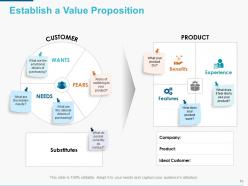
Slide 10: This is Establish a Value Proposition slide showing- Customer, Wants, Fears, Needs, Substitutes, Product, Benefits, Experience, Features.
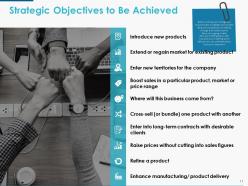
Slide 11: This slide shows Strategic Objectives to be Achieved. Before outlining your strategy, you should be able to highlight and consider: What your competitors are offering through their mobile channel, What you’re going to offer, What you’re NOT going to offer, How what you’re offering will be different and, yes, preferably better than your competitors.
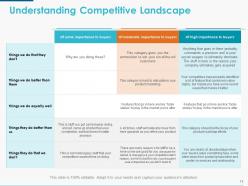
Slide 12: This slide helps in Understanding Competitive Landscape.
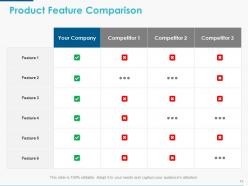
Slide 13: This slide shows Product Feature Comparison.
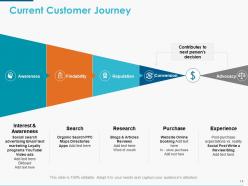
Slide 14: This slide shows Current Customer Journey with the following steps- Awareness, Findability, Reputation, Conversion, Advocacy.
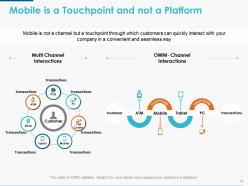
Slide 15: This slide explains Mobile is a Touchpoint and not a Platform by using Multi Channel Interactions OMNI- Channel Interactions etc.
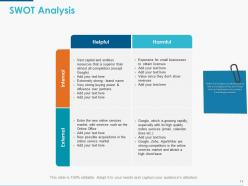
Slide 16: This is SWOT Analysis slide. Define the Strengths and Weaknesses as well as the Opportunities and Threats that can help/prevent your product from being successful.
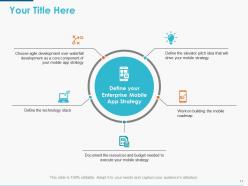
Slide 17: This is Define the elevator pitch idea that will drive your mobile strategy slide. You can add your own title and use it.
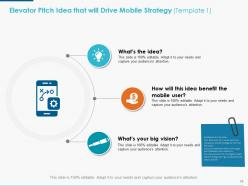
Slide 18: This is Elevator Pitch Idea that will Drive Mobile Strategy (Template 1) slide. We have also mentioned few guidelines which are to be followed while creating your own elevator pitch idea.
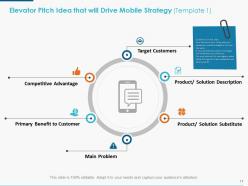
Slide 19: This is also Elevator Pitch Idea that will Drive Mobile Strategy slide showing- Target Customers, Main Problem, Product/ Solution Substitute, Primary Benefit to Customer, Competitive Advantage, Product/ Solution Description.
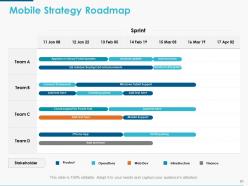
Slide 20: This slide shows Mobile Strategy Roadmap containing the data of various teams.
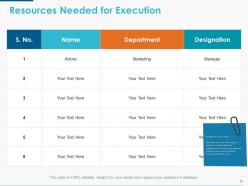
Slide 21: This slide shows Resources Needed for Execution with Guidelines.
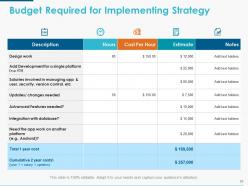
Slide 22: This slide shows Budget Required for Implementing Strategy.
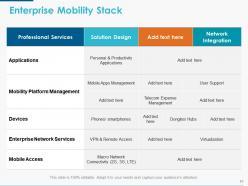
Slide 23: This slide presents Enterprise Mobility Stack subheaded as- Professional Services, Solution Design, Network Integration.
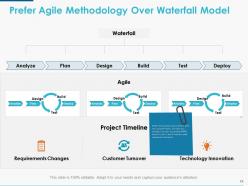
Slide 24: This slide shows Prefer Agile Methodology Over Waterfall Model. Define the quickest way to deliver what the customer wants, and then you develop it as soon as possible (MVP), launch it, test it, and if need be, make subsequent iterations.
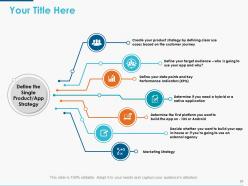
Slide 25: This is Define the Single Product/App Strategy slide in which you can add Your Own Title.
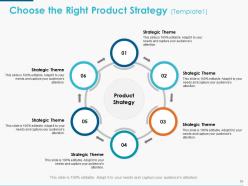
Slide 26: This is Choose the Right Product Strategy (Template1) slide on the basis of- Strategic Theme.
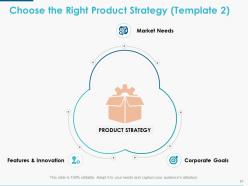
Slide 27: This is also Choose the Right Product Strategy (Template 2) slide as per- Market Needs, Features & Innovation, Corporate Goals.
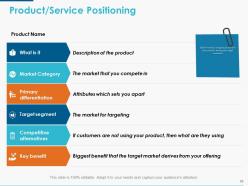
Slide 28: This slide shows Product/Service Positioning. Explain how you are going to position your product among your target customers in this slide and use it accordingly.
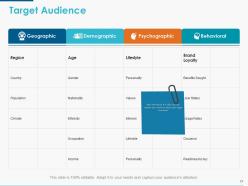
Slide 29: This is Target Audience slide categorized as- Geographic, Demographic, Psychographic, Behavioral. With the help of this slide, you can explain your audience about your target customers.
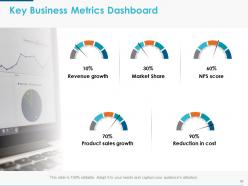
Slide 30: This slide displays Key Business Metrics Dashboard which shows- Revenue growth, Reduction in cost, Product sales growth, Market Share, NPS score.
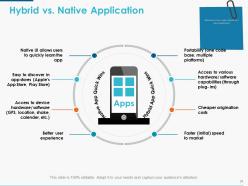
Slide 31: This is Hybrid vs. Native Application slide. Determine if you need a hybrid or a native application by making use of the parameters mentioned here.
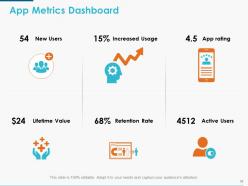
Slide 32: This slide presents App Metrics Dashboard showing Increased Usage, App rating, Retention Rate, New Users, Lifetime Value, Active Users etc. as examples.
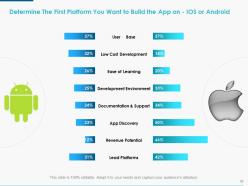
Slide 33: This slide helps to Determine the First Platform You Want to Build the App on - IOS or Android based on the stats mentioned.
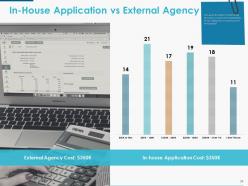
Slide 34: This is In-House Application Vs External Agency slide which is helpful in determining whether you should outsource the development of the application or hire more people?
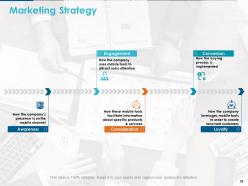
Slide 35: This slide shows Marketing Strategy with the following five constituents- Awareness, Consideration, Loyalty, Conversion, Engagement.
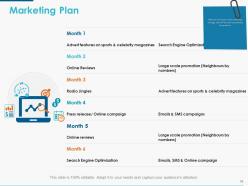
Slide 36: This slide shows the Marketing Plan. Mention the month wise marketing strategy that will be used to promote the product.
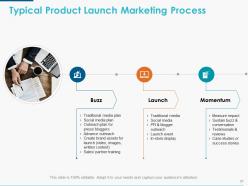
Slide 37: This slide shows Typical Product Launch Marketing Process with the following three steps- Momentum, Buzz, Launch.
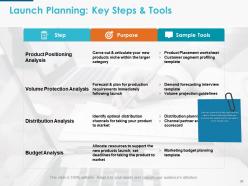
Slide 38: This slide shows Launch Planning: Key Steps & Tools. Here are some of the key steps that are a part of launch planning. State your purpose and sample tools to be used in front of each step.
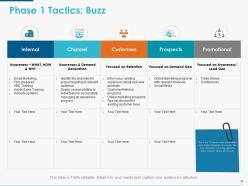
Slide 39: This slide shows Phase 1 Tactics: Buzz. It is the 1st step to create a buzz about your product/service in the market. We have classified it into 5 key segments where different tactics will be used.
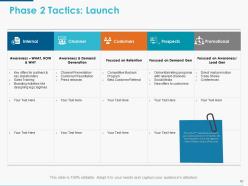
Slide 40: This slide shows Phase 2 Tactics: Launch. It is the 2nd step where you launch your product/service in the market. We have classified it into 5 key segments where different tactics will be used.
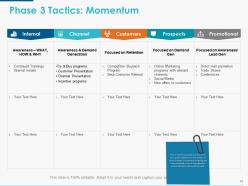
Slide 41: This slide shows Phase 3 Tactics: Momentum. It is the 3rd step after the launch of your product/service in the market. In order to keep the momentum going, we have classified it into 5 key segments where different tactics will be used.
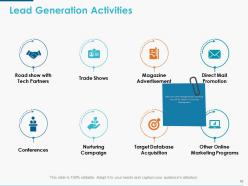
Slide 42: This slide shows Lead Generation Activities. Mention some lead generation activities that will be helpful in business development.
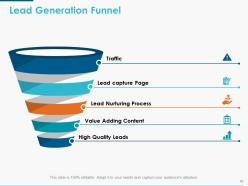
Slide 43: This slide shows Lead Generation Funnel diagram.
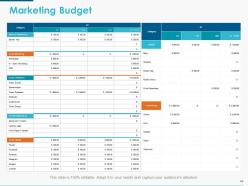
Slide 44: This slide shows the Marketing Budget.
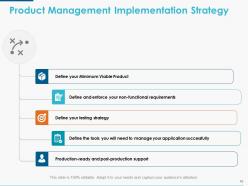
Slide 45: This slide shows Product Management Implementation Strategy with the following steps- Define your Minimum Viable Product, Define and enforce your non-functional requirements, Define your testing strategy, Define the tools you will need to manage your application successfully, Production-ready and post-production support.
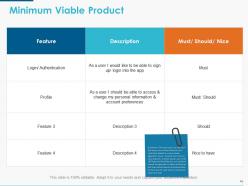
Slide 46: This slide shows Minimum Viable Product with the following sub headings- Feature, Description, Must/ Should/ Nice to state.
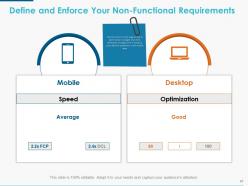
Slide 47: This is Define and Enforce Your Non-Functional Requirements slide. Identify score for each page as well as optimization strategies that many developers disregard and in doing so cause additive problems to their mobile apps.
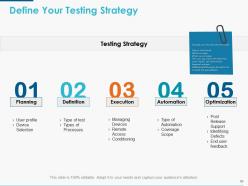
Slide 48: This is Define Your Testing Strategy slide with the following steps- Planning, Definition, Execution, Automation, Optimization.
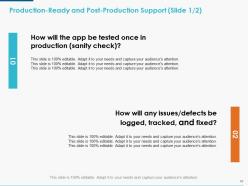
Slide 49: This is Production-Ready and Post-Production Support slide with the following points- How will the app be tested once in production (sanity check)? How will any issues/defects be logged, tracked, and fixed?.
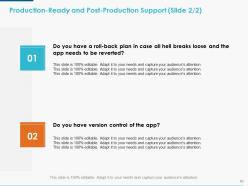
Slide 50: This is also Production-Ready And Post-Production Support slide with the following points- Do you have a roll-back plan in case all hell breaks loose and the app needs to be reverted? Do you have version control of the app?.
Slide 51: This is Mobile Strategy Icons Slide. Alter/ modify icons as per your need.
Slide 52: This is also Mobile Strategy Icons Slide. Alter/ modify icons as per your need.
Slide 53: This is a Coffee Break slide to halt. You may change it as per requirement.
Slide 54: This slide is titled Additional Slides to move forward. You can change the slide content as per need.
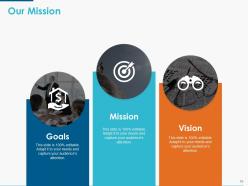
Slide 55: This is Our Mission slide. Show your company mission, vision and goals here.
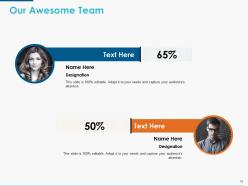
Slide 56: This slide shows Our Awesome Team with name, image and designation to fill.
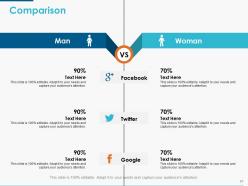
Slide 57: This is a Comparison slide. You can compare products/ entities etc. here.
Slide 58: This is a Venn diagram image slide to show information, specifications etc.
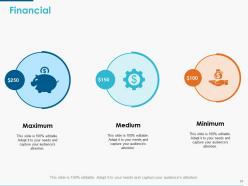
Slide 59: This is a Financial score slide to show financial aspects here.
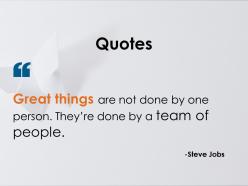
Slide 60: This is a Quotes slide to convey company/ organization message, beliefs etc. You may change the slide content as per need.
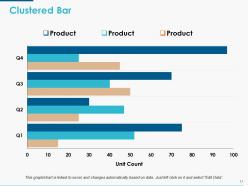
Slide 61: This slide shows a Clustered Bar for product/ entity comparison.
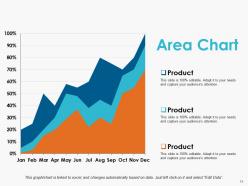
Slide 62: This is an Area Chart slide to present product/ entity comparison, information etc.
Slide 63: This is a Thank You slide with Address# street number, city, state, Contact Numbers, Email Address.
Mobile Strategy Powerpoint Presentation Slides with all 63 slides:
Identify challenges to be faced with our Mobile Strategy Powerpoint Presentation Slides. Create the framework to cater for the impact.



FAQs for Mobile Strategy
So you'll need to figure out UX design first, then decide on iOS, Android, or both. Performance metrics are huge too. Don't sleep on app store optimization and push notifications - that stuff actually moves the needle. Integration with your current systems is where most companies totally mess up though, seen it happen so many times. Figure out how your audience actually uses their phones, then pick between native app, responsive web, or hybrid. Honestly? Start by looking at what mobile stuff you already have and find the worst gaps in how customers move through everything.
So you'll want to track app downloads and retention rates first - that's the basics. Session duration matters too, plus how much revenue each mobile user brings in. That's honestly the metric that'll make or break your whole mobile thing. App store ratings are clutch for getting discovered. I'd also watch user feedback pretty closely since people aren't shy about complaining when stuff doesn't work. Monthly check-ins work well - just compare everything against whatever goals you set initially. Then tweak based on what's actually happening, not what you hoped would happen.
Mobile UX basically makes or breaks everything. Users will bail in seconds if your app feels clunky - and honestly, can you blame them? I do the same thing when an app takes forever to load. Fast loading times are non-negotiable. Design for thumbs, not mouse clicks. Smaller screens mean you can't cram everything on there like desktop. Short attention spans too. Your navigation needs to be dead simple, and streamline those user flows as much as possible. I'd start by checking where people are dropping off most - that's usually where the biggest problems are hiding.
Track stuff like how long people stay in your app and whether they're actually converting. User engagement metrics will show you where people bail out - sometimes it's weird spots you'd never expect. A/B test different layouts because mobile users have zero patience, seriously. Demographics matter too. Like if most people use your app at 7pm on weekends, that totally changes when you should send push notifications. Oh, and don't try to fix everything at once. Pick one thing you want to improve and start there, then build on it.
Honestly, I'd zero in on three big things: 5G, AI personalization, and PWAs. 5G is finally everywhere so you can build way richer experiences without people rage-quitting your app. Everyone expects apps to actually know them now - like suggesting stuff based on their behavior. PWAs are kind of genius because they feel native but cost way less to build. Voice stuff and AR are picking up steam too, though maybe not as urgent. Oh and definitely audit what you've got first - no point building shiny new features if your current experience sucks. Pick one thing to test this quarter and see how it goes.
Look at where people find you first - social, search, whatever - then trace how mobile fits into that whole journey. Don't treat your app like it's this completely separate thing (I've seen so many companies mess this up). Your mobile stuff should feel like the same brand experience, just smaller screen. Also, forget about vanity metrics like app downloads. Focus on whether mobile actually helps people buy your product or whatever your main goal is. The messaging needs to match what you're doing everywhere else, then just test different parts until it clicks.
Honestly, the biggest pain is when your data's all over the place. Like your app shows one thing, website shows another - customers get pissed when inventory doesn't match up. Then there's the nightmare of people starting over every time they switch from mobile to desktop or whatever. Campaign coordination is brutal too since different teams barely talk to each other. Oh and tracking someone's journey when they're bouncing between your store, Instagram, and your site? Good luck with that mess. I'd start by just writing down all your touchpoints first, then figure out where the worst disconnects are happening.
Start by figuring out who your audience actually is - age, location, how they behave online. Then customize your messages for those groups. Mobile users get annoyed fast (I mean, we all do when we're on our phones), so keep things short and relevant. Try geofencing for local deals, push notifications when timing matters, and SMS for the really urgent stuff. Honestly, I'd test small groups first before going big. Check what's already working in your mobile analytics - might save you some headaches. Build on whatever's giving you decent results already.
Dude, start with Google PageSpeed Insights - it'll show you exactly what's killing your load times. Most sites totally bomb on image optimization, so definitely switch to WebP and lazy load anything below the fold. Minify your CSS/JS files and get critical content loading first. Browser caching is huge too, don't sleep on that. Oh and compress everything - images especially. A CDN helps tons if you can swing it. Honestly the HTTP requests thing is probably boring but it makes a real difference. Just pick like 2-3 issues from PageSpeed and fix those first instead of trying to do everything at once.
So basically, social media integration is like turning your app into this content-sharing beast. I'd start with social login first - honestly, nobody wants to fill out another damn signup form these days. Then you can add sharing buttons for achievements and stuff, plus maybe pull in social feeds to keep people scrolling longer. The real magic happens when users start sharing organically though, that's how you get actual growth. Just don't go overboard picking every platform - stick to where your users actually hang out. Oh and make the sharing feel natural, not like you're begging for it. Users can smell desperation from a mile away.
Data encryption and strong authentication should be your starting point. APIs are where most breaches happen, so lock those down first. Multi-factor auth is non-negotiable these days. Your employees will definitely use personal devices for work no matter what you tell them - just accept it and create policies around it. Encrypt everything in transit and at rest. Don't forget app store security requirements can be pretty strict depending on your platform. Honestly, do a risk assessment right away to figure out what sensitive data you'll be handling. That'll save you from scrambling later when you realize you missed something obvious.
Honestly, just make it actually useful and people will use it. Push notifications for order updates are clutch - nobody wants to wonder where their stuff is. Loyalty rewards work too, or personalized content based on what they actually do in the app. Interactive stuff like polls or reviews can be pretty engaging. Easy reordering is huge if you're in food/retail. I'd probably start with just one or two features though and get those right first. There's already way too many apps trying to do everything at once and failing miserably at all of it.
So basically responsive design means your website automatically adjusts to whatever screen someone's using - phone, tablet, desktop, whatever. Way better than maintaining separate mobile and desktop sites (which honestly sounds like a nightmare). You build it once and it just works everywhere. Google prefers it too since there's only one URL to crawl instead of multiple versions. Plus your users get the same experience no matter what device they're on. I'd probably start by checking how your current site looks on mobile - that'll show you where the biggest problems are.
Honestly, just make it part of your daily habit instead of cramming once in a while. I'm totally hooked on checking Mobile Marketer and TechCrunch during coffee breaks - maybe that's weird but whatever. Subscribe to App Annie or Sensor Tower newsletters for solid data stuff. Reddit and LinkedIn have decent mobile communities too. Set up Google Alerts for "mobile trends" and app store updates so you don't miss anything. Here's what really works though: block out time monthly to snoop on your competitors' apps. Download their updates, see what they're actually pushing. Sounds creepy but it's necessary.
Honestly, the worst mistake is trying to tackle every platform right away. You'll burn out and everything will suck. Pick one platform first - whichever one your actual users hang out on - and make it really good there. Mobile isn't just your website shrunk down either, which took me forever to figure out. People use their phones totally differently. Short attention spans, different goals, you know? Don't skip the research part or your app will be slow as hell. Build small, get feedback, then expand. Way less painful that way.
No Reviews