


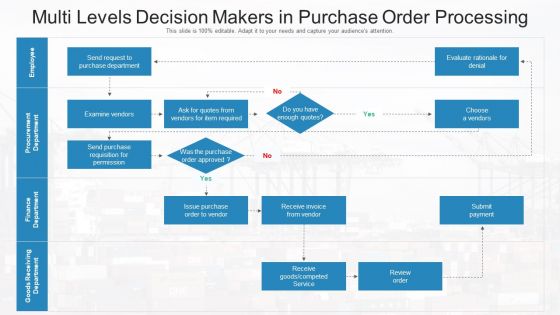
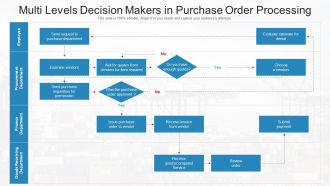
Multi levels decision makers in purchase order processing




Try Before you Buy Download Free Sample Product
 Impress Your
 Audience
 100%
100% Editable
 Save Hours
 of Time


Our Multi Levels Decision Makers In Purchase Order Processing are topically designed to provide an attractive backdrop to any subject. Use them to look like a presentation pro.
People who downloaded this PowerPoint presentation also viewed the following :
Multi levels decision makers in purchase order processing with all 2 slides:
Use our Multi Levels Decision Makers In Purchase Order Processing to effectively help you save your valuable time. They are readymade to fit into any presentation structure.
FAQs for Multi levels decision makers in
So there's basically three levels you need to worry about. Header level has all your main PO stuff - vendor info, dates, payment terms, that kind of thing. Then you've got line items where you specify exactly what you're buying and how much. Distribution level is where it gets a bit tedious honestly, but that's how you tell the system which accounts or cost centers to hit. I always think of the header as controlling the whole document while line items are the actual products. Don't approve anything until all three parts are set up right or you'll end up with a mess.
So basically, you set different approval levels based on how much money we're talking about. Small stuff gets approved fast locally, but the big purchases still go through the right people. Honestly, it's pretty brilliant once you get it working. No more waiting weeks for someone to sign off on printer paper, but you'll still catch any crazy expensive mistakes before they happen. I'd start by figuring out where things get stuck now - like, what dollar amounts cause the most delays? Then build your thresholds around that. Makes the whole process way less painful.
So basically, approval workflows just route your purchase orders to the right people automatically. When you submit a PO, it knows if your manager needs to sign off, or if finance has to look at it, or whatever. Dollar amounts and department rules determine who gets it. Pretty convenient honestly - nobody has to sit there figuring out the chain of command. Your company probably has spending thresholds set up already (ask around if you don't know them). Just factor in approval time when you're planning purchases so you're not waiting around forever.
So basically you map your approval levels to match how your company actually works - dollar amounts, departments, that kind of thing. Most systems are pretty flexible about this stuff. Like, you don't want your CEO signing off on every single pen order, that's just insane. I'd start with something simple: department heads handle under $1K, directors get $1K-$10K, and the big bosses deal with anything higher. Look at how approvals happen now (even the messy informal stuff) and just build your system around that. Different vendor types or item categories can have their own rules too if you need them.
Honestly, data consistency is going to be your worst enemy. People create orders however they want, which totally screws up those parent-child relationships you're trying to build. Getting everyone to actually USE the new system? Good luck with that - they're so stuck in their old ways. Your ERP integration will probably break at least twice. Oh, and approval workflows turn into a nightmare once you've got multiple hierarchy levels going. The reporting gets stupid complicated too. Just do a pilot run first with one department. Trust me, you'll find problems you didn't even know existed.
So basically, it cuts out all that manual tracking nonsense you're doing now. Real-time updates show exactly where each PO is stuck, plus automated routing sends stuff to the right people without you babysitting it. Dashboards make bottlenecks super obvious - way better than those annoying email chains we all hate. You can set rules once (dollar amounts, departments, whatever) and it handles everything after that. Oh, and the alerts actually work, which is nice. I'd map your current approval process first, then find software that fits how you already work instead of turning everything upside down.
Focus on cycle times first - that's where you'll spot if stuff gets stuck in your approval chain. Compliance rates matter too since they show whether people actually follow your process or just work around it. Cost per transaction is worth tracking, though honestly most companies skip this one. Exception rates are probably the most telling metric - if everyone's constantly bypassing your hierarchy, it means your setup doesn't match how work actually flows. I'd benchmark where you're at now, then check monthly. Processing speed and bottleneck analysis will help you figure out which approval levels you can ditch.
Honestly, setting up a proper approval chain is a game-changer. No more random people signing off on stuff they shouldn't, and orders actually get to the right person instead of floating around forever. Different dollar amounts go to different managers - pretty straightforward but saves so much confusion. The best part? Everything gets tracked automatically, so when someone inevitably asks "who approved this mess?" six months later, you'll actually have answers. It stops duplicate orders too, which happens more than you'd think. Trust me, spend the time upfront organizing this and you'll thank yourself later when procurement isn't constantly blowing up your phone.
Honestly, a good PO hierarchy actually makes vendors love working with you. They know exactly who to call - procurement for contract stuff, department heads for technical questions. No more ping-ponging between random people (which drives everyone crazy). Your approval process stays consistent too, so vendors aren't getting mixed signals from different people. It builds serious trust because you look organized instead of chaotic. Oh, and definitely share your approval flow with key vendors upfront so they're not guessing.
So basically it's about who gets to say yes to spending money. Centralized means everything goes through one procurement team - super slow but at least everyone follows the same rules. Decentralized lets each department approve their own stuff, which is way faster but you'll probably end up with chaos across teams. Honestly, most places do a mix where small purchases stay with departments but anything expensive needs central approval. You should check what dollar amounts trigger each level at your company - that's usually the key thing to know.
Set up your PO approval workflows with conditional routing - stuff like spend limits, vendor categories, whatever compliance needs. Don't hardcode anything though, that's where companies mess up when new SOX rules drop. You'll want role-based permissions that can actually flex when regulations shift. Adding new approval steps or tweaking authorization limits should be doable without scrapping your whole setup. Honestly, I've watched too many finance teams scramble because their system was too rigid. Test any changes with sample POs first before going live company-wide. Document everything too.
Honestly, start with approval workflows and spending limits - that's where most screw-ups happen. Train them on who approves what dollar amounts so you don't get those annoying "whoops, sent it to the wrong person" delays. Hands-on software practice beats theory every time. Role permissions are huge too (people need to know their lane). I'd do a half-day workshop covering the basics, maybe throw together some quick reference sheets with approval charts. Then follow up with real scenarios - that's when it actually clicks for most people.
So basically, PO hierarchies are like the bridge between your purchase orders and all your other systems - ERP, inventory, supplier portals, you name it. When you set them up right, everything flows automatically. Your POs go through approval workflows, inventory gets updated, demand planning syncs up. It's like having a translator for all your different platforms, which honestly cuts down on so much tedious manual stuff. The cool part is when you approve something at the parent level, all the child orders update too. Just make sure your hierarchy setup matches how your other systems are configured - learned that one the hard way!
Start with your main divisions or departments, then add functions like procurement and finance underneath. Honestly, keep it to 3-4 levels tops because who wants to chase down seven people just for basic office stuff? Each level needs clear spending limits and approval authority - that part's crucial. Match it to how decisions actually flow in your company, not whatever's on the official org chart (those are usually outdated anyway). Before you roll it out company-wide, test a few sample POs first. You'll catch weird bottlenecks that way. Trust me, it's way easier to fix issues with three test cases than with angry employees.
Honestly, the easiest way is just tracking your approval times and seeing where stuff gets stuck. Pull reports on processing times by approval level - you'll probably find some obvious bottlenecks pretty quick. Also worth checking rejection rates and spending patterns across departments. Sometimes certain teams always blow their budgets or your approval thresholds are just set weird. I'd focus on which approval amounts cause the longest delays first, since that's usually where the real headaches are. The data makes it pretty obvious once you actually look at it.
-
Easy to edit slides with easy to understand instructions.