


Negotiation plan Powerpoint Ppt Template Bundles




Try Before you Buy Download Free Sample Product
 Impress Your
 Audience
 100%
100% Editable
 Save Hours
 of Time


Introducing our comprehensive PPT on the Negotiation Plan designed to enhance your strategic negotiation skills. This expertly crafted presentation delves into the client negotiation plan phases, equipping you with a step by step approach to navigate intricate business discussions. Uncover the intricacies of structuring foolproof software contract negotiation plans, ensuring favorable terms for all stakeholders involved. Seamlessly integrate effective sales negotiation strategies into your business plan, fostering lucrative deals and sustainable relationships. The included negotiation plan document template streamlines your preparation, enabling you to articulate objectives, tactics, and concessions with precision. Elevate your negotiation prowess today with our PPT, a powerful resource for mastering the art of successful business negotiations.
People who downloaded this PowerPoint presentation also viewed the following :
Negotiation plan Powerpoint Ppt Template Bundles with all 24 slides:
Use our Negotiation plan Powerpoint Ppt Template Bundles to effectively help you save your valuable time. They are readymade to fit into any presentation structure.


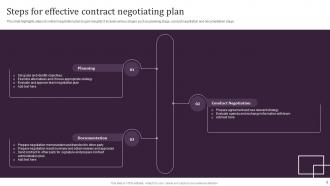

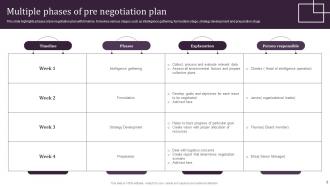








FAQs for Negotiation plan Powerpoint
So for your negotiation template, start with what you want and your backup plan if things fall apart. Map out what the other side probably cares about - their constraints, interests, all that stuff. I'd definitely add a section for potential problems because honestly, something always breaks down halfway through. Figure out your strategy, timeline, and how you'll measure if it worked. Oh and don't forget the boring but crucial stuff - who actually makes decisions on both sides and what concessions you're cool with. Keep it simple, maybe 6-8 slides tops, then tweak it for whatever you're dealing with.
Dude, visuals are game-changers in negotiations. People absorb images like 60,000 times faster than text - crazy right? So instead of droning on about numbers, show charts or graphs. Your audience will actually remember what you're saying. Honestly, everyone's distracted these days anyway, so visuals keep them focused. They help you guide the conversation too. You can point to specific data when making your argument. The best part? Complex stuff becomes way easier to understand, so decisions happen quicker. Just keep your slides clean and stick to bullet points - nobody wants to read paragraphs.
Start by researching what both sides actually want - not just what they're saying they want. Active listening is huge here, and asking open-ended questions helps you dig deeper. I used to rush this part, but timing your concessions makes or breaks everything. Bundle multiple issues together instead of tackling them one by one. Try shifting the language from "me vs. you" to "us vs. this problem" - sounds cheesy but it works. Don't forget to develop your BATNA beforehand. Having backup options gives you confidence. Brainstorm creative solutions too. The best deals happen when you find something neither side initially considered.
Honestly, your negotiation style completely dictates what slides you need. Collaborative people should focus on mutual wins and shared goals. Going competitive? Emphasize your strengths and backup options instead. I've literally watched presentations crash because someone brought collaborative slides to a competitive meeting - so awkward. If you're more accommodating, build in relationship stuff and show flexibility. Avoiders need simple frameworks that don't feel pushy. Really though, just match your deck to how you actually negotiate. Don't try being someone you're not - it shows.
Yeah, you really can't skip the audience research part. Figure out who's gonna be there first - are you talking to C-suite folks who just want the big picture? Or middle managers who actually want to see all the data? Experience level matters too. Like, if they're seasoned negotiators, you can throw in some complex stuff, but newbies need the basics broken down. I actually watched someone crash and burn once because they went super technical with a room full of non-experts. Kinda painful to watch. Map out their roles and what they actually care about, then design everything around that. Their communication style should drive your whole approach.
Definitely do it! Case studies make such a huge difference - way better than just throwing theory at people. You can either make whole slides for bigger examples or drop shorter ones throughout your main points. Honestly, I've watched presentations go from boring to brilliant when someone's like "here's exactly how Microsoft dealt with this." People just get it more with real stuff vs abstract concepts. Oh and make sure your examples are actually current and relevant to what you're negotiating about. Nobody wants some random impressive-sounding case that doesn't really fit your situation.
Definitely go with navy blue, charcoal gray, or deep green - they make you look legit without being too intense. Red and orange are a no-go since they come across super aggressive (trust me on this one lol). Navy with white text looks clean, or charcoal with light gray if you want something softer. Don't go crazy with colors though - stick to 2-3 max so people actually focus on what you're saying. Oh and test your slides beforehand! Conference room lighting is weird and can totally wash out colors that looked perfect on your laptop.
Dude, templates are seriously a lifesaver. You get this whole framework already mapped out - just drop in your goals, backup plan, what you're willing to give up, all that stuff. Way better than staring at a blank page wondering where to start. They basically force you to think through everything important, like what the other person actually wants or how you'll kick things off. I mean, I still forget obvious stuff sometimes even WITH a template lol. But yeah, you can spend your energy on the actual strategy instead of figuring out how to organize everything. Just tweak it for whatever you're dealing with and you're good to go.
Dude, infographics are a game changer for negotiation stuff. People actually pay attention instead of zoning out when you show them visual data vs endless bullet points. You can break down complicated deal structures or timelines without making everyone's eyes glaze over. They keep the conversation focused too - nobody's getting lost in random spreadsheet details or checking Instagram (okay, maybe some people still will). The narrative flows better when you've got charts and simple icons guiding the story. Even basic visuals beat walls of text every single time. Trust me on this one.
Honestly, the biggest thing is tweaking your slides based on how different cultures communicate. High-context cultures need way more relationship-building content upfront - like, they won't even get to business without it. Germans? Total opposite. They want you to cut the fluff and get straight to objectives. Watch your language around concessions too. Some cultures need face-saving workarounds instead of direct "no" situations. Oh, and timeline expectations are all over the place internationally. What takes two meetings in the US might need five elsewhere. I'd throw in a cultural notes section where you can jot down gift protocols or topics to avoid - saves you from those awkward moments later.
Oh man, don't cram walls of text on your slides - I've seen so many people do this and it's painful to watch. Your presentation should be visual, not a book chapter. Skip the aggressive language too because you'll look inflexible right off the bat. Double-check your numbers are current - outdated stats will tank your credibility instantly. Here's the thing though: don't write out everything you plan to say on the actual slides. That's like reading your grocery list during dinner conversation. Focus on clean talking points instead and let the discussion happen naturally. Trust me on this one.
Dude, storytelling is everything in negotiation presentations. Your data means nothing if people can't connect with it emotionally. Instead of boring bullet points, craft a narrative that shows the problem, the stakes, and why your solution works. I've watched so many deals die because the presentation was just charts and facts - total snoozefest. Your slides should walk them through where you are now, what's broken, and how this negotiation fixes everything. Oh and don't just list information randomly. Build each slide around that story structure and you'll actually get somewhere with these people.
Honestly, bar charts are your best bet for negotiation stuff. They're perfect for showing offer changes or comparing what each side wants. Comparison tables are clutch too - way cleaner than trying to explain everything verbally during your presentation. Skip pie charts completely, they don't really make sense for this kind of data. Line graphs work if you've got multiple rounds to show, but don't overthink it. Your audience needs to get it fast while you're talking. I learned this the hard way in my last quarterly review - fancy charts just confuse people when they should be listening to you instead.
Just grab a basic template and swap out the boring placeholder stuff with whatever actually applies to your industry. Change the colors, throw your logo on there - pretty standard stuff. I usually start general then get specific, like if you're in tech, switch "product pricing" to "software licensing" or whatever. The examples matter way more than you'd think though - make sure they actually match what you'll be dealing with. Oh and don't overthink it. Pick 2-3 templates that feel right for how you negotiate, then just customize from there. Way easier than building from scratch.
Honestly, ditch the text-heavy slides - people zone out when they're reading paragraphs. Go visual instead and tell stories they'll actually connect with. I always add those "what would you do?" moments because everyone loves weighing in on tricky scenarios. Polls work great too, or just break them into small groups to hash out tactics. You've got to watch the room though - if they look bored, switch gears. Oh, and this might be obvious but make sure each section ends with something concrete they can try next week. Nothing worse than leaving a workshop with zero practical takeaways.
-
Easy to use and customize templates. Helped me give a last minute presentation.
-
Helpful product design for delivering presentation.