


Non profit pitch deck ppt template




Try Before you Buy Download Free Sample Product
 Impress Your
 Audience
 100%
100% Editable
 Save Hours
 of Time


Introducing our non profit pitch deck PPT template. Display the impact of your non profit organization with the help of our non- profit organization PowerPoint deck. Discuss the problems and provide solutions using this non-governmental organization PPT layout. Make this non-profit promotion PowerPoint design part of your presentation and review acquisition, renewal, and lead generation pattern of the organization. This particular aid assistance PPT theme lets you open up about your fundraising statistics. This fund generating creative PowerPoint set helps you to put forth your key insights about kindness and giving back to the world. This NGO pitch PPT bundle includes a slide which talks about the benefits offered to the donors. Selection of this national organization PowerPoint template contains a slide which discusses the benefits that are offered to charities. This charity pitch PPT deck lets you make required variations to icons and colors. Choose this non-profit organization PowerPoint design to showcase organization and assurance. Download this PPT slide to explore true perfection.
People who downloaded this PowerPoint presentation also viewed the following :
Content of this Powerpoint Presentation
Slide 1: This is the opening slide of “Non-Profit Pitch Deck” Add your company name here.
Slide 2: This slide shows “Table of Contents for Non-Profit Pitch Deck”. It covers Problems, Solutions, About Organization, and much more.
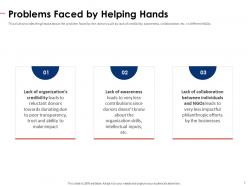
Slide 3: This slide consists of “Problems Faced by Helping Hands”. This slide provides a glimpse of the problems faced by the donors such as lack of credibility, awareness, collaboration, etc. in different NGOs.
Slide 4: This slide shows “Solutions Offered by Our Non-Profit Organization”. This slide provides a glimpse of the solutions offered by nonprofit organizations such as acquisition, renewal, monthly giving, lapsed recapture, lead generation, etc.
Slide 5: This slide provides a glimpse of the non-profit organization overview which focuses on details of the company along with the values offered by this firm.
Slide 6: This slide talks about “Corporate Philanthropy Fundraising Statistics”. It gives you a glimpse of the fundraising statistics of corporate philanthropy which focuses on offering gift programs, unclaimed funds, etc.
Slide 7: This slide emphasizes “Leading in Kindness” and a graph illustrating different countries along with their adult population donating money and GDP per capita.
Slide 8: This slide is titled “We Accelerate Change”. It provides the goals and aim of our organization which focuses on various charitable individuals, groups, and NGOs which can connect and make improvements in society.
Slide 9: This slide is titled “Our Business Model”. It provides the business model which focuses on the minimal commission fee charged by our organization based on the donation amount.
Slide 10: This slide shows “How it Works for Donors”. The slide provides the working of our organization model which focuses on donors, charitable people, charities involved, and small commissions.
Slide 11: This slide talks about “Benefits Offered to Donors”. It provides the benefits offered to the donors such as easy connectivity, donation assurance, ways of contribution, creating the change, etc.
Slide 12: This slide talks about “Apply to become a partner”. It provides the steps involved in working with charities that focus on applying for the partner, their verification, and getting certified.
Slide 13: This slide gives you the idea about “Benefits Offered to Charities”. It talks about the benefits offered to the donors such as easy connectivity, donation assurance, ways of contribution, creating the change, etc.
Slide 14: This slide is titled “Costs Incurred by Our Organization”. It provides the cost incurred by the organization such as solution development & scaling, marketing & collaborations, team expansion & innovation.
Slide 15: This slide gives us in-depth information about “Our Organization Growth Projections”. It provides the details about our organization’s growth projections which focus on a number of NGOs, funds raised and profits earned.
Slide 16: This slide talks about “Community Reach”. It provides the details about our organization’s community partners such as senior groups, campaigns in the education sector, and collaboration with artists, etc.
Slide 17: This slide shows “Our Government and Corporate Partnerships”. It provides the details about our organization’s government and corporate partnerships which will widen the reach, share technology & tolls, and explore CSR activities.
Slide 18: This slide is titled “Our Organization Team Structure”. It provides the working of our organization model which focuses on donors, charitable people, charities involved, and small commissions.
Slide 19: This slide shows Icons Slide for Nonprofit Pitch Deck.
Slide 20: This slide is about Additional Slides.
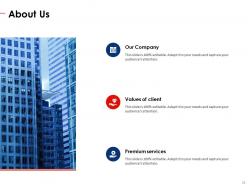
Slide 21: This slide is titled “About Us”.
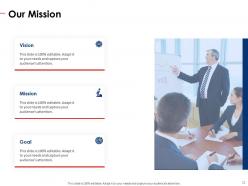
Slide 22: This slide is Titled “Our Mission”. It presents the mission, vision, and goal of your company.
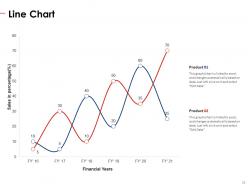
Slide 23: This slide displays a Line Chart.
Slide 24: This extra slide shows “Post it Notes”.
Slide 25: This slide is about Timeline. It shows the progress of the project.
Slide 26: This slide is titled “Financial”.
Slide 27: This slide is titled “Dashboard”.
Slide 28: This is a slide with a 30 60 90 Days Plan to set goals for these important intervals.
Slide 29: This is a Thank You slide where details such as the address, contact number, email address are added.
Non profit pitch deck ppt template with all 29 slides:
Use our Non Profit Pitch Deck Ppt Template to effectively help you save your valuable time. They are readymade to fit into any presentation structure.
-
Non Profit Pitch Deck
-
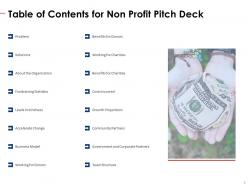
Table of Contents for Non Profit Pitch Deck
-
Problems Faced by Helping Hands
-
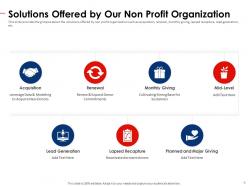
Solutions Offered by Our Non Profit Organization
-
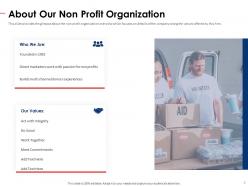
About Our Non Profit Organization
-
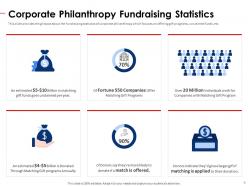
Corporate Philanthropy Fundraising Statistics
-
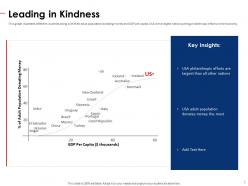
Leading in Kindness
-
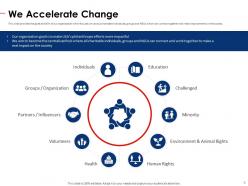
We Accelerate Change
-
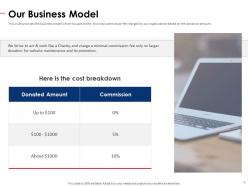
Our Business Model
-
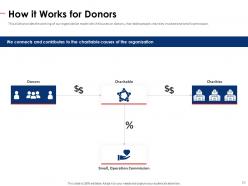
How it Works for Donors
-
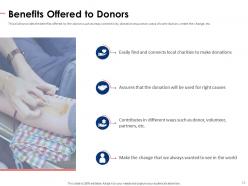
Benefits Offered to Donors
-
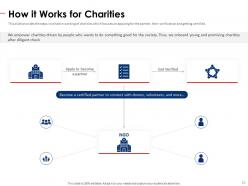
How it Works for Charities
-
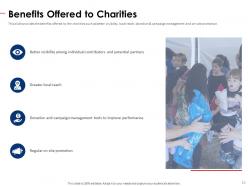
Benefits Offered to Charities
-
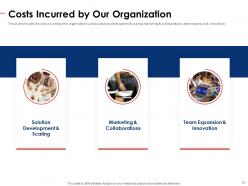
Costs Incurred by Our Organization
-
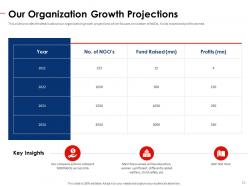
Our Organization Growth Projections
-
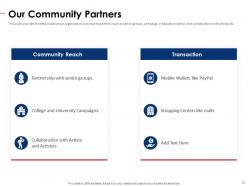
Our Community Partners
-
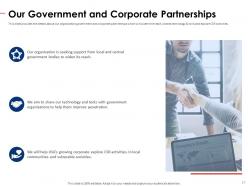
Our Government and Corporate Partnerships
-
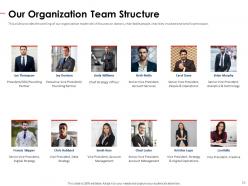
Our Organization Team Structure
-
Icons Slide for Non Profit Pitch Deck
-
Additional Slides
-
About Us
-
Our Mission
-
Line Chart
-
Post it Notes
-
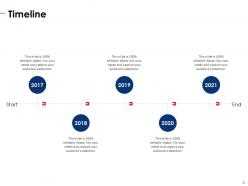
Timeline
-
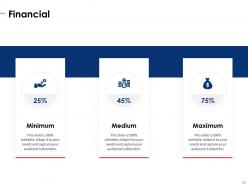
Financial
-
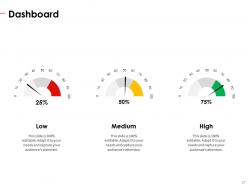
Dashboard
-
30 60 90 Day Plan
-
Thank You
FAQs for Non profit pitch
OK so first thing - hit them with the problem you're solving, like make it urgent and real. Your mission comes next, then show actual numbers because donors eat that stuff up. Honestly the boring financial stuff matters more than you think - budget breakdown, exactly what you need, where the money goes. Your team section is huge since people fund people, not just ideas. Oh and don't be vague with your ask! Say "we need $50K for X program" not some wishy-washy "we'd love support." Make it stupid easy for them to write the check.
Honestly, most nonprofit pitches are boring as hell - just stat after stat that makes people's eyes glaze over. You need to tell an actual story instead. Pick one person you've helped and make them the main character. Start with the problem they faced (that's your villain), show how your nonprofit stepped in to help, then paint a picture of their life now. Give them a name, show their face - make donors feel like they know this person. I always tell people to think of it like a movie plot, not a spreadsheet. Numbers are fine, but weave them into the story. That's what gets people to actually open their wallets.
Honestly, less is more with these presentations. Clean slides work way better than cluttered ones - donors get distracted otherwise. Real photos of people you've actually helped? That's gold. Stock photos look fake and everyone can tell. I'd skip the crazy animations too (seen too many nonprofits go nuts with those). Pick maybe 2-3 brand colors, readable fonts - don't get creative there. One main point per slide keeps things focused. Oh, and definitely test it on your phone or tablet first. You never know what device you'll end up using when you're actually presenting.
Honestly, just swap out the key parts depending on who you're talking to. Donors want those impact numbers upfront - show them their cash actually does something. Volunteers? They're way more interested in the actual experience and meeting cool people (and yeah, free food at events is weirdly important lol). Partners need to see what's in it for them too. Don't change your mission, but definitely adjust how you frame the problem and what action you want them to take. Make 2-3 template versions so you're not reinventing the wheel every time.
Focus on outcomes, not just outputs. Like instead of "we served 1,000 meals," say "80% of participants found stable housing within 6 months." Way more compelling to funders. Include your beneficiary numbers, success rates, cost per person served. Long-term impact data is gold if you have it. Stories are great but honestly, you need the hard numbers to back them up. New organization? No worries - just be upfront about your timeline and how you plan to track results moving forward.
Honestly, case studies and testimonials are like magic for nonprofit pitch decks. They transform your mission from some abstract concept into real proof that you're actually changing lives. Sure, data matters, but stories? Those stick with people forever. Pick 2-3 really powerful testimonials - add photos if you can get them. Create mini case studies showing the whole transformation journey. That single mom who landed her dream job after your training program, or how your community garden literally fed 200 families last year. Just make sure everything connects directly to what you're asking funding for. Keep it brief but pack an emotional punch.
Honestly, stick to 10-15 slides max. That'll give you about 10-12 minutes to present, which leaves room for Q&A in your 20-minute slot. Trust me, people's attention spans are terrible these days - they'll be scrolling Instagram if you drone on too long. Focus on three things: your mission, impact numbers, and what you need funding-wise. Everything else? Cut it. I learned this the hard way at my first pitch - went way over and could see people mentally checking out. Time yourself when you practice because running long kills the vibe instantly. Save 8-10 minutes for questions at the end. That's where the magic happens and you actually connect with people.
Dude, just be totally upfront with your money situation. Donors hate surprises, so show them exactly where their cash goes - not just "we need 50K for stuff" but actual line items. Pie charts are your friend here. Don't try hiding overhead costs either, that's sketchy as hell. Your current funding status needs to be crystal clear, plus realistic timelines for what you're trying to raise. Oh and please check your math - I've seen so many decks where the numbers don't even add up, it's embarrassing. Give them specific milestones so they know what their donation actually accomplishes.
Your branding needs to be on point - donors can spot sloppy, inconsistent stuff from a mile away. Logo, colors, fonts should match across every single slide. Creates that professional vibe funders expect. But here's the thing most people miss: your messaging has to align too. Can't sound like a corporate robot in one section then get all heartfelt in another. Everything should feel authentically you, whether you're talking mission or asking for cash. Oh, and document your brand guidelines first - I learned this the hard way. Don't wing it.
Honestly, photos of your actual people beat boring stock images every time - way more emotional punch. Make infographics for the impact stuff (people served, money allocated) because nobody wants to stare at spreadsheet numbers. Your color scheme should match your brand obviously, but here's the thing - every single visual needs to actually support your story, not just take up space. I mean, board members and donors need to *feel* what you're doing, not just get it intellectually. Oh and don't forget captions that connect back to whatever you're asking for. Visuals basically make your data way less intimidating.
Honestly, the worst thing you can do is make it all about your org instead of actual impact. Skip the boring program details - donors want to see outcomes, not how your internal stuff works. And don't oversell! Nothing tanks your credibility faster than throwing out crazy unrealistic numbers or super vague metrics. Keep financials clear but not overwhelming. Also, real stories from people you've helped beat statistics every time. I know it's tempting to cram everything in, but focus on what their money will actually accomplish. Then back that up with solid data and tell them exactly what's next.
Okay so definitely practice out loud - like actually speaking, not just thinking through it in your head. I always record myself doing each section because you catch the weirdest stuff when you watch it back, like saying "um" every ten seconds. Get some colleagues to grill you with hard questions beforehand. Time yourself too since you'll either rush through everything when you're nervous or get way too into explaining the parts you love. Oh and this is key - do one full run-through with people who don't know your org at all. They'll call out confusing insider language instantly.
Honestly, I'd just start with Canva - they have a bunch of nonprofit templates and you don't need to be a design wizard to make something decent. PowerPoint works too if your whole team needs to edit it together. Prezi's kinda cool for the flashy moving presentation thing, but I feel like donors sometimes prefer straightforward over fancy? Google Slides is solid for collaboration. If you've got money to burn, Adobe Creative Suite looks the most professional, but that's probably overkill. Try Canva's free version first and see what happens - you can always switch later once you figure out your vibe.
Don't wait until the end to ask for anything - that's where most nonprofits screw up. Sprinkle gentle asks throughout, like "join our mission" early on. Then ramp up to the bigger stuff. Each call-to-action should connect to whatever story you just shared on that slide. Give people options too - different donation amounts, volunteer gigs, partnerships. Some donors want to write checks, others prefer getting their hands dirty. Your final ask needs to be crystal clear with actual next steps. Something like "let's schedule a follow-up this week" works way better than vague promises.
Honestly, pitch decks now are all about visuals and real stories - way less text, way more photos showing actual impact. Donors are pretty skeptical these days, so you need hard numbers and measurable results, not just heartwarming fluff. I'd start with one person's story and follow them through your whole presentation. Shows the transformation super clearly. Oh, and sustainability plans are basically mandatory now - funders hate wondering if their money disappears after year one. Keep it tight, maybe 10-12 slides tops. Practice telling it like you're just talking to someone, not reading a script.
-
Excellent products for quick understanding.
-
Awesome presentation, really professional and easy to edit.