


Organisational Development Powerpoint Presentation Slides




Try Before you Buy Download Free Sample Product
 Impress Your
 Audience
 100%
100% Editable
 Save Hours
 of Time


Select our content ready Organisational Development Powerpoint Presentation Slides to create an employee performance management system. The professional-looking organizational performance management Powerpoint complete deck covers various slides such as management program, core performance criteria, goal setting process, types of goals/priorities, performance coaching, employees responsibilities, dos & don’ts, performance feedback, multiple sources of feedback, self-evaluation form, performance review form, assessment & rating, improvement plan, supervisors comments, employee development program, performance management KPIs & dashboard etc. All slides provided in organization learning & knowledge management presentation deck are fully editable, users can edit them as per their requirements. Encourage your employees to participate in the company’s planning process using employee development PPT visuals. Incorporate the highly creative performance planning PowerPoint templates to make employees align with the vision of the organization for improved organizational performance. Create an environment of trust Download visually appealing employee training & development presentation slideshow to create an interactive business presentation. Get grey cells going at the correct frequency. Our Organisational Development Powerpoint Presentation Slides are great for fine tuning.
People who downloaded this PowerPoint presentation also viewed the following :
Content of this Powerpoint Presentation
Slide 1: This slide introduces Organizational Development. State Your Company Name and begin.
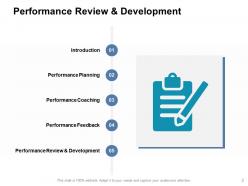
Slide 2: This slide shows Performance Review & Development describing- Introduction, Performance Planning, Performance Coaching, Performance Feedback, Performance Review & Development.
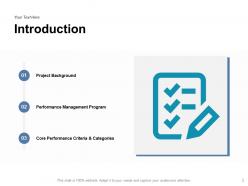
Slide 3: This is an Introduction slide describing- Project Background, Performance Management Program, Core Performance Criteria & Categories.
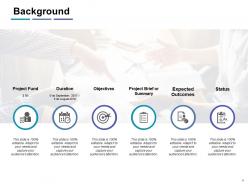
Slide 4: This slide showcases Background with- Project Fund, Duration, Objectives, Project Brief or Summary, Expected Outcomes, Core Performance Criteria & Categories.
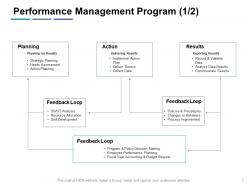
Slide 5: This slide shows Performance Management Program with- Planning, Action, Results, Feedback Loop.
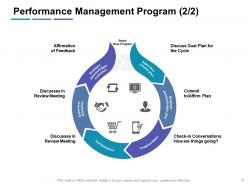
Slide 6: This is another slide describing Performance Management Program.
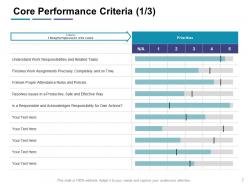
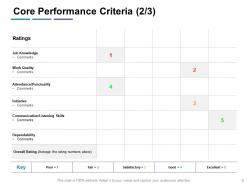
Slide 7: This slide presents Core Performance Criteria priority wise.
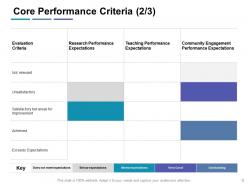
Slide 8: This slide displays Core Performance Criteria rating wise.
Slide 9: This is another slide on Core Performance Criteria. You can add or edit data as per requirements.
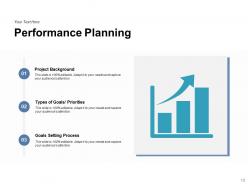
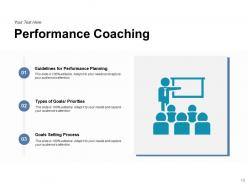
Slide 10: This slide represents Performance Planning describing- Guidelines for Performance Planning, Types of Goals/ Priorities, Goals Setting Process.
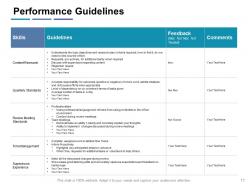
Slide 11: This slide shows Performance Guidelines in a tabular form.
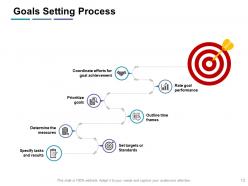
Slide 12: This slide displays Goals Setting Process describing- Specify Tasks and Results, Set Targets or Standards, Determine the Measures, Outline Time Frames, Rate Goal Performance, Coordinate Efforts for Goal Achievement, Prioritize Goals.
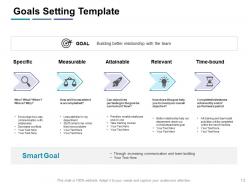
Slide 13: This slide represents Goals Setting Template describing- Specific, Measurable, Attainable, Relevant, Time-Bound.
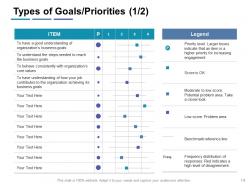
Slide 14: This slide presents Types of Goals/Priorities. You can add or edit goals and their priorities as per requirements.
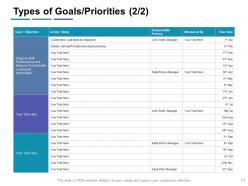
Slide 15: This is another slide describing Types of Goals/Priorities.
Slide 16: This slide displays Performance Coaching with related imagery.
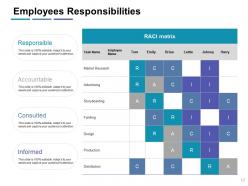
Slide 17: This slide represents Employees Responsibilities in a matrix form.
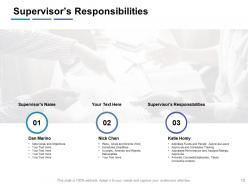
Slide 18: This slide showcases Supervisor’s Responsibilities in tabular form.
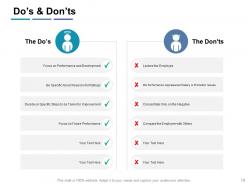
Slide 19: This slide shows Do’s & Don’ts. You can add or edit data as per requirements.
Slide 20: This slide presents Performance Feedback with related imagery.
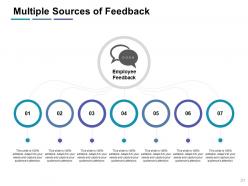
Slide 21: This slide displays Multiple Sources of Feedback as- Peers, Subordinates, Suppliers, Customers, Team Members, Line Managers, Direct Reports.
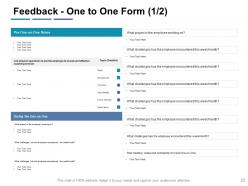
Slide 22: This slide represents Feedback - One to One Form. You can add or edit data as per requirements.
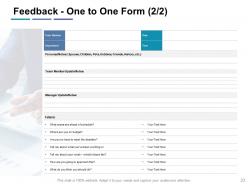
Slide 23: This is another slide for Feedback - One to One Form.
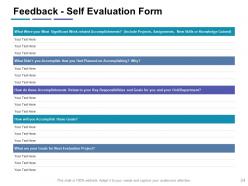
Slide 24: This slide showcases Feedback - Self Evaluation Form.
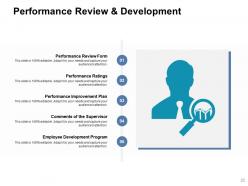
Slide 25: This slide displays Performance Review & Development with related imagery.
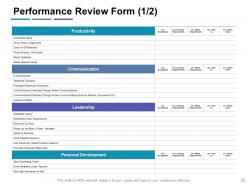
Slide 26: This slide shows Performance Review Form with categories as Productivity, Communication, Leadership and Personal development.
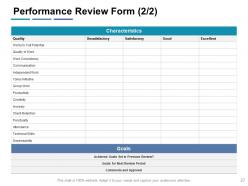
Slide 27: This is another slide with Performance Review Form describing characteristics.
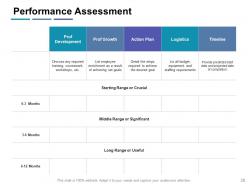
Slide 28: This slide presents Performance Assessment in a tabular form.
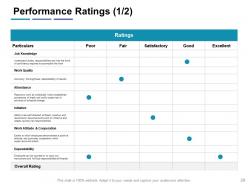
Slide 29: This slide displays Performance Ratings in a tabular form with rating scale from poor to excellent.
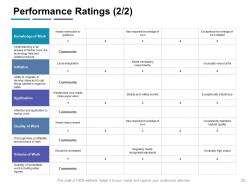
Slide 30: This is another slide on Performance Ratings. You can add or edit text as per requirements.
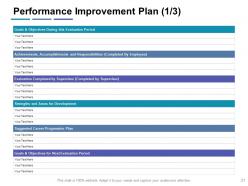
Slide 31: This slide represents Performance Improvement Plan in tabular form with additional text boxes.
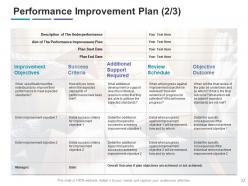
Slide 32: This slide showcases Performance Improvement Plan describing Improvement objectives, Success Criteria, Additional support required, review schedule and objective outcome.
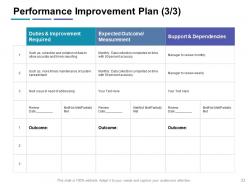
Slide 33: This slide shows Performance Improvement Plan with duties and improvement required, expected outcome/measurement, support and dependencies.
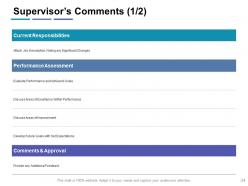
Slide 34: This slide presents Supervisor’s Comments with categories as Current responsibilities, Performance assessment. Comments & approval.
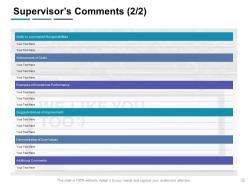
Slide 35: This is another slide on Supervisor’s Comments in tabular form.
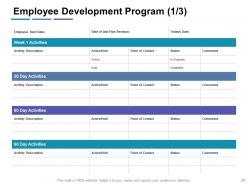
Slide 36: This slide displays Employee Development Program with weekly, 30 day, 60 day, and 90 day activities.
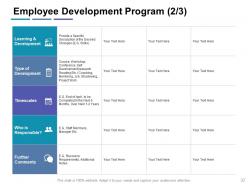
Slide 37: This is another slide on Employee Development Program with categories as Learning & development, Type of development, Timescales, person responsible, Comments.
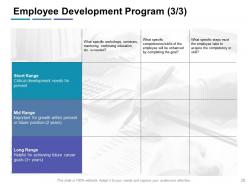
Slide 38: This is another slide on Employee Development Program in a matrix form.
Slide 39: This slide displays Performance Management KPIs & Dashboard with related imagery.
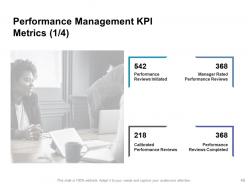
Slide 40: This slide shows Performance Management KPI Metrics with imagery and text.
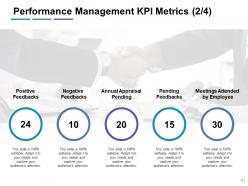
Slide 41: This slide presents Performance Management KPI Metrics describing- Positive Feedbacks, Negative Feedbacks, Annual Appraisal Pending, Pending Feedbacks, Meetings Attended by Employee.
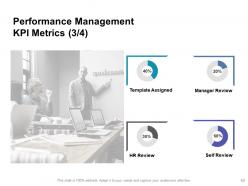
Slide 42: This is another slide on Performance Management KPI Metrics with donut pie chart.
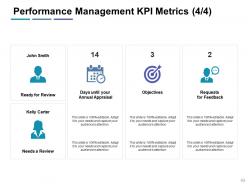
Slide 43: This slide represents Performance Management KPI Metrics with person for review and person who needs a review.
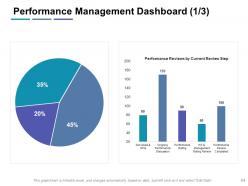
Slide 44: This slide showcases Performance Management Dashboard with donut pie chart and bar graph.
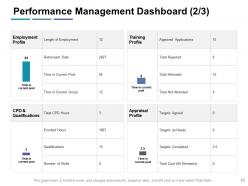
Slide 45: This slide shows Performance Management Dashboard with categories as- Employment Profile, Training Profile, CPD & Qualifications, Appraisal Profile.
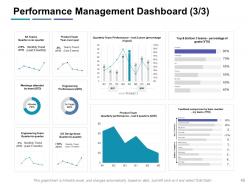
Slide 46: This slide presents Performance Management Dashboard with the help of graphs.
Slide 47: This slide displays icons for the presentation.
Slide 48: This slide reminds about a Coffee Break.
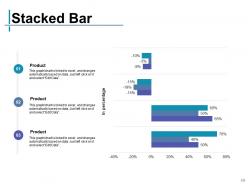
Slide 49: This slide shows Stacked Bar chart with three products comparison.
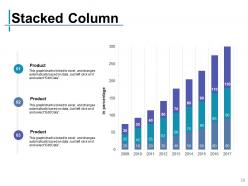
Slide 50: This slide displays Stacked Column chart with three products comparison.
Slide 51: This slide is titled as Additional Slides for moving forward.
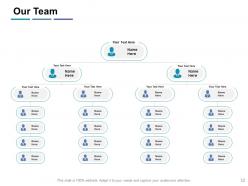
Slide 52: This is Our Team slide with names and designation.
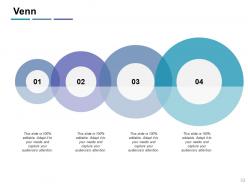
Slide 53: This is a Venn slide with text boxes.
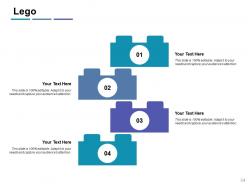
Slide 54: This is a Lego slide with additional text boxes to show information.
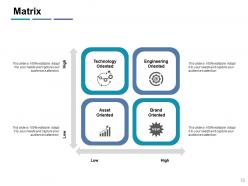
Slide 55: This is a Matrix slide. Show relevant comparing data accordingly.
Slide 56: This slide shows Mind Map for representing entities.
Slide 57: This is a Hierarchy slide with text boxes.
Slide 58: This is an Idea Generation slide to state a new idea.
Slide 59: This slide shows Magnifying Glass to highlight information.
Slide 60: This is a Thank You slide with address, contact numbers and email address.
Organisational Development Powerpoint Presentation Slides with all 60 slides:
Use our Organisational Development Powerpoint Presentation Slides to effectively help you save your valuable time. They are readymade to fit into any presentation structure.
FAQs for Organisational Development
Honestly, leadership buy-in is make-or-break for OD - if your executives aren't committed, you're basically dead in the water. Communication matters way more than people think too. Everyone needs to understand what's changing and why, otherwise you'll get resistance. Data collection helps track if things are actually working. Employee engagement is critical since, well, they're the ones doing the work! Change management processes keep everything organized, though sometimes the best plans still go sideways. Everything should tie back to your strategic goals somehow. Start with figuring out where you are now, then tackle whatever's most broken first. Feedback loops help you course-correct along the way.
Honestly, culture is everything when it comes to change at work. If your company is super risk-averse or everyone works in their own little bubbles, good luck getting anyone on board with new ideas. It's brutal. But places that already value learning and talking openly? Change happens so much smoother there. You've gotta take a hard look at what you're dealing with culture-wise first. Then either work within it or start shifting things before you roll out anything big. I've seen too many solid plans completely bomb because people skipped this step.
Leadership makes or breaks growth, honestly. Without good leaders, everyone's just doing their own thing with zero direction. The key is creating that safe space where people aren't afraid to mess up or try new things. Some leaders get stuck in their ways though - I've seen it happen so many times. But the ones who actually adapt? They show their teams it's okay to evolve too. Oh, and communication is huge. Don't just tell people what to do; explain why you're doing it. Give them what they need to grow with the company.
Honestly, start with employee surveys and performance data - that's your goldmine right there. Interview stakeholders at different levels too because the view from the top is usually pretty different from what's happening on the ground. Map out where you are versus where you need to be: leadership skills, team stuff, processes, culture. Competitor analysis is clutch here (I always find something surprising). Mix hard numbers with real feedback from people. Oh, and don't try fixing everything - that's a recipe for chaos. Focus on whatever's actually blocking your big goals first.
Honestly, communication is everything here - don't let people guess what's happening. I've watched so many changes blow up because leadership just disappeared when things got messy. Set up regular check-ins where your team can actually tell you what's wrong, not just nod along. Get your key people involved in planning this stuff if you can. Give everyone clear jobs during the chaos. Oh, and celebrate the small stuff too - sounds cheesy but it works. My main thing? Talk to your team weekly and really listen. People can smell fake engagement from a mile away.
Tech completely changed how OD works - everything's way more data-driven now. Analytics help you spot organizational gaps, and pulse surveys give you real-time feedback instead of waiting months for results. Dashboards track your change progress too. Digital tools are supposed to break down silos, but honestly? Sometimes they just create new ones. The real win is getting actual insights instead of going with your gut. Pick one thing you're currently guessing about and see what data you can dig up there. You'll probably be surprised by what you find.
Honestly, continuous learning is what stops your team from becoming obsolete. People who keep upskilling solve problems better and actually want to stick around - nobody likes feeling stagnant at work. When stuff inevitably changes (and it always does), your employees can adapt instead of panicking. Plus you're growing talent internally rather than constantly recruiting. The real win? Your whole organization gets more innovative because everyone's bringing new ideas and skills to their role. I'd start by figuring out where your team has gaps, then build some learning paths around those areas. Way more effective than hoping people figure it out themselves.
Honestly, start with monthly pulse surveys and regular one-on-ones between managers and their teams. Anonymous feedback is gold - people will tell you stuff they'd never say face-to-face. Cross-departmental check-ins help too since departments can get weirdly siloed. But here's the thing that actually matters: you have to act on what people tell you, or they'll just stop bothering to give feedback. I'd begin with maybe two feedback methods, see how it goes, then add more once you've shown people their input leads to real changes. Oh, and keep the surveys short - nobody wants to fill out a dissertation.
Track the obvious stuff first - engagement scores, retention rates, performance numbers that actually matter for what you're trying to do. ROI is huge because leadership eats that up. But honestly? Sometimes just walking around tells you more than any spreadsheet. Are people actually talking to each other more? Do they seem less miserable on Monday mornings? Set up maybe 3-4 key metrics you check monthly, then do those pulse surveys quarterly to catch whatever the numbers miss. Oh and productivity measures too - almost forgot that one. The soft stuff matters just as much as the hard data.
Honestly, you've got to connect your development stuff directly to business results first. Leadership training? Track how it affects retention or revenue. Too many companies just throw training at people without any real purpose - drives me crazy. Get the business leaders involved from day one so they're actually invested. Focus on KPIs that the executives care about, not just typical HR numbers. Oh, and build in regular check-ins because priorities will definitely shift. They always do, usually when you least expect it.
Honestly, most of these things crash because people just hate change - like, really hate it. Leadership not being on board is massive too. I've seen so many good ideas die because executives said "sure, sounds great" but didn't actually commit resources or realistic timelines. Communication's another killer. If you can't explain WHY this matters, forget it. Oh, and cultural fit - if what you're trying to do goes against how people actually work there, you're screwed. My advice? Get the bosses truly invested first, then start with small wins to prove it works before going big.
Don't treat diversity like some side project you'll get to later. Build it into everything from the start - your hiring, promotions, leadership development, all of it. Take a hard look at where bias might be sneaking in (spoiler: it's probably everywhere). Most performance reviews are broken anyway, so fix those too. Mix up your project teams, get people mentoring across different backgrounds, and actually develop underrepresented talent for leadership roles. Honestly, the companies that get this right make D&I part of their DNA, not just another initiative that dies when things get hectic.
Look, when your team feels good, everything else just clicks. Productivity goes up, people actually stick around, and you get way more creative ideas flowing. Makes total sense when you think about it - nobody's doing their best work while completely burned out. Companies that actually invest in this stuff see fewer sick days and way less turnover. Oh, and don't just make it some random HR initiative that nobody cares about. You've gotta treat it like it actually matters strategically. Honestly, the easiest place to start? Just ask people what they need most. You'd be surprised what they'll tell you.
Honestly, the biggest thing is looping people in from the start - nobody likes decisions just dumped on them. Keep explaining why you're doing this change, over and over. Sounds repetitive but trust me, it works. Actually listen when they push back too because sometimes they catch stuff you totally missed. Don't forget the emotional piece either. Even good changes freak people out. Get some training going and find your enthusiastic people first - they'll help sell it to everyone else. Let it spread organically from there.
Honestly, you've gotta make sure people feel safe speaking up first - like they won't get shut down for weird ideas or concerns. Regular check-ins help, but not the boring status ones. Actually dig into what's going wrong. Everyone should know their role AND how it fits with everyone else's stuff. Also - and this drives me crazy - please don't scatter info across a million different apps. Pick tools that actually talk to each other! Transparency is huge. When people know what's happening, they'll jump in more. Oh, and celebrate the small wins too. Keeps everyone motivated instead of just grinding toward some distant finish line.
-
Visually stunning presentation, love the content.
-
Commendable slides with attractive designs. Extremely pleased with the fact that they are easy to modify. Great work!
-
Easy to edit slides with easy to understand instructions.