

Training And Development Powerpoint Presentation Slides





Try Before you Buy Download Free Sample Product
 Impress Your
 Audience
 100%
100% Editable
 Save Hours
 of Time


Highlight the features that help to maximize the performance level of your employee by using our Training And Development PowerPoint Presentation Slides. With the aid of the talent development strategy PPT theme, you can discuss the various benefits like increased productivity, skills development, team development, and many more. You can showcase the numerous plan to upgrade your employee performance with the help of this visually appealing L&D strategy. Take the assistance of learning and development plan PowerPoint graphic and conduct training programs that increase the managerial skills of your employees. Employ the training and development strategy presentation template and explain how to achieve your employee performance goals more efficiently. You can maximize employee motivation by using the L&D strategy presentation. Talk about your core competencies with the aid of this strategic training PPT visual. Therefore, download our ready-to-use talent management plan PowerPoint slide and discuss how to deliver a better quality of work.
People who downloaded this PowerPoint presentation also viewed the following :
Content of this Powerpoint Presentation
In today's fast-paced and complicated business world, an organization's progress is inextricably linked to the ongoing development of its staff. It's more than simply a corporate courtesy; it's a strategically necessary, well-crafted training and development program. These programs lay the groundwork for the company's success by raising productivity and capacity through skill development, as well as forming a strong, cohesive workforce capable of achieving excellent results.
Our extensively researched package, Training and Development PowerPoint Presentation Slides, offers a road map for adopting a dynamic strategy for developing your team's capabilities. This resource will provide you with everything you need to create a talent development strategy that is highly aligned with company goals and drives individuals to new competency levels. This is more of a collection of slides designed to be a powerful tool for establishing a clear vision for employee growth, emphasizing the benefits of skill development, and stressing the value of team building.
This L&D approach, when integrated into your business plan, will result in a comprehensive set of training programs that increase managerial acumen while also increasing staff motivation. This template is ready to use and readily editable, guiding you on how to portray your core capabilities and pave the road to attaining performance goals with perfection and efficiency.
Here’s a best-in-class tool to unlock your employees' potential with our Training Plan Strategy Development Roadmap, a guiding document for charting a course to success.
Let’s explore!
Template 1: Interactive Learning Roadmap

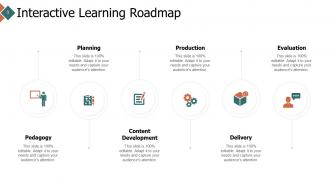
This Instructional Design process for training and development is separated into stages: planning, pedagogy, content development, production, delivery, and evaluation. Each phase is visually depicted with icons that indicate the systematic flow of designing and implementing a successful learning experience. The design is essential and facilitates knowledge assimilation, allowing each stage's details to be developed with specific alterations based on the needs of the learning environment
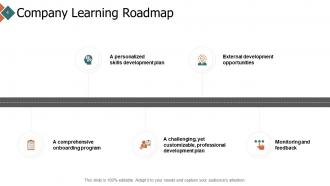
Template 2: Company Learning Roadmap
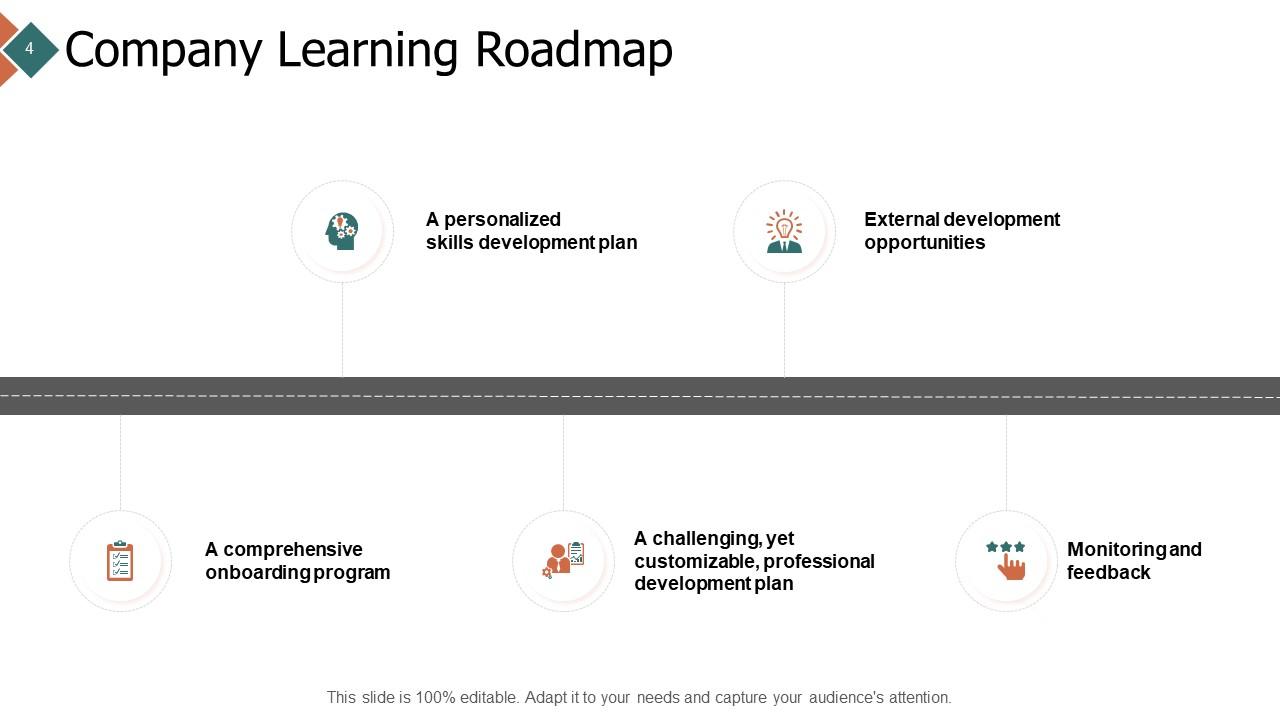
This presentation slide provides a concise visual reference to building and improving abilities inside your organization. Designed for HR professionals and team leaders, the onboarding program is intended to help add structure to your organization's learning and development by providing a structured onboarding program, a specific plan for building and developing abilities, and opportunities for growth outside of the firm. This design even emphasizes the energy of personal and professional development, as well as an endless cycle of performance monitoring and feedback. The slides' style and iconography provide a clear grasp of the processes required to promote a culture of continuous learning and growth.
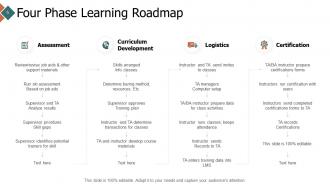
Template 3: Four-Phase Learning Roadmap
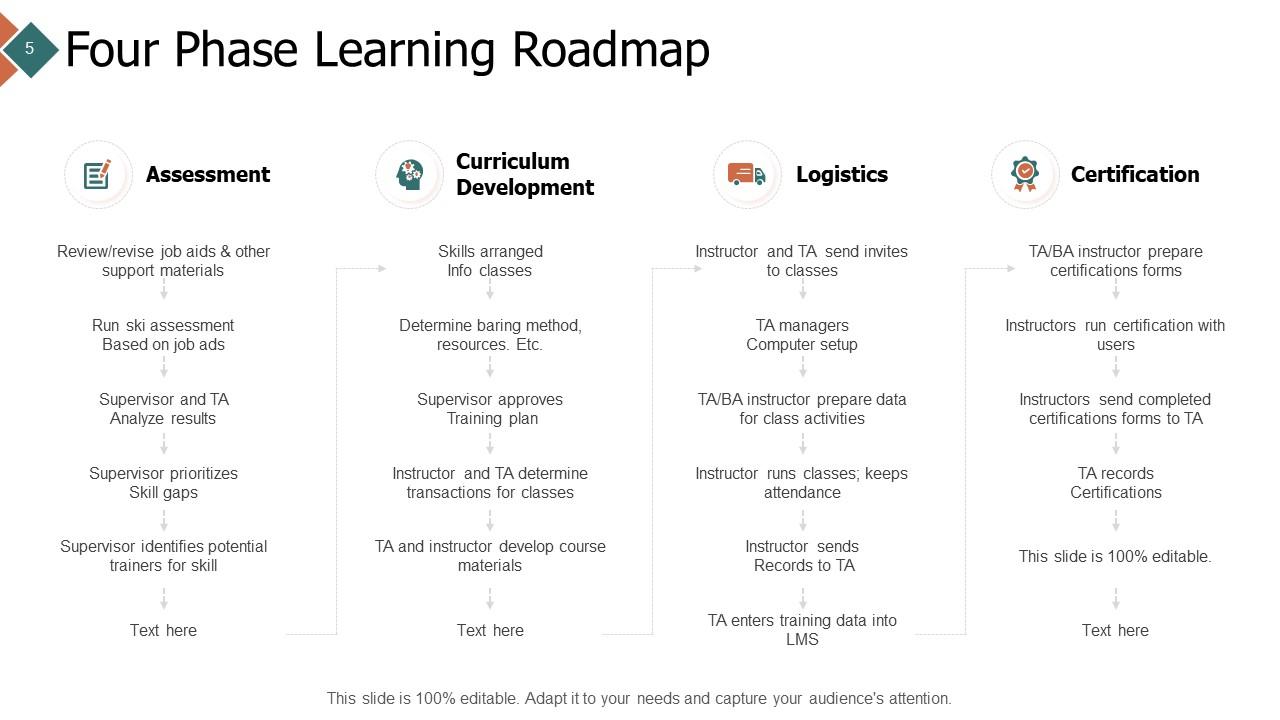
The presentation slide depicts a fundamental process for developing and delivering a training program using a structured approach to orchestrating holistic learning within a company. It describes the four-stage sequence. Stage 1 focuses on needs assessment by outlining specific processes for evaluating job aids in areas that will assist in identifying needs or skill shortages. It then progresses to the curriculum creation stage, during which skills are sorted out, techniques are determined, and materials are prepared under the supervision of an instructor. The third phase focuses on logistics, which include invites, coordination of technological setup, and attendance checks to ensure an uninterrupted educational flow. Finally, certification is achieved through documentation.
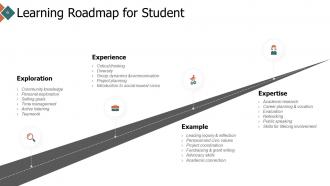
Template 4: Learning Roadmap for Student
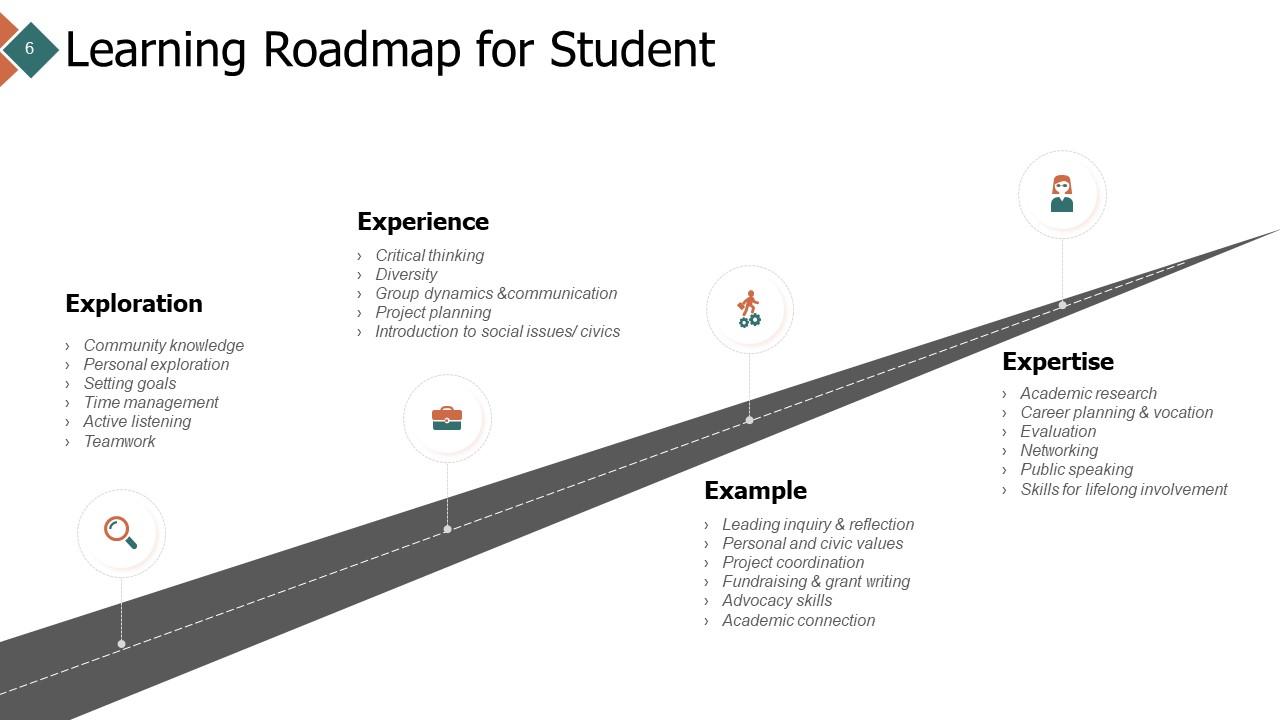
This PPT Template provides a strategic plan that elaborates on phases of education. In a self-explanatory manner, these are named as exploration, experience, example, and expertise. The Exploratory Stage focuses on goal planning and teamwork. During the Experiential Stage, students learn to think critically and are exposed to coping with issues related to social concerns. The final part, the Example phase, allows learners to apply what they have learned in enquiry and advocacy. The final stage is the Expertise phase, where students enter when they have mastered academic research and professional presentation skills. Such a template design is handy for instructors in allowing students to progress from fundamental knowledge acquisition to subject mastery. Icons accompany each stage, which means simplifying concepts so that they are observed and memorized. Teachers, counselors, and students benefit from the deck as it allows them to have a systematic, precise approach to studies.
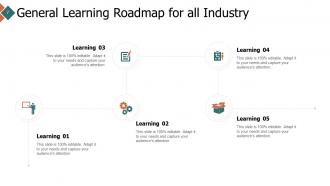
Template 5: General Learning Roadmap for All Industry
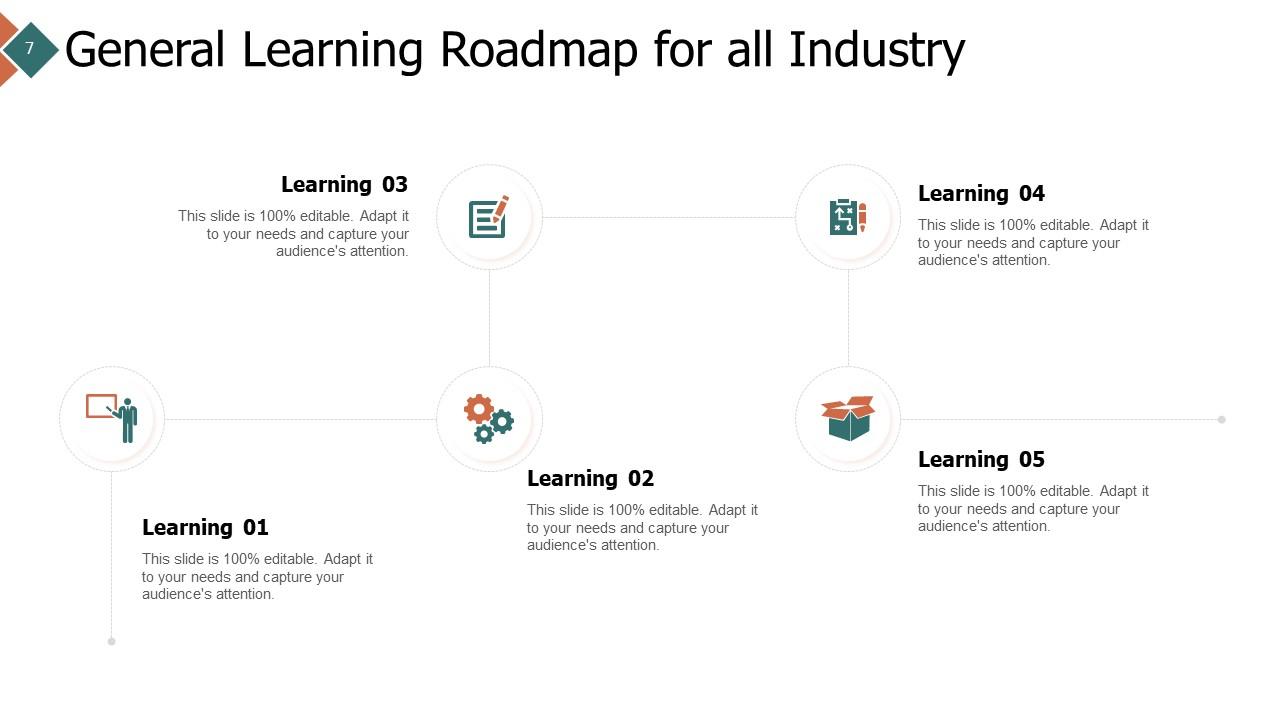
This is a versatile learning tool because the presentation slide serves as a fillable guide for expanding knowledge across so many sectors. It is presented in a simple, step-by-step way, with easily identifiable icons indicating various phases in the learning process. Each step is applicable to specific themes and can even help trainers and educators identify how comprehension has progressed from fundamental knowledge to a more advanced concept. The slide designs are tidy and professional, making them ideal for corporate trainers, educational institutions, and self-paced learning modules. It effectively catches an audience by providing a visual illustration of a learning trajectory that might be applied to a variety of educational goals or an instructor's preference, ensuring that learners are engaged and informed at all stages of the educational process.
Using our Individual Development Plan Template, you can help each person on your team realize their potential. Empower, innovate, and perform. Start the change at SlideTeam.net right now!
Blueprint for Excellence: Nurturing Talent Across the Board
As we conclude our journey across the complex world of training and development, one thing remains clear: investing in human capital is the most rewarding enterprise a firm can ever do. Every slide in this Training and Development PowerPoint Presentation Slides has been reviewed as if it were a cog in a large piece of machinery, namely, organizational development. The template provides thorough direction on unlocking potential at all organizational levels, beginning with a clear and interactive learning roadmap to chart the course for individual mastery using the student learning roadmap.
The call to action could not be clearer: utilize these PPT Templates as more than tools. These are compasses that will guide you through the industry's ever-changing dynamics. So, as you say "goodbye" to this instructive journey, may the following stages lead you to become a master of research and excellence, a future in which each team member has been trained and transformed.
PS Start your organizational transformation journey with our 12-Week Employee Training and Development Program. This is the blueprint for building a smarter, more skilled workforce. Start transforming today at SlideTeam.net!
Training And Development Powerpoint Presentation Slides with all 20 slides:
Use our Training And Development Powerpoint Presentation Slides to effectively help you save your valuable time. They are readymade to fit into any presentation structure.


FAQs for Training And Development
Start with a survey - ask your team what skills they're missing. That's your needs assessment right there. Set specific goals for what people should actually DO after training, not just "understand concepts" or whatever. Delivery matters way more than people think. Boring PowerPoints kill learning, so go interactive - workshops, mentoring, hands-on stuff. But here's where everyone screws up: follow-up. Most programs just end and hope for the best. You've got to check if people are using what they learned and if it's actually helping performance. Otherwise you're just burning budget on feel-good sessions.
Honestly, measuring training ROI is kinda messy but doable. Track the stuff that actually moves the needle - productivity bumps, less turnover, fewer accidents, better sales numbers. The hard part? You'll never know if it's really the training or just other random changes happening (there's always something, ugh). Set your goals upfront, then check back at 3, 6, and 12 months. Don't forget the softer stuff like engagement scores and who's getting promoted. My advice? Pick 2-3 metrics max that tie to what your business actually cares about. Otherwise you'll drown in data.
Tech totally runs training now, no way around it. LMS systems handle all the admin stuff while AI customizes content for each person - pretty wild how that works. VR training still blows my mind, like you're actually there. Your team can learn on their phones during lunch breaks or whatever, and the data shows you what's actually moving the needle instead of just burning budget. Best part? You can train thousands of people but it still feels personal. I'd start by figuring out where your current setup is falling short.
Honestly, personalized learning just hits different. Employees actually give a damn when training connects to their real goals instead of some random corporate checklist. They can go at their own speed, focus on skills they want, and it shows you're invested in their future - not just using them until they burn out. Generic training sessions? Total waste of everyone's time. I'd start by literally asking your team what they want to learn. Sounds obvious but most companies skip that step entirely. Then match those interests to whatever resources you've got. Game changer for retention too.
Getting people to actually show up is brutal - everyone's got some "urgent" meeting that magically appears. Then there's the whole measuring thing... like, did anyone actually change how they work six months later? Who knows. Managers push back constantly because they think it's wasted time (which, fair enough, some training totally is). Budget's always tight. Oh, and trying to make content work for both newbies and veterans? Good luck with that. Start small though, get the bosses on board first, and always connect it back to actual business wins. That's what's worked for me.
Honestly, just tie your training directly to what you're trying to fix business-wise. Need better customer retention? Skip the generic leadership fluff and focus on actual customer service skills. I've watched companies blow so much money on trendy workshops that accomplish nothing. Get your department heads to tell you where the real skill gaps are - the ones actually hurting performance. Track your KPIs before and after training to see if it's working. Oh, and don't just rely on those "how'd you like the training?" surveys. They're pretty useless for measuring real impact.
Honestly, start with surveys to find out where people are struggling skillwise. Talk to managers too - they see the daily chaos firsthand and usually have strong opinions about what's broken. Performance reviews and exit interviews are actually goldmines for spotting patterns (I know, sounds boring but trust me). Mix it up with focus groups or just observing how things really work versus how they're supposed to work. Get input from different angles so you're not just guessing. Once you've got all that data, figure out what'll have the biggest impact and tackle those gaps first.
Honestly, just blend them right into your tech training instead of making separate courses. When teaching troubleshooting, make people explain the problem to someone who doesn't know tech - there's your communication practice. Peer reviews during coding sessions work really well for feedback skills. Team projects are perfect since everyone has to actually collaborate and sometimes lead. I always think it feels more natural when soft skills come up because they're needed, not because you're checking a box. Oh, and use real scenarios your team deals with - makes it way more relevant than generic examples.
Look, employee feedback is pure gold for fixing your training programs. People will tell you straight up when something sucks - like when everyone's lost by module 3 or those role-play scenarios feel ancient. Way better than just hoping your stuff works, you know? Set up different ways for them to complain - surveys, focus groups, whatever. Then actually use what they tell you to fix things fast. Honestly, the timing thing trips up a lot of managers. Grab feedback right after each session while it's still fresh in their heads, not weeks later when they've forgotten everything.
Honestly, you've gotta weave learning into daily stuff instead of treating it like some once-a-quarter thing everyone dreads. Give people actual time for skill building and celebrate when they finish courses or try new approaches. Leadership has to walk the walk though - when managers share what they're learning, it makes everyone else feel like it's actually okay to do the same. I've watched companies talk a big game about learning culture then dump impossible deadlines on people. Makes no sense! Start with just one solid initiative. Maybe lunch sessions? Then build from there once it sticks.
Honestly, blended learning is pretty genius. You get online modules people can knock out whenever, but you still have those face-to-face sessions where real learning happens. People actually remember more when they're getting info from different angles - online reading, then in-person discussions and role-plays. Way cheaper than hauling everyone to some training center for a week too. I'd do like 70% online for the basics, then bring people together for the meaty stuff - problem-solving, debates, that kind of thing. Works way better than going all-in on either approach.
Try adding points and badges to your training - adults get weirdly competitive over digital rewards, it's actually hilarious to watch. Leaderboards work great too. Make progress super visible with things like completion bars or team challenges. Quick quizzes with instant scoring keep people engaged. Honestly, celebrating tiny wins makes a huge difference. I'd start with just basic points first though - see how they react before going crazy with bells and whistles. The whole trick is making it feel less like work and more like... well, not work.
Skip the boring PDF dumps - seriously, who has time for that? Go with short video modules and hands-on stuff instead. Interactive workshops work way better than lectures, trust me. Set up buddy systems between newbies and veteran employees, that's been a game changer at my company. Mix live sessions with things people can do whenever (time zones are brutal). Oh, and don't forget virtual coffee meetups - sounds cheesy but people actually love them. Regular check-ins keep everyone connected too.
Survey your team first - find out how they actually like to learn. Some people are visual, so throw in infographics and videos. Others need to get their hands dirty with workshops. Discussion groups work for the talkers. Podcasts are clutch too (I'm obsessed with listening while doing dishes, weird I know). The whole point is giving everyone the same info but in different ways. Mix up your delivery methods so people can pick what doesn't make their brain hurt. Way better than forcing everyone into the same boring format.
AI personalization is getting scary good at adapting to how people actually learn. Microlearning's everywhere now - makes sense since nobody has time for 3-hour training sessions anymore. VR training finally moved past the gimmicky phase and works well for hands-on stuff. Skills-based learning is replacing those old role-focused programs because, honestly, jobs change way too fast now. Remote learning obviously stuck around after 2020. I'd take a hard look at what you're doing now and maybe pilot one new approach - don't try to overhaul everything at once.
-
Great product with effective design. Helped a lot in our corporate presentations. Easy to edit and stunning visuals.
-
Commendable slides with attractive designs. Extremely pleased with the fact that they are easy to modify. Great work!
-
Easy to edit slides with easy to understand instructions.