

Our solution for the problem ppt slides





Try Before you Buy Download Free Sample Product
 Impress Your
 Audience
 100%
100% Editable
 Save Hours
 of Time


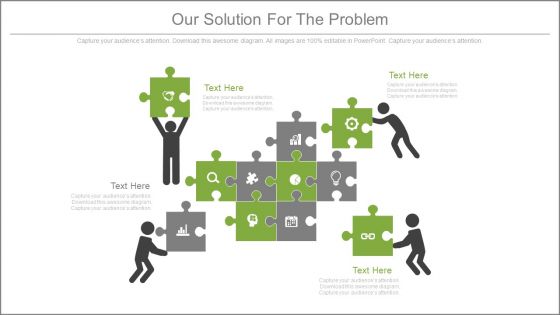
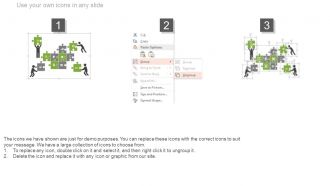
Every business is about solutions to customer problems – no problems, no business. So, here are we presenting to you our solution for the problem PowerPoint Template. This is a four stage process. The stages in this process are puzzle, strategy, business, marketing and management. The Slide Graphic has been designed with a beautiful visual which is conveying the message that there is solution to any problem which is there in day to day operating business environment. There are 4 persons who are trying to solve the puzzle with their team efforts just as the team members of any organization should do in order to achieve their goals and objectives. Creating a startup, or managing any business, is all about problem solving. People who are good at problem solving are some of the most valuable and respected people in every area. So, stop worrying about your business problems and find a solution to them by using our creative problem solving PPT Slide. Give a fillip to your argument with our Our Solution For The Problem Ppt Slides. They endow you with greater credibility.
People who downloaded this PowerPoint presentation also viewed the following :
Our solution for the problem ppt slides with all 5 slides:
Get to the action before anyone else with our Our Solution For The Problem Ppt Slides. They are always at the forefront.
FAQs for Our solution for the
Okay so first thing - figure out what problem you're actually solving and lead with that. Gets people invested right away. Walk them through your solution after that, but keep it simple and visual if you can. I've watched so many pitches crash because people just jump into features without any setup, it's painful. Then connect your solution to real benefits they'll care about - saved time, extra money, whatever headache you're fixing. Oh and definitely practice those transitions beforehand so you don't sound like a robot reading slides.
Honestly, visuals are a game-changer for explaining tricky stuff. People's brains just process images way faster than walls of text. When you throw in charts or diagrams, suddenly those messy data connections actually make sense. I learned this the hard way during a presentation last year - lost half the room within minutes! Screenshots work great too, especially for technical demos. Here's the thing though: don't just slap random graphics everywhere. Each visual needs to actually support what you're saying. Keep them clean and simple. Your audience will thank you later, and you'll get way better questions during the Q&A instead of confused stares.
Start with the problem you're solving, not the technical stuff - nobody cares about your fancy solution if they don't get why it matters. Present multiple options too. Honestly, pitching just one idea makes you seem inflexible and kills any real discussion. Skip the jargon completely! I've watched brilliant concepts crash because someone couldn't explain them like a normal person. Address the obvious problems upfront instead of pretending they don't exist. Oh, and always wrap up with clear next steps - who's doing what and when.
Ditch the feature dumps and start with a story instead. Show the pain first - like "Meet Sarah from accounting, drowning in spreadsheets every month." Walk them through the mess your audience deals with daily. Then reveal how your solution transforms everything. End with the happy outcome where life's actually manageable again. It's way more engaging than bullet points, trust me. People connect with characters and real problems, not technical specs. Opens work best when you paint that "before" picture first - gets everyone nodding along because they've been there. The whole problem-to-solution journey just hits different when there's an actual person involved.
Dude, you HAVE to know your audience first - it's honestly the make-or-break thing. Are you talking to executives who only care about money? Tech people who want the nitty-gritty details? Or regular users who just want things to work smoothly? I've watched so many good presentations completely bomb because someone pitched features to executives who needed to hear about business results instead. Pretty brutal honestly. Figure out what's actually stressing them out, then speak their language. Don't build anything until you know who's sitting in those chairs and what problems they're trying to solve.
Honestly, charts and graphs are game-changers for presentations. Complex data becomes instantly readable instead of boring people with endless spreadsheets. A good infographic hits way harder than walls of text - there's something about visuals that just clicks with people. Different folks process info differently too, so you'll reach more of your audience. Bar charts and line graphs are your best friends to start with. Don't overcomplicate unless it actually makes your point clearer. Oh, and visuals somehow make everything feel more credible? Maybe it's just me, but data looks more legit in chart form.
Okay so first thing - nail down the actual problem you're fixing and why anyone should give a shit. Walk through your solution step by step after that, connecting each part to the next. I used to bomb this because I'd get all hyped about cool features instead of what people actually get out of it lol. Make your slides visual, tell a story instead of just dumping bullet points everywhere. Finish strong with what you need from them specifically. The whole thing should feel like you're just talking to them, not reading from a script. Oh and practice those transitions between sections - nothing kills momentum like awkward pauses when you're switching gears.
Honestly, figure out what they'll complain about before you even start talking. Budget issues? Timeline concerns? Just bake your responses right into the pitch instead of getting caught off guard. I've been burned by this more times than I care to admit lol. When someone does interrupt with objections, don't get defensive - that's the kiss of death. Just nod, acknowledge what they're saying, then hit them with your data or examples. Practice responses to maybe 3-4 of the most obvious concerns so you don't sound like you're scrambling. Stay chill and remember they're not personally attacking you, they just need convincing.
Honestly, tech tools are a lifesaver for presentations. I always start with AI for rough drafts - saves me staring at a blank page forever. Templates keep everything looking professional without the hassle. Canva's pretty solid if you're not a design person (which, let's be real, most of us aren't). The collaboration platforms are clutch too - no more emailing files back and forth like we're still in the stone age. Data visualization tools will automatically turn your boring spreadsheets into actual charts people want to look at. Just pick whatever fixes your biggest headache first.
Dude, you gotta break up that PowerPoint monotony somehow. Get them talking - ask questions, do polls, whatever keeps them awake. Stories work way better than boring theory, trust me on this one. People forget facts but they'll remember when you told them about that time your project totally crashed and burned. Keep slides super visual, move around the room, and honestly? If you see people scrolling Instagram, just switch it up completely. Sometimes you gotta go off-script and just have a real conversation instead.
Don't just tack feedback onto the end - that's where presentations go to die. Build in checkpoints after each big section instead. Ask stuff like "Does this match your priorities?" or "What worries you about actually doing this?" Way better than the awkward question dump at the end that everyone rushes through. Plus you can pivot if you're missing the mark. After each part, quickly recap what you heard from them before moving on. Keeps people way more engaged than just talking at them for 20 minutes straight, then scrambling through questions.
So formal presentations are the polished stuff - you know, executive summaries, clean slides, tons of data to back up every point. Usually for clients or big meetings. Informal? Way more relaxed. Could be a team huddle or just sketching ideas on a whiteboard (which honestly works better sometimes). Formal follows that rigid problem-to-solution structure. With informal you can just brainstorm out loud and bounce ideas around. Really depends on your audience - like, what kind of decision are they making? That'll tell you how buttoned-up it needs to be.
Dude, you NEED real examples - seriously. Abstract ideas just make people's eyes glaze over. I've watched so many pitches bomb because they stayed super theoretical the whole time. Examples help people actually picture your solution working in their world. Plus it shows you're not just throwing ideas at the wall, you know? Like you've actually thought this through. Pick 2-3 solid examples that hit close to home for whoever you're presenting to. Trust me, it's the difference between "that's interesting" and "okay, how do we make this happen?"
Honestly, prep until you know your stuff inside and out - that's half the battle right there. Instead of thinking "oh god they're all judging me," flip it to "I'm here to help them fix something." Do some power poses in the bathroom first (I know, I know, but it actually works). Breathe deep and talk slower than what feels right. Your audience genuinely wants you to nail this since they need answers. Lead with your best points to get some wins early. If you mess up? Just say "sorry, let me restate that" and move on. People barely notice small stumbles anyway.
Honestly, the best way is just asking people straight up - send a quick survey about whether your points were clear and if they're actually gonna move forward with your idea. I know it feels awkward but the feedback is gold. Also look at the concrete stuff - did you get the funding or approval you wanted? The Q&A section usually tells you everything too, since that's when you can really see if people got it or if they're completely lost. Oh, and definitely do a debrief meeting within like a week while it's all still fresh in everyone's head.
-
Perfect template with attractive color combination.
-
I discovered this website through a google search, the services matched my needs perfectly and the pricing was very reasonable. I was thrilled with the product and the customer service. I will definitely use their slides again for my presentations and recommend them to other colleagues.