

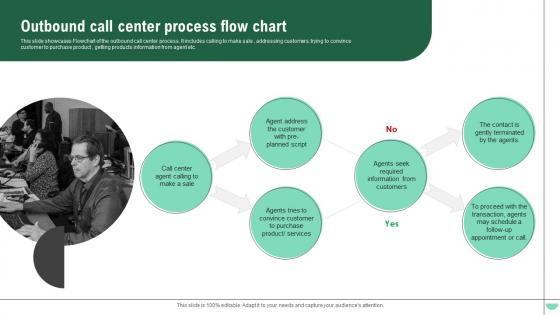
Outbound Call Center Process Flow Chart




Try Before you Buy Download Free Sample Product
 Impress Your
 Audience
 100%
100% Editable
 Save Hours
 of Time


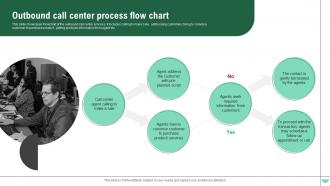
This slide showcases Flowchart of the outbound call center process. It includes calling to make sale , addressing customers, trying to convince customer to purchase product , getting products information from agent etc.
People who downloaded this PowerPoint presentation also viewed the following :
Outbound Call Center Process Flow Chart with all 6 slides:
Use our Outbound Call Center Process Flow Chart to effectively help you save your valuable time. They are readymade to fit into any presentation structure.





FAQs for Outbound Call Center
So you'll need a few main pieces: lead data, your dialing system, how agents handle calls, and tracking what happens with each one. Start with picking leads, dial them, then figure out what to do based on the outcome - answered, voicemail, busy, whatever. Most places totally blow it on the follow-up part though. Map out callbacks, update records, send hot leads to the right people. Oh, and definitely look at your current setup first to see where calls are getting lost or stuck somewhere. That'll save you a ton of headaches later.
Look, those first 30 seconds are make-or-break time. You'll either hook them or watch them bail immediately. What I'd focus on is having solid qualifying questions ready - stuff that helps you figure out where to send them next. Maybe it's scheduling a demo, maybe transferring to your sales team, or just setting up a follow-up call. The whole thing flows better when you nail that initial contact. I've seen too many people wing it and then wonder why they're getting hung up on constantly. Get your routing questions down pat and you won't be scrambling to save calls that started poorly. Trust me, it's worth obsessing over those opening moments.
Think of call scripts like a GPS for your sales calls - they keep everyone from getting lost mid-conversation. Most companies build them right into their workflow charts so agents know what to say when customers throw curveballs. New reps especially need this stuff to feel confident, but honestly? The best scripts don't sound scripted at all. You want them conversational, not like you're reading from a textbook. Test different versions regularly. What sounds good on paper might totally flop on actual calls. Good scripts can seriously boost your conversion rates though.
Dude, get yourself a predictive dialer first - that thing will literally double your contact rates by auto-calling while agents finish up their current conversations. No more awkward downtime. After that, CRM integration is huge because your team can instantly pull up customer history instead of fumbling around. AI scripts are pretty cool too, they suggest responses based on how customers are reacting. Call analytics help you figure out what's actually working (and what isn't). I'd honestly start simple with just the dialer though. Don't overwhelm your team with everything at once - they'll hate you for it.
Honestly, focus on contact rate first - are you even reaching people? Then conversion rate shows if your pitch actually works. Call duration matters too because rushed calls suck, but so do marathon ones that go nowhere. Track dials per hour and how many people hang up right after picking up. Oh, and don't sleep on agent satisfaction scores - miserable reps will tank your whole operation. I'd set up something that updates every hour so you can tweak scripts or timing when things start going sideways. Way better than waiting till end of week to realize you've been bleeding money.
Okay so here's what I'd do - set up feedback collection right after each call ends. Sale, rejection, whatever the outcome was. Then get the customer side too with quick surveys or follow-up emails (honestly the surveys work better if you keep them super short). The cool part is when you actually USE this stuff to improve your scripts and training. Most people just collect feedback and let it sit there doing nothing. Pick one type of feedback first though - don't try to track everything at once or you'll burn out. Once you've got a good rhythm going, then add more feedback points.
Your training makes or breaks everything honestly. Agents who know their stuff will nail the scripts, handle pushback better, and get prospects moving. Bad training? You're looking at longer calls and terrible conversion rates. Here's the thing though - good agents also know when to throw the script out the window (happens way more than managers want to admit). I'd focus heavy on role-playing that matches your actual call scenarios. And don't forget to update training when you tweak processes - nothing worse than outdated info floating around.
Honestly, bad data is your worst enemy - half the phone numbers are dead or the contact info is completely wrong. Super annoying when you're trying to hit your numbers. Then you'll waste tons of time talking to people who can't actually make decisions, which drives me crazy. Budget and timeline questions? Good luck getting straight answers - everyone's suddenly vague about money. Oh, and don't even get me started on leads who aren't really interested but won't just say so. Best thing you can do is nail down a good qualification process with pointed questions. Helps you spot the real deals fast instead of chasing ghosts.
Honestly, CRM systems are game-changers for outbound calls. Your agents get instant access to customer history, purchase data, all that good stuff - no more dead air while they're scrambling to find info. Auto-dialing saves tons of time too. You can schedule calls when customers actually want them, and the system tracks which scripts convert best. Plus it handles follow-ups automatically, which I love because nothing falls through the cracks. Your team spends way more time talking to prospects instead of clicking around databases. Just sync up your calling lists with whatever CRM you're already using and you're golden.
Honestly, the two big mistakes I see are making flows way too complicated and totally forgetting about rejection scenarios. Like, teams get obsessed with designing the perfect "yes" path but then completely ignore what happens when people hang up or ask to be removed. That's a compliance nightmare waiting to happen. Also - and this might sound obvious - but keep your visual flow simple enough that new agents won't get lost following it. Too many decision branches just confuse everyone. Build in your opt-out stuff and follow-up protocols from the start. Oh, and definitely test it with real agents before you go live with it.
So compliance isn't something you just tack on - it has to be woven into your whole call process from start to finish. You'll need systems for scrubbing do-not-call lists, getting proper consent, disclosure stuff for recordings, and handling opt-outs at every step. Yeah, it feels like a pain sometimes but trust me, those fines are brutal if you mess up. The trick is automating as much as possible so your agents aren't bogged down with extra steps. Just map out where regulations hit your workflow and build those protections right in. Way easier than retrofitting later.
Okay so the biggest thing is just really listening to them and asking questions that get them talking about what they actually need. People genuinely love hearing their own name - sounds cheesy but it totally works. Match how they're talking, like if they're fast-paced or more chill. Don't just follow some script either, ask follow-ups based on what they literally just told you. Oh and here's something most people mess up - actually pause after they speak and show you heard them before jumping to your next point. That's how you build trust and keep them engaged instead of checked out.
Think of data analysis like your GPS for cold calls - shows you what's actually working versus what's bombing. Track stuff like conversion rates, when people actually answer (usually not Monday mornings, trust me), and which scripts don't make them hang up immediately. Weekly reports are your friend here. Pick out the top 2-3 patterns you notice, then tweak your approach based on those insights. Way better than just randomly dialing numbers and hoping for the best. You'll see improvements pretty quickly once you start paying attention to the demographic patterns and timing stuff.
Alright, so here's what works for me - start by going over the benefits they seemed most excited about, then talk like it's already happening. Say "when we set this up" instead of "if you buy it." Limited time offers are gold because nobody wants to feel like they missed out. Ask directly for the sale but give them options - "standard or premium package?" instead of yes/no. When they object (and they will), acknowledge what they're saying first before you redirect back to the value. Oh, and practice your closing lines until they don't sound rehearsed. That assumptive close thing really does work if you don't come across as pushy about it.
So swim lanes are your friend here - set up horizontal sections for agents, supervisors, support staff, whatever roles you have. Draw arrows between them whenever someone hands something off. Honestly, this is the only way I've found that actually shows who's responsible for what without making your head spin. Mark the big collaboration moments - escalations, specialist handoffs, task assignments. Don't forget feedback loops since people rarely just pass things along once and call it done. I'd start with one customer journey and just trace everywhere multiple people touch it.
-
These stunning templates can help you create a presentation like a pro.
-
A beautiful, professional design paired with high-quality images and content that is sure to impress. It is a must-use PPT template in my opinion.