


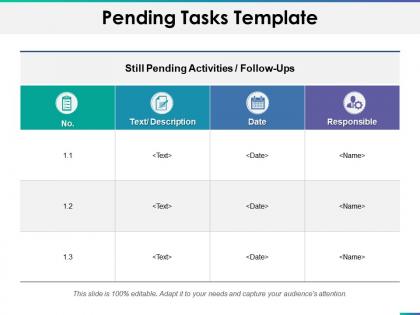
Pending tasks template ppt summary example introduction




Try Before you Buy Download Free Sample Product
 Impress Your
 Audience
 100%
100% Editable
 Save Hours
 of Time


Emerge as the dark horse with our Pending Tasks Template Ppt Summary Example Introduction. Impress folks enough to be considered a favorite.
People who downloaded this PowerPoint presentation also viewed the following :
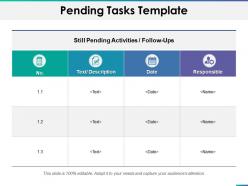
Pending tasks template ppt summary example introduction with all 5 slides:
Allow them to benefit effectively with our Pending Tasks Template Ppt Summary Example Introduction. Hand down your expertise with great care.
FAQs for Pending tasks template ppt
Definitely need the basics - task description, who's doing it, deadline, priority level. Status columns are a lifesaver for tracking what's actually moving vs what's been sitting there forever. Oh and creation dates! Seriously eye-opening to see how long stuff has been languishing. Don't forget notes for dependencies and context since that info vanishes fast when you're bouncing between projects. Categories or tags help tons for filtering by project type. But honestly? Keep it dead simple or you'll never update the thing and it'll just become another useless spreadsheet graveyard.
Honestly, just figure out what your team actually does first, then build around that. Construction folks need safety boxes and permit stuff. Marketing wants approval flows and campaign dates. Software people are obsessed with sprints and bug ratings - they're all totally different beasts. Start basic and add fields, priorities, and categories that match how you guys work. Don't overthink it initially. The template will get better once you see what everyone's actually using versus what sits there collecting digital dust. Map your real process, not some ideal version that doesn't exist.
Digital ones let you set reminders and sync between your phone and laptop, which is super handy. Plus you can check things off and they'll sort automatically. Printable templates are way more basic but honestly? There's something weirdly satisfying about physically crossing stuff out with a pen. I still do that sometimes even though it's probably less efficient lol. If you're working with other people or need to access your list from different places, definitely go digital. Otherwise just try both and see what clicks for you.
Just add a priority column to your template - High/Medium/Low works, or go with numbers 1-5. The Eisenhower matrix thing is actually pretty solid if you're into that urgent vs important stuff. Color coding helps too, like making urgent tasks red so they jump out at you. Oh, and throw in deadline columns plus time estimates so you know what's realistic. Don't bury priority info in the task descriptions where you'll never see it. Start with three levels and tweak from there. Honestly, keeping it simple at first saves you from overthinking the whole system.
Okay so definitely include who owns what task, deadlines, and priority levels - saves you from those annoying "wait who's handling this?" moments. Status updates are clutch too (like "stuck" or "almost done"). Add a comments section for quick updates - honestly that's been a lifesaver for me when working remotely. Time estimates help with planning, and maybe some tags for project phases. Oh, and task dependencies if things build on each other. Start simple though - if it's too complicated people just won't use it consistently. You can always add more features later once everyone's actually using the basic version.
Colors and little icons will totally change how you use your task template. I usually do red for urgent stuff, yellow for medium, green for low priority - you know the drill. Your brain just picks up on visual stuff way faster than reading through everything. Icons are solid too for different task types or showing what's done. Honestly feels like night and day compared to staring at boring lists all the time. Just don't go crazy with too many colors or you'll end up more confused. Stick to maybe 3-4 max and you're golden.
Honestly, your task template doesn't have to be this boring static thing. Start with one simple automation - maybe notifications when deadlines are coming up? That alone will save your sanity. You can connect it to tools like Asana or Monday so deadlines sync automatically. Smart templates can sort tasks by urgency and generate progress reports too. Real-time collaboration keeps everyone on the same page, which is clutch if you're working with a team. Priority scoring sounds fancy but it actually helps a ton. Pick whatever fixes your biggest headache first, then add more features later.
Your template's only as good as the feedback you get on it. Ask your team what's actually working and what sucks - people will tell you straight up if something's confusing or if they're skipping steps entirely. I've watched "perfect" templates crash and burn because nobody actually used them the way they were designed. Watch for patterns too. Are people constantly asking the same questions? Creating weird workarounds? That's your cue to fix things. Monthly check-ins work well for this stuff. You'll be surprised how much you can improve just by paying attention to what people do vs. what you thought they'd do.
Honestly, these templates are lifesavers for keeping track of all your deadlines and stuff. No more things slipping through the cracks. I used to have sticky notes plastered everywhere - total chaos lol. Now I can actually see what's overdue, what's coming up next, and who's supposed to be doing what. The best part? When everyone on your team uses the same setup, you're all finally on the same page about priorities. You can sort by due dates, check progress at a glance. Just start by dumping everything you're currently juggling into it.
Don't make your template super rigid or you'll be cramming tasks into weird categories that make no sense. Keep status options to like 3-4 max - I learned this the hard way when I had 8 different status levels and spent forever just picking one. Vague descriptions are the worst too. "Follow up on project" tells you literally nothing when you're looking at it next week. Oh, and set up due dates and priority levels right away. Adding them later sucks. Honestly though? Simple works best. Just track what you actually need.
Oh man, pending task templates are a game changer! I wish someone told me about this years ago because it saves SO much brain power. Start with whatever you do most - like if you're always planning the same type of projects, make a template with your usual phases and just swap out the details each time. Same with personal stuff like monthly planning or prepping for trips. The trick is to nail down your standard categories and deadlines first, then you're basically just filling in blanks instead of starting from scratch every single time. Trust me on this one.
Honestly, I'd go with something like Asana or ClickUp for pending task templates. They're built for this stuff - you can set up templates with assignees and due dates already baked in. Monday.com's solid too. That said, don't overthink it. A simple Google Sheet or Notion page might be all you need, especially if your team's small. I've seen people get way too fancy with project management tools when a basic spreadsheet would've done the trick. The real trick is getting everyone to actually stick with whatever you pick. Start with something simple that feels familiar, then move up to fancier tools if you outgrow it.
Honestly, pending task templates are a game-changer for agile workflows. You get this clean visual of your backlog without drowning in chaos. Story points, sprint goals, blockers - everything's right there instead of scattered across random sticky notes (okay, I still use those too sometimes). Moving stuff between pending, in progress, and done becomes super smooth. The iterative flow just works better. Set up different views for each sprint cycle, and definitely make sure everyone can jump in and update things live. Trust me on this one - it beats hunting down status updates in Slack threads.
Honestly, having a task template is a game changer for your brain. No more mental juggling act trying to remember everything. I literally add stuff I already did sometimes just to get that satisfying check mark - don't judge me lol. When tasks are scattered in your head, it feels overwhelming. But seeing them organized? Way less anxiety about forgetting important things. Your headspace gets so much clearer. The dopamine hit from checking things off is real too. Just start simple and you'll notice the difference pretty quickly.
Honestly, most task templates are just overwhelming walls of text that make you want to close the tab immediately. Break stuff up with clear headings and consistent spacing - it's a game changer. Color-coding helps too, especially for due dates and priority levels. Group similar tasks together and throw in some progress bars so people actually feel like they're getting somewhere. Oh, and please use normal language instead of corporate speak that nobody talks like in real life. Search filters are clutch when lists get long. The whole point is making it feel manageable rather than like you're drowning in work.
No Reviews