


Phase Wise Schedule For Project Management




Try Before you Buy Download Free Sample Product
 Impress Your
 Audience
 100%
100% Editable
 Save Hours
 of Time


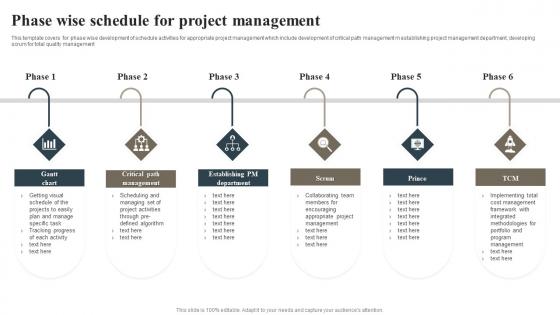
This template covers for phase wise development of schedule activities for appropriate project management which include development of critical path management m establishing project management department, developing scrum for total quality management.
People who downloaded this PowerPoint presentation also viewed the following :
Phase Wise Schedule For Project Management with all 6 slides:
Use our Phase Wise Schedule For Project Management to effectively help you save your valuable time. They are readymade to fit into any presentation structure.






FAQs for Phase Wise Schedule
So you'll need tasks with clear start/finish dates, plus how they connect to each other. Resource assignments are key too. Build in buffer time - seriously, projects always take longer than you think. Show your critical path so you know which delays actually matter. Include major deliverables and approval checkpoints. Oh, and don't forget external stuff that could mess you up. The tricky part? Finding the sweet spot between detailed enough to be helpful but not so crazy detailed that updating it becomes a total pain. Critical milestones are huge too.
So CPM shows you which tasks can't be delayed without screwing up your whole deadline - that's your critical path. Map out all your task dependencies first, then calculate the longest sequence. Those become your must-watch activities. Honestly, I wish I'd learned this method earlier because it's such a lifesaver for knowing where to focus. You'll also spot tasks with "float" time - basically wiggle room where delays won't hurt the overall schedule. Start there and you'll quickly see which bottlenecks will bite you if things go sideways.
Honestly, Gantt charts are a game changer for seeing your whole project timeline in one view. You'll instantly spot which tasks run parallel and what depends on what - super helpful for catching bottlenecks early. Stakeholders love them too since the visual format beats trying to explain messy schedules out loud. Real-time progress tracking is clutch when you update completion percentages. The dependency mapping though? That's where they really shine. You can catch critical path problems before they blow up your timeline. Excel works fine to start with, or try Smartsheet if you want something fancier.
Look, schedule changes are gonna happen no matter what, so pad your timeline from the start. When stuff inevitably goes sideways, figure out the damage fast and loop in your stakeholders before you do anything. I've watched way too many project managers try to eat delays quietly - huge mistake that always backfires. Be real about your new timeline, don't sugarcoat it. You'll probably need to mess with scope, get more people, or push deadlines. Get everything in writing and make sure everyone signs off on the changes. Oh, and start those "what happens if..." conversations early so your team isn't blindsided when chaos hits.
Honestly, you can't nail down realistic timelines without figuring out your resource situation first. I learned this the hard way on my last project - thought I had everything mapped out perfectly until half my team got reassigned. Now I always check who's actually available and what skills they bring before I even think about deadlines. Look at everyone's current workload too, because that's where surprises usually come from. It's kinda like planning dinner for six people without checking if anyone's vegetarian. Smart resource planning upfront saves you from those panic moments when critical stuff gets delayed because key people aren't around.
Oh man, the classic mistake is being way too optimistic with timing. Like, you think something will take 2 days and suddenly it's been a week lol. Always add buffer time because weird stuff WILL pop up. Also don't stack tasks right on top of each other - when one thing runs late (and it will), everything falls apart like dominoes. Check if your team is actually available first too. People have vacations, other projects, life happens. Honestly? The worst thing you can do is promise crazy deadlines just to make everyone happy. Start realistic, add 20% padding, then run it by whoever's actually doing the work.
Honestly, project management software just handles all the annoying stuff that usually screws up your timeline. Real-time updates mean no more hunting people down for status reports (thank god). When something gets delayed, it automatically shifts everything else around - way better than manually fixing spreadsheets like some kind of caveman. The visual dashboards are actually pretty useful for spotting where things are getting stuck. I'd say just pick one tool and make your team update their tasks weekly. That alone will show you if you're falling behind before it becomes a disaster. Trust me on this one.
Honestly, three-point estimation saves my butt every time - grab optimistic, pessimistic, and realistic timeframes, then do a weighted average. Historical data from similar stuff is clutch if you've got it lying around. I always bug people who've actually done the work before for their take. Breaking tasks down feels like overkill but damn does it work better. You can also just compare to past projects that were similar. Oh, and analogous estimating is basically the same thing I guess? Anyway, definitely use two different methods and write down why you picked those numbers. Future you will thank you.
So dependencies are basically this chain reaction thing that'll totally mess up your timeline. Task A finishes late? Everything after it gets pushed back too. The critical path is your longest chain of tasks - that's what sets your minimum project time. I learned this the hard way on my last project, ugh. Too many dependencies and you're screwed if one thing goes wrong. You lose all flexibility. Try mapping them out early so you can spot which tasks can actually run at the same time instead of one after another.
So milestones are just the big moments in your project - when major stuff gets done or phases wrap up. They help you track where you're at and give stakeholders something concrete to look at. Honestly, I think of them as anchor points that everything else kind of revolves around. Super useful for catching problems early too, since you'll spot if things are sliding behind schedule. One thing though - don't create a million of them or you'll drown in checkpoints. Just pick the ones that actually move the needle and matter to people who care about your project.
So with Agile, you basically throw out those massive upfront timelines. Work in 2-4 week sprints instead and adjust constantly. Features get prioritized in a backlog rather than some rigid Gantt chart - honestly took me forever to get used to that part. But it's so much better once you're rolling with it. Your whole schedule stays flexible since you're getting feedback nonstop and can actually pivot when things change. The trick is accepting you can't predict everything from the start. Plan your next sprint super detailed, but keep everything else loose.
Weekly check-ins are your best friend here - get all the key people in a room and actually talk through where things stand. Send out those visual updates too, like Gantt charts or even just red/yellow/green status reports (honestly, the simple stuff works just as well). Different people need different details though - your executives just want the big milestones while team leads are gonna want all the specifics. Oh, and don't wait for people to ask about problems. Set up some kind of shared dashboard they can peek at whenever, and if you see delays coming, bring solutions with the bad news. Way better than just dropping problems in people's laps.
Ugh, regulatory changes are the WORST for project timelines. You'll be cruising along and then boom - new compliance rules drop and suddenly you're hitting the brakes. Half the time you end up redesigning whole sections just to meet whatever standards they threw at you. My advice? Build in buffer time right from the start because this stuff happens more than you'd think. Also set up some kind of alert system for your industry - maybe check quarterly with your team about what's potentially coming. I learned this the hard way on a project last year where we got blindsided by new data privacy requirements.
So buffer time is like your insurance policy against everything going sideways. Look at which tasks depend on each other, figure out what's risky vs. safe, then check how your team usually performs. I throw in 10-20% extra for easy stuff, maybe 50% for the sketchy tasks - though honestly, every PM I know does this differently. Some people pad individual tasks, others just block out buffer time at big milestones. Oh, and definitely tell your stakeholders why the timeline isn't just adding up task times. They'll appreciate the honesty when things actually stay on track.
Look at your last 3-5 projects and see where you always mess up timing. I swear, there's always that one type of task that takes way longer than expected. Pull the data and compare what you planned vs what actually happened. Short sentences work here - find your patterns. Where did things go over? What bottlenecks keep showing up? Your team probably has a consistent pace you can count on. Build in buffer time based on this stuff, not just wishful thinking. It's honestly way better than guessing.
-
SlideTeam is the best in the business. Their templates are engaging and customizable. You can rely on them.
-
Mesmerized with the fantastic collection! Super sleek, relevant infographics.